OPEN-SOURCE SCRIPT
% of ATR
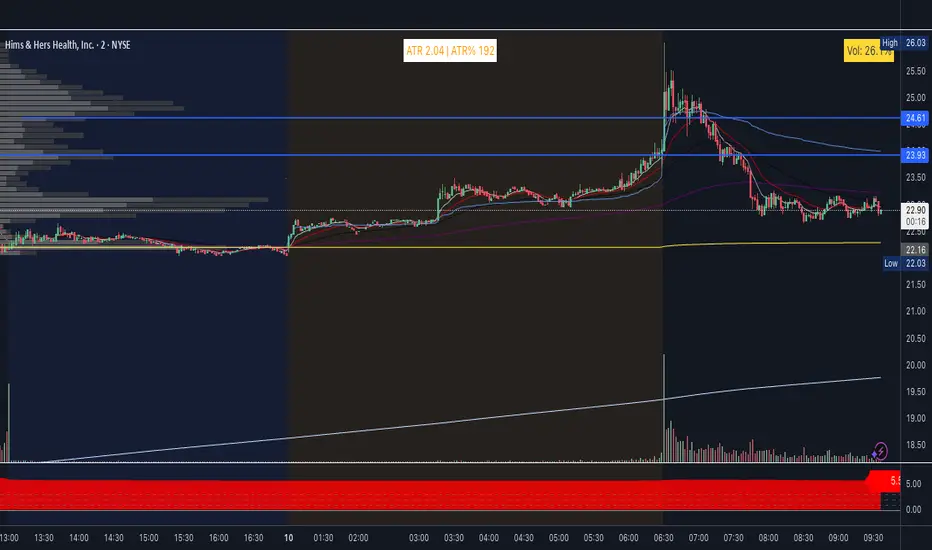
ATR and extended hours
ATR now shows a value in pre-market and after-hours. The indicator uses the last completed daily bar’s ATR (via ta.atr(length)[1] and lookahead_on) so it no longer returns empty when the 1D EOD feed has no “current” bar outside RTH.
High of day / Low of day
HOD and LOD are now updated on all intraday bars (pre-market, regular session, and after-hours). The previous 9:30 AM filter was removed so the day’s high and low are tracked correctly from the first bar of the day.
Label format
Table text format: ATR ##.## | H ##.## L ##.## | ATR% ##
ATR and H/L use two decimals; ATR% is a whole number.
Settings
Show High/Low (H/L) – Toggle to include or hide H and L in the label.
ATR % Thresholds – Four configurable levels (defaults 25, 100, 200, 300) define the five ATR% bands for coloring.
ATR % Colors – Five colors (Color 1 = lowest %, Color 5 = highest %) in a dedicated group; band logic uses the threshold inputs above.
Color logic
Color bands are driven by the new threshold inputs (no more hardcoded 25/100/200/300. Band boundaries are fully user-configurable.
ATR now shows a value in pre-market and after-hours. The indicator uses the last completed daily bar’s ATR (via ta.atr(length)[1] and lookahead_on) so it no longer returns empty when the 1D EOD feed has no “current” bar outside RTH.
High of day / Low of day
HOD and LOD are now updated on all intraday bars (pre-market, regular session, and after-hours). The previous 9:30 AM filter was removed so the day’s high and low are tracked correctly from the first bar of the day.
Label format
Table text format: ATR ##.## | H ##.## L ##.## | ATR% ##
ATR and H/L use two decimals; ATR% is a whole number.
Settings
Show High/Low (H/L) – Toggle to include or hide H and L in the label.
ATR % Thresholds – Four configurable levels (defaults 25, 100, 200, 300) define the five ATR% bands for coloring.
ATR % Colors – Five colors (Color 1 = lowest %, Color 5 = highest %) in a dedicated group; band logic uses the threshold inputs above.
Color logic
Color bands are driven by the new threshold inputs (no more hardcoded 25/100/200/300. Band boundaries are fully user-configurable.
Open-source script
In true TradingView spirit, the creator of this script has made it open-source, so that traders can review and verify its functionality. Kudos to the author! While you can use it for free, remember that republishing the code is subject to our House Rules.

Disclaimer
The information and publications are not meant to be, and do not constitute, financial, investment, trading, or other types of advice or recommendations supplied or endorsed by TradingView. Read more in the Terms of Use.
Open-source script
In true TradingView spirit, the creator of this script has made it open-source, so that traders can review and verify its functionality. Kudos to the author! While you can use it for free, remember that republishing the code is subject to our House Rules.
Disclaimer
The information and publications are not meant to be, and do not constitute, financial, investment, trading, or other types of advice or recommendations supplied or endorsed by TradingView. Read more in the Terms of Use.