Updated
Trendshot by MTM
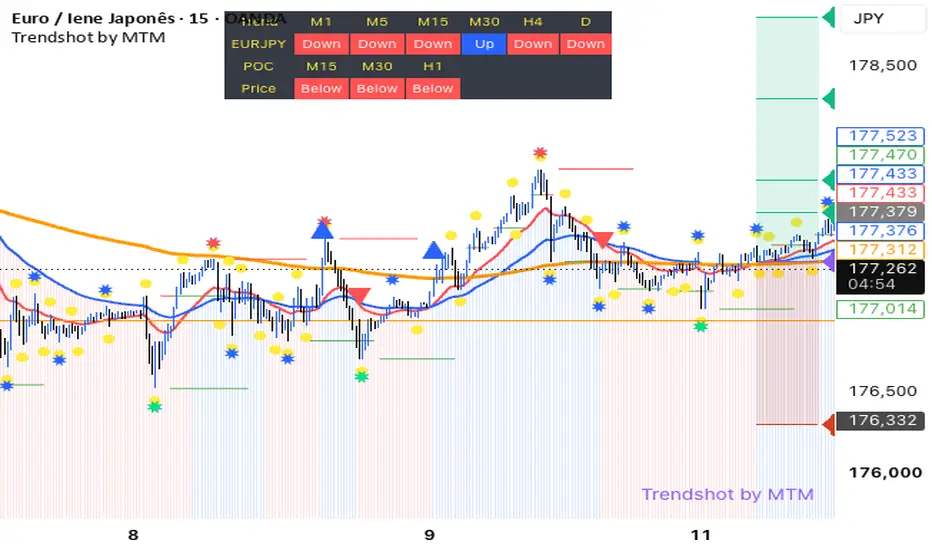
# Trendshot by MTM — Multi-Timeframe Trend & Trade Management
**Trade with context. Execute with discipline.**
Trendshot by MTM is a multi-functional technical analysis indicator designed to help traders identify market direction, analyse price structure and plan potential trade setups with greater clarity.
Combining trend-following tools, multi-timeframe analysis, volume-based price levels and automated risk/reward projections, Trendshot provides a structured view of the market directly on your TradingView chart.
### KEY FEATURES
**📈 1. EMA Trend System**
- Fast EMA (20), Slow EMA (50) and Long-Term EMA (238).
- Visual trend representation and crossover signals.
- Helps identify potential bullish and bearish momentum shifts.
**⏱️ 2. Multi-Timeframe Trend Dashboard**
- Monitor trend direction across up to six configurable timeframes.
- Default timeframes: M1, M5, M15, M30, H4 and Daily.
- Quickly assess whether different timeframes show bullish or bearish conditions.
**🎯 3. Volume Point of Control (POC)**
- Volume-based POC levels calculated for M15, M30 and H1.
- Optional horizontal POC line to identify an estimated high-volume price area.
- Dashboard showing whether the current price is above or below each POC.
**🧱 4. Dynamic Support & Resistance**
- Automatically identifies relevant swing highs and lows.
- Displays potential support and resistance levels and associated zones.
- Optional historical structure levels for additional market context.
- ATR-based filters help qualify price swings and zone sizes.
**⭐ 5. Market Swing Markers**
- Small, medium and large markers highlight potential swing highs and lows.
- Helps visualise market turning points and price structure.
**🛡️ 6. Entry, Stop Loss & Take Profit**
- Visualises the potential entry level following a confirmed EMA crossover.
- Configurable Stop Loss based on fixed distance or previous support/resistance structure.
- Displays up to four Take Profit levels.
- Colour-coded risk and reward zones for easier trade planning.
**🕒 7. Trade Session Filter**
- Default trading window: 08:00–21:00, based on the chart/exchange time.
- Option to display signals outside the configured trading window.
**🔔 8. TradingView Alerts**
- Configurable alerts for bullish and bearish crossover signals.
- Suitable for traders who want to monitor setups without watching every candle.
### DESIGNED FOR
Trendshot by MTM can support discretionary traders analysing Forex, Gold (XAUUSD), indices and cryptocurrencies, subject to the characteristics of the instrument, broker feed and chart timeframe.
Whether you are scalping, day trading or analysing broader market direction, the objective is to bring essential technical information together in one chart.
### IMPORTANT NOTES
Trendshot by MTM is an indicator for technical analysis and educational purposes. It does not guarantee profitable trades, predict market direction with certainty or execute orders automatically.
Signals are based on EMA crossovers and should be assessed alongside market structure, volatility, trading costs and an appropriate risk management plan. Support/resistance levels, POC calculations and historical swing markers are analytical estimates, not guarantees of future price behaviour.
The default Stop Loss and Take Profit settings are configurable and should be reviewed for each instrument and trading strategy.
Trading leveraged financial products involves substantial risk and may result in the loss of capital.
### INTELLECTUAL PROPERTY
© Ricardo Garcia | RicardoGarciaPT — MoreThanMoney
Trendshot by MTM is proprietary intellectual property. Copying, redistribution, resale or modification of the source code without prior written authorisation is prohibited.
**MoreThanMoney — More than money. A better way to understand the markets.**
**Trade with context. Execute with discipline.**
Trendshot by MTM is a multi-functional technical analysis indicator designed to help traders identify market direction, analyse price structure and plan potential trade setups with greater clarity.
Combining trend-following tools, multi-timeframe analysis, volume-based price levels and automated risk/reward projections, Trendshot provides a structured view of the market directly on your TradingView chart.
### KEY FEATURES
**📈 1. EMA Trend System**
- Fast EMA (20), Slow EMA (50) and Long-Term EMA (238).
- Visual trend representation and crossover signals.
- Helps identify potential bullish and bearish momentum shifts.
**⏱️ 2. Multi-Timeframe Trend Dashboard**
- Monitor trend direction across up to six configurable timeframes.
- Default timeframes: M1, M5, M15, M30, H4 and Daily.
- Quickly assess whether different timeframes show bullish or bearish conditions.
**🎯 3. Volume Point of Control (POC)**
- Volume-based POC levels calculated for M15, M30 and H1.
- Optional horizontal POC line to identify an estimated high-volume price area.
- Dashboard showing whether the current price is above or below each POC.
**🧱 4. Dynamic Support & Resistance**
- Automatically identifies relevant swing highs and lows.
- Displays potential support and resistance levels and associated zones.
- Optional historical structure levels for additional market context.
- ATR-based filters help qualify price swings and zone sizes.
**⭐ 5. Market Swing Markers**
- Small, medium and large markers highlight potential swing highs and lows.
- Helps visualise market turning points and price structure.
**🛡️ 6. Entry, Stop Loss & Take Profit**
- Visualises the potential entry level following a confirmed EMA crossover.
- Configurable Stop Loss based on fixed distance or previous support/resistance structure.
- Displays up to four Take Profit levels.
- Colour-coded risk and reward zones for easier trade planning.
**🕒 7. Trade Session Filter**
- Default trading window: 08:00–21:00, based on the chart/exchange time.
- Option to display signals outside the configured trading window.
**🔔 8. TradingView Alerts**
- Configurable alerts for bullish and bearish crossover signals.
- Suitable for traders who want to monitor setups without watching every candle.
### DESIGNED FOR
Trendshot by MTM can support discretionary traders analysing Forex, Gold (XAUUSD), indices and cryptocurrencies, subject to the characteristics of the instrument, broker feed and chart timeframe.
Whether you are scalping, day trading or analysing broader market direction, the objective is to bring essential technical information together in one chart.
### IMPORTANT NOTES
Trendshot by MTM is an indicator for technical analysis and educational purposes. It does not guarantee profitable trades, predict market direction with certainty or execute orders automatically.
Signals are based on EMA crossovers and should be assessed alongside market structure, volatility, trading costs and an appropriate risk management plan. Support/resistance levels, POC calculations and historical swing markers are analytical estimates, not guarantees of future price behaviour.
The default Stop Loss and Take Profit settings are configurable and should be reviewed for each instrument and trading strategy.
Trading leveraged financial products involves substantial risk and may result in the loss of capital.
### INTELLECTUAL PROPERTY
© Ricardo Garcia | RicardoGarciaPT — MoreThanMoney
Trendshot by MTM is proprietary intellectual property. Copying, redistribution, resale or modification of the source code without prior written authorisation is prohibited.
**MoreThanMoney — More than money. A better way to understand the markets.**
Release Notes
cosmetic sizes changesRelease Notes
POC Line fixRelease Notes
Ajuste de Alertas
Disclaimer
The information and publications are not meant to be, and do not constitute, financial, investment, trading, or other types of advice or recommendations supplied or endorsed by TradingView. Read more in the Terms of Use.
Disclaimer
The information and publications are not meant to be, and do not constitute, financial, investment, trading, or other types of advice or recommendations supplied or endorsed by TradingView. Read more in the Terms of Use.