Updated
NASDAQ Pre-Market Range Sweep [josseliani]
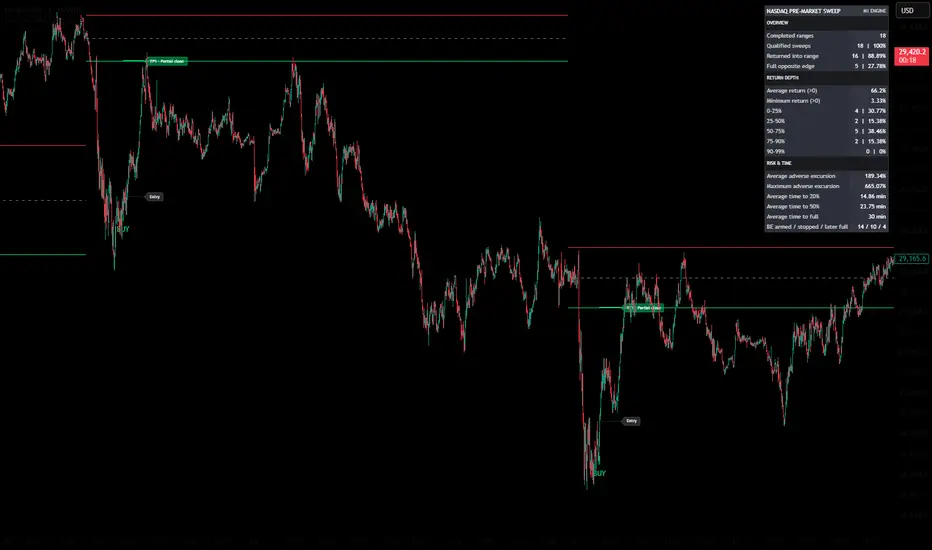
NASDAQ Pre-Market Range Sweep is an intraday trading assistant built around a familiar pre-market range sweep-and-reclaim setup. It automatically maps the NASDAQ range formed between 08:00 and 09:00 New York time, then monitors price behavior as activity increases ahead of the 09:30 cash-session open. The main idea is simple: after price sweeps liquidity beyond one side of the pre-market range, it may either continue moving away or return inside the range and move toward its midpoint or opposite boundary. Instead of requiring users to draw these levels manually and monitor every candle, the indicator plots the range, qualifies the sweep, waits for one of two entry confirmations, marks Entry and TP1, and collects historical statistics for the same setup.
This is an indicator, not a TradingView strategy. It does not place orders or manage positions.
WHY THIS RANGE
By default, the range is built from M1 candles between 08:00 and 09:00 in the America/New_York time zone.
This hour captures a defined part of the NASDAQ pre-market before the transition into the more active New York morning and the 09:30 cash-session open. Once this period is complete, the indicator fixes: → Range High → Range Low → the 50% midpoint
With the default one-minute delay, sweep monitoring begins at 09:01 New York time.
The range levels can remain visible for a fixed number of minutes or extend until the next daily range begins.
QUALIFIED LIQUIDITY SWEEP
A small wick through Range High or Range Low is not enough to qualify as a sweep.
The entire M1 candle must be outside the range: → for an upper sweep, the candle’s low must be above Range High → for a lower sweep, the candle’s high must be below Range Low
By default, the outside candle must also take the nearest previously confirmed pivot on the same side. This optional structural filter helps distinguish a more substantial liquidity event from a minor extension beyond the range.
A qualified sweep is not an immediate entry. The indicator then waits for one of two confirmations: Range Reclaim or Pivot Entry.
RANGE RECLAIM
Range Reclaim is used when price returns inside the pre-market range after the sweep.
For a BUY after a lower sweep, the indicator waits for a closed M1 candle that: → closes inside the range → has at least 70% of its body inside the range under the default settings
Once that candle has closed, its high becomes the confirmation level. BUY is displayed when price subsequently breaks that high.
For a SELL after an upper sweep, the logic is reversed: the acceptance candle closes inside the range, and SELL is confirmed when price subsequently breaks its low.
For Range Reclaim: → Entry is the high or low whose break confirmed the signal → TP1 · Partial close is placed at the 50% midpoint of the range
The midpoint is used as the first structural objective because price has returned inside the range but is not guaranteed to reach the opposite boundary.
PIVOT ENTRY
Pivot Entry is designed for cases where price continues significantly beyond the swept range boundary.
The search for this entry is activated only after price has moved at least one complete range width beyond that boundary.
The indicator then waits for a new confirmed pivot to form outside the range: → after a lower sweep, it looks for a confirmed pivot high below Range Low and a subsequent break above it → after an upper sweep, it looks for a confirmed pivot low above Range High and a subsequent break below it
For Pivot Entry: → Entry is placed at the broken pivot level → TP1 · Partial close is placed at the nearest boundary of the original range
If Range Reclaim and Pivot Entry are confirmed on the same M1 candle, only one signal is recorded.
SIGNAL CONTROL
The same acceptance candle or confirmed pivot cannot generate repeated signals.
After a BUY, another BUY requires a genuinely new low beyond the extreme of the previous outside movement. After a SELL, another SELL requires a genuinely new high. The number of signals per range is also limited by the Maximum signals per range setting.
Once price reaches the opposite boundary of the range, the current range cycle is considered complete, and no additional signals are generated until the next range.
CHART DISPLAY
The indicator can display: → Range High and Range Low → the 50% midpoint → confirmed BUY and SELL arrows → Entry → TP1 · Partial close → the statistics table
BUY and SELL arrows show that one of the two confirmation models has been completed. Entry marks the level whose break confirmed the setup. TP1 · Partial close marks the first structural reference: → the range midpoint for Range Reclaim → the nearest range boundary for Pivot Entry
The trade markup is an analytical reference. It does not represent an automatically executed order or a guaranteed target.
TIMEFRAMES
All signal calculations are performed using M1 data.
On M1, the indicator displays the original signals together with the Entry and TP1 markup. On M5 and M15, it displays markers cloned from the original M1 events. It does not recalculate the setup using M5 or M15 candles. This allows the same M1 signals to be viewed within a wider market context.
Timeframes above M15 are not supported.
STATISTICS TABLE
The statistics table provides a historical view of how price behaved after a qualified sweep. For each completed range, the table evaluates the first qualified sweep found within the observation window.
Return depth is normalized according to the width of each individual range: → 0% = the swept boundary → 50% = the range midpoint → 100% = the opposite boundary
OVERVIEW
Completed ranges — the number of completed observations. An observation ends when price reaches the opposite boundary or when the statistics look-forward window expires.
Qualified sweeps — the number of completed ranges in which a qualified sweep occurred. The percentage is calculated from all completed ranges.
Returned into range — the number and percentage of qualified sweeps followed by at least some movement back inside the range.
Full opposite edge — the number and percentage of qualified sweeps that eventually reached the opposite range boundary.
RETURN DEPTH
Average return (>0) — the average maximum return depth among sweeps that produced a positive return. A complete return is capped at 100%.
Minimum return (>0) — the smallest positive return recorded in the sample.
0–25%, 25–50%, 50–75%, 75–90%, and 90–99% — the distribution of incomplete returns that did not reach the opposite boundary.
These rows show how far price most often returned. They are useful because waiting for the opposite boundary in every case may not be realistic.
RISK & TIME
Average adverse excursion — the average maximum distance that price continued moving away from the range after the qualified sweep. It is expressed as a percentage of that range’s width.
Maximum adverse excursion — the largest such movement recorded in the available sample.
For example, a maximum adverse excursion of 600% means that, in the most extreme historical case, price continued approximately six range widths farther away before the observation ended.
Average time to 20% — the average number of minutes from the sweep until price completed a 20% return.
Average time to 50% — the average number of minutes from the sweep until price reached the range midpoint.
Average time to full — the average number of minutes from the sweep until price reached the opposite boundary.
These values help estimate how long the historical return process usually took rather than assuming that it should happen immediately.
BREAK-EVEN SIMULATION
BE armed / stopped / later full is a statistical simulation only.
It shows: → how many events reached the selected return depth and activated the hypothetical protection level → how many subsequently returned to that simulated protection level → how many of those stopped cases later reached the opposite boundary anyway
The simulation does not move a real stop, alter the signals, or manage a trade.
EXAMPLE OF READING THE TABLE

The table shown in this example contains:
→ Completed ranges: 18
→ Qualified sweeps: 18 | 100%
→ Returned into range: 16 | 88.89%
→ Full opposite edge: 5 | 27.78%
Completed ranges: 18
The indicator completed 18 statistical observations on the available chart history.
An observation is considered complete when either:
→ price reaches the opposite boundary of the range
→ the Statistics look-forward window expires
This number does not represent 18 trades. It represents 18 completed range observations.
Qualified sweeps: 18 | 100%
A qualified sweep was found in all 18 completed observations.
The 100% is calculated as:
→ 18 qualified sweeps ÷ 18 completed ranges
For the statistics, only the first qualified sweep found within each range observation is evaluated.
Returned into range: 16 | 88.89%
After 16 of the 18 qualified sweeps, price made at least some positive movement back inside the range.
The percentage is calculated as:
→ 16 returns ÷ 18 qualified sweeps = 88.89%
This does not mean that all 16 events reached the midpoint or the opposite boundary. It means only that price moved back inside the range by more than 0%.
Full opposite edge: 5 | 27.78%
In 5 of the 18 qualified sweep events, price moved through the entire range and reached its opposite boundary.
The percentage is calculated as:
→ 5 full returns ÷ 18 qualified sweeps = 27.78%
This is an important distinction. In this sample, price returned inside the range in 88.89% of the events, but it completed the full journey to the opposite boundary in only 27.78%.
The table therefore helps avoid the assumption that every successful return should be held all the way to the other side of the range.
RETURN DEPTH
The same example shows:
→ Average return (>0): 66.2%
→ Minimum return (>0): 3.33%
Average return (>0): 66.2%
Among the 16 events that produced a positive return, the average maximum return depth was 66.2% of the corresponding range width.
The calculation includes partial returns and full returns. A return that reaches the opposite boundary is capped at 100%.
This does not mean that every event returned 66.2%. It means that 66.2% was the average maximum depth across the positive-return sample.
Minimum return (>0): 3.33%
The smallest positive return in the sample was only 3.33% of the range width.
Events with no positive return are not included in this minimum calculation. This row shows the weakest recorded return that was still greater than zero.
INCOMPLETE RETURN DISTRIBUTION
The example contains:
→ 0–25%: 4 | 30.77%
→ 25–50%: 2 | 15.38%
→ 50–75%: 5 | 38.46%
→ 75–90%: 2 | 15.38%
→ 90–99%: 0 | 0%
Five events reached the full opposite boundary and are therefore excluded from these incomplete-return groups.
That leaves:
→ 18 qualified sweeps − 5 full returns = 13 incomplete returns
The percentages in this section are calculated from these 13 incomplete events, not from all 18 qualified sweeps.
0–25%: 4 | 30.77%
Four of the 13 incomplete observations returned by less than 25% of the range width.
This group also includes events with a 0% return. Therefore, not every event in the 0–25% group necessarily moved back inside the range.
25–50%: 2 | 15.38%
Two incomplete observations returned through at least 25% of the range but did not reach its midpoint.
50–75%: 5 | 38.46%
Five incomplete observations reached the midpoint and continued beyond it, but did not reach 75% of the range.
This was the largest incomplete-return group in the example.
75–90%: 2 | 15.38%
Two observations returned through at least 75% of the range but stopped before reaching 90%.
90–99%: 0 | 0%
None of the incomplete observations stopped between 90% and 99%.
Events that reached 100% are counted separately under Full opposite edge.
ADVERSE EXCURSION
The example shows:
→ Average adverse excursion: 189.34%
→ Maximum adverse excursion: 665.07%
Adverse excursion measures how far price continued moving away from the swept boundary after the qualified sweep.
It is also normalized according to the width of the corresponding range.
Average adverse excursion: 189.34%
On average, price traveled approximately 1.89 range widths farther away from the swept boundary during the observed events.
This number shows why a liquidity sweep should not automatically be treated as an immediate reversal or as an entry without confirmation.
Maximum adverse excursion: 665.07%
In the most extreme observation, price continued approximately 6.65 range widths beyond the swept boundary.
This does not mean that every setup requires such a large stop. It shows the largest historical extension found in the available sample and demonstrates that price can continue significantly farther after a sweep.
TIME STATISTICS
The example shows:
→ Average time to 20%: 14.86 min
→ Average time to 50%: 23.75 min
→ Average time to full: 30 min
These values are measured from the qualified sweep.
Average time to 20%: 14.86 min
Among the observations that reached a 20% return, the average time required was 14.86 minutes.
Events that never reached 20% are not included in this average.
Average time to 50%: 23.75 min
Among the observations that reached the range midpoint, the average time required was 23.75 minutes.
Events that never reached 50% are not included.
Average time to full: 30 min
Among the five observations that reached the opposite boundary, the average time required to complete the full return was 30 minutes.
This does not mean that a full return should always occur within 30 minutes. It describes only the average of the completed full-return cases in this sample.
BREAK-EVEN SIMULATION
The example shows:
→ BE armed / stopped / later full: 14 / 10 / 4
With the default 20% activation setting, this means:
→ 14 events reached at least a 20% return and activated the hypothetical protection level
→ 10 of those events subsequently returned to the simulated protection level
→ 4 of those 10 events later reached the opposite boundary anyway
This row helps examine whether protecting a position after the first part of the return might remove exposure from some events that would later continue to the full target.
It is a statistical simulation only. It does not place a stop, move a stop, change the signals, or manage a real position.
WHAT THE TABLE TELLS ME
In this particular sample, the table shows that a return inside the range occurred much more frequently than a complete move to the opposite boundary.
It also shows:
→ how deep the average return was
→ how shallow the weakest positive return was
→ where incomplete returns most often stopped
→ how long different stages of the return usually took
→ how far price sometimes continued away from the range before returning or before the observation ended
The purpose of the table is not to prove that the setup will work in the future. It provides a structured statistical view of the price behavior visible on the current chart, symbol, data feed, and settings.
HOW I USE IT
I use the indicator on a NASDAQ M1 chart and first wait for the pre-market range to be completed.
After 09:00 New York time, I watch for a qualified sweep of one of the boundaries. The sweep itself is not my entry.
I then wait for either: → a confirmed return inside the range through Range Reclaim → a confirmed pivot break after a deeper movement outside the range
The arrow shows that one of these confirmation conditions has been completed. Entry marks the confirmation level and the potential trade-entry level. TP1 · Partial close marks the first structural area where a partial exit or closer observation of the price reaction may be considered.
The default settings and presets are built for the NASDAQ sweep-and-reclaim strategy around the New York pre-market open. The same logic can also be used on other instruments, including FX pairs and gold. On gold, you can keep the same New York pre-market range; the market will simply produce its own statistics. On EURUSD, for example, you can build a London session window by adjusting Range start hour / minute and Range length (still entered in New York time).
Use the statistics table to judge how clean the setup looks on that symbol and those settings, and build the variation that fits you: → try different instruments and currency pairs → try different chart timeframes → choose your own pre-market hour and range length → decide from the table whether the setup is worth trading there
MAIN SETTINGS
Range start hour / minute — sets the beginning of the range in New York time.
Range length — sets the duration of the range.
Start watching after range end — sets the delay before sweep monitoring begins. The default value of one minute starts monitoring at 09:01.
Statistics look-forward window — sets how long each sweep is observed for the statistics table.
Signal window mode — limits signal generation to a fixed period or allows it to continue until the next range.
Signal window — sets the duration of the fixed signal-search period.
Maximum signals per range — limits the number of confirmed signals for one range.
Minimum reclaim body inside range — sets how much of the closed acceptance candle’s body must be inside the range.
Require nearest confirmed pivot sweep — requires the outside candle to take the nearest confirmed pivot.
Pivot strength — controls the size and confirmation delay of local pivots.
Level extension — extends the range levels for a fixed period or until the next range.
Trade markup length — controls the length of the Entry and TP1 lines.
ORIGINALITY
Pre-market ranges, liquidity sweeps, and confirmed pivots are established market concepts. The originality of this implementation lies in how these elements are combined and managed as one complete process.
The script: → requires the entire M1 candle to move outside the range → can require the nearest confirmed pivot to be swept → separates the liquidity event from the entry confirmation → provides two distinct confirmation models: Range Reclaim and Pivot Entry → activates Pivot Entry only after a one-range-width excursion → prevents the same candle or pivot from producing repeated signals → requires a new external extreme before another same-direction signal can occur → terminates the cycle after price reaches the opposite boundary → includes a normalized statistics table designed specifically to evaluate this range-sweep setup
The table is not intended to present a strategy win rate. It provides a statistical view of the underlying idea: how often qualified sweeps occurred, how often price returned inside the range, how frequently it reached the opposite boundary, the average and minimum return depth, the time required for different stages of the return, and the adverse distance price sometimes traveled before returning or before the observation ended.
This helps users evaluate the historical behavior of the setup instead of assuming that every sweep must produce a complete return or that every return should take the same amount of time.
The indicator is published free and open-source so that users can inspect the calculations and verify how the signals and statistics are produced.
LIMITATIONS
Results can differ between NASDAQ symbols, exchanges, and data feeds because the calculations depend on M1 OHLC data.
Confirmed pivots require bars on their right side and therefore become available only after a structural confirmation delay.
M5 and M15 display cloned M1 events, not independently calculated higher-timeframe signals.
The statistics describe only the available historical sample under the current settings. They are not a strategy report and do not guarantee future results.
The indicator does not account for commissions, slippage, position size, or individual stop-loss placement. Entry, TP1, and the break-even simulation are analytical references, not automated trade-management instructions.
This is an indicator, not a TradingView strategy. It does not place orders or manage positions.
WHY THIS RANGE
By default, the range is built from M1 candles between 08:00 and 09:00 in the America/New_York time zone.
This hour captures a defined part of the NASDAQ pre-market before the transition into the more active New York morning and the 09:30 cash-session open. Once this period is complete, the indicator fixes: → Range High → Range Low → the 50% midpoint
With the default one-minute delay, sweep monitoring begins at 09:01 New York time.
The range levels can remain visible for a fixed number of minutes or extend until the next daily range begins.
QUALIFIED LIQUIDITY SWEEP
A small wick through Range High or Range Low is not enough to qualify as a sweep.
The entire M1 candle must be outside the range: → for an upper sweep, the candle’s low must be above Range High → for a lower sweep, the candle’s high must be below Range Low
By default, the outside candle must also take the nearest previously confirmed pivot on the same side. This optional structural filter helps distinguish a more substantial liquidity event from a minor extension beyond the range.
A qualified sweep is not an immediate entry. The indicator then waits for one of two confirmations: Range Reclaim or Pivot Entry.
RANGE RECLAIM
Range Reclaim is used when price returns inside the pre-market range after the sweep.
For a BUY after a lower sweep, the indicator waits for a closed M1 candle that: → closes inside the range → has at least 70% of its body inside the range under the default settings
Once that candle has closed, its high becomes the confirmation level. BUY is displayed when price subsequently breaks that high.
For a SELL after an upper sweep, the logic is reversed: the acceptance candle closes inside the range, and SELL is confirmed when price subsequently breaks its low.
For Range Reclaim: → Entry is the high or low whose break confirmed the signal → TP1 · Partial close is placed at the 50% midpoint of the range
The midpoint is used as the first structural objective because price has returned inside the range but is not guaranteed to reach the opposite boundary.
PIVOT ENTRY
Pivot Entry is designed for cases where price continues significantly beyond the swept range boundary.
The search for this entry is activated only after price has moved at least one complete range width beyond that boundary.
The indicator then waits for a new confirmed pivot to form outside the range: → after a lower sweep, it looks for a confirmed pivot high below Range Low and a subsequent break above it → after an upper sweep, it looks for a confirmed pivot low above Range High and a subsequent break below it
For Pivot Entry: → Entry is placed at the broken pivot level → TP1 · Partial close is placed at the nearest boundary of the original range
If Range Reclaim and Pivot Entry are confirmed on the same M1 candle, only one signal is recorded.
SIGNAL CONTROL
The same acceptance candle or confirmed pivot cannot generate repeated signals.
After a BUY, another BUY requires a genuinely new low beyond the extreme of the previous outside movement. After a SELL, another SELL requires a genuinely new high. The number of signals per range is also limited by the Maximum signals per range setting.
Once price reaches the opposite boundary of the range, the current range cycle is considered complete, and no additional signals are generated until the next range.
CHART DISPLAY
The indicator can display: → Range High and Range Low → the 50% midpoint → confirmed BUY and SELL arrows → Entry → TP1 · Partial close → the statistics table
BUY and SELL arrows show that one of the two confirmation models has been completed. Entry marks the level whose break confirmed the setup. TP1 · Partial close marks the first structural reference: → the range midpoint for Range Reclaim → the nearest range boundary for Pivot Entry
The trade markup is an analytical reference. It does not represent an automatically executed order or a guaranteed target.
TIMEFRAMES
All signal calculations are performed using M1 data.
On M1, the indicator displays the original signals together with the Entry and TP1 markup. On M5 and M15, it displays markers cloned from the original M1 events. It does not recalculate the setup using M5 or M15 candles. This allows the same M1 signals to be viewed within a wider market context.
Timeframes above M15 are not supported.
STATISTICS TABLE
The statistics table provides a historical view of how price behaved after a qualified sweep. For each completed range, the table evaluates the first qualified sweep found within the observation window.
Return depth is normalized according to the width of each individual range: → 0% = the swept boundary → 50% = the range midpoint → 100% = the opposite boundary
OVERVIEW
Completed ranges — the number of completed observations. An observation ends when price reaches the opposite boundary or when the statistics look-forward window expires.
Qualified sweeps — the number of completed ranges in which a qualified sweep occurred. The percentage is calculated from all completed ranges.
Returned into range — the number and percentage of qualified sweeps followed by at least some movement back inside the range.
Full opposite edge — the number and percentage of qualified sweeps that eventually reached the opposite range boundary.
RETURN DEPTH
Average return (>0) — the average maximum return depth among sweeps that produced a positive return. A complete return is capped at 100%.
Minimum return (>0) — the smallest positive return recorded in the sample.
0–25%, 25–50%, 50–75%, 75–90%, and 90–99% — the distribution of incomplete returns that did not reach the opposite boundary.
These rows show how far price most often returned. They are useful because waiting for the opposite boundary in every case may not be realistic.
RISK & TIME
Average adverse excursion — the average maximum distance that price continued moving away from the range after the qualified sweep. It is expressed as a percentage of that range’s width.
Maximum adverse excursion — the largest such movement recorded in the available sample.
For example, a maximum adverse excursion of 600% means that, in the most extreme historical case, price continued approximately six range widths farther away before the observation ended.
Average time to 20% — the average number of minutes from the sweep until price completed a 20% return.
Average time to 50% — the average number of minutes from the sweep until price reached the range midpoint.
Average time to full — the average number of minutes from the sweep until price reached the opposite boundary.
These values help estimate how long the historical return process usually took rather than assuming that it should happen immediately.
BREAK-EVEN SIMULATION
BE armed / stopped / later full is a statistical simulation only.
It shows: → how many events reached the selected return depth and activated the hypothetical protection level → how many subsequently returned to that simulated protection level → how many of those stopped cases later reached the opposite boundary anyway
The simulation does not move a real stop, alter the signals, or manage a trade.
EXAMPLE OF READING THE TABLE
The table shown in this example contains:
→ Completed ranges: 18
→ Qualified sweeps: 18 | 100%
→ Returned into range: 16 | 88.89%
→ Full opposite edge: 5 | 27.78%
Completed ranges: 18
The indicator completed 18 statistical observations on the available chart history.
An observation is considered complete when either:
→ price reaches the opposite boundary of the range
→ the Statistics look-forward window expires
This number does not represent 18 trades. It represents 18 completed range observations.
Qualified sweeps: 18 | 100%
A qualified sweep was found in all 18 completed observations.
The 100% is calculated as:
→ 18 qualified sweeps ÷ 18 completed ranges
For the statistics, only the first qualified sweep found within each range observation is evaluated.
Returned into range: 16 | 88.89%
After 16 of the 18 qualified sweeps, price made at least some positive movement back inside the range.
The percentage is calculated as:
→ 16 returns ÷ 18 qualified sweeps = 88.89%
This does not mean that all 16 events reached the midpoint or the opposite boundary. It means only that price moved back inside the range by more than 0%.
Full opposite edge: 5 | 27.78%
In 5 of the 18 qualified sweep events, price moved through the entire range and reached its opposite boundary.
The percentage is calculated as:
→ 5 full returns ÷ 18 qualified sweeps = 27.78%
This is an important distinction. In this sample, price returned inside the range in 88.89% of the events, but it completed the full journey to the opposite boundary in only 27.78%.
The table therefore helps avoid the assumption that every successful return should be held all the way to the other side of the range.
RETURN DEPTH
The same example shows:
→ Average return (>0): 66.2%
→ Minimum return (>0): 3.33%
Average return (>0): 66.2%
Among the 16 events that produced a positive return, the average maximum return depth was 66.2% of the corresponding range width.
The calculation includes partial returns and full returns. A return that reaches the opposite boundary is capped at 100%.
This does not mean that every event returned 66.2%. It means that 66.2% was the average maximum depth across the positive-return sample.
Minimum return (>0): 3.33%
The smallest positive return in the sample was only 3.33% of the range width.
Events with no positive return are not included in this minimum calculation. This row shows the weakest recorded return that was still greater than zero.
INCOMPLETE RETURN DISTRIBUTION
The example contains:
→ 0–25%: 4 | 30.77%
→ 25–50%: 2 | 15.38%
→ 50–75%: 5 | 38.46%
→ 75–90%: 2 | 15.38%
→ 90–99%: 0 | 0%
Five events reached the full opposite boundary and are therefore excluded from these incomplete-return groups.
That leaves:
→ 18 qualified sweeps − 5 full returns = 13 incomplete returns
The percentages in this section are calculated from these 13 incomplete events, not from all 18 qualified sweeps.
0–25%: 4 | 30.77%
Four of the 13 incomplete observations returned by less than 25% of the range width.
This group also includes events with a 0% return. Therefore, not every event in the 0–25% group necessarily moved back inside the range.
25–50%: 2 | 15.38%
Two incomplete observations returned through at least 25% of the range but did not reach its midpoint.
50–75%: 5 | 38.46%
Five incomplete observations reached the midpoint and continued beyond it, but did not reach 75% of the range.
This was the largest incomplete-return group in the example.
75–90%: 2 | 15.38%
Two observations returned through at least 75% of the range but stopped before reaching 90%.
90–99%: 0 | 0%
None of the incomplete observations stopped between 90% and 99%.
Events that reached 100% are counted separately under Full opposite edge.
ADVERSE EXCURSION
The example shows:
→ Average adverse excursion: 189.34%
→ Maximum adverse excursion: 665.07%
Adverse excursion measures how far price continued moving away from the swept boundary after the qualified sweep.
It is also normalized according to the width of the corresponding range.
Average adverse excursion: 189.34%
On average, price traveled approximately 1.89 range widths farther away from the swept boundary during the observed events.
This number shows why a liquidity sweep should not automatically be treated as an immediate reversal or as an entry without confirmation.
Maximum adverse excursion: 665.07%
In the most extreme observation, price continued approximately 6.65 range widths beyond the swept boundary.
This does not mean that every setup requires such a large stop. It shows the largest historical extension found in the available sample and demonstrates that price can continue significantly farther after a sweep.
TIME STATISTICS
The example shows:
→ Average time to 20%: 14.86 min
→ Average time to 50%: 23.75 min
→ Average time to full: 30 min
These values are measured from the qualified sweep.
Average time to 20%: 14.86 min
Among the observations that reached a 20% return, the average time required was 14.86 minutes.
Events that never reached 20% are not included in this average.
Average time to 50%: 23.75 min
Among the observations that reached the range midpoint, the average time required was 23.75 minutes.
Events that never reached 50% are not included.
Average time to full: 30 min
Among the five observations that reached the opposite boundary, the average time required to complete the full return was 30 minutes.
This does not mean that a full return should always occur within 30 minutes. It describes only the average of the completed full-return cases in this sample.
BREAK-EVEN SIMULATION
The example shows:
→ BE armed / stopped / later full: 14 / 10 / 4
With the default 20% activation setting, this means:
→ 14 events reached at least a 20% return and activated the hypothetical protection level
→ 10 of those events subsequently returned to the simulated protection level
→ 4 of those 10 events later reached the opposite boundary anyway
This row helps examine whether protecting a position after the first part of the return might remove exposure from some events that would later continue to the full target.
It is a statistical simulation only. It does not place a stop, move a stop, change the signals, or manage a real position.
WHAT THE TABLE TELLS ME
In this particular sample, the table shows that a return inside the range occurred much more frequently than a complete move to the opposite boundary.
It also shows:
→ how deep the average return was
→ how shallow the weakest positive return was
→ where incomplete returns most often stopped
→ how long different stages of the return usually took
→ how far price sometimes continued away from the range before returning or before the observation ended
The purpose of the table is not to prove that the setup will work in the future. It provides a structured statistical view of the price behavior visible on the current chart, symbol, data feed, and settings.
HOW I USE IT
I use the indicator on a NASDAQ M1 chart and first wait for the pre-market range to be completed.
After 09:00 New York time, I watch for a qualified sweep of one of the boundaries. The sweep itself is not my entry.
I then wait for either: → a confirmed return inside the range through Range Reclaim → a confirmed pivot break after a deeper movement outside the range
The arrow shows that one of these confirmation conditions has been completed. Entry marks the confirmation level and the potential trade-entry level. TP1 · Partial close marks the first structural area where a partial exit or closer observation of the price reaction may be considered.
The default settings and presets are built for the NASDAQ sweep-and-reclaim strategy around the New York pre-market open. The same logic can also be used on other instruments, including FX pairs and gold. On gold, you can keep the same New York pre-market range; the market will simply produce its own statistics. On EURUSD, for example, you can build a London session window by adjusting Range start hour / minute and Range length (still entered in New York time).
Use the statistics table to judge how clean the setup looks on that symbol and those settings, and build the variation that fits you: → try different instruments and currency pairs → try different chart timeframes → choose your own pre-market hour and range length → decide from the table whether the setup is worth trading there
MAIN SETTINGS
Range start hour / minute — sets the beginning of the range in New York time.
Range length — sets the duration of the range.
Start watching after range end — sets the delay before sweep monitoring begins. The default value of one minute starts monitoring at 09:01.
Statistics look-forward window — sets how long each sweep is observed for the statistics table.
Signal window mode — limits signal generation to a fixed period or allows it to continue until the next range.
Signal window — sets the duration of the fixed signal-search period.
Maximum signals per range — limits the number of confirmed signals for one range.
Minimum reclaim body inside range — sets how much of the closed acceptance candle’s body must be inside the range.
Require nearest confirmed pivot sweep — requires the outside candle to take the nearest confirmed pivot.
Pivot strength — controls the size and confirmation delay of local pivots.
Level extension — extends the range levels for a fixed period or until the next range.
Trade markup length — controls the length of the Entry and TP1 lines.
ORIGINALITY
Pre-market ranges, liquidity sweeps, and confirmed pivots are established market concepts. The originality of this implementation lies in how these elements are combined and managed as one complete process.
The script: → requires the entire M1 candle to move outside the range → can require the nearest confirmed pivot to be swept → separates the liquidity event from the entry confirmation → provides two distinct confirmation models: Range Reclaim and Pivot Entry → activates Pivot Entry only after a one-range-width excursion → prevents the same candle or pivot from producing repeated signals → requires a new external extreme before another same-direction signal can occur → terminates the cycle after price reaches the opposite boundary → includes a normalized statistics table designed specifically to evaluate this range-sweep setup
The table is not intended to present a strategy win rate. It provides a statistical view of the underlying idea: how often qualified sweeps occurred, how often price returned inside the range, how frequently it reached the opposite boundary, the average and minimum return depth, the time required for different stages of the return, and the adverse distance price sometimes traveled before returning or before the observation ended.
This helps users evaluate the historical behavior of the setup instead of assuming that every sweep must produce a complete return or that every return should take the same amount of time.
The indicator is published free and open-source so that users can inspect the calculations and verify how the signals and statistics are produced.
LIMITATIONS
Results can differ between NASDAQ symbols, exchanges, and data feeds because the calculations depend on M1 OHLC data.
Confirmed pivots require bars on their right side and therefore become available only after a structural confirmation delay.
M5 and M15 display cloned M1 events, not independently calculated higher-timeframe signals.
The statistics describe only the available historical sample under the current settings. They are not a strategy report and do not guarantee future results.
The indicator does not account for commissions, slippage, position size, or individual stop-loss placement. Entry, TP1, and the break-even simulation are analytical references, not automated trade-management instructions.
Release Notes
Update: M1 Trade Markup Adjustment→ The Entry and partial Take Profit markup is still displayed only on M1.
→ M5 and M15 continue to show the cloned M1 signal markers without Entry or Take Profit markup.
→ The underlying sweep and reclaim logic has not been redesigned. This update adjusts the reference trade markup and removes Range Reclaim signals that appear after most of the range has already been covered.
→ The markup remains a visual reference only. Traders should continue to use their own entries, stop losses, profit targets and risk-management rules.
How the reference markup works:
→ If price moves at least one full range width outside the pre-market range, the reference objective on the return remains the nearest range boundary.
→ If a Range Reclaim Entry appears within the first 25% of the range, the midpoint remains the first partial Take Profit reference.
→ If the Entry appears more than 25% inside the range, the midpoint may already be too close to provide a meaningful target. In this case, the partial Take Profit is placed at the opposite range boundary.
→ If the Entry appears after price has already covered more than 75% of the range, no Range Reclaim signal is displayed. At that point, most of the expected movement through the range has already taken place.
This adjustment is intended mainly for narrow pre-market ranges, where the Entry and the previous midpoint target could otherwise appear on the same M1 candle or within only a very small distance of each other.
Release Notes
Added Expansion Buy/Sell signals in the breakout direction after a range boundary retest and confirmed pivot break.TP is projected one range width from the broken boundary. If the entry is more than 50% of the range width beyond that boundary, TP is placed an equal distance beyond the entry.
Release Notes
Added a filter, enabled by default, that allows Expansion signals only after price has touched both boundaries of the completed pre-market range. Wick touches count. You can disable this filter in the Expansion settings. 
Indicators, updates & setups:
magicdiagonals.com/
Free Telegram: t.me/magicdiagonals
magicdiagonals.com/
Free Telegram: t.me/magicdiagonals
Disclaimer
The information and publications are not meant to be, and do not constitute, financial, investment, trading, or other types of advice or recommendations supplied or endorsed by TradingView. Read more in the Terms of Use.
Indicators, updates & setups:
magicdiagonals.com/
Free Telegram: t.me/magicdiagonals
magicdiagonals.com/
Free Telegram: t.me/magicdiagonals
Disclaimer
The information and publications are not meant to be, and do not constitute, financial, investment, trading, or other types of advice or recommendations supplied or endorsed by TradingView. Read more in the Terms of Use.