OPEN-SOURCE SCRIPT
Updated Best Position Size Calculator
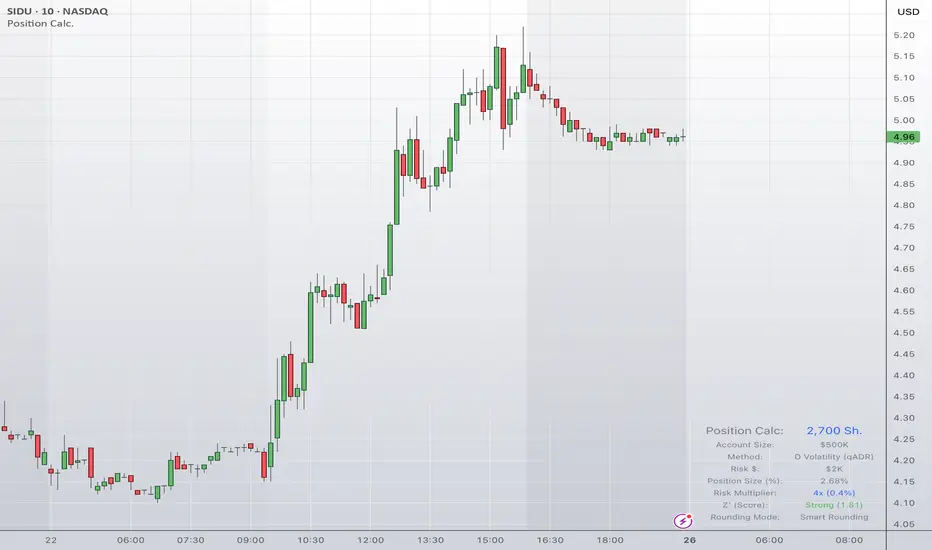
BEST POSITION SIZE CALCULATOR (PINE SCRIPT V6)
OVERVIEW:
Most traders fail not because of poor entries, but due to terrible risk management. Standard position size calculators are static, rigid, and tedious to use. The Best Position Size Calculator is a dynamic, institutional-grade risk management dashboard built directly into your chart.
Instead of just multiplying a percentage by your account balance, this script dynamically optimizes your share size based on live market volatility, broad market conditions, liquidity depth, and execution environments. It serves as an ultimate Go/No-Go gauge for entering trades safely.
WHAT THE SCRIPT DOES:
The indicator calculates the exact number of shares or contracts to purchase based on your personalized account settings. It visually displays this data in a clean, customizable on-screen dashboard.
Beyond simple calculations, the script acts as an automated defensive filter. If market conditions are highly dangerous (parabolic extensions, extreme overbought levels, dry liquidity, or a broken macro trend), the calculator will dynamically lock execution and flag a warning directly on your table, preventing you from taking high-risk setups.
HOW IT DOES IT (THE CORE ENGINE):
This script features a multi-layered calculation engine across several parameters:
Flexible Risk Architectures: You can determine your risk per share using six distinct methodologies:
1. LOD (Low of Day): Dynamically calculates risk based on the current session's low.
2. % of Account: A fixed percentage layout.
3. Volatility Matrix: Uses four specialized volatility tools across multi-timeframe structures (ATR, ADR, qADR, or StDev).
Progressive Risk Scaling: It pulls data from a major reference index (like NASDAQ:QQQ) and tracks its Z-score. When the broader market is healthy, it securely scales your risk up (up to 4x base risk); when the broad market is hostile, it dials your risk back down.
Smart Rounding Logic: Instead of suggesting fractional shares for large accounts (like buying 4,532.12 shares), the script uses an advanced tiered system to floor shares logically based on block size (rounding to the nearest 10, 50, 100, or 1000 shares dynamically).
Defensive Filtering Matrix: The script checks five separate conditions before displaying a size:
1. Liquidity Filter: Assesses average daily dollar volume to protect you from illiquid slippage.
2. Volume Cap Filter: Limits total share size to a maximum percentage of the daily average volume so your order doesn't disrupt the book.
3. Parabolic Filter: Flags when daily and weekly RSIs are simultaneously overextended (above or equal to 80).
4. Z' Trend and Overbought Filters: Maps out the asset's current Z-Score profile (Hostile, Weak, Neutral, Strong, or Overbought).
5. Long-Term Trend Filter: Utilizes a Weekly Rate of Change (ROC 50) filter to verify macro market direction.
HOW TO USE IT:
1. Input Your Metrics: Open the settings panel and enter your total Account Size, Base Risk %, and Max Position Size boundaries.
2. Select Your Sizing Method: Choose how you plan to manage stops (such as placing stops under the Low of Day or wrapping it around an ATR multiple).
3. Read the Dashboard:
- Blue text indicates a healthy environment with your optimal share size calculated.
- Orange text indicates that your size was safely capped to protect you from illiquidity or excessive capital concentration.
- Red or Gray text warnings (like Overbought, Low Liquidity, or wROC less than 0) warn you that a filter has triggered, notifying you to skip the trade or exercise extreme caution.
WHY THIS SCRIPT IS TRULY ORIGINAL:
Traditional position sizing scripts are blind. They treat a trade the exact same way during a roaring bull market as they do in a choppy bear market, or on a highly liquid stock versus an illiquid micro-cap.
This script is unique because it introduces dynamic adaptability and defensive restrictions. It combines cross-asset index tracking (Progressive Risk) with localized volatility indicators, then routes the output through institutional volume-cap guardrails and smart rounding. It is not just a calculator; it is an automated risk manager that scales your position size up when odds are in your favor and freezes entry sizes when market conditions turn toxic.
IMPORTANT NOTICE AND RISK DISCLAIMER:
This tool is designed strictly for informational and educational purposes. Every effort has been made to ensure the mathematical calculations within this Pine Script are correct, robust, and functional. However, software errors, data feed latencies, and market anomalies can occur.
Trading financial markets involves substantial risk of loss. Utilizing this script does not guarantee profitability or protection against loss. If you execute a trade and lose money, it is entirely your responsibility. The author assumes no financial liability for any losses, missed opportunities, or damages incurred from the use of this indicator. Always cross-verify position sizes manually before committing capital. Use at your own discretion.
OVERVIEW:
Most traders fail not because of poor entries, but due to terrible risk management. Standard position size calculators are static, rigid, and tedious to use. The Best Position Size Calculator is a dynamic, institutional-grade risk management dashboard built directly into your chart.
Instead of just multiplying a percentage by your account balance, this script dynamically optimizes your share size based on live market volatility, broad market conditions, liquidity depth, and execution environments. It serves as an ultimate Go/No-Go gauge for entering trades safely.
WHAT THE SCRIPT DOES:
The indicator calculates the exact number of shares or contracts to purchase based on your personalized account settings. It visually displays this data in a clean, customizable on-screen dashboard.
Beyond simple calculations, the script acts as an automated defensive filter. If market conditions are highly dangerous (parabolic extensions, extreme overbought levels, dry liquidity, or a broken macro trend), the calculator will dynamically lock execution and flag a warning directly on your table, preventing you from taking high-risk setups.
HOW IT DOES IT (THE CORE ENGINE):
This script features a multi-layered calculation engine across several parameters:
Flexible Risk Architectures: You can determine your risk per share using six distinct methodologies:
1. LOD (Low of Day): Dynamically calculates risk based on the current session's low.
2. % of Account: A fixed percentage layout.
3. Volatility Matrix: Uses four specialized volatility tools across multi-timeframe structures (ATR, ADR, qADR, or StDev).
Progressive Risk Scaling: It pulls data from a major reference index (like NASDAQ:QQQ) and tracks its Z-score. When the broader market is healthy, it securely scales your risk up (up to 4x base risk); when the broad market is hostile, it dials your risk back down.
Smart Rounding Logic: Instead of suggesting fractional shares for large accounts (like buying 4,532.12 shares), the script uses an advanced tiered system to floor shares logically based on block size (rounding to the nearest 10, 50, 100, or 1000 shares dynamically).
Defensive Filtering Matrix: The script checks five separate conditions before displaying a size:
1. Liquidity Filter: Assesses average daily dollar volume to protect you from illiquid slippage.
2. Volume Cap Filter: Limits total share size to a maximum percentage of the daily average volume so your order doesn't disrupt the book.
3. Parabolic Filter: Flags when daily and weekly RSIs are simultaneously overextended (above or equal to 80).
4. Z' Trend and Overbought Filters: Maps out the asset's current Z-Score profile (Hostile, Weak, Neutral, Strong, or Overbought).
5. Long-Term Trend Filter: Utilizes a Weekly Rate of Change (ROC 50) filter to verify macro market direction.
HOW TO USE IT:
1. Input Your Metrics: Open the settings panel and enter your total Account Size, Base Risk %, and Max Position Size boundaries.
2. Select Your Sizing Method: Choose how you plan to manage stops (such as placing stops under the Low of Day or wrapping it around an ATR multiple).
3. Read the Dashboard:
- Blue text indicates a healthy environment with your optimal share size calculated.
- Orange text indicates that your size was safely capped to protect you from illiquidity or excessive capital concentration.
- Red or Gray text warnings (like Overbought, Low Liquidity, or wROC less than 0) warn you that a filter has triggered, notifying you to skip the trade or exercise extreme caution.
WHY THIS SCRIPT IS TRULY ORIGINAL:
Traditional position sizing scripts are blind. They treat a trade the exact same way during a roaring bull market as they do in a choppy bear market, or on a highly liquid stock versus an illiquid micro-cap.
This script is unique because it introduces dynamic adaptability and defensive restrictions. It combines cross-asset index tracking (Progressive Risk) with localized volatility indicators, then routes the output through institutional volume-cap guardrails and smart rounding. It is not just a calculator; it is an automated risk manager that scales your position size up when odds are in your favor and freezes entry sizes when market conditions turn toxic.
IMPORTANT NOTICE AND RISK DISCLAIMER:
This tool is designed strictly for informational and educational purposes. Every effort has been made to ensure the mathematical calculations within this Pine Script are correct, robust, and functional. However, software errors, data feed latencies, and market anomalies can occur.
Trading financial markets involves substantial risk of loss. Utilizing this script does not guarantee profitability or protection against loss. If you execute a trade and lose money, it is entirely your responsibility. The author assumes no financial liability for any losses, missed opportunities, or damages incurred from the use of this indicator. Always cross-verify position sizes manually before committing capital. Use at your own discretion.
Release Notes
Improved the smart rounding to work better with large share prices by using log-based roundingRelease Notes
Last update accidentally removed the "Allow Fractional Shares" option. This update restores it back into the script.Release Notes
Organized inputs more logicallyImproved smart rounding to work more robustly
Added option for 1 sig or 2 sig figs in smart rounding
Open-source script
In true TradingView spirit, the creator of this script has made it open-source, so that traders can review and verify its functionality. Kudos to the author! While you can use it for free, remember that republishing the code is subject to our House Rules.

Disclaimer
The information and publications are not meant to be, and do not constitute, financial, investment, trading, or other types of advice or recommendations supplied or endorsed by TradingView. Read more in the Terms of Use.
Open-source script
In true TradingView spirit, the creator of this script has made it open-source, so that traders can review and verify its functionality. Kudos to the author! While you can use it for free, remember that republishing the code is subject to our House Rules.
Disclaimer
The information and publications are not meant to be, and do not constitute, financial, investment, trading, or other types of advice or recommendations supplied or endorsed by TradingView. Read more in the Terms of Use.