Volume Info Panel (TRUE RVOL + Expected Close) - Toggles
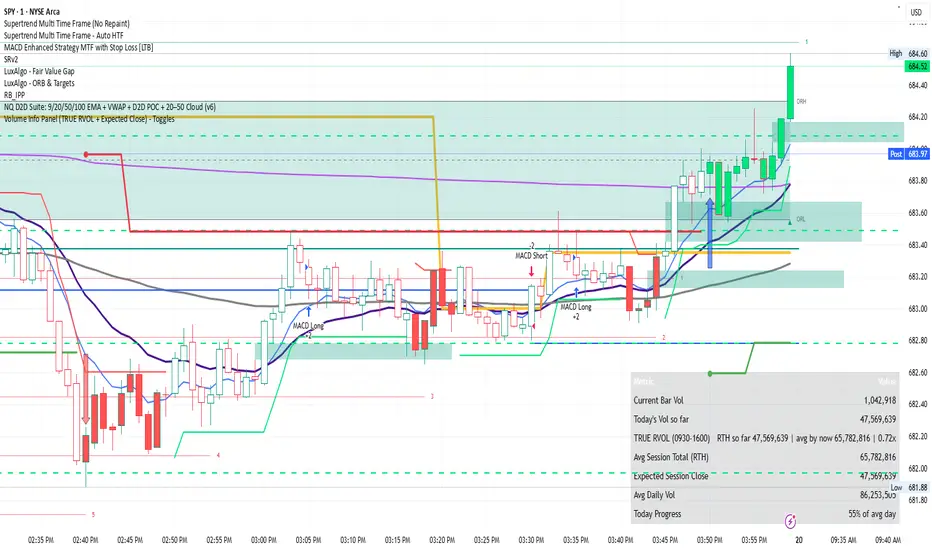
Volume Info Panel (TRUE RVOL + Expected Close) – TogglesPurpose
Clean, customizable volume dashboard for intraday and daily analysis. Delivers real-time bar volume, session cumulative, time-adjusted TRUE RVOL, projected session close, and progress vs average daily volume—all in one compact, toggleable panel.
Core Metrics
Current Bar Vol
Today’s Volume So Far
TRUE RVOL (RTH time-adjusted)
Avg RTH Session Total
Expected RTH Session Close Volume
Avg Daily Volume (SMA)
Today’s Progress (% of avg daily)
TRUE RVOL Logic
Compares current cumulative volume at the exact bar-of-session position (e.g., 47th bar into RTH) against the average cumulative volume at that same position across prior sessions (default 20-session lookback).
→ Avoids the distortion of standard RVOL that ignores intraday volume distribution.
Outside RTH displays the most recent completed session’s final RVOL vs its historical average.
Expected Close Calculation
Projects remaining session volume using the historical average pace beyond the current bar-of-session position, then adds it to current cumulative.
Key Customisation Options
Panel position (9 choices: corners, centers, middles)
Show/hide header row
Individual row toggles
Auto-hide most RTH-specific rows outside regular session
Separate label vs value text sizes
Per-row text colors
Background + border color/transparency
RTH session definition (default 0930–1600 exchange time)
Lookback periods: daily SMA (default 20), TRUE RVOL sessions (default 20)
Memory cap for stored historical sessions (default 80)
Best Use Cases
Intraday volume confirmation / exhaustion signals
Judging whether current pace is unusually strong or weak relative to history
Anticipating whether volume will tail off or accelerate into the close
Quick reference for “how does today compare so far” without multiple indicators
Technical Notes
Requires intraday timeframe for TRUE RVOL, Expected Close, and session metrics
On daily+ timeframes shows only avg daily volume and today’s progress
Efficient array-based history storage with automatic pruning
All calculations update on the last (realtime) bar
Add → search “Volume Info Panel TRUE RVOL Toggles” (or paste the code directly). Tweak colors, toggles and session times to match your market and style.
Disclaimer
This indicator is provided for informational and educational purposes only. It is not financial advice, investment recommendation, or a solicitation to buy or sell any security or instrument. Past performance is not indicative of future results. Volume data and calculations depend on the accuracy and availability of exchange-provided volume feeds, which can vary by symbol, broker, and data provider. Users should independently verify all information and conduct their own analysis before making any trading or investment decisions. The author assumes no responsibility for any losses incurred from the use of this script. Always trade with proper risk management.
Clean, customizable volume dashboard for intraday and daily analysis. Delivers real-time bar volume, session cumulative, time-adjusted TRUE RVOL, projected session close, and progress vs average daily volume—all in one compact, toggleable panel.
Core Metrics
Current Bar Vol
Today’s Volume So Far
TRUE RVOL (RTH time-adjusted)
Avg RTH Session Total
Expected RTH Session Close Volume
Avg Daily Volume (SMA)
Today’s Progress (% of avg daily)
TRUE RVOL Logic
Compares current cumulative volume at the exact bar-of-session position (e.g., 47th bar into RTH) against the average cumulative volume at that same position across prior sessions (default 20-session lookback).
→ Avoids the distortion of standard RVOL that ignores intraday volume distribution.
Outside RTH displays the most recent completed session’s final RVOL vs its historical average.
Expected Close Calculation
Projects remaining session volume using the historical average pace beyond the current bar-of-session position, then adds it to current cumulative.
Key Customisation Options
Panel position (9 choices: corners, centers, middles)
Show/hide header row
Individual row toggles
Auto-hide most RTH-specific rows outside regular session
Separate label vs value text sizes
Per-row text colors
Background + border color/transparency
RTH session definition (default 0930–1600 exchange time)
Lookback periods: daily SMA (default 20), TRUE RVOL sessions (default 20)
Memory cap for stored historical sessions (default 80)
Best Use Cases
Intraday volume confirmation / exhaustion signals
Judging whether current pace is unusually strong or weak relative to history
Anticipating whether volume will tail off or accelerate into the close
Quick reference for “how does today compare so far” without multiple indicators
Technical Notes
Requires intraday timeframe for TRUE RVOL, Expected Close, and session metrics
On daily+ timeframes shows only avg daily volume and today’s progress
Efficient array-based history storage with automatic pruning
All calculations update on the last (realtime) bar
Add → search “Volume Info Panel TRUE RVOL Toggles” (or paste the code directly). Tweak colors, toggles and session times to match your market and style.
Disclaimer
This indicator is provided for informational and educational purposes only. It is not financial advice, investment recommendation, or a solicitation to buy or sell any security or instrument. Past performance is not indicative of future results. Volume data and calculations depend on the accuracy and availability of exchange-provided volume feeds, which can vary by symbol, broker, and data provider. Users should independently verify all information and conduct their own analysis before making any trading or investment decisions. The author assumes no responsibility for any losses incurred from the use of this script. Always trade with proper risk management.

Disclaimer
The information and publications are not meant to be, and do not constitute, financial, investment, trading, or other types of advice or recommendations supplied or endorsed by TradingView. Read more in the Terms of Use.
Disclaimer
The information and publications are not meant to be, and do not constitute, financial, investment, trading, or other types of advice or recommendations supplied or endorsed by TradingView. Read more in the Terms of Use.