OPEN-SOURCE SCRIPT
Prop Firm Risk Guard I EonMetrics
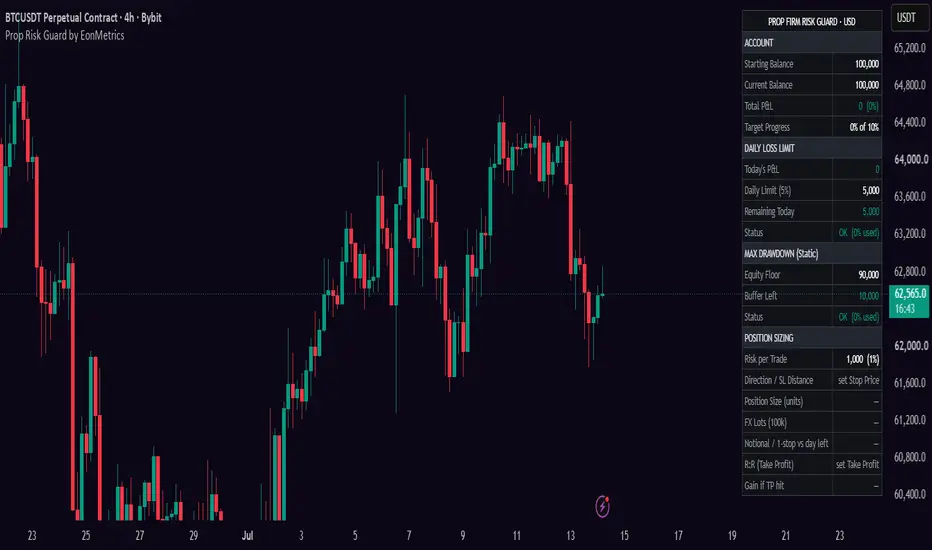
Prop Firm Risk Guard
Prop Firm Risk Guard is a risk dashboard and position size calculator for prop firm challenge and funded-account traders. It keeps the numbers that decide whether your account survives — the Daily Loss Limit, the Max Drawdown floor and the size of your next trade — on one screen, derived from one shared account state.

Stated plainly up front: TradingView cannot see your broker account. Your balance and today's P&L are MANUAL inputs — you type them in, the script does the limit math and the sizing math. Entry, Stop and Take Profit are also yours: the script never calculates or suggests any of them, it only draws the levels you decided on and does the arithmetic. The only live, price-driven element is the Entry/SL/TP lines and their cross alerts. No signals, no trade suggestions.
🔶WHY ONE SCRIPT
A challenge usually fails through one compounding mistake: a trade sized without checking how much of today's loss allowance is actually left, so a routine stop-out becomes a daily breach. That check only works when the daily limit, the drawdown floor and the position size are computed from the same account state at the same moment — which is why they are one dashboard instead of separate tools you would have to cross-reference by hand. The last sizing row makes the link explicit: it compares one full stop-out against your remaining daily room and turns red BEFORE the trade if it doesn't fit.
🔶WHAT IT DOES
Daily Loss Limit — enter your firm's daily loss % and its basis (starting or current balance). Today's P&L is a NET number, wins offset losses. Because firms word this rule two ways, both models are supported: Floor (the day has a fixed equity floor, so intraday profit adds room before it — the common model) and Hard Cap (the allowed loss is fixed, profit does not extend it). The table shows the remaining allowance in money and a status ladder: OK → CAUTION (50% used) → DANGER (80%) → BREACHED.
Max Drawdown — Static (floor fixed below the starting balance) or Trailing (floor follows the equity high-water mark). Shows the floor as an actual money level and the buffer above it, with the same status ladder.
Position sizing — risk per trade as % of balance or a fixed amount, planned entry (or live price) and stop. Returns the size in units, the forex conversion to 100k lots and the notional value. A Contract Multiplier input keeps the math correct on futures (e.g. ES = 50, GC = 100) as well as stocks, crypto and forex.
Take Profit (optional) — add your own TP price to see the R:R ratio and the money gain if it hits, using the same calculated size. If the TP sits on the wrong side of entry for your direction, the cell flags it instead of showing a meaningless ratio.
Entry / SL / TP lines — your levels drawn on the chart, with three alert conditions that fire when price crosses any of them.

🔶HOW TO USE
1. Settings → Account: starting balance, current balance; high-water mark for trailing-drawdown firms (0 = auto).
2. Prop Firm Rules: copy the exact numbers and models from your firm's dashboard.
3. During the session, keep Today's P&L updated — the daily section only knows what you tell it.
4. Before a trade: set risk, entry and stop; read the size; make sure the last row is not red.
5. Optional: add a TP for R:R, and set alerts on the three price-cross conditions.
🔶SETTINGS
Account (balances, high-water mark) · Prop Firm Rules (daily loss % + basis + Floor/Hard Cap, max drawdown % + Static/Trailing, profit target) · Today's P&L · Position Sizing (risk mode, entry/stop/TP, contract multiplier, lines toggle) · Table (position, text size).
This tool does the arithmetic of your firm's rules and your own trade plan. It does not know your account, does not predict anything and does not tell you what to trade.
Part of the EonMetrics toolset.
Prop Firm Risk Guard is a risk dashboard and position size calculator for prop firm challenge and funded-account traders. It keeps the numbers that decide whether your account survives — the Daily Loss Limit, the Max Drawdown floor and the size of your next trade — on one screen, derived from one shared account state.
Stated plainly up front: TradingView cannot see your broker account. Your balance and today's P&L are MANUAL inputs — you type them in, the script does the limit math and the sizing math. Entry, Stop and Take Profit are also yours: the script never calculates or suggests any of them, it only draws the levels you decided on and does the arithmetic. The only live, price-driven element is the Entry/SL/TP lines and their cross alerts. No signals, no trade suggestions.
🔶WHY ONE SCRIPT
A challenge usually fails through one compounding mistake: a trade sized without checking how much of today's loss allowance is actually left, so a routine stop-out becomes a daily breach. That check only works when the daily limit, the drawdown floor and the position size are computed from the same account state at the same moment — which is why they are one dashboard instead of separate tools you would have to cross-reference by hand. The last sizing row makes the link explicit: it compares one full stop-out against your remaining daily room and turns red BEFORE the trade if it doesn't fit.
🔶WHAT IT DOES
Daily Loss Limit — enter your firm's daily loss % and its basis (starting or current balance). Today's P&L is a NET number, wins offset losses. Because firms word this rule two ways, both models are supported: Floor (the day has a fixed equity floor, so intraday profit adds room before it — the common model) and Hard Cap (the allowed loss is fixed, profit does not extend it). The table shows the remaining allowance in money and a status ladder: OK → CAUTION (50% used) → DANGER (80%) → BREACHED.
Max Drawdown — Static (floor fixed below the starting balance) or Trailing (floor follows the equity high-water mark). Shows the floor as an actual money level and the buffer above it, with the same status ladder.
Position sizing — risk per trade as % of balance or a fixed amount, planned entry (or live price) and stop. Returns the size in units, the forex conversion to 100k lots and the notional value. A Contract Multiplier input keeps the math correct on futures (e.g. ES = 50, GC = 100) as well as stocks, crypto and forex.
Take Profit (optional) — add your own TP price to see the R:R ratio and the money gain if it hits, using the same calculated size. If the TP sits on the wrong side of entry for your direction, the cell flags it instead of showing a meaningless ratio.
Entry / SL / TP lines — your levels drawn on the chart, with three alert conditions that fire when price crosses any of them.
🔶HOW TO USE
1. Settings → Account: starting balance, current balance; high-water mark for trailing-drawdown firms (0 = auto).
2. Prop Firm Rules: copy the exact numbers and models from your firm's dashboard.
3. During the session, keep Today's P&L updated — the daily section only knows what you tell it.
4. Before a trade: set risk, entry and stop; read the size; make sure the last row is not red.
5. Optional: add a TP for R:R, and set alerts on the three price-cross conditions.
🔶SETTINGS
Account (balances, high-water mark) · Prop Firm Rules (daily loss % + basis + Floor/Hard Cap, max drawdown % + Static/Trailing, profit target) · Today's P&L · Position Sizing (risk mode, entry/stop/TP, contract multiplier, lines toggle) · Table (position, text size).
This tool does the arithmetic of your firm's rules and your own trade plan. It does not know your account, does not predict anything and does not tell you what to trade.
Part of the EonMetrics toolset.
Open-source script
In true TradingView spirit, the creator of this script has made it open-source, so that traders can review and verify its functionality. Kudos to the author! While you can use it for free, remember that republishing the code is subject to our House Rules.

Disclaimer
The information and publications are not meant to be, and do not constitute, financial, investment, trading, or other types of advice or recommendations supplied or endorsed by TradingView. Read more in the Terms of Use.
Open-source script
In true TradingView spirit, the creator of this script has made it open-source, so that traders can review and verify its functionality. Kudos to the author! While you can use it for free, remember that republishing the code is subject to our House Rules.
Disclaimer
The information and publications are not meant to be, and do not constitute, financial, investment, trading, or other types of advice or recommendations supplied or endorsed by TradingView. Read more in the Terms of Use.