OPEN-SOURCE SCRIPT
H4 Open Marker + 2H Trendline (ICT Times)
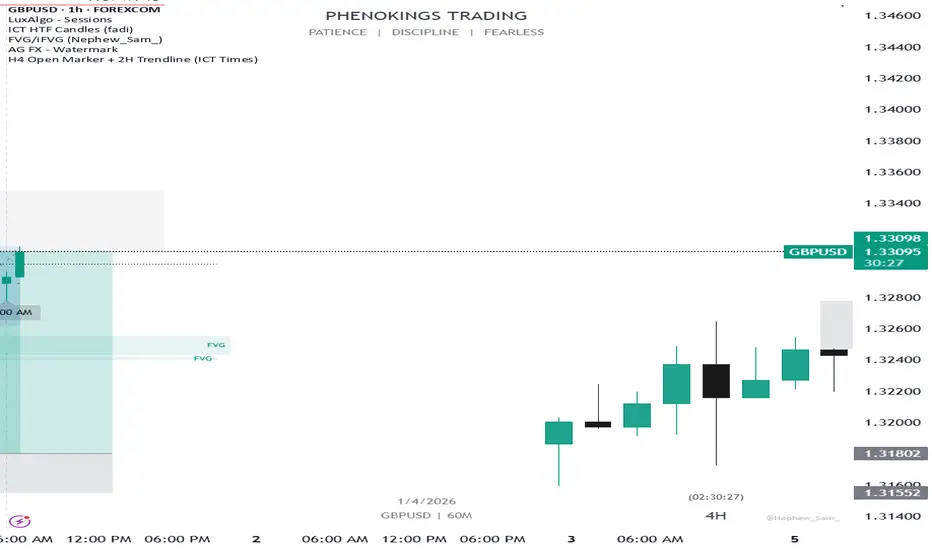
This indicator helps ICT traders visualize H4 session opens and the first 2 hours of price action with dynamic labeling. ( Note: insight came from personal study of ICT concepts)
🔹 FEATURES:
• Marks H4 candle opens at ICT times (1AM, 5AM, 9AM, 1PM, 5PM, 9PM) based on your local time zone
• Draws a horizontal trendline at the open price that extends for the first 2 hours only
• Time labels positioned dynamically:
- Bullish candles → label BELOW the candle (pointing up)
- Bearish candles → label ABOVE the candle (pointing down)
• Optional vertical lines at each selected H4 open
• Configurable colors, line styles, and label sizes
🔹 SETTINGS:
• UTC Offset – Adjust to your time zone (e.g., -5 for New York EST)
• Individual toggles for each H4 session (1AM, 5AM, 9AM, 1PM, 5PM, 9PM)
• Vertical line: color, style (Solid/Dashed/Dotted)
• 2H Trendline: color, style
• Label: background color, text color, size
🔹 HOW TO USE:
1. Add the indicator to your chart
2. Set your UTC offset correctly for your time zone
3. Toggle on/off specific H4 sessions you want to see
4. The horizontal line will appear at the H4 open and extend for the next 2 hours
5. Labels automatically position based on candle direction
🔹 NOTES:
• Only shows the last 7 days of data to avoid clutter
• Works on any timeframe, but designed for H4 analysis
• Max 500 lines drawn for performance.
🔹 FEATURES:
• Marks H4 candle opens at ICT times (1AM, 5AM, 9AM, 1PM, 5PM, 9PM) based on your local time zone
• Draws a horizontal trendline at the open price that extends for the first 2 hours only
• Time labels positioned dynamically:
- Bullish candles → label BELOW the candle (pointing up)
- Bearish candles → label ABOVE the candle (pointing down)
• Optional vertical lines at each selected H4 open
• Configurable colors, line styles, and label sizes
🔹 SETTINGS:
• UTC Offset – Adjust to your time zone (e.g., -5 for New York EST)
• Individual toggles for each H4 session (1AM, 5AM, 9AM, 1PM, 5PM, 9PM)
• Vertical line: color, style (Solid/Dashed/Dotted)
• 2H Trendline: color, style
• Label: background color, text color, size
🔹 HOW TO USE:
1. Add the indicator to your chart
2. Set your UTC offset correctly for your time zone
3. Toggle on/off specific H4 sessions you want to see
4. The horizontal line will appear at the H4 open and extend for the next 2 hours
5. Labels automatically position based on candle direction
🔹 NOTES:
• Only shows the last 7 days of data to avoid clutter
• Works on any timeframe, but designed for H4 analysis
• Max 500 lines drawn for performance.
Open-source script
In true TradingView spirit, the creator of this script has made it open-source, so that traders can review and verify its functionality. Kudos to the author! While you can use it for free, remember that republishing the code is subject to our House Rules.

Disclaimer
The information and publications are not meant to be, and do not constitute, financial, investment, trading, or other types of advice or recommendations supplied or endorsed by TradingView. Read more in the Terms of Use.
Open-source script
In true TradingView spirit, the creator of this script has made it open-source, so that traders can review and verify its functionality. Kudos to the author! While you can use it for free, remember that republishing the code is subject to our House Rules.
Disclaimer
The information and publications are not meant to be, and do not constitute, financial, investment, trading, or other types of advice or recommendations supplied or endorsed by TradingView. Read more in the Terms of Use.