AMD Cycle Tracker [MQLSoftware]
More exclusive indicators from MQLSoftware
Subscribe to MQLSoftware Pro Analysis Suite for $69.00/month to get exclusive indicators by this author. You pay right on TradingView and can use them on your charts straight away.
Explore MQLSoftware Pro Analysis SuiteOVERVIEW
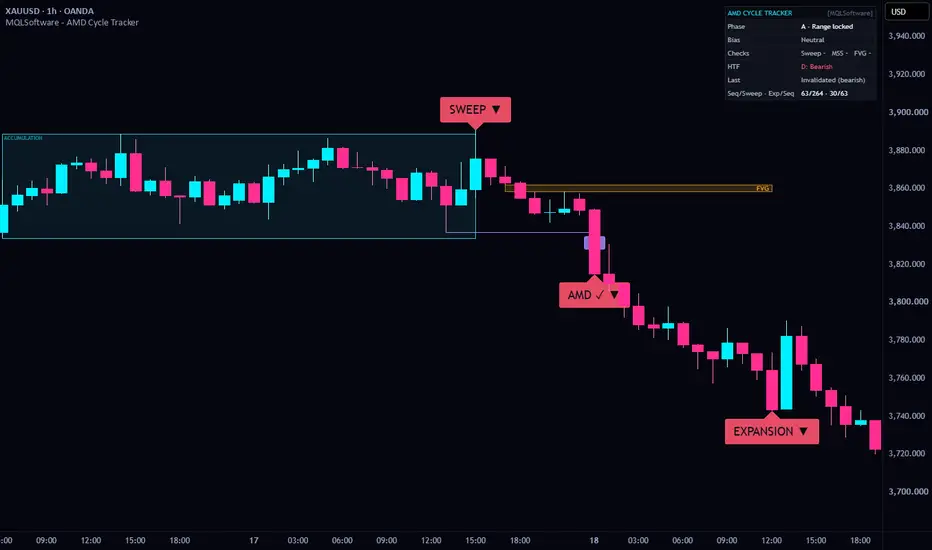
AMD Cycle Tracker follows one liquidity cycle at a time and draws it as it happens: a locked consolidation range, a liquidity sweep of that range, a market structure shift plus fair value gap, and finally a measurable directional expansion - or an invalidation or timeout. It is an analytical overlay, not an entry system. The bias shown is a model state, not a prediction.
CONCEPTS
Each phase has an operational definition, because OHLC data cannot prove institutional intent.
Only one setup is alive at a time, so signals cannot overlap or contradict.
FEATURES
HOW TO USE
Read the panel first, then the chart: a locked box means the model is waiting for a breach; SWEEP means the boundary was taken and rejected; MSS and FVG appear after it; the sequence label (AMD check) means all structure conditions are met but expansion is not yet reached; EXPANSION means the measurable objective was closed beyond. A failed setup is folded into its sweep label (dimmed, with a cross).
Tune Range Height limits and Sweep Min Depth for the instrument; defaults scale with ATR. Many sweeps end invalidated or expired - the panel counts them instead of hiding them.
REPAINTING AND LIMITS
All signals, drawings, counters and alerts are produced on confirmed bars. Swings are used only after their right-side bars close, so they carry that delay. The only live elements are the dashed forming-range outline and the panel on the current bar; the higher-timeframe row reads the last closed HTF bar. In Bar Replay a signal appears one step after its bar closes, with its original bar time. Counters depend on the history loaded on the chart.
CONCLUSION
A rule-based map of the accumulation, sweep, structure shift and expansion sequence, with every definition visible in the settings and every confirmed event fixed once it prints. Use it to study how liquidity events develop on your markets, not as a stand-alone trading signal.
AMD Cycle Tracker follows one liquidity cycle at a time and draws it as it happens: a locked consolidation range, a liquidity sweep of that range, a market structure shift plus fair value gap, and finally a measurable directional expansion - or an invalidation or timeout. It is an analytical overlay, not an entry system. The bias shown is a model state, not a prediction.
CONCEPTS
Each phase has an operational definition, because OHLC data cannot prove institutional intent.
- A - Accumulation: a completed-bar window (default 20 bars) qualifies when its height is within an ATR band, closes are choppy (low efficiency ratio) and both edges were touched. The range is then LOCKED; its boundaries never move.
- M - Manipulation: price trades beyond a locked edge by a minimum depth (default 0.10 ATR, wicks count) and closes back inside within a short window (default 0-1 extra bars). No re-entry means a real breakout and is not labelled a sweep.
- S - Structure: after the sweep, BOTH a close through the latest confirmed, still-unbroken swing (MSS) and a three-candle fair value gap in the setup direction must confirm within a window (default 12 bars), in either order. The swing level is fixed on an earlier bar than the break.
- D - Distribution/Expansion: a close at least 1.0 locked-range heights beyond the sequence-confirmation close. A close beyond the sweep extreme invalidates; running out of bars records a timeout.
Only one setup is alive at a time, so signals cannot overlap or contradict.
FEATURES
- Locked range box, sweep marker, MSS line, FVG zone with mitigation tracking, sequence and expansion labels
- Minimal, Standard and Detailed display modes; the last N patterns are kept, older drawings are deleted
- Compact status panel (or full): phase, model bias, sweep / MSS / FVG state, last outcome, higher-timeframe context
- Label size setting (Small / Normal / Large) for phones and small screens
- Higher-timeframe context from the last closed HTF bar (automatic or chosen), optional alignment filter
- Optional direction, session and displacement filters
- Event counters with explicit denominators (sequences per sweep, expansions per sequence); counts of model events, not trade results
- Alerts for each sweep, MSS, sequence, expansion, invalidation and expiry, plus one combined alert() message
HOW TO USE
Read the panel first, then the chart: a locked box means the model is waiting for a breach; SWEEP means the boundary was taken and rejected; MSS and FVG appear after it; the sequence label (AMD check) means all structure conditions are met but expansion is not yet reached; EXPANSION means the measurable objective was closed beyond. A failed setup is folded into its sweep label (dimmed, with a cross).
Tune Range Height limits and Sweep Min Depth for the instrument; defaults scale with ATR. Many sweeps end invalidated or expired - the panel counts them instead of hiding them.
REPAINTING AND LIMITS
All signals, drawings, counters and alerts are produced on confirmed bars. Swings are used only after their right-side bars close, so they carry that delay. The only live elements are the dashed forming-range outline and the panel on the current bar; the higher-timeframe row reads the last closed HTF bar. In Bar Replay a signal appears one step after its bar closes, with its original bar time. Counters depend on the history loaded on the chart.
CONCLUSION
A rule-based map of the accumulation, sweep, structure shift and expansion sequence, with every definition visible in the settings and every confirmed event fixed once it prints. Use it to study how liquidity events develop on your markets, not as a stand-alone trading signal.

🟣 Free tools, guides & product resources:
mqlsoftware.com/account/
🟣 New tools, releases & updates:
t.me/mqlsoftware_official
MQLSoftware — trading analysis tools & indicators.
Disclaimer
The information and publications are not meant to be, and do not constitute, financial, investment, trading, or other types of advice or recommendations supplied or endorsed by TradingView. Read more in the Terms of Use.