Updated
fed/fomc and us elections dates
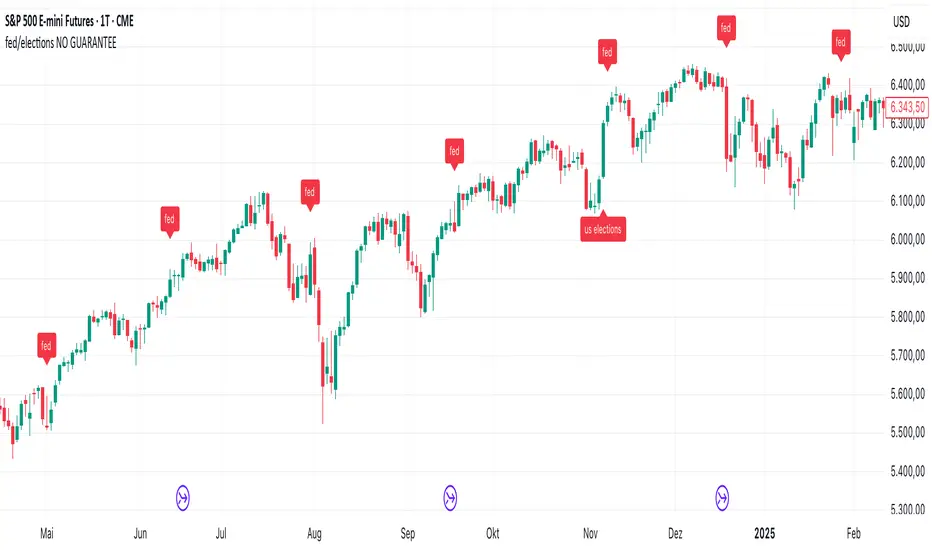
Fed Meeting Dates & US Elections – Historical and Projected (from 1987)
This script marks Federal Reserve meeting dates, emergency meetings, US presidential elections, and midterm elections directly on the chart.
Data source
All dates were sourced from the official Federal Reserve website. The data collection was automated and dates were not individually verified. NO GUARANTEE IS MADE THAT ALL DATES ARE ACCURATE. USE AT YOUR OWN RISK.
Meeting dates
Only the first day of each Federal Reserve meeting is displayed, not the full duration of the meeting.
Why 1987?
Pine Script limits the number of labels that can be displayed. Starting from 1987 keeps the script within these limits while still covering several decades of market history. The script intentionally does not use the full maximum of 500 labels, leaving room for labels from other scripts running on the same chart.
Extending the script
Adding future dates is straightforward – the script can simply be extended by appending new entries to the arrays at the bottom of the data section.
A note on label style
Labels were chosen over vertical lines for a specific reason: vertical lines with `extend.both` in Pine Script cause the chart to rescale, making candles appear very small. Labels with `yloc.abovebar` / `yloc.belowbar` do not affect chart scaling. If anyone finds a way to display clean vertical lines without causing rescaling, feel free to modify the code – and a message would be very welcome.
This script marks Federal Reserve meeting dates, emergency meetings, US presidential elections, and midterm elections directly on the chart.
Data source
All dates were sourced from the official Federal Reserve website. The data collection was automated and dates were not individually verified. NO GUARANTEE IS MADE THAT ALL DATES ARE ACCURATE. USE AT YOUR OWN RISK.
Meeting dates
Only the first day of each Federal Reserve meeting is displayed, not the full duration of the meeting.
Why 1987?
Pine Script limits the number of labels that can be displayed. Starting from 1987 keeps the script within these limits while still covering several decades of market history. The script intentionally does not use the full maximum of 500 labels, leaving room for labels from other scripts running on the same chart.
Extending the script
Adding future dates is straightforward – the script can simply be extended by appending new entries to the arrays at the bottom of the data section.
A note on label style
Labels were chosen over vertical lines for a specific reason: vertical lines with `extend.both` in Pine Script cause the chart to rescale, making candles appear very small. Labels with `yloc.abovebar` / `yloc.belowbar` do not affect chart scaling. If anyone finds a way to display clean vertical lines without causing rescaling, feel free to modify the code – and a message would be very welcome.
Release Notes
updated comments and formattingRelease Notes
modified historic dates appearance. was one day late, now on first date of meeting. modified future dates appearance. is one day late, no solution found - changed label to "text".
Release Notes
recent dates. Release Notes
recent dates.Release Notes
recent datesRelease Notes
recent dates
Disclaimer
The information and publications are not meant to be, and do not constitute, financial, investment, trading, or other types of advice or recommendations supplied or endorsed by TradingView. Read more in the Terms of Use.
Disclaimer
The information and publications are not meant to be, and do not constitute, financial, investment, trading, or other types of advice or recommendations supplied or endorsed by TradingView. Read more in the Terms of Use.