Aggiornato
Naked POC (nPOC) (Clean and No Clutter)
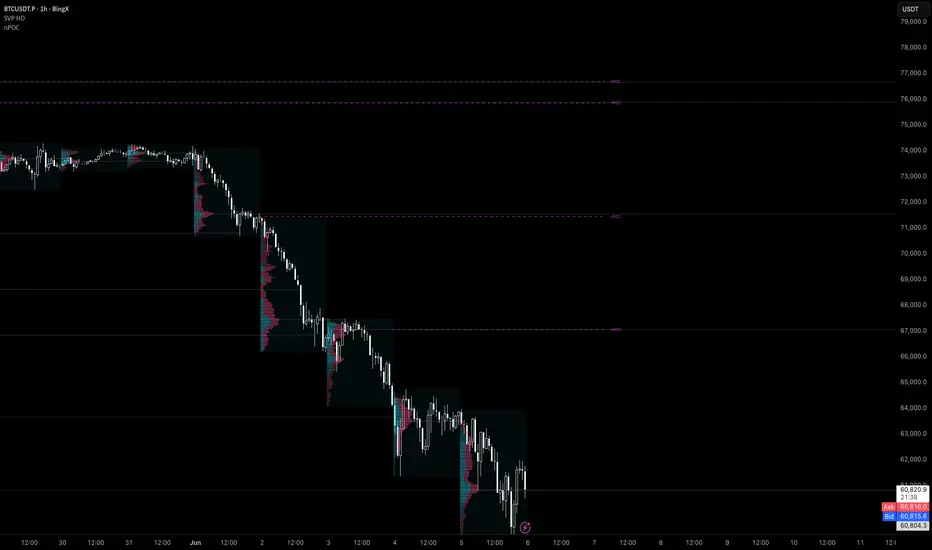
TradingView's built-in Session Volume Profile is powerful — but it plasters a full histogram over your chart for every session. When you're reading price action in real time, that's a lot of noise for one number that actually matters: the POC.
This indicator strips it down. No histogram. No boxes. Just the levels that are still unvisited — the ones that actually have magnetic pull on price.
━━ WHAT IS A NAKED POC? ━━
The Point of Control (POC) is the price where the most volume traded during a session. A POC is naked when price has not revisited it since the session closed. Naked POCs are unfilled magnets. Once price touches one, it is automatically removed from the chart.
━━ VOLUME DISTRIBUTION ━━
Most volume profile tools distribute each bar's volume uniformly across its high-low range. This indicator uses a close-weighted triangular distribution — bins near the bar's close receive more weight than bins at the extremes. The POC lands closer to where price repeatedly settled, not just where it briefly spiked.
━━ SETTINGS ━━
Recommended timeframe: 1H – 4H
A warning label appears automatically if the indicator is applied to an incompatible timeframe.
This indicator strips it down. No histogram. No boxes. Just the levels that are still unvisited — the ones that actually have magnetic pull on price.
━━ WHAT IS A NAKED POC? ━━
The Point of Control (POC) is the price where the most volume traded during a session. A POC is naked when price has not revisited it since the session closed. Naked POCs are unfilled magnets. Once price touches one, it is automatically removed from the chart.
━━ VOLUME DISTRIBUTION ━━
Most volume profile tools distribute each bar's volume uniformly across its high-low range. This indicator uses a close-weighted triangular distribution — bins near the bar's close receive more weight than bins at the extremes. The POC lands closer to where price repeatedly settled, not just where it briefly spiked.
━━ SETTINGS ━━
- TPO Bins — resolution of the volume calculation (20–500). Higher = more precise POC location.
- Max Visible nPOCs — cap on how many naked levels are shown at once. Default: 15.
- Max Age (days) — automatically expires levels older than N days regardless of fill. Default: 7.
- Extend Forward (hours) — how far the dashed line extends to the right.
- Remove When Filled — toggle whether levels disappear on touch or stay permanently.
- Color — fully customizable.
Recommended timeframe: 1H – 4H
A warning label appears automatically if the indicator is applied to an incompatible timeframe.
Note di rilascio
the indicator now is available <1h but 1m might be laggy or might take longer time to load.
Confluencer
Systematic & Discretionary Trader
Building precision tools for serious market analysis.
The Confluence Array — Indicator Suite for futures, crypto & forex traders.
Systematic & Discretionary Trader
Building precision tools for serious market analysis.
The Confluence Array — Indicator Suite for futures, crypto & forex traders.
Declinazione di responsabilità
Le informazioni e le pubblicazioni non sono intese come, e non costituiscono, consulenza o raccomandazioni finanziarie, di investimento, di trading o di altro tipo fornite o approvate da TradingView. Per ulteriori informazioni, consultare i Termini di utilizzo.
Confluencer
Systematic & Discretionary Trader
Building precision tools for serious market analysis.
The Confluence Array — Indicator Suite for futures, crypto & forex traders.
Systematic & Discretionary Trader
Building precision tools for serious market analysis.
The Confluence Array — Indicator Suite for futures, crypto & forex traders.
Declinazione di responsabilità
Le informazioni e le pubblicazioni non sono intese come, e non costituiscono, consulenza o raccomandazioni finanziarie, di investimento, di trading o di altro tipo fornite o approvate da TradingView. Per ulteriori informazioni, consultare i Termini di utilizzo.