OPEN-SOURCE SCRIPT
EMA Pinch Ladder [AlgoNorth]
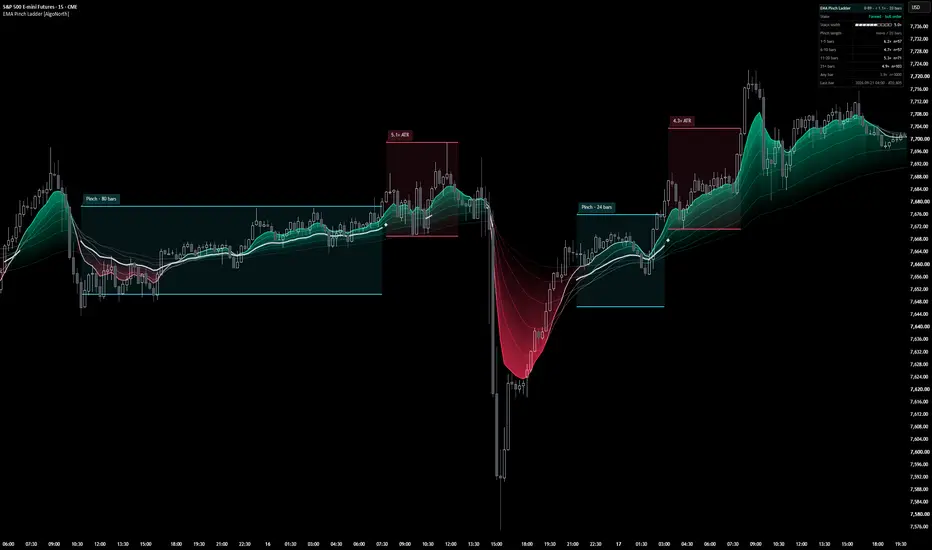
EMA Pinch Ladder
You know that moment when your moving averages bunch up into one tight little knot and the whole chart goes quiet?
Every trader has a theory about what comes next. EMA Pinch Ladder goes and finds out.
It spots every time six EMAs pinch together on your chart, boxes it up, then tracks how far price travels once the pinch lets go. Every result is filed on the ladder by how long the pinch lasted — quick blips, medium coils, marathon squeezes — and sits right next to what an ordinary stretch of your chart does. One glance tells you whether the quiet on this chart has really been the calm before the storm.
The glowing ribbon shows how neatly the stack is lined up. The white thread follows a pinch as it forms, one closed bar at a time. The panel keeps a running tally, with the sample count on every row. And because everything is measured in ATRs, the same settings carry across symbols and timeframes.
One heads-up before you dive in: the ladder measures how far price moved, not which way, and the zones are drawn once each pinch has played out. Think of it as a history book for your chart rather than a crystal ball — more on that in the limitations below.
🔶 USAGE
🔸 Reading the chart
- Cyan zone — a finished pinch: the six EMAs closed in tight. The tag says how many bars it lasted.
- Pink zone — the 20 bars measured from the release: the full high-to-low range price covered, tagged in ATRs.
- White thread — a pinch in progress, drawn at the close of each bar.
- Diamond — marks the bar where a pinch of at least the minimum length ended.
- Ribbon glow — how neatly the six EMAs are stacked and how far they have fanned. Cosmetic: it restates what the lines already show.
🔸 Reading the ladder
Here's an example of the panel on ES1! 15m, last bar 2026-09-21 02:30 exchange time (Chicago), bar #20,799:
1–5 bars 6.2× n=57
6–10 bars 4.7× n=57
11–20 bars 5.3× n=71
21+ bars 4.9× n=103
Any bar 3.9× n=3000
How to read it: "1–5 bars 6.2× n=57" means that after the 57 pinches lasting 1–5 bars, price travelled a median of about 6.2 ATRs over the 20 bars from the release.
"Any bar" is the same measurement from every bar (the last 3,000), so you can compare. Here, every pinch row sits above it, and the shortest pinches sit highest.
Your numbers will differ with the symbol, timeframe and history loaded, and they shift as new bars arrive. Check the limitations for one important caveat before reading too much into any gap, then load it on your own market and see what yours says.
🔸 Ways to use it
- Test the squeeze idea on your own symbol and timeframe before building anything on it.
- Get a feel for how much room price has needed after pinches on this chart.
- Compare markets and timeframes without changing any settings — everything is measured in ATRs, so the same values carry across.
- Watch the State row: it shows live whether the stack is pinched right now, and for how many bars.
- Alerts: pinch reached minimum length, pinch released, stack in bull order, stack in bear order.
🔶 DETAILS
🔸 What counts as a pinch
Six EMAs (8, 13, 21, 34, 55, 89 by default) form the stack. The gap between the highest and lowest is divided by a 100-bar ATR, so "Pinch width" is a multiple of ATR, not a price distance — one setting behaves similarly across symbols and timeframes.
A pinch starts when the gap drops under the pinch width, and ends once it opens past the width plus the release buffer (25% by default). The buffer stops one pinch being chopped into several while the gap hovers on the line. It also means a running pinch can include bars slightly wider than the pinch width itself.
🔸 What gets measured
When a pinch ends, the script takes the full high-to-low range of the 20 bars from the release (20 by default, adjustable) — counting the release bar as bar one — and divides it by the ATR as it stood at the release. The ATR is frozen there, so 3× means three times the volatility going in.
🔸 How the ladder is built
Every finished pinch is filed by length: 1–5, 6–10, 11–20 and 21+ bars (all three boundaries adjustable). Pinches too short to draw are still counted. Each row shows the median, not the average, so one wild release can't dominate it. A row stays blank until it holds 5 samples, and n is always shown.
🔸 Nothing repaints
Every pinch decision happens on a closed bar. Zones and tags are created once and never moved or recoloured. The live readouts are the panel's State and Stack width rows, and the EMA lines on the forming bar, which settle at the close like any moving average. Nothing is fetched: no other timeframe, no external data — every number comes from the bars on your chart.
🔸 Why zones can overlap
Cyan zones are pinches; pink zones are the 20 bars measured after each one ends. If the market pinches again inside that window, the two zones overlap — both are correct, they just describe the same bars from two angles.
🔸 A thread without a zone
That's a pinch shorter than "Minimum bars to draw": it was tracked live and counted in the panel, but too short to be boxed.
🔶 SETTINGS
🔸 Stack — six EMA lengths (source fixed to close) and the ATR length used as the yardstick.
🔸 Pinch — pinch width, release buffer, outcome bars and minimum bars to draw (also the threshold for the two pinch alerts).
🔸 Length buckets — three ladder boundaries (read in ascending order, whatever order you enter them) and the minimum samples before a row shows a figure.
🔸 Stack appearance — palettes including Neutral (one hue for both orders, so the stack can't be mistaken for your candle colours), custom colours, glow strength and EMA lines.
🔸 Zones and tags — show or hide each element, colours, fills, how many zones stay on the chart, edge width and tag size.
🔸 Panel — full or compact rows, five positions and text size. The header shows the live settings and the last row shows the bar time and count, so you can always tell which copy you're reading and that it's current.
🔶 LIMITATIONS
🔸 Historical context, not live calls. Zones are drawn once each pinch has played out. While a pinch is running, the live signs are the thread and the State row.
🔸 Measures distance, not direction. The outcome is the full high-to-low range of the window, so a trend, a reversal and wide chop can all print the same number. It tells you how far price travelled, not which way.
🔸 Part of the gap is built in. Each window starts on the bar where the stack opened up, so some of the extra movement comes from how the window is chosen. The "Any bar" row is there as a reference for that.
🔸 Samples overlap. "Any bar" includes the pinch bars themselves, and back-to-back pinches can share bars, so treat n as a count of windows rather than fully independent samples. Each row keeps its most recent 500 pinches; "Any bar" keeps the last 3,000 bars.
🔸 Your chart, your numbers. Symbol, timeframe, loaded history and settings all change the figures. Heikin Ashi and Renko use synthetic bars, and the panel flags it when one is loaded.
🔸 A measuring tool, not a strategy. It gives no entries or exits and isn't a backtest. It describes the past, and it isn't financial advice.
Also worth knowing: it needs about 100 bars to warm up, overnight and regular hours are counted together, "Last bar" shows exchange time, and you can move the panel with Position if price runs through it.
🔶 SUMMARY
EMA ribbons are nothing new — the twist here is the measuring. EMA Pinch Ladder marks every time six EMAs pinch together on your chart and measures how far price travels once each pinch lets go. Each result is filed on a ladder by how long the pinch lasted, and the panel shows every row beside an ordinary stretch of the same chart, with the sample count included.
You know that moment when your moving averages bunch up into one tight little knot and the whole chart goes quiet?
Every trader has a theory about what comes next. EMA Pinch Ladder goes and finds out.
It spots every time six EMAs pinch together on your chart, boxes it up, then tracks how far price travels once the pinch lets go. Every result is filed on the ladder by how long the pinch lasted — quick blips, medium coils, marathon squeezes — and sits right next to what an ordinary stretch of your chart does. One glance tells you whether the quiet on this chart has really been the calm before the storm.
The glowing ribbon shows how neatly the stack is lined up. The white thread follows a pinch as it forms, one closed bar at a time. The panel keeps a running tally, with the sample count on every row. And because everything is measured in ATRs, the same settings carry across symbols and timeframes.
One heads-up before you dive in: the ladder measures how far price moved, not which way, and the zones are drawn once each pinch has played out. Think of it as a history book for your chart rather than a crystal ball — more on that in the limitations below.
🔶 USAGE
🔸 Reading the chart
- Cyan zone — a finished pinch: the six EMAs closed in tight. The tag says how many bars it lasted.
- Pink zone — the 20 bars measured from the release: the full high-to-low range price covered, tagged in ATRs.
- White thread — a pinch in progress, drawn at the close of each bar.
- Diamond — marks the bar where a pinch of at least the minimum length ended.
- Ribbon glow — how neatly the six EMAs are stacked and how far they have fanned. Cosmetic: it restates what the lines already show.
🔸 Reading the ladder
Here's an example of the panel on ES1! 15m, last bar 2026-09-21 02:30 exchange time (Chicago), bar #20,799:
1–5 bars 6.2× n=57
6–10 bars 4.7× n=57
11–20 bars 5.3× n=71
21+ bars 4.9× n=103
Any bar 3.9× n=3000
How to read it: "1–5 bars 6.2× n=57" means that after the 57 pinches lasting 1–5 bars, price travelled a median of about 6.2 ATRs over the 20 bars from the release.
"Any bar" is the same measurement from every bar (the last 3,000), so you can compare. Here, every pinch row sits above it, and the shortest pinches sit highest.
Your numbers will differ with the symbol, timeframe and history loaded, and they shift as new bars arrive. Check the limitations for one important caveat before reading too much into any gap, then load it on your own market and see what yours says.
🔸 Ways to use it
- Test the squeeze idea on your own symbol and timeframe before building anything on it.
- Get a feel for how much room price has needed after pinches on this chart.
- Compare markets and timeframes without changing any settings — everything is measured in ATRs, so the same values carry across.
- Watch the State row: it shows live whether the stack is pinched right now, and for how many bars.
- Alerts: pinch reached minimum length, pinch released, stack in bull order, stack in bear order.
🔶 DETAILS
🔸 What counts as a pinch
Six EMAs (8, 13, 21, 34, 55, 89 by default) form the stack. The gap between the highest and lowest is divided by a 100-bar ATR, so "Pinch width" is a multiple of ATR, not a price distance — one setting behaves similarly across symbols and timeframes.
A pinch starts when the gap drops under the pinch width, and ends once it opens past the width plus the release buffer (25% by default). The buffer stops one pinch being chopped into several while the gap hovers on the line. It also means a running pinch can include bars slightly wider than the pinch width itself.
🔸 What gets measured
When a pinch ends, the script takes the full high-to-low range of the 20 bars from the release (20 by default, adjustable) — counting the release bar as bar one — and divides it by the ATR as it stood at the release. The ATR is frozen there, so 3× means three times the volatility going in.
🔸 How the ladder is built
Every finished pinch is filed by length: 1–5, 6–10, 11–20 and 21+ bars (all three boundaries adjustable). Pinches too short to draw are still counted. Each row shows the median, not the average, so one wild release can't dominate it. A row stays blank until it holds 5 samples, and n is always shown.
🔸 Nothing repaints
Every pinch decision happens on a closed bar. Zones and tags are created once and never moved or recoloured. The live readouts are the panel's State and Stack width rows, and the EMA lines on the forming bar, which settle at the close like any moving average. Nothing is fetched: no other timeframe, no external data — every number comes from the bars on your chart.
🔸 Why zones can overlap
Cyan zones are pinches; pink zones are the 20 bars measured after each one ends. If the market pinches again inside that window, the two zones overlap — both are correct, they just describe the same bars from two angles.
🔸 A thread without a zone
That's a pinch shorter than "Minimum bars to draw": it was tracked live and counted in the panel, but too short to be boxed.
🔶 SETTINGS
🔸 Stack — six EMA lengths (source fixed to close) and the ATR length used as the yardstick.
🔸 Pinch — pinch width, release buffer, outcome bars and minimum bars to draw (also the threshold for the two pinch alerts).
🔸 Length buckets — three ladder boundaries (read in ascending order, whatever order you enter them) and the minimum samples before a row shows a figure.
🔸 Stack appearance — palettes including Neutral (one hue for both orders, so the stack can't be mistaken for your candle colours), custom colours, glow strength and EMA lines.
🔸 Zones and tags — show or hide each element, colours, fills, how many zones stay on the chart, edge width and tag size.
🔸 Panel — full or compact rows, five positions and text size. The header shows the live settings and the last row shows the bar time and count, so you can always tell which copy you're reading and that it's current.
🔶 LIMITATIONS
🔸 Historical context, not live calls. Zones are drawn once each pinch has played out. While a pinch is running, the live signs are the thread and the State row.
🔸 Measures distance, not direction. The outcome is the full high-to-low range of the window, so a trend, a reversal and wide chop can all print the same number. It tells you how far price travelled, not which way.
🔸 Part of the gap is built in. Each window starts on the bar where the stack opened up, so some of the extra movement comes from how the window is chosen. The "Any bar" row is there as a reference for that.
🔸 Samples overlap. "Any bar" includes the pinch bars themselves, and back-to-back pinches can share bars, so treat n as a count of windows rather than fully independent samples. Each row keeps its most recent 500 pinches; "Any bar" keeps the last 3,000 bars.
🔸 Your chart, your numbers. Symbol, timeframe, loaded history and settings all change the figures. Heikin Ashi and Renko use synthetic bars, and the panel flags it when one is loaded.
🔸 A measuring tool, not a strategy. It gives no entries or exits and isn't a backtest. It describes the past, and it isn't financial advice.
Also worth knowing: it needs about 100 bars to warm up, overnight and regular hours are counted together, "Last bar" shows exchange time, and you can move the panel with Position if price runs through it.
🔶 SUMMARY
EMA ribbons are nothing new — the twist here is the measuring. EMA Pinch Ladder marks every time six EMAs pinch together on your chart and measures how far price travels once each pinch lets go. Each result is filed on a ladder by how long the pinch lasted, and the panel shows every row beside an ordinary stretch of the same chart, with the sample count included.
Script open-source
Nello spirito di TradingView, l'autore di questo script lo ha reso open source, in modo che i trader possano esaminarne e verificarne la funzionalità. Complimenti all'autore! Sebbene sia possibile utilizzarlo gratuitamente, ricordiamo che la ripubblicazione del codice è soggetta al nostro Regolamento.

Declinazione di responsabilità
Le informazioni e le pubblicazioni non sono intese come, e non costituiscono, consulenza o raccomandazioni finanziarie, di investimento, di trading o di altro tipo fornite o approvate da TradingView. Per ulteriori informazioni, consultare i Termini di utilizzo.
Script open-source
Nello spirito di TradingView, l'autore di questo script lo ha reso open source, in modo che i trader possano esaminarne e verificarne la funzionalità. Complimenti all'autore! Sebbene sia possibile utilizzarlo gratuitamente, ricordiamo che la ripubblicazione del codice è soggetta al nostro Regolamento.
Declinazione di responsabilità
Le informazioni e le pubblicazioni non sono intese come, e non costituiscono, consulenza o raccomandazioni finanziarie, di investimento, di trading o di altro tipo fornite o approvate da TradingView. Per ulteriori informazioni, consultare i Termini di utilizzo.