OPEN-SOURCE SCRIPT
BTC Spot CVD (Daily Reset) - Multi Exchange
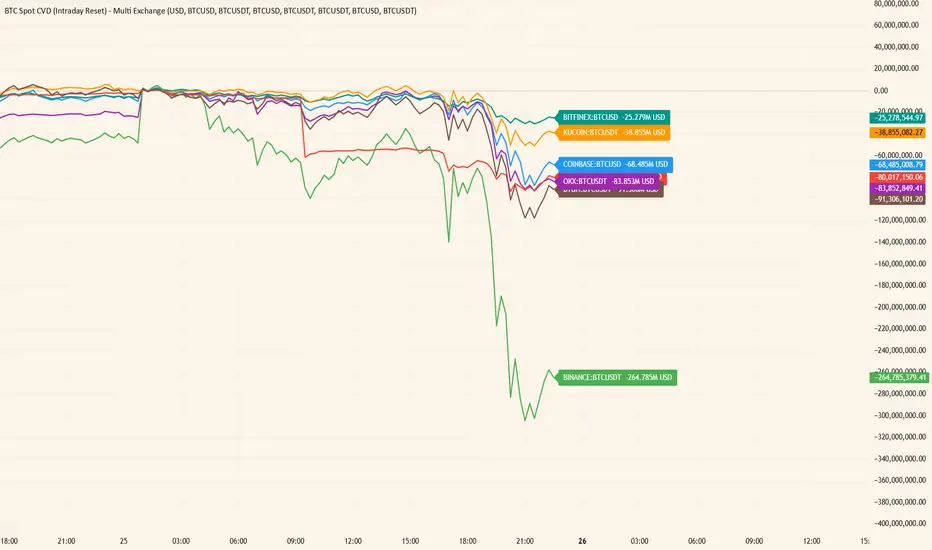
This indicator plots intraday Cumulative Volume Delta (CVD) for BTC spot markets across multiple major exchanges in a single pane, allowing quick comparison of relative buying/selling pressure throughout the day.
Exchanges / Pairs included
COINBASE:BTCUSD
OKX:BTCUSDT
BINANCE:BTCUSDT
BITFINEX:BTCUSD
KUCOIN:BTCUSDT
KRAKEN:BTCUSD
BYBIT:BTCUSDT
Each exchange is drawn as its own colored CVD line, and the right edge shows a live label with full symbol name + current CVD value.
How CVD is calculated (important)
TradingView spot feeds generally do not provide true aggressor-side trade data (buy vs sell).
This script uses a tick-rule estimate based on bar-to-bar price change:
If close > close[1] → bar volume is treated as buying (+)
If close < close[1] → bar volume is treated as selling (−)
If unchanged → 0
That signed volume is accumulated over time to form CVD.
Intraday reset
CVD resets at the start of each new trading day (based on the symbol’s daily session/day boundary on TradingView). This makes it easy to compare “today’s” flow across venues without long-term drift.
Units toggle: BTC vs USD
In settings you can switch:
BTC mode: CVD in BTC (base units)
USD mode: CVD converted to quote value using the bar’s price (BTC delta × price).
For USDT pairs, USD mode treats USDT as USD-like.
How to use
Add the indicator to any chart/timeframe.
Use the Inputs panel to show/hide specific exchanges.
Compare which venues lead/lag and where delta is strongest/weakest intraday.
Use the zero line as a quick reference for net positive vs net negative delta for the day.
Notes / limitations
This is an approximation of volume delta using OHLCV data, not true order-flow delta from trade prints.
Results can vary by timeframe because the tick-rule sign is derived from the bar close.
Exchanges / Pairs included
COINBASE:BTCUSD
OKX:BTCUSDT
BINANCE:BTCUSDT
BITFINEX:BTCUSD
KUCOIN:BTCUSDT
KRAKEN:BTCUSD
BYBIT:BTCUSDT
Each exchange is drawn as its own colored CVD line, and the right edge shows a live label with full symbol name + current CVD value.
How CVD is calculated (important)
TradingView spot feeds generally do not provide true aggressor-side trade data (buy vs sell).
This script uses a tick-rule estimate based on bar-to-bar price change:
If close > close[1] → bar volume is treated as buying (+)
If close < close[1] → bar volume is treated as selling (−)
If unchanged → 0
That signed volume is accumulated over time to form CVD.
Intraday reset
CVD resets at the start of each new trading day (based on the symbol’s daily session/day boundary on TradingView). This makes it easy to compare “today’s” flow across venues without long-term drift.
Units toggle: BTC vs USD
In settings you can switch:
BTC mode: CVD in BTC (base units)
USD mode: CVD converted to quote value using the bar’s price (BTC delta × price).
For USDT pairs, USD mode treats USDT as USD-like.
How to use
Add the indicator to any chart/timeframe.
Use the Inputs panel to show/hide specific exchanges.
Compare which venues lead/lag and where delta is strongest/weakest intraday.
Use the zero line as a quick reference for net positive vs net negative delta for the day.
Notes / limitations
This is an approximation of volume delta using OHLCV data, not true order-flow delta from trade prints.
Results can vary by timeframe because the tick-rule sign is derived from the bar close.
Script open-source
Nello spirito di TradingView, l'autore di questo script lo ha reso open source, in modo che i trader possano esaminarne e verificarne la funzionalità. Complimenti all'autore! Sebbene sia possibile utilizzarlo gratuitamente, ricordiamo che la ripubblicazione del codice è soggetta al nostro Regolamento.

Declinazione di responsabilità
Le informazioni e le pubblicazioni non sono intese come, e non costituiscono, consulenza o raccomandazioni finanziarie, di investimento, di trading o di altro tipo fornite o approvate da TradingView. Per ulteriori informazioni, consultare i Termini di utilizzo.
Script open-source
Nello spirito di TradingView, l'autore di questo script lo ha reso open source, in modo che i trader possano esaminarne e verificarne la funzionalità. Complimenti all'autore! Sebbene sia possibile utilizzarlo gratuitamente, ricordiamo che la ripubblicazione del codice è soggetta al nostro Regolamento.
Declinazione di responsabilità
Le informazioni e le pubblicazioni non sono intese come, e non costituiscono, consulenza o raccomandazioni finanziarie, di investimento, di trading o di altro tipo fornite o approvate da TradingView. Per ulteriori informazioni, consultare i Termini di utilizzo.