OPEN-SOURCE SCRIPT
Remaining FVG [Quanty]
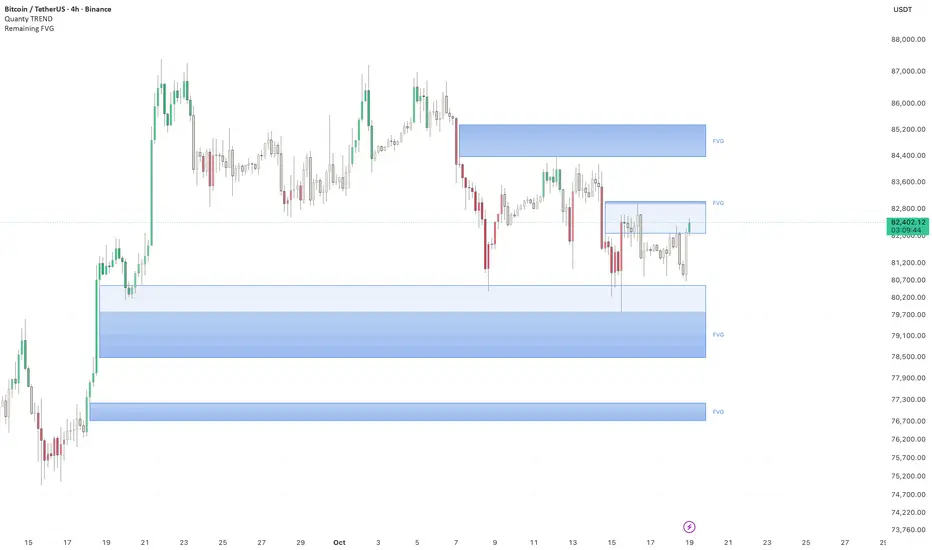
Fair value gaps as boxes that show how much of the gap is left: the part price has already traded into turns light, and the part still open stays dark, darkest at the far edge.
Remaining FVG marks the price range a fast move left untraded. When price comes back into the gap, the light part grows and the dark part shrinks, so you can see at a glance whether the zone in your own plan is still there. When price reaches the far side, the gap is filled and the box is removed. Gaps can come from the chart's own timeframe or from a higher one, while the chart's own candles fill them.
HOW IT WORKS
The rules for a gap left by an up move; a gap left by a down move is the mirror image.
1. Gap. Three closed candles in a row of the chosen timeframe (the chart's own by default), with no missing time between them, so a weekend or session break does not form a gap (monthly timeframes skip this check, because months differ in length). The low of the third candle must be above the high of the first. The gap must be wider than zero and at least 0.15 ATR (14) of the middle candle on that timeframe (a setting), so tiny gaps are ignored. ATR is Wilder's average true range.
2. Box. The box covers the gap, from the high of the first candle up to the low of the third, with a thin frame. On the chart's own timeframe it starts at the third candle and appears on the close of that candle, never earlier. The word FVG sits at its right edge, and the box is drawn 6 bars past the last closed candle.
3. Two tones. Every later chart candle that trades into the gap moves the top of the dark part down to that candle's low. The part above it, which price has already traded into, is drawn light. The dark part is what has not been traded yet: it is darkest at the far edge, the bottom of the gap, and it never grows back.
4. Filled. When a chart candle's low reaches the bottom of the original gap, the gap is filled: a wick is enough, no close is needed. The box is then removed. If you turn on "Show filled gaps" (off by default), a faint dashed outline of the original gap stays in the gap's own colour, from the candle that formed it to the candle that filled it: the last 12 filled gaps, fewer when Live boxes is above 6, so that no more than 18 gaps show.
5. Limits. A new gap that overlaps the open part of a live gap left by a move in the same direction is skipped; boxes that only share an edge do not overlap. Up to 6 live boxes are shown (a setting, 1 to 12); when a new box goes over the limit, the oldest live box is removed. A box that is still live 300 candles of the chosen timeframe after it formed is removed, and it is not counted as filled.
6. Timeframe. Empty by default, which means the chart's own timeframe. If you choose a higher timeframe, gaps are found from its candles, while the chart's own candles shrink and fill them as above. Only closed candles of the chosen timeframe are read, so a gap is found once its third candle has closed and boxes are not redrawn: the box appears on the close of the first chart candle after that, and starts at the first chart candle of the third candle's period. If you choose a timeframe below the chart's, the chart's own timeframe is used and a small note on the last candle says so.
Chart candles are read only once they have closed; nothing repaints.
HOW TO READ IT
Both kinds of gap are blue by default. At every candle close, the open part of a gap left by an up move sits below price, and the open part of a gap left by a down move above it, so the position of the box tells you which way the move went. The two colours are separate settings if you want to tell them apart by colour. A box does not tell you where price goes next, and it is not a trade signal.
The dark part is what is still open; the light part is what price has already traded into. A box that is almost all light has little of the gap left. A dashed outline, if you turn filled gaps on, is history: the full original gap and the bar where it was filled. It is no longer a live zone.
Use the box as a check, not a trigger: when price comes back to a zone in your own plan, see how much of the gap is still open there. Check the behaviour on your own symbol and timeframe before you rely on it.
Settings: "Minimum gap (x ATR 14)" (default 0.15, from 0 to 2), "Live boxes" (default 6, from 1 to 12), "Show filled gaps" (off by default), "Timeframe" (empty = the chart's), and the two colours "Gap from an up move" and "Gap from a down move" (both blue by default). ATR length, the 300-candle limit and the 6-bar extension are fixed.
Alerts: "New FVG" when a gap forms and "FVG filled" when a gap is filled to its far edge, both on the close of the candle.
Written from the concept; no code from other scripts is used.
Not investment advice.
Remaining FVG marks the price range a fast move left untraded. When price comes back into the gap, the light part grows and the dark part shrinks, so you can see at a glance whether the zone in your own plan is still there. When price reaches the far side, the gap is filled and the box is removed. Gaps can come from the chart's own timeframe or from a higher one, while the chart's own candles fill them.
HOW IT WORKS
The rules for a gap left by an up move; a gap left by a down move is the mirror image.
1. Gap. Three closed candles in a row of the chosen timeframe (the chart's own by default), with no missing time between them, so a weekend or session break does not form a gap (monthly timeframes skip this check, because months differ in length). The low of the third candle must be above the high of the first. The gap must be wider than zero and at least 0.15 ATR (14) of the middle candle on that timeframe (a setting), so tiny gaps are ignored. ATR is Wilder's average true range.
2. Box. The box covers the gap, from the high of the first candle up to the low of the third, with a thin frame. On the chart's own timeframe it starts at the third candle and appears on the close of that candle, never earlier. The word FVG sits at its right edge, and the box is drawn 6 bars past the last closed candle.
3. Two tones. Every later chart candle that trades into the gap moves the top of the dark part down to that candle's low. The part above it, which price has already traded into, is drawn light. The dark part is what has not been traded yet: it is darkest at the far edge, the bottom of the gap, and it never grows back.
4. Filled. When a chart candle's low reaches the bottom of the original gap, the gap is filled: a wick is enough, no close is needed. The box is then removed. If you turn on "Show filled gaps" (off by default), a faint dashed outline of the original gap stays in the gap's own colour, from the candle that formed it to the candle that filled it: the last 12 filled gaps, fewer when Live boxes is above 6, so that no more than 18 gaps show.
5. Limits. A new gap that overlaps the open part of a live gap left by a move in the same direction is skipped; boxes that only share an edge do not overlap. Up to 6 live boxes are shown (a setting, 1 to 12); when a new box goes over the limit, the oldest live box is removed. A box that is still live 300 candles of the chosen timeframe after it formed is removed, and it is not counted as filled.
6. Timeframe. Empty by default, which means the chart's own timeframe. If you choose a higher timeframe, gaps are found from its candles, while the chart's own candles shrink and fill them as above. Only closed candles of the chosen timeframe are read, so a gap is found once its third candle has closed and boxes are not redrawn: the box appears on the close of the first chart candle after that, and starts at the first chart candle of the third candle's period. If you choose a timeframe below the chart's, the chart's own timeframe is used and a small note on the last candle says so.
Chart candles are read only once they have closed; nothing repaints.
HOW TO READ IT
Both kinds of gap are blue by default. At every candle close, the open part of a gap left by an up move sits below price, and the open part of a gap left by a down move above it, so the position of the box tells you which way the move went. The two colours are separate settings if you want to tell them apart by colour. A box does not tell you where price goes next, and it is not a trade signal.
The dark part is what is still open; the light part is what price has already traded into. A box that is almost all light has little of the gap left. A dashed outline, if you turn filled gaps on, is history: the full original gap and the bar where it was filled. It is no longer a live zone.
Use the box as a check, not a trigger: when price comes back to a zone in your own plan, see how much of the gap is still open there. Check the behaviour on your own symbol and timeframe before you rely on it.
Settings: "Minimum gap (x ATR 14)" (default 0.15, from 0 to 2), "Live boxes" (default 6, from 1 to 12), "Show filled gaps" (off by default), "Timeframe" (empty = the chart's), and the two colours "Gap from an up move" and "Gap from a down move" (both blue by default). ATR length, the 300-candle limit and the 6-bar extension are fixed.
Alerts: "New FVG" when a gap forms and "FVG filled" when a gap is filled to its far edge, both on the close of the candle.
Written from the concept; no code from other scripts is used.
Not investment advice.
Script open-source
Nello spirito di TradingView, l'autore di questo script lo ha reso open source, in modo che i trader possano esaminarne e verificarne la funzionalità. Complimenti all'autore! Sebbene sia possibile utilizzarlo gratuitamente, ricordiamo che la ripubblicazione del codice è soggetta al nostro Regolamento.

Declinazione di responsabilità
Le informazioni e le pubblicazioni non sono intese come, e non costituiscono, consulenza o raccomandazioni finanziarie, di investimento, di trading o di altro tipo fornite o approvate da TradingView. Per ulteriori informazioni, consultare i Termini di utilizzo.
Script open-source
Nello spirito di TradingView, l'autore di questo script lo ha reso open source, in modo che i trader possano esaminarne e verificarne la funzionalità. Complimenti all'autore! Sebbene sia possibile utilizzarlo gratuitamente, ricordiamo che la ripubblicazione del codice è soggetta al nostro Regolamento.
Declinazione di responsabilità
Le informazioni e le pubblicazioni non sono intese come, e non costituiscono, consulenza o raccomandazioni finanziarie, di investimento, di trading o di altro tipo fornite o approvate da TradingView. Per ulteriori informazioni, consultare i Termini di utilizzo.