OPEN-SOURCE SCRIPT
ICT Pulse - Bias & Stats Dashboard
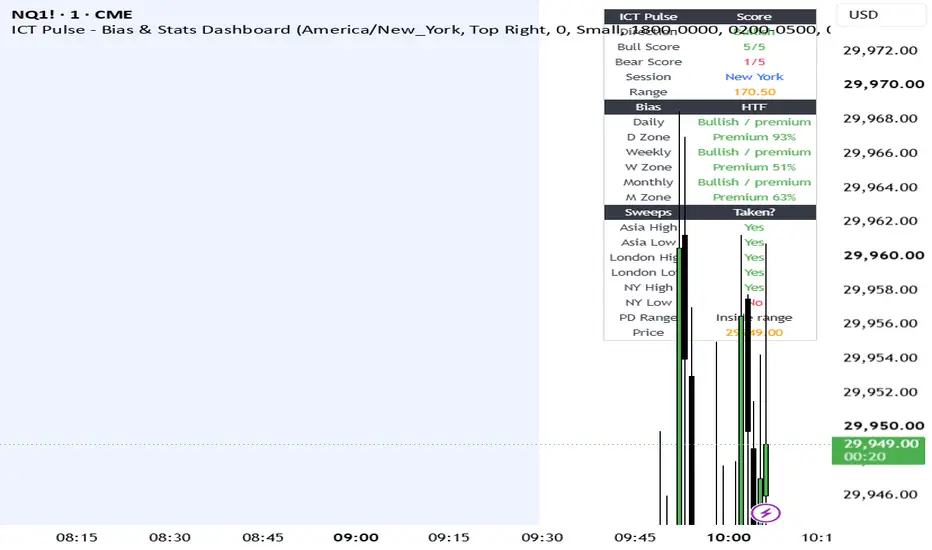
ICT Pulse — Bias & Session Dashboard
ICT Pulse is a dashboard-style indicator designed to summarize higher-timeframe context, session status, and liquidity conditions for discretionary ICT-style futures trading.
The script does not generate buy or sell signals. Its purpose is to organize market context into a compact dashboard so traders can quickly understand where price is trading relative to previous ranges and whether session liquidity has been taken.
How it works
ICT Pulse compares the current price to the previous daily, weekly, and monthly ranges. For each range, it calculates whether price is trading in premium or discount by measuring the current close relative to the prior high, low, and midpoint.
The dashboard then combines this higher-timeframe information with session conditions. It tracks the active Asia, London, and New York sessions, records each session’s high and low, and monitors whether those levels have later been traded through.
The confluence score is a simple context score, not a signal system. Bullish and bearish scores are built from five conditions:
* Daily range position
* Weekly range position
* Monthly range position
* Whether opposing-side liquidity has been taken
* Whether price is above or below the active session midpoint
For example, the bullish score increases when price is in premium on higher timeframes, when downside liquidity has been taken, and when price is holding above the current session midpoint. The bearish score uses the opposite conditions.
Main features
* Daily, weekly, and monthly bias summary
* Premium/discount status for previous daily, weekly, and monthly ranges
* Active session detection
* Current session range tracking
* Asia, London, and New York high/low sweep status
* Bullish and bearish confluence score
* Dashboard-only layout to reduce chart clutter
How to use it
ICT Pulse is best used as a market-context tool before looking for entries. A trader can use it to check whether higher-timeframe conditions are aligned, whether important session liquidity has already been taken, and whether the current session is supporting bullish, bearish, or neutral conditions.
Suggested workflow:
1. Check daily, weekly, and monthly bias.
2. Check whether price is in premium or discount.
3. Check whether Asia, London, or New York liquidity has been taken.
4. Compare the bullish and bearish confluence scores.
5. Use a separate execution model for entries, stops, and trade management.
This script is intended for educational and analytical use only. It does not provide financial advice, trade recommendations, or guaranteed outcomes. Futures and financial market trading involves risk.
ICT Pulse is a dashboard-style indicator designed to summarize higher-timeframe context, session status, and liquidity conditions for discretionary ICT-style futures trading.
The script does not generate buy or sell signals. Its purpose is to organize market context into a compact dashboard so traders can quickly understand where price is trading relative to previous ranges and whether session liquidity has been taken.
How it works
ICT Pulse compares the current price to the previous daily, weekly, and monthly ranges. For each range, it calculates whether price is trading in premium or discount by measuring the current close relative to the prior high, low, and midpoint.
The dashboard then combines this higher-timeframe information with session conditions. It tracks the active Asia, London, and New York sessions, records each session’s high and low, and monitors whether those levels have later been traded through.
The confluence score is a simple context score, not a signal system. Bullish and bearish scores are built from five conditions:
* Daily range position
* Weekly range position
* Monthly range position
* Whether opposing-side liquidity has been taken
* Whether price is above or below the active session midpoint
For example, the bullish score increases when price is in premium on higher timeframes, when downside liquidity has been taken, and when price is holding above the current session midpoint. The bearish score uses the opposite conditions.
Main features
* Daily, weekly, and monthly bias summary
* Premium/discount status for previous daily, weekly, and monthly ranges
* Active session detection
* Current session range tracking
* Asia, London, and New York high/low sweep status
* Bullish and bearish confluence score
* Dashboard-only layout to reduce chart clutter
How to use it
ICT Pulse is best used as a market-context tool before looking for entries. A trader can use it to check whether higher-timeframe conditions are aligned, whether important session liquidity has already been taken, and whether the current session is supporting bullish, bearish, or neutral conditions.
Suggested workflow:
1. Check daily, weekly, and monthly bias.
2. Check whether price is in premium or discount.
3. Check whether Asia, London, or New York liquidity has been taken.
4. Compare the bullish and bearish confluence scores.
5. Use a separate execution model for entries, stops, and trade management.
This script is intended for educational and analytical use only. It does not provide financial advice, trade recommendations, or guaranteed outcomes. Futures and financial market trading involves risk.
Script open-source
Nello spirito di TradingView, l'autore di questo script lo ha reso open source, in modo che i trader possano esaminarne e verificarne la funzionalità. Complimenti all'autore! Sebbene sia possibile utilizzarlo gratuitamente, ricordiamo che la ripubblicazione del codice è soggetta al nostro Regolamento.

Declinazione di responsabilità
Le informazioni e le pubblicazioni non sono intese come, e non costituiscono, consulenza o raccomandazioni finanziarie, di investimento, di trading o di altro tipo fornite o approvate da TradingView. Per ulteriori informazioni, consultare i Termini di utilizzo.
Script open-source
Nello spirito di TradingView, l'autore di questo script lo ha reso open source, in modo che i trader possano esaminarne e verificarne la funzionalità. Complimenti all'autore! Sebbene sia possibile utilizzarlo gratuitamente, ricordiamo che la ripubblicazione del codice è soggetta al nostro Regolamento.
Declinazione di responsabilità
Le informazioni e le pubblicazioni non sono intese come, e non costituiscono, consulenza o raccomandazioni finanziarie, di investimento, di trading o di altro tipo fornite o approvate da TradingView. Per ulteriori informazioni, consultare i Termini di utilizzo.