Turtle Soup Failed Breakout [MarkitTick]
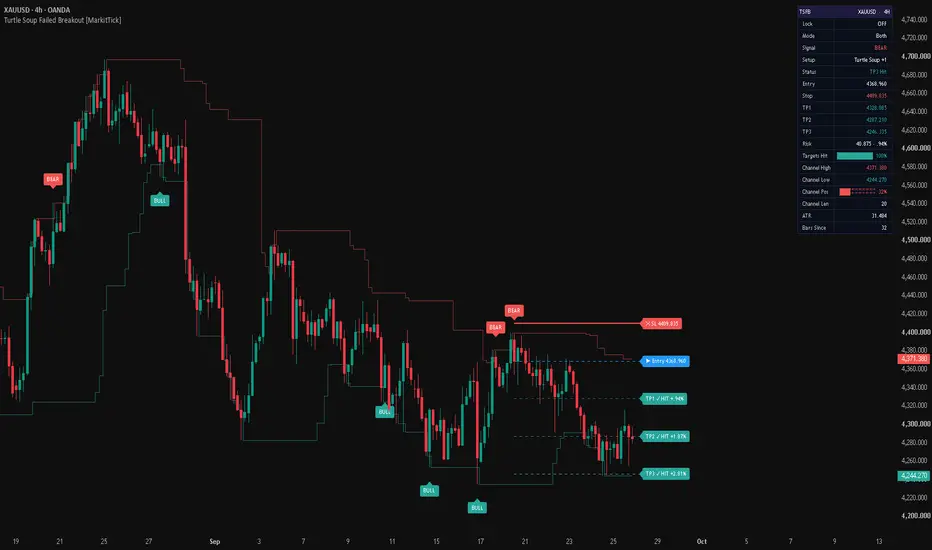
💡 Most breakout traders act on the moment price moves past a well-known high or low. This indicator looks for the opposite: a push beyond a 20-bar extreme that fails to hold and closes back inside the range. That is the Turtle Soup pattern, and its +1 variant, which waits one extra bar for confirmation. The script finds both setups, filters them if you choose, and draws a full trade plan on the chart for every confirmed signal: entry, a volatility-based stop, three targets measured in multiples of risk, live tracking of each level, a dashboard and webhook-ready alerts. It is meant for traders who want failed breakouts spotted by clear rules, not by eye.
✨ Originality and Utility
A standard price channel (the highest high and lowest low of recent bars) only shows where the range is. What price does at those edges is left to the trader. This script turns the edge into a test: it records when price breaks the edge, checks whether the break was rejected, and makes sure the extreme being broken is not too recent. Only then does it produce a signal.
What it adds over a plain channel or a basic breakout script:
● Why these components belong together
Each part answers one question the pattern raises. The channel defines the level being tested. The age rule decides whether that level matters. The same-bar or next-bar reclaim decides whether the breakout actually failed. The ATR buffer sizes the stop to current volatility, so the invalidation point is not a fixed price distance. The R-multiple targets express reward in units of that same risk, which keeps trades comparable across symbols and timeframes. The higher-timeframe and ADX filters are optional context: one asks whether the reversal agrees with the bigger trend, the other whether the market has enough directional energy. None of these parts is decoration, and each changes which signals appear or how they are managed.
🔬 Methodology and Concepts
• The reference channel
On every bar the script takes the highest high and the lowest low of the previous Channel Len bars (20 by default). The current bar is not included, so it is always compared with a range that was already complete before it opened. The script also measures how many bars ago each extreme was set, counted back from the current bar. If Smoothing is enabled, the channel is passed through the chosen moving average (SMA, EMA, RMA, WMA or HMA) before any signal is evaluated. The age of the extreme is still measured from the raw, unsmoothed high or low.
• Turtle Soup (same-bar failure)
A long setup forms when the bar's low trades below the channel low but the bar closes back above it, and the prior low is at least Min Extreme Age bars old (4 by default). A short setup is the mirror image: the high trades above the channel high, the close finishes back below it, and the prior high meets the same age rule.
• Turtle Soup +1 (next-bar failure)
A long setup forms when the previous bar traded below its channel low and closed below it, a real close outside the range, and the current bar then closes back above that same level. The age rule is applied to the previous bar's extreme. A short setup mirrors this at the channel high. The variant catches breakouts that looked accepted for one bar before being rejected.
• Signal confirmation
A signal becomes final only when its bar closes. If the long and short conditions ever qualify on the same bar, neither signal fires. The Setup input picks Turtle Soup, Turtle Soup +1, or Both. When both variants qualify on the same bar in Both mode, the signal is labelled Turtle Soup and the stop uses the wider two-bar extreme.
• Stop placement
For a long, the stop sits below the signal bar's low (or the lower of the two bars for the +1 variant) by SL Buffer ATR multiplied by the Average True Range (0.25 ATR over 14 bars by default). For a short, the stop sits above the matching high by the same buffer. The stop therefore sits just beyond the price that invalidates the failed-breakout idea.
• Targets
Entry is the close of the signal bar. Risk is the distance from entry to stop. TP1, TP2 and TP3 are placed at 1, 2 and 3 times that risk in the trade's direction by default. If two targets are set to the same multiple, they are merged into one level and its label names both.
• Trade tracking
Tracking starts on the bar after the signal. Each bar, the script checks whether price reached the stop or any target. The stop is checked first, so if one bar touches both the stop and a target, the stop is counted. This is the conservative reading of an ambiguous bar. The stop stays at its original price after TP1 or TP2 is reached. A trade is finished when the stop is hit or TP3 is reached. A new signal in either direction replaces the current plan, whether the previous trade was still open or not.
• Optional filters
Higher-timeframe filter: longs need the last completed higher-timeframe close to be above its EMA (50 periods on the 240-minute timeframe by default), and shorts need it below. Only fully closed higher-timeframe values are used, so the filter does not change after the fact. If the selected timeframe is lower than the chart's, the filter is skipped and the dashboard says so. On non-standard chart types the filter reads the standard version of the symbol.
ADX filter: a signal needs the previous bar's ADX to be at or above ADX Min (20 by default, with a 14-bar DI and ADX length).
🎨 Visual Guide
• Channel lines
Two stepped lines mark the reference channel. The upper line (semi-transparent red by default) is the prior channel high, the level a bearish setup must fail at. The lower line (semi-transparent green by default) is the prior channel low, the level a bullish setup must fail at. They can be hidden with Channel Lines.
• Signal markers
A green BULL label under the bar marks a confirmed long setup. A red BEAR label above the bar marks a confirmed short setup. Only confirmed signals are marked.
• Trade levels
For the latest signal, five horizontal levels are drawn from the signal bar:
While the trade is open, the levels extend ten bars past the newest bar. Once the trade closes, they stop ten bars after the closing bar, so a finished plan stays readable without stretching across the chart. Only the most recent plan is shown.
• Hit labels
When price reaches a target or the stop, that level's label changes to show HIT together with the percentage move from entry to that level. A glance at the labels shows how far the trade got.
• Dashboard
A two-column panel (top right by default) shows the symbol and timeframe in its header, then:
Progress bars are green at 66% and above, amber from 33% to 65%, and red below 33%.
📖 How to Use
• Alerts
For webhook automation, create an alert with the "Any alert() function call" condition. On a confirmed long it sends a JSON message with the action, ticker, timeframe, direction, entry, stop, three targets, setup name and the channel level that failed, plus a separate close message for any short position. A confirmed short sends the mirror pair. Each target sends its own message when price reaches it. Target alerts fire when price touches the level during the bar, while entry alerts wait for the bar to close. There are also simple named alerts: BUY Signal, SELL Signal, Close Long Signal, Close Short Signal, TP1 Hit, TP2 Hit and TP3 Hit. The script has no stop-loss alert.
• Repainting behaviour
Signals are final only at bar close, the channel is built from bars that are already complete, and the higher-timeframe filter reads only completed higher-timeframe values. A signal that has printed is not removed or moved later. The dashboard and the target tracking on the forming bar update live, as any real-time display does.
⚙️ Inputs and Settings
• Core
• Filters
• Trade Tools
• Visuals, Dashboard, Alerts and Colors
● Credits
The Turtle Soup pattern and its +1 variant were described by Laurence Connors and Linda Bradford Raschke in Street Smarts as a counter to the classic channel-breakout approach associated with the Turtle traders. This script is an original implementation of that published concept. Unlike the original rules, which enter with a stop order at the level during the bar, this version waits for a confirmed close before signalling.
🔍 Deconstruction of the Underlying Scientific and Academic Framework
• Order statistics and range extremes
The channel high and low are the maximum and minimum of a fixed window of prices, which are order statistics of that sample. In a random-walk market, new extremes of a window appear regularly by chance alone. The Turtle Soup idea rests on the observation that some of these new extremes are not followed through. When price returns inside the window straight away, it suggests the extreme was produced by a short burst of orders rather than a lasting shift in value.
• Stop clustering and liquidity
Traders often place stop orders just beyond visible highs and lows, and breakout traders place entry orders there. When price reaches these levels, the resting orders fill at once, which can stretch the move briefly. If no new participants arrive, the move fades once that liquidity is used up, and price returns into the range. The age rule targets levels that have been in place long enough for such orders to build up.
• Mean reversion at the edges of a range
Range trading assumes price tends to return toward the middle of a balance area after testing its edges. The failed breakout is a sign that the balance area is still in place. Mean-reversion edges are usually strongest when there is no strong trend, which is why the optional higher-timeframe filter can be used to keep only reversals that agree with the bigger direction.
• Volatility normalisation with ATR
Average True Range, introduced by J. Welles Wilder, measures typical bar size including gaps. Placing the stop a fraction of ATR beyond the failed extreme scales the buffer to current conditions: wider in volatile markets, tighter in calm ones. This lowers the chance that ordinary noise triggers the stop while keeping the invalidation point close to the structure.
• Directional strength with ADX
The Average Directional Index, also developed by Wilder, measures how strongly price is trending regardless of direction. Using the previous bar's ADX as a minimum requirement keeps signals only when the market has enough directional movement for a reversal to travel. It is a measure of energy, not of direction.
• Risk expressed as R-multiples
Measuring targets in multiples of the initial risk comes from position-sizing and expectancy frameworks, where each trade's outcome is expressed in units of what was risked. This makes results comparable across instruments with very different prices, and makes the ratio of reward to risk explicit for every signal.
• Multi-timeframe confirmation
Checking a lower-timeframe signal against a higher-timeframe trend is a filtering idea: the higher timeframe changes more slowly and carries less noise, so it serves as a background condition. Reading only completed higher-timeframe values keeps that background fixed once seen, which matters for a fair review of past signals.
● Limitations
Failed breakouts are one reading of price at a range edge, not a forecast. In strong trends, new extremes often keep extending, and counter-trend setups can produce a series of stops. The stop-first rule for ambiguous bars and the fixed stop after TP1 are deliberate simplifications. Results depend heavily on the symbol, the timeframe and the settings, and should be studied on your own data before any use.
⚠️ Disclaimer
All provided scripts and indicators are strictly for educational exploration and must not be interpreted as financial advice or a recommendation to execute trades. We expressly disclaim all liability for any financial losses or damages that may result, directly or indirectly, from the reliance on or application of these tools. Market participation carries inherent risk where past performance never guarantees future returns, leaving all investment decisions and due diligence solely at your own discretion.
✨ Originality and Utility
A standard price channel (the highest high and lowest low of recent bars) only shows where the range is. What price does at those edges is left to the trader. This script turns the edge into a test: it records when price breaks the edge, checks whether the break was rejected, and makes sure the extreme being broken is not too recent. Only then does it produce a signal.
What it adds over a plain channel or a basic breakout script:
- Two pattern variants in one tool. Turtle Soup (pierce and reclaim on the same bar) and Turtle Soup +1 (close beyond the level, then reclaim on the next bar) can run alone or together.
- An age requirement on the extreme. The prior high or low must be at least a set number of bars old. A break of an extreme made two bars ago is ordinary noise, while a break of an older extreme is a real test of a level other traders are watching.
- A complete trade plan for every signal: entry at the confirmed close, a stop placed beyond the failed extreme with an ATR buffer, and three targets in multiples of that risk.
- Level tracking after entry: each target and the stop are checked bar by bar, their labels update when reached, and the dashboard shows the trade status.
- Two optional filters, a higher-timeframe trend filter and an ADX strength filter. Both read only completed data.
- Structured JSON webhook messages for entries, closes of the opposite side, and each target.
● Why these components belong together
Each part answers one question the pattern raises. The channel defines the level being tested. The age rule decides whether that level matters. The same-bar or next-bar reclaim decides whether the breakout actually failed. The ATR buffer sizes the stop to current volatility, so the invalidation point is not a fixed price distance. The R-multiple targets express reward in units of that same risk, which keeps trades comparable across symbols and timeframes. The higher-timeframe and ADX filters are optional context: one asks whether the reversal agrees with the bigger trend, the other whether the market has enough directional energy. None of these parts is decoration, and each changes which signals appear or how they are managed.
🔬 Methodology and Concepts
• The reference channel
On every bar the script takes the highest high and the lowest low of the previous Channel Len bars (20 by default). The current bar is not included, so it is always compared with a range that was already complete before it opened. The script also measures how many bars ago each extreme was set, counted back from the current bar. If Smoothing is enabled, the channel is passed through the chosen moving average (SMA, EMA, RMA, WMA or HMA) before any signal is evaluated. The age of the extreme is still measured from the raw, unsmoothed high or low.
• Turtle Soup (same-bar failure)
A long setup forms when the bar's low trades below the channel low but the bar closes back above it, and the prior low is at least Min Extreme Age bars old (4 by default). A short setup is the mirror image: the high trades above the channel high, the close finishes back below it, and the prior high meets the same age rule.
• Turtle Soup +1 (next-bar failure)
A long setup forms when the previous bar traded below its channel low and closed below it, a real close outside the range, and the current bar then closes back above that same level. The age rule is applied to the previous bar's extreme. A short setup mirrors this at the channel high. The variant catches breakouts that looked accepted for one bar before being rejected.
• Signal confirmation
A signal becomes final only when its bar closes. If the long and short conditions ever qualify on the same bar, neither signal fires. The Setup input picks Turtle Soup, Turtle Soup +1, or Both. When both variants qualify on the same bar in Both mode, the signal is labelled Turtle Soup and the stop uses the wider two-bar extreme.
• Stop placement
For a long, the stop sits below the signal bar's low (or the lower of the two bars for the +1 variant) by SL Buffer ATR multiplied by the Average True Range (0.25 ATR over 14 bars by default). For a short, the stop sits above the matching high by the same buffer. The stop therefore sits just beyond the price that invalidates the failed-breakout idea.
• Targets
Entry is the close of the signal bar. Risk is the distance from entry to stop. TP1, TP2 and TP3 are placed at 1, 2 and 3 times that risk in the trade's direction by default. If two targets are set to the same multiple, they are merged into one level and its label names both.
• Trade tracking
Tracking starts on the bar after the signal. Each bar, the script checks whether price reached the stop or any target. The stop is checked first, so if one bar touches both the stop and a target, the stop is counted. This is the conservative reading of an ambiguous bar. The stop stays at its original price after TP1 or TP2 is reached. A trade is finished when the stop is hit or TP3 is reached. A new signal in either direction replaces the current plan, whether the previous trade was still open or not.
• Optional filters
Higher-timeframe filter: longs need the last completed higher-timeframe close to be above its EMA (50 periods on the 240-minute timeframe by default), and shorts need it below. Only fully closed higher-timeframe values are used, so the filter does not change after the fact. If the selected timeframe is lower than the chart's, the filter is skipped and the dashboard says so. On non-standard chart types the filter reads the standard version of the symbol.
ADX filter: a signal needs the previous bar's ADX to be at or above ADX Min (20 by default, with a 14-bar DI and ADX length).
🎨 Visual Guide
• Channel lines
Two stepped lines mark the reference channel. The upper line (semi-transparent red by default) is the prior channel high, the level a bearish setup must fail at. The lower line (semi-transparent green by default) is the prior channel low, the level a bullish setup must fail at. They can be hidden with Channel Lines.
• Signal markers
A green BULL label under the bar marks a confirmed long setup. A red BEAR label above the bar marks a confirmed short setup. Only confirmed signals are marked.
• Trade levels
For the latest signal, five horizontal levels are drawn from the signal bar:
- Stop: a thick solid red line with a red label showing SL and its price.
- Entry: a dashed blue line with a blue label showing Entry and its price.
- TP1, TP2, TP3: dashed green lines that become more opaque from TP1 to TP3, each with a green label showing its price.
While the trade is open, the levels extend ten bars past the newest bar. Once the trade closes, they stop ten bars after the closing bar, so a finished plan stays readable without stretching across the chart. Only the most recent plan is shown.
• Hit labels
When price reaches a target or the stop, that level's label changes to show HIT together with the percentage move from entry to that level. A glance at the labels shows how far the trade got.
• Dashboard
A two-column panel (top right by default) shows the symbol and timeframe in its header, then:
- Lock: whether Lock Signal is active.
- Mode and Setup: the selected mode and the variant behind the latest signal.
- Signal: BULL in green or BEAR in red for the latest trade.
- Status: Open, TP1 Hit, TP2 Hit, TP3 Hit, Stopped, or Stopped after a given target.
- Entry, Stop, TP1, TP2, TP3: the exact prices.
- Risk: the entry-to-stop distance in price and as a percentage of entry.
- Targets Hit: a ten-block progress bar showing how many of the three targets were reached.
- Channel High, Channel Low and Channel Len: the current range and its lookback.
- Channel Pos: a progress bar showing where the current close sits inside the channel, from 0% at the low to 100% at the high.
- ATR and Bars Since: current volatility and the number of bars since the latest signal.
- HTF Filter, ADX Filter and Smoothing rows appear only when those features are enabled.
Progress bars are green at 66% and above, amber from 33% to 65%, and red below 33%.
📖 How to Use
- Choose the setup. Turtle Soup reacts faster. Turtle Soup +1 waits for one extra bar of evidence that the breakout failed. Both shows everything.
- Read the context. A BULL marker at the channel low means price broke below an older low and could not stay there. A BEAR marker at the channel high means the same failure above an older high.
- Use the drawn plan as a reference. The stop shows where the failed-breakout idea is invalidated, and the targets show where the reward reaches one, two and three times the risk.
- Follow the levels. HIT labels and the Status row show whether the trade reached its targets or was stopped. After TP1 the stop does not move, so any trailing or breakeven management is your own decision.
- Add filters when the market needs them. The higher-timeframe filter keeps only reversals that agree with the bigger trend. The ADX filter removes signals in very quiet conditions. Compare results on your own symbol with and without each filter.
- Use Lock Signal when you want the current plan held. While it is on, a new signal on the most recent bar does not replace the drawn levels. Historical bars are not affected, and the chart recalculates on reload.
• Alerts
For webhook automation, create an alert with the "Any alert() function call" condition. On a confirmed long it sends a JSON message with the action, ticker, timeframe, direction, entry, stop, three targets, setup name and the channel level that failed, plus a separate close message for any short position. A confirmed short sends the mirror pair. Each target sends its own message when price reaches it. Target alerts fire when price touches the level during the bar, while entry alerts wait for the bar to close. There are also simple named alerts: BUY Signal, SELL Signal, Close Long Signal, Close Short Signal, TP1 Hit, TP2 Hit and TP3 Hit. The script has no stop-loss alert.
• Repainting behaviour
Signals are final only at bar close, the channel is built from bars that are already complete, and the higher-timeframe filter reads only completed higher-timeframe values. A signal that has printed is not removed or moved later. The dashboard and the target tracking on the forming bar update live, as any real-time display does.
⚙️ Inputs and Settings
• Core
- Setup: Turtle Soup, Turtle Soup +1, or Both.
- Channel Len: number of prior bars used for the high and low channel. Longer values test more significant levels and give fewer signals.
- Min Extreme Age: how old the prior extreme must be. Higher values ignore breaks of very recent extremes.
• Filters
- HTF Filter, HTF TF, HTF EMA Len: turn the trend filter on, pick its timeframe (not lower than the chart's) and set its EMA length.
- ADX Filter, ADX Min, ADX Len: turn the strength filter on and set its threshold and length.
- Smoothing and Smooth Len: smooth the channel with a moving average before signals are checked. Smoothing makes the levels less jagged but also slower to follow new extremes.
• Trade Tools
- Lock Signal: holds the current plan on the latest bar.
- ATR Len and SL Buffer ATR: set the volatility measure and how far beyond the failed extreme the stop sits.
- TP1 R, TP2 R, TP3 R: the targets as multiples of risk.
• Visuals, Dashboard, Alerts and Colors
- Signal Markers and Channel Lines toggle the BULL and BEAR labels and the channel.
- Show Dashboard and Position control the panel.
- The action fields set the text sent as the action in each webhook message (defaults: long, short, closelong, closeshort, tp1, tp2, tp3), so the messages can match the receiving system.
- Every color on the chart and dashboard can be changed in the Colors group.
● Credits
The Turtle Soup pattern and its +1 variant were described by Laurence Connors and Linda Bradford Raschke in Street Smarts as a counter to the classic channel-breakout approach associated with the Turtle traders. This script is an original implementation of that published concept. Unlike the original rules, which enter with a stop order at the level during the bar, this version waits for a confirmed close before signalling.
🔍 Deconstruction of the Underlying Scientific and Academic Framework
• Order statistics and range extremes
The channel high and low are the maximum and minimum of a fixed window of prices, which are order statistics of that sample. In a random-walk market, new extremes of a window appear regularly by chance alone. The Turtle Soup idea rests on the observation that some of these new extremes are not followed through. When price returns inside the window straight away, it suggests the extreme was produced by a short burst of orders rather than a lasting shift in value.
• Stop clustering and liquidity
Traders often place stop orders just beyond visible highs and lows, and breakout traders place entry orders there. When price reaches these levels, the resting orders fill at once, which can stretch the move briefly. If no new participants arrive, the move fades once that liquidity is used up, and price returns into the range. The age rule targets levels that have been in place long enough for such orders to build up.
• Mean reversion at the edges of a range
Range trading assumes price tends to return toward the middle of a balance area after testing its edges. The failed breakout is a sign that the balance area is still in place. Mean-reversion edges are usually strongest when there is no strong trend, which is why the optional higher-timeframe filter can be used to keep only reversals that agree with the bigger direction.
• Volatility normalisation with ATR
Average True Range, introduced by J. Welles Wilder, measures typical bar size including gaps. Placing the stop a fraction of ATR beyond the failed extreme scales the buffer to current conditions: wider in volatile markets, tighter in calm ones. This lowers the chance that ordinary noise triggers the stop while keeping the invalidation point close to the structure.
• Directional strength with ADX
The Average Directional Index, also developed by Wilder, measures how strongly price is trending regardless of direction. Using the previous bar's ADX as a minimum requirement keeps signals only when the market has enough directional movement for a reversal to travel. It is a measure of energy, not of direction.
• Risk expressed as R-multiples
Measuring targets in multiples of the initial risk comes from position-sizing and expectancy frameworks, where each trade's outcome is expressed in units of what was risked. This makes results comparable across instruments with very different prices, and makes the ratio of reward to risk explicit for every signal.
• Multi-timeframe confirmation
Checking a lower-timeframe signal against a higher-timeframe trend is a filtering idea: the higher timeframe changes more slowly and carries less noise, so it serves as a background condition. Reading only completed higher-timeframe values keeps that background fixed once seen, which matters for a fair review of past signals.
● Limitations
Failed breakouts are one reading of price at a range edge, not a forecast. In strong trends, new extremes often keep extending, and counter-trend setups can produce a series of stops. The stop-first rule for ambiguous bars and the fixed stop after TP1 are deliberate simplifications. Results depend heavily on the symbol, the timeframe and the settings, and should be studied on your own data before any use.
⚠️ Disclaimer
All provided scripts and indicators are strictly for educational exploration and must not be interpreted as financial advice or a recommendation to execute trades. We expressly disclaim all liability for any financial losses or damages that may result, directly or indirectly, from the reliance on or application of these tools. Market participation carries inherent risk where past performance never guarantees future returns, leaving all investment decisions and due diligence solely at your own discretion.

💡 Proprietary indicators. Original research. Built by analysts who trade.
📢 Free Telegram: t.me/MarkitTick_Updates
👑 Premium: TradingView Marketplace
📘 Guides: markittick.com
📢 Free Telegram: t.me/MarkitTick_Updates
👑 Premium: TradingView Marketplace
📘 Guides: markittick.com
Declinazione di responsabilità
Le informazioni e le pubblicazioni non sono intese come, e non costituiscono, consulenza o raccomandazioni finanziarie, di investimento, di trading o di altro tipo fornite o approvate da TradingView. Per ulteriori informazioni, consultare i Termini di utilizzo.
💡 Proprietary indicators. Original research. Built by analysts who trade.
📢 Free Telegram: t.me/MarkitTick_Updates
👑 Premium: TradingView Marketplace
📘 Guides: markittick.com
📢 Free Telegram: t.me/MarkitTick_Updates
👑 Premium: TradingView Marketplace
📘 Guides: markittick.com
Declinazione di responsabilità
Le informazioni e le pubblicazioni non sono intese come, e non costituiscono, consulenza o raccomandazioni finanziarie, di investimento, di trading o di altro tipo fornite o approvate da TradingView. Per ulteriori informazioni, consultare i Termini di utilizzo.