Camarilla Pivots - JAW Trades
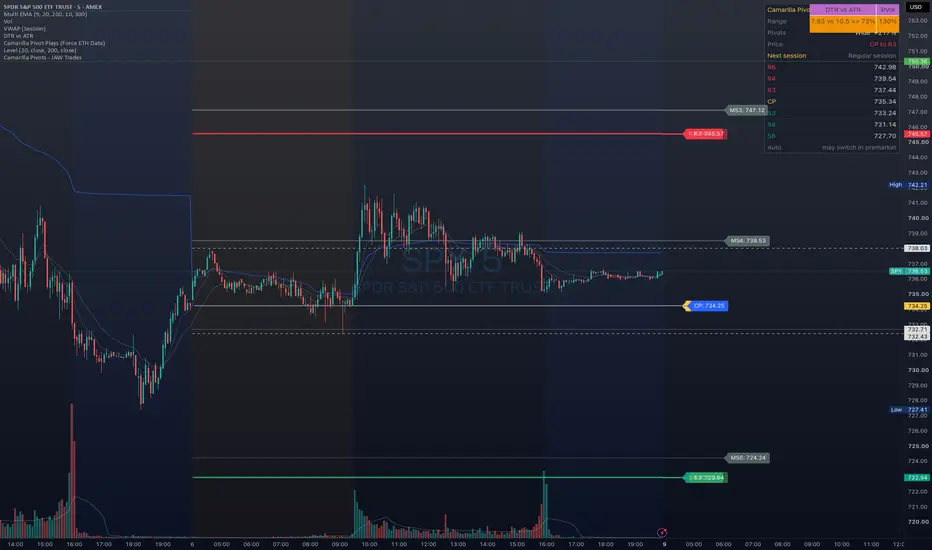
I trade off Camarilla levels every day. I built this version because most scripts put the levels in the wrong place after a big premarket or after-hours move. This one picks the right data for the day and keeps the chart clean.
How it works
The levels come from the prior day's high, low and close. CP is the prior close.
By default it uses the regular session. If yesterday's after-hours or today's premarket traded beyond yesterday's regular session range by more than 1% of the daily ATR, it switches to extended hours data. You can also force either one.
The table
Range: Higher, Lower or Neutral, based on today's CP against yesterday's.
Pivots: Wide, Narrow or Similar, with the % change in R3 to S3 width.
Price: where price is right now, for example "CP to R3".
After the close it shows tomorrow's levels so you can plan the night before.
Settings
Every level from R6 to S6, plus CP, can be shown or hidden, with its own colour, opacity, width and line style. R3, R4, R6, S3, S4, S6 and CP are on by default. The R3 to R4 and S3 to S4 zones are lightly shaded.
Weekly and monthly levels can be switched on for the current week and month, in their own colours.
Alerts are available for price crossing R3, R4, S3, S4 or CP.
Session times are New York time. These are reference levels, not buy or sell signals. For education only, not financial advice.
How it works
The levels come from the prior day's high, low and close. CP is the prior close.
By default it uses the regular session. If yesterday's after-hours or today's premarket traded beyond yesterday's regular session range by more than 1% of the daily ATR, it switches to extended hours data. You can also force either one.
The table
Range: Higher, Lower or Neutral, based on today's CP against yesterday's.
Pivots: Wide, Narrow or Similar, with the % change in R3 to S3 width.
Price: where price is right now, for example "CP to R3".
After the close it shows tomorrow's levels so you can plan the night before.
Settings
Every level from R6 to S6, plus CP, can be shown or hidden, with its own colour, opacity, width and line style. R3, R4, R6, S3, S4, S6 and CP are on by default. The R3 to R4 and S3 to S4 zones are lightly shaded.
Weekly and monthly levels can be switched on for the current week and month, in their own colours.
Alerts are available for price crossing R3, R4, S3, S4 or CP.
Session times are New York time. These are reference levels, not buy or sell signals. For education only, not financial advice.

Declinazione di responsabilità
Le informazioni e le pubblicazioni non sono intese come, e non costituiscono, consulenza o raccomandazioni finanziarie, di investimento, di trading o di altro tipo fornite o approvate da TradingView. Per ulteriori informazioni, consultare i Termini di utilizzo.
Declinazione di responsabilità
Le informazioni e le pubblicazioni non sono intese come, e non costituiscono, consulenza o raccomandazioni finanziarie, di investimento, di trading o di altro tipo fornite o approvate da TradingView. Per ulteriori informazioni, consultare i Termini di utilizzo.