OPEN-SOURCE SCRIPT
Aggiornato Compression Breakout Readiness [AGPro Series]
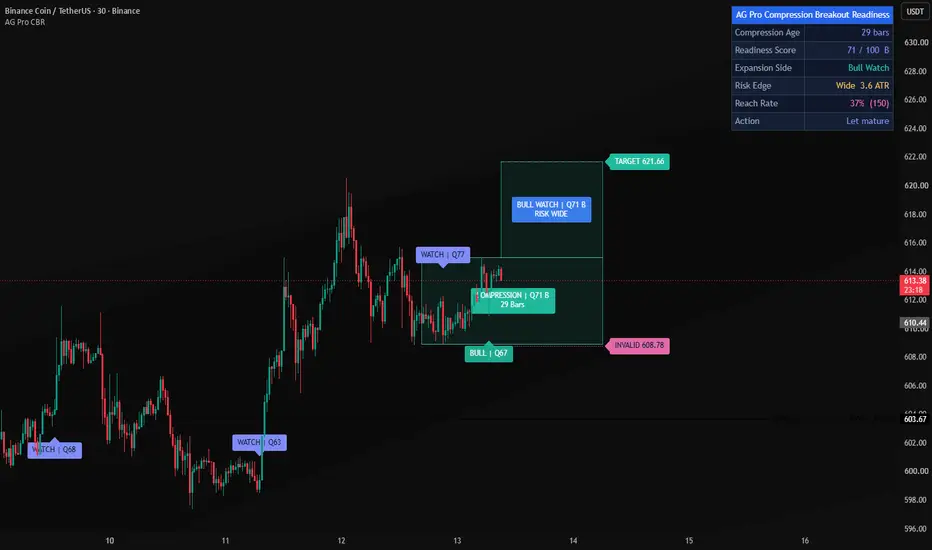
Compression Breakout Readiness [AGPro Series]
🧠 Core Idea
Is compression mature enough for a breakout watch state, or is the range still early, noisy, or structurally weak?
📌 Overview / What it does
Compression Breakout Readiness [AGPro Series] is a chart-first breakout planning tool designed to evaluate whether a compressed range has developed enough maturity to deserve active attention.
Instead of printing a generic breakout signal, the script studies range contraction, ATR compression, pivot tightening, volume dry-up, directional side bias, invalidation-edge distance, and projected breakout room. These components are converted into a 0-100 Readiness Score and a clear next-action state.
The script produces an active compression box, breakout watch corridor, invalidation edge, target guide, compact state labels, alerts, and a clean AGPro planning panel. It does not predict direction, automate execution, or guarantee that a breakout will follow through.
🎯 Purpose & Design Philosophy
This script was built for traders who want to evaluate the quality of compression before reacting to a breakout attempt.
Many breakout tools only mark the moment price crosses a level. The more useful planning question often comes earlier: is the range actually tight, mature, quiet, and biased enough to watch, or is the structure still too loose?
The design supports a decision-first workflow: identify compression, measure readiness, check risk edge, review the watch side, then decide whether the chart deserves attention.
⚡ Why This Script Is Different
Most tools focus on squeeze dots, breakout arrows, generic consolidation boxes, or simple high/low range breaks.
This script does NOT act as a generic squeeze indicator, a choppiness filter, a support/resistance mapper, or a direct buy/sell signal generator.
Instead, it evaluates compression maturity before and around the breakout edge. The main output is not a trade command. It is a readiness state that helps the user separate READY WATCH conditions from early, neutral, overheated, or invalidated compression contexts.
⚙️ Methodology
1. Context Detection
The script maps the active compression range and evaluates whether current volatility and range width are contracting relative to their baselines.
2. Reference Mapping
It builds the compression box, active breakout watch corridor, invalidation edge, and target guide from the current structure.
3. Reaction Evaluation
The model scores range contraction, ATR compression, pivot tightening, volume dry-up, side bias, and compression age. It also checks whether the invalidation edge is too tight, too wide, or balanced.
4. Visual Output
The result is shown through centered zone text, compact chart labels, clean edge lines, deterministic alerts, and a premium AGPro panel.
🗺️ How to Read the Chart
Compression Box = the active range being evaluated for breakout readiness.
Breakout Watch Corridor = the planning area beyond the active compression edge.
Invalidation Edge = the opposite-side reference used to judge risk context.
Labels = compact state markers such as READY WATCH, WATCH, EDGE REVIEW, PREMATURE, HOT RISK, and INVALID EDGE.
Colors = teal for bullish watch context, pink for bearish or invalid context, amber for caution, and indigo for watch/neutral emphasis.
Panel = the panel summarizes Compression Age, Readiness Score, Expansion Side, Risk Edge, and Action.
🚦 Signals & States
• READY WATCH → compression is mature, biased, and risk edge distance is balanced enough for active review.
• WATCH → compression is developing, but at least one readiness component remains incomplete.
• EDGE REVIEW → price has moved beyond the compression edge and the user should verify the close and broader context.
• PREMATURE → compression has not lasted long enough to build strong maturity.
• HOT RISK → volatility has expanded too aggressively for clean readiness interpretation.
• NO BIAS → compression exists, but the directional side is not clear enough in Auto mode.
• INVALID EDGE → price crossed the active invalidation edge and the prior context may need reset.
🔔 Alerts Logic
Alerts trigger when the planner enters READY WATCH, WATCH, EDGE REVIEW, HOT RISK, or INVALID EDGE state.
These alerts are attention markers. They are not trade instructions, entry signals, broker actions, or automated strategy commands.
🧩 Confluence Logic
The strongest readiness state appears when multiple components align:
Range contraction + ATR compression + pivot tightening + volume dry-up + directional side bias + balanced risk edge.
When those components improve together, the score can rise toward READY WATCH. If volatility becomes too hot, risk becomes distorted, or the active edge fails, the state downgrades.
📊 When to Use
• Before evaluating a possible breakout setup
• During narrow ranges where volatility is compressing
• Around coiling structures that need maturity review
• When comparing whether one compression range is cleaner than another
• On liquid symbols where range, ATR, and volume behavior are meaningful
⚠️ When NOT to Use
• Extremely low-liquidity markets
• Highly noisy micro-timeframes
• News-driven volatility spikes
• Symbols with unreliable or missing volume data
• Situations where the user wants a simple breakout arrow or automated trade signal
🎛️ Key Inputs
• Breakout Watch Side → selects Auto, Bullish Watch, or Bearish Watch evaluation.
• Compression Lookback → defines the active range used for readiness scoring.
• ATR Baseline → controls volatility compression comparison.
• Volume Dry-Up Length → evaluates whether participation is contracting inside compression.
• Minimum Compression Age → controls how mature a range must be before stronger readiness states appear.
• READY / WATCH Thresholds → adjust how selective the planner is.
• Visual settings → control compression box, breakout corridor, range edges, invalidation edge, projection length, labels, and candle tint.
• Panel settings → control panel visibility, location, theme, and font size.
🖥️ Interface & Visual Design
The interface is intentionally chart-first.
The compression box uses centered text so the user can read score and age directly inside the structure. The breakout corridor provides a clean forward planning reference without filling the chart with many competing levels.
The AGPro panel uses a single merged blue header row and a compact five-row decision layout. Label and panel font sizes are adjustable, with Normal as the default.
🧪 Practical Usage Workflow
1. Read the panel Readiness Score and Action.
2. Check whether the compression box is mature or premature.
3. Review the Expansion Side and breakout watch corridor.
4. Compare the Risk Edge with the visible structure.
5. Treat labels and alerts as review prompts, not trade commands.
🔍 Interpretation Guidelines
A higher score means the script sees stronger compression maturity according to its rule set.
READY WATCH does not mean price must break out. It means the compression context is organized enough to deserve attention.
WATCH means the structure may be developing but is not fully mature.
HOT RISK and INVALID EDGE are caution states. They warn that the range may no longer be clean enough for the same readiness read.
🚫 What This Script Is NOT
This script is not a prediction engine.
It is not financial advice.
It is not an auto-trading system.
It does not provide guaranteed signals.
It is not a generic squeeze indicator.
It is not a choppiness dashboard.
It is not a support/resistance scanner.
It is not a direct breakout entry tool.
⚠️ Limitations & Transparency
Compression quality depends on the selected lookback, timeframe, volatility baseline, and market condition.
Volume dry-up may be less reliable on symbols with inconsistent exchange volume.
Fast volatility expansion can quickly change the readiness state.
Different timeframes can show different compression ranges and side-bias context.
The script is rule-based and should be interpreted as an analytical planning layer, not as certainty.
🧠 Market Context Notes
Compression by itself is not enough.
A useful breakout watch context also needs maturity, reduced noise, a readable side, and a practical invalidation edge.
This script keeps those elements visible so users can review breakout readiness before reacting emotionally to a candle crossing a range edge.
🧾 Use Case Examples
When a range contracts, ATR falls below baseline, volume dries up, and side bias becomes clear, the planner may move toward WATCH or READY WATCH.
When price pushes beyond the edge while readiness is acceptable, the script can mark EDGE REVIEW so the user can verify the close and broader context.
When ATR expands too aggressively before structure is mature, the planner can show HOT RISK instead of treating every move as a clean breakout context.
🧱 System Philosophy
Compression Breakout Readiness follows the AGPro Series decision-engine approach:
Context first.
Readiness before reaction.
Risk edge before target guide.
Attention markers instead of promises.
🔐 Non-Promise Statement
No script can remove uncertainty.
No state, score, label, alert, box, corridor, or line should be interpreted as guaranteed market direction.
📉 Risk Disclosure
Trading involves risk.
All decisions remain the responsibility of the user.
This script is for educational and analytical chart review only and does not provide financial advice.
📚 Educational Note
Use the script to study how compression matures, weakens, breaks, or invalidates around range edges. The strongest reading comes from combining the panel state with the visible chart structure and broader market context.
🧠 Core Idea
Is compression mature enough for a breakout watch state, or is the range still early, noisy, or structurally weak?
📌 Overview / What it does
Compression Breakout Readiness [AGPro Series] is a chart-first breakout planning tool designed to evaluate whether a compressed range has developed enough maturity to deserve active attention.
Instead of printing a generic breakout signal, the script studies range contraction, ATR compression, pivot tightening, volume dry-up, directional side bias, invalidation-edge distance, and projected breakout room. These components are converted into a 0-100 Readiness Score and a clear next-action state.
The script produces an active compression box, breakout watch corridor, invalidation edge, target guide, compact state labels, alerts, and a clean AGPro planning panel. It does not predict direction, automate execution, or guarantee that a breakout will follow through.
🎯 Purpose & Design Philosophy
This script was built for traders who want to evaluate the quality of compression before reacting to a breakout attempt.
Many breakout tools only mark the moment price crosses a level. The more useful planning question often comes earlier: is the range actually tight, mature, quiet, and biased enough to watch, or is the structure still too loose?
The design supports a decision-first workflow: identify compression, measure readiness, check risk edge, review the watch side, then decide whether the chart deserves attention.
⚡ Why This Script Is Different
Most tools focus on squeeze dots, breakout arrows, generic consolidation boxes, or simple high/low range breaks.
This script does NOT act as a generic squeeze indicator, a choppiness filter, a support/resistance mapper, or a direct buy/sell signal generator.
Instead, it evaluates compression maturity before and around the breakout edge. The main output is not a trade command. It is a readiness state that helps the user separate READY WATCH conditions from early, neutral, overheated, or invalidated compression contexts.
⚙️ Methodology
1. Context Detection
The script maps the active compression range and evaluates whether current volatility and range width are contracting relative to their baselines.
2. Reference Mapping
It builds the compression box, active breakout watch corridor, invalidation edge, and target guide from the current structure.
3. Reaction Evaluation
The model scores range contraction, ATR compression, pivot tightening, volume dry-up, side bias, and compression age. It also checks whether the invalidation edge is too tight, too wide, or balanced.
4. Visual Output
The result is shown through centered zone text, compact chart labels, clean edge lines, deterministic alerts, and a premium AGPro panel.
🗺️ How to Read the Chart
Compression Box = the active range being evaluated for breakout readiness.
Breakout Watch Corridor = the planning area beyond the active compression edge.
Invalidation Edge = the opposite-side reference used to judge risk context.
Labels = compact state markers such as READY WATCH, WATCH, EDGE REVIEW, PREMATURE, HOT RISK, and INVALID EDGE.
Colors = teal for bullish watch context, pink for bearish or invalid context, amber for caution, and indigo for watch/neutral emphasis.
Panel = the panel summarizes Compression Age, Readiness Score, Expansion Side, Risk Edge, and Action.
🚦 Signals & States
• READY WATCH → compression is mature, biased, and risk edge distance is balanced enough for active review.
• WATCH → compression is developing, but at least one readiness component remains incomplete.
• EDGE REVIEW → price has moved beyond the compression edge and the user should verify the close and broader context.
• PREMATURE → compression has not lasted long enough to build strong maturity.
• HOT RISK → volatility has expanded too aggressively for clean readiness interpretation.
• NO BIAS → compression exists, but the directional side is not clear enough in Auto mode.
• INVALID EDGE → price crossed the active invalidation edge and the prior context may need reset.
🔔 Alerts Logic
Alerts trigger when the planner enters READY WATCH, WATCH, EDGE REVIEW, HOT RISK, or INVALID EDGE state.
These alerts are attention markers. They are not trade instructions, entry signals, broker actions, or automated strategy commands.
🧩 Confluence Logic
The strongest readiness state appears when multiple components align:
Range contraction + ATR compression + pivot tightening + volume dry-up + directional side bias + balanced risk edge.
When those components improve together, the score can rise toward READY WATCH. If volatility becomes too hot, risk becomes distorted, or the active edge fails, the state downgrades.
📊 When to Use
• Before evaluating a possible breakout setup
• During narrow ranges where volatility is compressing
• Around coiling structures that need maturity review
• When comparing whether one compression range is cleaner than another
• On liquid symbols where range, ATR, and volume behavior are meaningful
⚠️ When NOT to Use
• Extremely low-liquidity markets
• Highly noisy micro-timeframes
• News-driven volatility spikes
• Symbols with unreliable or missing volume data
• Situations where the user wants a simple breakout arrow or automated trade signal
🎛️ Key Inputs
• Breakout Watch Side → selects Auto, Bullish Watch, or Bearish Watch evaluation.
• Compression Lookback → defines the active range used for readiness scoring.
• ATR Baseline → controls volatility compression comparison.
• Volume Dry-Up Length → evaluates whether participation is contracting inside compression.
• Minimum Compression Age → controls how mature a range must be before stronger readiness states appear.
• READY / WATCH Thresholds → adjust how selective the planner is.
• Visual settings → control compression box, breakout corridor, range edges, invalidation edge, projection length, labels, and candle tint.
• Panel settings → control panel visibility, location, theme, and font size.
🖥️ Interface & Visual Design
The interface is intentionally chart-first.
The compression box uses centered text so the user can read score and age directly inside the structure. The breakout corridor provides a clean forward planning reference without filling the chart with many competing levels.
The AGPro panel uses a single merged blue header row and a compact five-row decision layout. Label and panel font sizes are adjustable, with Normal as the default.
🧪 Practical Usage Workflow
1. Read the panel Readiness Score and Action.
2. Check whether the compression box is mature or premature.
3. Review the Expansion Side and breakout watch corridor.
4. Compare the Risk Edge with the visible structure.
5. Treat labels and alerts as review prompts, not trade commands.
🔍 Interpretation Guidelines
A higher score means the script sees stronger compression maturity according to its rule set.
READY WATCH does not mean price must break out. It means the compression context is organized enough to deserve attention.
WATCH means the structure may be developing but is not fully mature.
HOT RISK and INVALID EDGE are caution states. They warn that the range may no longer be clean enough for the same readiness read.
🚫 What This Script Is NOT
This script is not a prediction engine.
It is not financial advice.
It is not an auto-trading system.
It does not provide guaranteed signals.
It is not a generic squeeze indicator.
It is not a choppiness dashboard.
It is not a support/resistance scanner.
It is not a direct breakout entry tool.
⚠️ Limitations & Transparency
Compression quality depends on the selected lookback, timeframe, volatility baseline, and market condition.
Volume dry-up may be less reliable on symbols with inconsistent exchange volume.
Fast volatility expansion can quickly change the readiness state.
Different timeframes can show different compression ranges and side-bias context.
The script is rule-based and should be interpreted as an analytical planning layer, not as certainty.
🧠 Market Context Notes
Compression by itself is not enough.
A useful breakout watch context also needs maturity, reduced noise, a readable side, and a practical invalidation edge.
This script keeps those elements visible so users can review breakout readiness before reacting emotionally to a candle crossing a range edge.
🧾 Use Case Examples
When a range contracts, ATR falls below baseline, volume dries up, and side bias becomes clear, the planner may move toward WATCH or READY WATCH.
When price pushes beyond the edge while readiness is acceptable, the script can mark EDGE REVIEW so the user can verify the close and broader context.
When ATR expands too aggressively before structure is mature, the planner can show HOT RISK instead of treating every move as a clean breakout context.
🧱 System Philosophy
Compression Breakout Readiness follows the AGPro Series decision-engine approach:
Context first.
Readiness before reaction.
Risk edge before target guide.
Attention markers instead of promises.
🔐 Non-Promise Statement
No script can remove uncertainty.
No state, score, label, alert, box, corridor, or line should be interpreted as guaranteed market direction.
📉 Risk Disclosure
Trading involves risk.
All decisions remain the responsibility of the user.
This script is for educational and analytical chart review only and does not provide financial advice.
📚 Educational Note
Use the script to study how compression matures, weakens, breaks, or invalidates around range edges. The strongest reading comes from combining the panel state with the visible chart structure and broader market context.
Note di rilascio
🔧 UPDATE NOTES - 1.1This update focuses on chart readability, zone-label structure, panel consistency, and publication-grade visual control.
The core purpose of the script remains unchanged.
This release improves how the existing compression-breakout readiness logic is presented, organized, and interpreted on the chart.
This script continues to function as an analytical and visualization tool.
It does not attempt to predict price direction or provide guaranteed outcomes.
------------------------
What Changed
------------------------
• Reworked zone text into separate centered badges.
Compression and breakout-corridor text now uses dedicated labels instead of zone text payloads.
• Added Show Centered Zone Badges.
Users can hide or show the centered compression and corridor badges without changing the core visual zones.
• Added Adaptive HTF Projection.
The visual projection expands on higher timeframes so zones remain easier to read on weekly and monthly charts.
• Expanded panel controls.
The panel now supports Elite Dark, Slate, and Clean Light themes, expanded location options, and live position updates.
• Expanded font-size controls.
Label and panel font-size inputs now include Huge, and chart labels, centered badges, invalidation tags, and panel text follow the configured settings.
• Refined visual density.
Default label count, spacing, zone transparency, and context spacing were adjusted for a cleaner publication screenshot.
------------------------
Visual Improvements
------------------------
• Improved chart readability by separating zone text from transparent range and corridor objects.
• Reduced visual crowding around the active compression area.
• Improved visual hierarchy so the compression box, breakout corridor, edge rails, labels, and panel are easier to scan.
• Kept the panel header as a single merged blue row with only the script name.
------------------------
Interface & Usability
------------------------
• Panel show/hide remains available and enabled by default.
• Panel theme, location, and font size remain user-adjustable.
• The panel location now updates live through table positioning.
• Zone badges and label size controls provide clearer chart customization.
------------------------
Behavior Notes
------------------------
This update does not change the core analytical logic of the script.
The goal is to improve clarity and usability, not to introduce new predictive behavior.
Users should interpret outputs the same way as before, but with cleaner zone structure and more controlled visual density.
------------------------
Limitations Reminder
------------------------
The script remains a rule-based analytical tool.
Compression quality, readiness score, risk edge distance, and expansion-side bias can vary across symbols, timeframes, volatility conditions, and liquidity conditions.
Outputs should always be interpreted within broader market context.
------------------------
Risk Reminder
------------------------
This script is for educational and analytical purposes only.
It does not provide financial advice or guaranteed trading outcomes.
Users remain responsible for their own decisions.
Note di rilascio
🔧 UPDATE NOTES - v1.2This update focuses on readability and decision transparency.
The core purpose of the script remains unchanged.
This release hardens on-chart label contrast and adds an honest follow-through
statistic so the strength of compression watch states is easier to judge.
This script continues to function as an analytical and visualization tool.
It does not attempt to predict price direction or provide guaranteed outcomes.
------------------------
What Changed
------------------------
• Stop-Aware Target-Room Reach Rate
A new "Reach Rate" panel row reports how often a fresh watch-grade state went on
to reach the target-room guide before the invalidation edge was crossed. A win
means the target room was reached first and a loss means the invalidation edge
was crossed first, which reuses the planner's own corridor and edge levels, now
measured across history. Watch states that resolve neither way inside the window
are left uncounted, and the row shows the sample size and reads "Building" until
enough watch states have completed. This adds context to the live readiness
score without changing how the score or any state is calculated.
• Hardened Label Contrast
The compression badge, breakout corridor badge, invalidation tag, and every
event and context label now select their text color from the brightness of their
own background, so bullish, bearish, neutral, and accent elements stay legible.
This corrects light text that previously sat on lighter compression, hot-risk,
and edge fills.
------------------------
Visual Improvements
------------------------
• Improved chart readability by hardening badge, tag, and label contrast
• Preserved the existing compression box, corridor, edges, and rail layout
• Refined visual hierarchy so watch and edge states read clearly
• Maintained the same premium presentation across panel themes
------------------------
Interface & Usability
------------------------
• Optimized panel layout with a new breakout follow-through row
• Improved label readability for better chart interaction
• Adjusted default visual presentation for a more balanced appearance
• Enhanced overall user experience without changing core logic
------------------------
Behavior Notes
------------------------
This update does not change the core analytical logic of the script.
The compression detection, readiness scoring, side bias, risk edge, and target
corridor logic behave the same as before. The Reach Rate is an observational
statistic only.
Users should interpret outputs the same way as before, but with improved visual
structure and added follow-through context.
------------------------
Limitations Reminder
------------------------
The script remains a rule-based analytical tool.
Market conditions such as volatility, liquidity, and timeframe differences may
affect how compression, watch states, and the reach rate appear.
The reach rate is a historical observation on the current chart and does not
predict future breakouts. Outputs should always be interpreted within broader
market context.
------------------------
Risk Reminder
------------------------
This script is for educational and analytical purposes only.
It does not provide financial advice or guaranteed trading outcomes.
Users remain responsible for their own decisions.
Note di rilascio
Version 1.3 - Centered Zone and Owned Edge ArchitectureThis update focused on making the compression range, projected expansion corridor, and risk edges read as one coherent active plan while preserving the compression-age, ATR, range, tightening, volume-dry-up, side-bias, readiness-score, proof-rate, and alert engines.
• Repositioned the compression and breakout-corridor badges to the exact horizontal and vertical centers of their owned zones.
• Refined both zone badges into compact two-line summaries that retain side, quality grade, age, and risk context with less vertical footprint.
• Activated the previously unused target badge and added the exact projected target price at the outer corridor rail.
• Added the exact invalidation price to the active invalidation badge so the risk rail is immediately auditable from the chart.
• Converted event and context badges to compact single-line text, reducing overlap risk near the compression edge and candle cluster.
• Increased default event spacing and reduced retained history so the active compression and corridor zones remain the primary visual story.
• Bound range-edge visibility to the compression-box lifecycle so no unidentified range rails remain when the box is hidden.
• Hardened the panel header rebuild by creating both blue title cells before merging them into one row.
Script open-source
Nello spirito di TradingView, l'autore di questo script lo ha reso open source, in modo che i trader possano esaminarne e verificarne la funzionalità. Complimenti all'autore! Sebbene sia possibile utilizzarlo gratuitamente, ricordiamo che la ripubblicazione del codice è soggetta al nostro Regolamento.

🧠 Trading Suite - Flagship Workflow
tradingview.com/script/XJmX3p98-Trading-Suite-AGPro-Series/
🔷 Crypto Setup Planner - Multi-Symbol Planner
tradingview.com/script/LgVRo7Ql-Crypto-Setup-Planner-AGPro-Series/
tradingview.com/script/XJmX3p98-Trading-Suite-AGPro-Series/
🔷 Crypto Setup Planner - Multi-Symbol Planner
tradingview.com/script/LgVRo7Ql-Crypto-Setup-Planner-AGPro-Series/
Declinazione di responsabilità
Le informazioni e le pubblicazioni non sono intese come, e non costituiscono, consulenza o raccomandazioni finanziarie, di investimento, di trading o di altro tipo fornite o approvate da TradingView. Per ulteriori informazioni, consultare i Termini di utilizzo.
Script open-source
Nello spirito di TradingView, l'autore di questo script lo ha reso open source, in modo che i trader possano esaminarne e verificarne la funzionalità. Complimenti all'autore! Sebbene sia possibile utilizzarlo gratuitamente, ricordiamo che la ripubblicazione del codice è soggetta al nostro Regolamento.
🧠 Trading Suite - Flagship Workflow
tradingview.com/script/XJmX3p98-Trading-Suite-AGPro-Series/
🔷 Crypto Setup Planner - Multi-Symbol Planner
tradingview.com/script/LgVRo7Ql-Crypto-Setup-Planner-AGPro-Series/
tradingview.com/script/XJmX3p98-Trading-Suite-AGPro-Series/
🔷 Crypto Setup Planner - Multi-Symbol Planner
tradingview.com/script/LgVRo7Ql-Crypto-Setup-Planner-AGPro-Series/
Declinazione di responsabilità
Le informazioni e le pubblicazioni non sono intese come, e non costituiscono, consulenza o raccomandazioni finanziarie, di investimento, di trading o di altro tipo fornite o approvate da TradingView. Per ulteriori informazioni, consultare i Termini di utilizzo.