Aggiornato
Buy/Sell Signals XL
**Buy/Sell Signals XL**
**What It Is**
- Five signal engines in one indicator: **OC**, **Breakout**, **Donchian**, **MA Cross** and **Supertrend**.
- You pick one engine at a time with the **Signal mode** dropdown. Trade lines, stats, info box, scanner and alerts are shared by every engine.
- Each engine has its own settings group, including its own stop loss and take profit settings. A **Stop Loss / Take Profit** group holds the settings every engine shares.
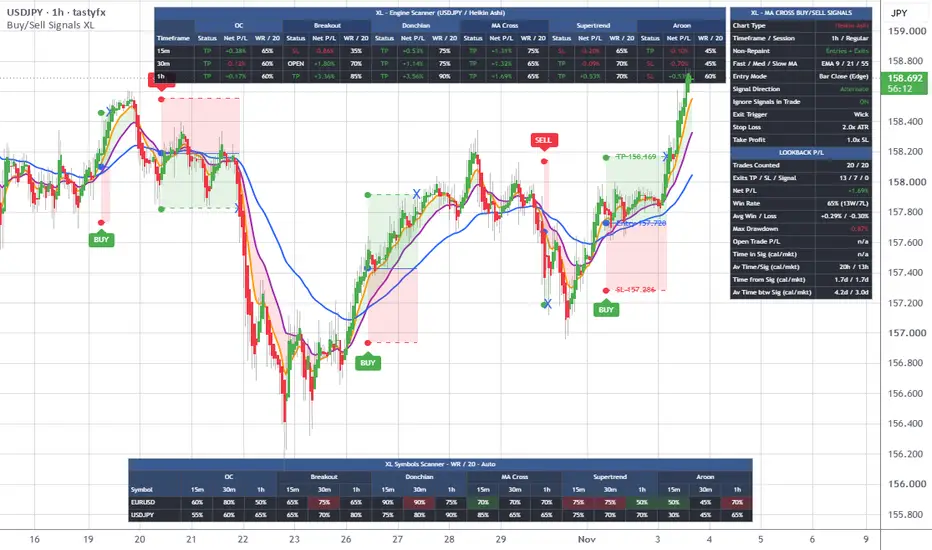
- Every signal draws a full trade plan: Entry, stop loss and take profit lines with labels and shaded zones. The plan is tracked until the stop or target is hit, so the stats are real simulated results from the chart's history.
**Rebrand Note**
- **Buy/Sell Signals XL** is the new name for the **All-in-One Buy/Sell Signals** indicator. It is the same five-engine indicator, now under the family naming of the other Buy/Sell Signals scripts.
- It includes all the latest updates: the expanded time rows (calendar and market time), the avg time marker dot and the new defaults.
- The "AIO" labels are now "XL". That covers the info box header, the scanner titles and the alert names and messages.
- If you used All-in-One, this replaces it. Add Buy/Sell Signals XL to your chart, and recreate any alerts so they use the new names.
**The Five Engines**
- **OC:** A large candle closes beyond the prior candle's body. BUY on a big bullish candle, SELL on a big bearish one.
- **Breakout:** Price builds a tight consolidation base, then a candle closes beyond its high (BUY) or its low (SELL).
- **Donchian:** A close beyond the Donchian channel, which is the highest high or lowest low of the last N bars.
- **MA Cross:** The fast moving average crosses the slow one.
- **Supertrend:** The Supertrend line flips from down to up (BUY) or from up to down (SELL).
**What You See on the Chart**
- BUY and SELL labels.
- An entry marker dot.
- Entry, SL and TP lines with price labels.
- Shaded SL and TP zones.
- An X where a trade exits.
- An optional **avg time marker (dot)** on the Entry line. It marks where an average trade would be over, based on your own closed trades. If price hasn't hit the target or stop by the dot, the trade is running longer than usual. It disappears when the trade closes.
- Per-engine extras: base zones (Breakout), channel and shading (Donchian), moving averages and shading (MA Cross), and the Supertrend line.
**Info Box**
- Shows the active engine's settings and the lookback stats: trades counted, exits (TP / SL / Signal), net P/L, win rate, average win and loss, max drawdown and open trade P/L.
- Four time rows, each showing **calendar time and market time** side by side (cal/mkt):
- **Avg Time/Sig:** how long trades typically last.
- **Time in Sig:** how long the open trade has been running.
- **Time btw Sig:** the average time between signals.
- **Time from Sig:** time since the last signal.
- **Calendar time** counts nights, weekends and holidays. **Market time** counts only the time the market was trading on your chart, so it follows your RTH, ETH or 24hr session.
**Multi-Timeframe Scanner**
- Scans a list of timeframes (default 5, 15, 30, 60, 4h, D) and shows each one's latest signal, status, entry, SL, TP, P/L, win rate and more.
- It always reads closed bars.
**Engine Scanner**
- Shows all five engines side by side on your current chart and the timeframe list, so you can see which engine is working and where.
**Alerts**
- 19 alert conditions: Buy and Sell for any engine, scanner alerts, and for each engine a signal alert, a take-profit-or-stop-loss alert and a scanner alert.
---
**User Inputs**
**General**
- **Non-repaint** (Entries + Exits):
- *Entries + Exits:* signals and SL/TP exits are confirmed only after the bar closes and never disappear or move.
- *Entries Only:* signals wait for the bar close, but SL and TP register the moment price touches them, like a real stop or limit order. This applies to the Wick exit trigger only.
- *Off:* everything is live and can repaint.
- The scanner always reads closed bars.
- **Signal mode** (OC): OC, Breakout, Donchian, MA Cross or Supertrend.
**OC Mode**
- **Average body length** (50): bars used to measure the average candle body. The same length averages volume.
- **Min body vs average (x)** (3.0): how big the signal candle's body must be compared to average. Higher means fewer, stronger signals. 0 turns it off.
- **Min volume vs average (x)** (0): the signal candle's volume must be at least this multiple of average. 0 turns it off.
- **Alternate signals** (ON): signals alternate BUY, SELL, BUY. Same-direction repeats are skipped. OFF lets every qualifying candle fire.
- **Ignore signals while a trade is open** (ON): no new signal fires until the open trade hits its SL or TP.
- **Stop loss mode** (Candle wick): ATR, Candle wick, Candle body or None.
- **Stop buffer (x ATR)** (0): pushes candle-based stops further out.
- **Take profit mode** (SL multiple): ATR target, SL multiple or Opposite signal.
- **Stop loss (x ATR)** (1.5): used in ATR stop mode.
- **Take profit (x ATR)** (3.0): used in ATR target mode.
- **Take profit (x SL)** (1.0): reward as a multiple of the stop distance.
**Breakout Mode**
- **Base mode** (Fixed): Fixed uses an exact base length. Variable finds the longest tight base within a range.
- **Fixed base length (bars)** (10): candles that form the base.
- **Variable min base / max base (bars)** (5 / 30): the range searched in Variable mode.
- **Max base height (x ATR)** (3.0): a base counts as tight only if its height is within this many ATR.
- **Breakout entry mode** (Bar Close (Edge)):
- *Bar Close (Edge):* needs a close beyond the base edge, with the entry measured from the edge.
- *Bar Close (Entry):* the entry is the signal bar's close.
- *Bar Wick (Edge):* a wick poke through the edge counts. This gives more signals and more false ones.
- **Min breakout strength (x ATR)** (0): the close must clear the base edge by at least this much.
- **Min volume vs average (x)** (0) and **Average volume length** (50): the volume filter.
- **Trend filter** (OFF), **Trend EMA length** (200): BUY only above the EMA, SELL only below.
- **Show trend EMA** (OFF), **Trend EMA color** (orange), **Trend EMA width** (1).
- **Alternate signals** (ON) and **Ignore signals while a trade is open** (ON).
- **Ignore base development while a trade is open** (ON): a base can't be built from the candles of the previous trade.
- **Show base zones** (ON).
- **Stop loss mode** (Base edge): ATR or Base edge.
- **Stop buffer (x ATR)** (0).
- **Take profit mode** (Base height): ATR target, SL multiple or Base height.
- **Stop loss (x ATR)** (1.5), **Take profit (x ATR)** (3.0), **Take profit (x SL)** (2.0), **Take profit (x base height)** (1.0).
**Donchian Mode**
- **Channel length** (20): bars in the channel. Longer means fewer, slower signals.
- **Entry mode** (Bar Close (Edge)): Bar Close (Entry) or Bar Close (Edge).
- **Min volume vs average (x)** (0).
- **Alternate signals** (ON) and **Ignore signals while a trade is open** (ON).
- **Show Donchian channel** (ON), **Channel color**, **Show channel shading** (ON), **Channel shading color**, **Show middle line** (ON).
- **Stop loss mode** (Channel opposite): ATR, Channel opposite, Channel middle, Candle wick, Candle body or None.
- **Stop buffer (x ATR)** (0).
- **Take profit mode** (SL multiple): ATR target, SL multiple or Opposite signal.
- **Stop loss (x ATR)** (2.0), **Take profit (x ATR)** (3.0), **Take profit (x SL)** (0.5).
**MA Cross Mode**
- **Fast MA length** (9), **Slow MA length** (21).
- **MA type** (EMA): SMA, EMA, WMA, HMA or RMA.
- **MA source** (Close): Close, Open, High, Low, HL2, HLC3 or OHLC4.
- **Min cross strength (x ATR)** (0): skips crosses where the lines barely separate. Useful values are small, like 0.05 to 0.3.
- **Trend filter** (OFF), **Trend MA length** (200).
- **Entry mode** (Bar Close (Edge)).
- **Min volume vs average (x)** (0).
- **Alternate signals** (OFF) and **Ignore signals while a trade is open** (ON).
- **Show moving averages** (ON), **Fast MA color**, **Slow MA color**, **Show MA shading** (ON), **Trend MA color**.
- **Stop loss mode** (ATR): ATR, Swing, Candle wick, Candle body or None.
- **Swing length (bars)** (5): used in Swing stop mode.
- **Stop buffer (x ATR)** (0).
- **Min stop distance (x ATR)** (1.0): stops that land too close to the entry are pushed out, so the lines don't stack.
- **Take profit mode** (SL multiple).
- **Stop loss (x ATR)** (2.0), **Take profit (x ATR)** (3.0), **Take profit (x SL)** (1.0).
**Supertrend Mode**
- **Supertrend ATR length** (10), **Supertrend factor** (3.0).
- **Entry mode** (Bar Close (Entry)).
- **Ignore signals while a trade is open** (ON).
- **Show Supertrend line** (ON), **Supertrend line width** (2).
- **Stop loss mode** (Supertrend line): Supertrend line, ATR, Candle wick, Candle body or None. The Supertrend line stop is locked in at the signal bar and doesn't trail.
- **Stop buffer (x ATR)** (0).
- **Take profit mode** (SL multiple).
- **Stop loss (x ATR)** (1.5), **Take profit (x ATR)** (3.0), **Take profit (x SL)** (0.5).
**Stop Loss / Take Profit (Shared)**
- **Enable SL/TP** (ON): ON uses the stop loss and take profit settings and draws the trade lines. OFF is pure stop-and-reverse, where trades close only on the opposite signal.
- **Exit trigger** (Wick): Wick exits at the exact level as soon as price touches it. Close exits only when a bar closes at or beyond the level, at that bar's close.
- **ATR length** (14).
**Lookback P/L**
- **Lookback (last N closed trades)** (20): how many closed trades count in the stats.
- **Show info box** (ON), **Info box position** (Top Right), **Info box size** (Small).
- **Show closed trades** (0): how many closed trades stay drawn on the chart (0 to 50). At 0, only the current trade is drawn.
**Multi-Timeframe Scanner**
- **Show scanner** (ON).
- **Scanner timeframes** (5, 15, 30, 60, 4h, D): comma separated or one per line. Use plain numbers for minutes, or forms such as 4h, 1D and 1W. A capital M means month.
- **Max timeframes** (8).
- **Scanner position** (Top Center), **Scanner size** (Small).
- **Scanner detail** (High): Micro, Low, Medium, High or Maximum. The calculation is the same at every level.
**Engine Scanner**
- **Show engine scanner** (ON).
- **Engine scanner position** (Bottom Center), **Engine scanner size** (Small).
- **Engine scanner detail** (Low): Micro, Low, Medium, High or Maximum.
- It uses the same timeframe list as the Multi-Timeframe Scanner.
**Display**
- **Show BUY/SELL labels** (ON), **BUY/SELL label size** (Small), **Buy color** (green), **Sell color** (red).
- **Show entry marker (dot)** (ON), **Entry marker color** (blue).
- **Show avg time marker (dot)** (ON), **Avg time marker color** (black), **Avg time marker size** (Large). The dot needs Show trade lines ON.
- **Show trade lines** (ON), **Entry line color**, **SL line color**, **TP line color**.
- **Show trade labels** (ON).
- **Show exit X** (ON), **Exit X color**.
- **Show trade zone shading** (ON), **SL zone color**, **TP zone color**.
- **Line width** (1).
**Notes**
- The Non-repaint setting does not affect the scanner, and Entries + Exits is the most reliable mode for alerts and stats.
- Volume filters need volume data on the symbol.
- The stats are simulated from chart history. Signals fill at the signal bar's close, or at the edge price in Edge entry modes.
**What It Is**
- Five signal engines in one indicator: **OC**, **Breakout**, **Donchian**, **MA Cross** and **Supertrend**.
- You pick one engine at a time with the **Signal mode** dropdown. Trade lines, stats, info box, scanner and alerts are shared by every engine.
- Each engine has its own settings group, including its own stop loss and take profit settings. A **Stop Loss / Take Profit** group holds the settings every engine shares.
- Every signal draws a full trade plan: Entry, stop loss and take profit lines with labels and shaded zones. The plan is tracked until the stop or target is hit, so the stats are real simulated results from the chart's history.
**Rebrand Note**
- **Buy/Sell Signals XL** is the new name for the **All-in-One Buy/Sell Signals** indicator. It is the same five-engine indicator, now under the family naming of the other Buy/Sell Signals scripts.
- It includes all the latest updates: the expanded time rows (calendar and market time), the avg time marker dot and the new defaults.
- The "AIO" labels are now "XL". That covers the info box header, the scanner titles and the alert names and messages.
- If you used All-in-One, this replaces it. Add Buy/Sell Signals XL to your chart, and recreate any alerts so they use the new names.
**The Five Engines**
- **OC:** A large candle closes beyond the prior candle's body. BUY on a big bullish candle, SELL on a big bearish one.
- **Breakout:** Price builds a tight consolidation base, then a candle closes beyond its high (BUY) or its low (SELL).
- **Donchian:** A close beyond the Donchian channel, which is the highest high or lowest low of the last N bars.
- **MA Cross:** The fast moving average crosses the slow one.
- **Supertrend:** The Supertrend line flips from down to up (BUY) or from up to down (SELL).
**What You See on the Chart**
- BUY and SELL labels.
- An entry marker dot.
- Entry, SL and TP lines with price labels.
- Shaded SL and TP zones.
- An X where a trade exits.
- An optional **avg time marker (dot)** on the Entry line. It marks where an average trade would be over, based on your own closed trades. If price hasn't hit the target or stop by the dot, the trade is running longer than usual. It disappears when the trade closes.
- Per-engine extras: base zones (Breakout), channel and shading (Donchian), moving averages and shading (MA Cross), and the Supertrend line.
**Info Box**
- Shows the active engine's settings and the lookback stats: trades counted, exits (TP / SL / Signal), net P/L, win rate, average win and loss, max drawdown and open trade P/L.
- Four time rows, each showing **calendar time and market time** side by side (cal/mkt):
- **Avg Time/Sig:** how long trades typically last.
- **Time in Sig:** how long the open trade has been running.
- **Time btw Sig:** the average time between signals.
- **Time from Sig:** time since the last signal.
- **Calendar time** counts nights, weekends and holidays. **Market time** counts only the time the market was trading on your chart, so it follows your RTH, ETH or 24hr session.
**Multi-Timeframe Scanner**
- Scans a list of timeframes (default 5, 15, 30, 60, 4h, D) and shows each one's latest signal, status, entry, SL, TP, P/L, win rate and more.
- It always reads closed bars.
**Engine Scanner**
- Shows all five engines side by side on your current chart and the timeframe list, so you can see which engine is working and where.
**Alerts**
- 19 alert conditions: Buy and Sell for any engine, scanner alerts, and for each engine a signal alert, a take-profit-or-stop-loss alert and a scanner alert.
---
**User Inputs**
**General**
- **Non-repaint** (Entries + Exits):
- *Entries + Exits:* signals and SL/TP exits are confirmed only after the bar closes and never disappear or move.
- *Entries Only:* signals wait for the bar close, but SL and TP register the moment price touches them, like a real stop or limit order. This applies to the Wick exit trigger only.
- *Off:* everything is live and can repaint.
- The scanner always reads closed bars.
- **Signal mode** (OC): OC, Breakout, Donchian, MA Cross or Supertrend.
**OC Mode**
- **Average body length** (50): bars used to measure the average candle body. The same length averages volume.
- **Min body vs average (x)** (3.0): how big the signal candle's body must be compared to average. Higher means fewer, stronger signals. 0 turns it off.
- **Min volume vs average (x)** (0): the signal candle's volume must be at least this multiple of average. 0 turns it off.
- **Alternate signals** (ON): signals alternate BUY, SELL, BUY. Same-direction repeats are skipped. OFF lets every qualifying candle fire.
- **Ignore signals while a trade is open** (ON): no new signal fires until the open trade hits its SL or TP.
- **Stop loss mode** (Candle wick): ATR, Candle wick, Candle body or None.
- **Stop buffer (x ATR)** (0): pushes candle-based stops further out.
- **Take profit mode** (SL multiple): ATR target, SL multiple or Opposite signal.
- **Stop loss (x ATR)** (1.5): used in ATR stop mode.
- **Take profit (x ATR)** (3.0): used in ATR target mode.
- **Take profit (x SL)** (1.0): reward as a multiple of the stop distance.
**Breakout Mode**
- **Base mode** (Fixed): Fixed uses an exact base length. Variable finds the longest tight base within a range.
- **Fixed base length (bars)** (10): candles that form the base.
- **Variable min base / max base (bars)** (5 / 30): the range searched in Variable mode.
- **Max base height (x ATR)** (3.0): a base counts as tight only if its height is within this many ATR.
- **Breakout entry mode** (Bar Close (Edge)):
- *Bar Close (Edge):* needs a close beyond the base edge, with the entry measured from the edge.
- *Bar Close (Entry):* the entry is the signal bar's close.
- *Bar Wick (Edge):* a wick poke through the edge counts. This gives more signals and more false ones.
- **Min breakout strength (x ATR)** (0): the close must clear the base edge by at least this much.
- **Min volume vs average (x)** (0) and **Average volume length** (50): the volume filter.
- **Trend filter** (OFF), **Trend EMA length** (200): BUY only above the EMA, SELL only below.
- **Show trend EMA** (OFF), **Trend EMA color** (orange), **Trend EMA width** (1).
- **Alternate signals** (ON) and **Ignore signals while a trade is open** (ON).
- **Ignore base development while a trade is open** (ON): a base can't be built from the candles of the previous trade.
- **Show base zones** (ON).
- **Stop loss mode** (Base edge): ATR or Base edge.
- **Stop buffer (x ATR)** (0).
- **Take profit mode** (Base height): ATR target, SL multiple or Base height.
- **Stop loss (x ATR)** (1.5), **Take profit (x ATR)** (3.0), **Take profit (x SL)** (2.0), **Take profit (x base height)** (1.0).
**Donchian Mode**
- **Channel length** (20): bars in the channel. Longer means fewer, slower signals.
- **Entry mode** (Bar Close (Edge)): Bar Close (Entry) or Bar Close (Edge).
- **Min volume vs average (x)** (0).
- **Alternate signals** (ON) and **Ignore signals while a trade is open** (ON).
- **Show Donchian channel** (ON), **Channel color**, **Show channel shading** (ON), **Channel shading color**, **Show middle line** (ON).
- **Stop loss mode** (Channel opposite): ATR, Channel opposite, Channel middle, Candle wick, Candle body or None.
- **Stop buffer (x ATR)** (0).
- **Take profit mode** (SL multiple): ATR target, SL multiple or Opposite signal.
- **Stop loss (x ATR)** (2.0), **Take profit (x ATR)** (3.0), **Take profit (x SL)** (0.5).
**MA Cross Mode**
- **Fast MA length** (9), **Slow MA length** (21).
- **MA type** (EMA): SMA, EMA, WMA, HMA or RMA.
- **MA source** (Close): Close, Open, High, Low, HL2, HLC3 or OHLC4.
- **Min cross strength (x ATR)** (0): skips crosses where the lines barely separate. Useful values are small, like 0.05 to 0.3.
- **Trend filter** (OFF), **Trend MA length** (200).
- **Entry mode** (Bar Close (Edge)).
- **Min volume vs average (x)** (0).
- **Alternate signals** (OFF) and **Ignore signals while a trade is open** (ON).
- **Show moving averages** (ON), **Fast MA color**, **Slow MA color**, **Show MA shading** (ON), **Trend MA color**.
- **Stop loss mode** (ATR): ATR, Swing, Candle wick, Candle body or None.
- **Swing length (bars)** (5): used in Swing stop mode.
- **Stop buffer (x ATR)** (0).
- **Min stop distance (x ATR)** (1.0): stops that land too close to the entry are pushed out, so the lines don't stack.
- **Take profit mode** (SL multiple).
- **Stop loss (x ATR)** (2.0), **Take profit (x ATR)** (3.0), **Take profit (x SL)** (1.0).
**Supertrend Mode**
- **Supertrend ATR length** (10), **Supertrend factor** (3.0).
- **Entry mode** (Bar Close (Entry)).
- **Ignore signals while a trade is open** (ON).
- **Show Supertrend line** (ON), **Supertrend line width** (2).
- **Stop loss mode** (Supertrend line): Supertrend line, ATR, Candle wick, Candle body or None. The Supertrend line stop is locked in at the signal bar and doesn't trail.
- **Stop buffer (x ATR)** (0).
- **Take profit mode** (SL multiple).
- **Stop loss (x ATR)** (1.5), **Take profit (x ATR)** (3.0), **Take profit (x SL)** (0.5).
**Stop Loss / Take Profit (Shared)**
- **Enable SL/TP** (ON): ON uses the stop loss and take profit settings and draws the trade lines. OFF is pure stop-and-reverse, where trades close only on the opposite signal.
- **Exit trigger** (Wick): Wick exits at the exact level as soon as price touches it. Close exits only when a bar closes at or beyond the level, at that bar's close.
- **ATR length** (14).
**Lookback P/L**
- **Lookback (last N closed trades)** (20): how many closed trades count in the stats.
- **Show info box** (ON), **Info box position** (Top Right), **Info box size** (Small).
- **Show closed trades** (0): how many closed trades stay drawn on the chart (0 to 50). At 0, only the current trade is drawn.
**Multi-Timeframe Scanner**
- **Show scanner** (ON).
- **Scanner timeframes** (5, 15, 30, 60, 4h, D): comma separated or one per line. Use plain numbers for minutes, or forms such as 4h, 1D and 1W. A capital M means month.
- **Max timeframes** (8).
- **Scanner position** (Top Center), **Scanner size** (Small).
- **Scanner detail** (High): Micro, Low, Medium, High or Maximum. The calculation is the same at every level.
**Engine Scanner**
- **Show engine scanner** (ON).
- **Engine scanner position** (Bottom Center), **Engine scanner size** (Small).
- **Engine scanner detail** (Low): Micro, Low, Medium, High or Maximum.
- It uses the same timeframe list as the Multi-Timeframe Scanner.
**Display**
- **Show BUY/SELL labels** (ON), **BUY/SELL label size** (Small), **Buy color** (green), **Sell color** (red).
- **Show entry marker (dot)** (ON), **Entry marker color** (blue).
- **Show avg time marker (dot)** (ON), **Avg time marker color** (black), **Avg time marker size** (Large). The dot needs Show trade lines ON.
- **Show trade lines** (ON), **Entry line color**, **SL line color**, **TP line color**.
- **Show trade labels** (ON).
- **Show exit X** (ON), **Exit X color**.
- **Show trade zone shading** (ON), **SL zone color**, **TP zone color**.
- **Line width** (1).
**Notes**
- The Non-repaint setting does not affect the scanner, and Entries + Exits is the most reliable mode for alerts and stats.
- Volume filters need volume data on the symbol.
- The stats are simulated from chart history. Signals fill at the signal bar's close, or at the edge price in Edge entry modes.
Note di rilascio
**Buy/Sell Signals XL: Update****New: Aroon Engine**
- XL now has a sixth signal engine: **Aroon**. Pick it in the **Signal mode** dropdown, next to OC, Breakout, Donchian, MA Cross and Supertrend.
- Aroon measures **time, not price**. Aroon Up tracks how recently the highest high happened and Aroon Down tracks how recently the lowest low happened, on a 0 to 100 scale. It shows which side is fresher, and whether the market is trending or ranging.
- Like every other engine, each Aroon signal draws the full trade plan: Entry, stop loss and take profit lines, labels, shaded zones, the exit X and the avg time marker dot. It also feeds the info box stats and the scanners.
- XL draws on the price chart, so the Aroon lines themselves are not drawn here. Use the standalone **Aroon Buy/Sell Signals** indicator if you want the Aroon lines in a pane.
**How the Aroon Signals Work**
- **Crossover mode (default):** BUY when Aroon Up crosses above Aroon Down. SELL when Aroon Down crosses above Aroon Up.
- **Strong trend mode:** BUY on the first bar where Aroon Up is at or above the level (70 by default) and Aroon Down is at or below 100 minus the level (30 by default). SELL is the mirror image.
- **Smoothing:** The Aroon lines can be smoothed (SMA, EMA, RMA, WMA or HMA) before the signals are read. The default is None.
**New: Aroon Mode Settings**
- **Aroon length** (14).
- **Signal mode** (Crossover): Crossover or Strong trend.
- **Strong trend level** (70).
- **Smoothing** (None) and **Smoothing length** (3).
- **Min volume vs average (x)** (0, off) and **Average volume length** (50).
- **Alternate signals** (ON) and **Ignore signals while a trade is open** (ON).
- **Stop loss mode** (ATR): ATR, Aroon extreme, Candle wick, Candle body or None. Aroon extreme places the stop at the lowest low (BUY) or highest high (SELL) of the last Aroon length bars.
- **Stop buffer (x ATR)** (0).
- **Take profit mode** (SL multiple): ATR target, SL multiple or Opposite signal.
- **Stop loss (x ATR)** (1.5), **Take profit (x ATR)** (3.0), **Take profit (x SL)** (1.0).
**Info Box**
- In Aroon mode the info box shows **Aroon Len / Smoothing** and **Signal Mode**, plus the usual rows and stats.
- The stop loss row shows **AE** when the Aroon extreme stop is used.
**Scanners**
- The **Multi-Timeframe Scanner** follows the Aroon mode when it is selected.
- The **Engine Scanner** now shows **six engines** side by side, with Aroon added as a new column group.
**Alerts**
- Aroon is included in the all-engines **Buy** and **Sell** alerts.
- Three new Aroon alert conditions: **Aroon Buy/Sell Signal**, **Aroon Take Profit or Stop Loss Hit** and **Aroon Scanner Buy/Sell Signal (Any Timeframe)**.
- That brings XL to 22 alert conditions.
**Defaults**
- No existing default settings changed in this update.
Note di rilascio
**Buy/Sell Signals XL: Update****Faster Loading**
- XL now loads and refreshes faster, especially on busy charts such as 5-minute charts with a lot of history.
- With the Aroon engine added, XL was doing extra Aroon math in every background copy of its engines, even when Aroon wasn't the engine you were using. Now the scanners and alert engines skip the Aroon calculations unless the Aroon engine is the one running.
- When you use Aroon smoothing, only the smoothing type you picked is calculated now, instead of all five.
- Your signals, trades, stats, scanners and alerts are unchanged. This is a speed update only, and no settings or defaults changed.
Note di rilascio
**Buy/Sell Signals XL – Speed Update**This update makes XL load and run noticeably faster, with no change to what it shows or how it trades.
**What was slow**
- XL holds six signal engines: OC, Breakout, Donchian, MA Cross, Supertrend and Aroon.
- Before, the indicator calculated the math for all six engines on every bar, even though you only use one at a time.
- On busy charts, such as lower timeframes with a lot of history, that extra work could make TradingView stop with a "Calculation timed out" error.
**What changed**
- XL now calculates only the engine you selected in **Signal mode**.
- The same applies inside the Multi-Timeframe Scanner, which only works through the selected mode on each timeframe.
- The Engine Scanner, which compares all six engines side by side, still runs everything. That is its job.
- Alerts are unchanged, and all six engines stay available.
**What you will notice**
- Faster loading, especially on lower timeframes and long histories.
- Fewer timeout errors.
- Signals, trade lines, stops, targets, stats and both scanner tables are the same as before.
**What stayed the same**
- Every input, default and tooltip.
- All signal rules, stop loss modes and take profit modes.
- All 22 alerts.
**What to do**
- Update to the new version. No settings need to be changed.
- Saved layouts keep working.
Note di rilascio
**Buy/Sell Signals XL – Update**XL now sizes your trades and shows them more clearly. The six signal engines are unchanged.
**Position sizing**
- Turn on **Show position size** and set **Risk per trade**. The size follows whichever **Signal mode** you have selected (OC, Breakout, Donchian, MA Cross, Supertrend or Aroon) and is set so the stop costs about that amount.
- Pick your **Account currency** so forex pairs like USDJPY convert correctly.
- The Entry label shows the size and the cost of the position. The SL and TP labels show your money at risk and your money to gain.
- **Show size in info box** (off by default) adds a Position Size section with the risk per trade, size, risk and reward, and cost.
- Each BUY/SELL can send an alert with the mode, entry, stop, target, size and risk. Pick "Any alert() function call" when you create it. The existing 22 alerts are unchanged.
- Works for forex, stocks, ETFs and crypto. Futures show n/a. It needs a stop loss.
**Easier-to-read trade info**
- **Solid label background** (off by default) puts a solid color behind the Entry, SL and TP labels so the trade lines no longer run through the text. The color is adjustable.
- A red SL dot and a green TP dot now mark where the stop and target sit on the signal candle. They are drawn with the trade lines and removed when the lines are removed. **SL/TP marker size** defaults to Large.
**Default change**
- **Show closed trades** now defaults to 10.
Note di rilascio
**Buy/Sell Signals XL Update: BUY/SELL Label Position**This update adds control over where the BUY and SELL labels sit in Breakout mode.
**What's New**
- **BUY/SELL label position:** A new setting, last in the Breakout Mode group, with three choices.
- **Candle:** The label sits just under the signal candle for a BUY and just above it for a SELL. This is how it worked before.
- **Box far edge:** The label sits on the far edge of the base box. A BUY goes on the bottom edge and a SELL goes on the top edge.
- **Furthest:** The label goes under the lower of the candle low and the box bottom for a BUY, and above the higher of the candle high and the box top for a SELL. This keeps the label clear of both the candle and the box.
**Why It Helps**
- **Cleaner chart:** The label no longer lands on top of the SL dot and the trade labels.
- **Tied to the setup:** The label stays with the base box instead of floating away from it when the breakout candle is tall.
**Good to Know**
- **Breakout mode only:** The other modes (OC, Donchian, MA Cross, Supertrend and Aroon) have no base box, so they keep the Candle position.
- **Default:** In Breakout mode the new default is Furthest, so your chart will look different until you switch the setting back to Candle.
- **Show base zones:** The two box choices need Show base zones turned ON. With it OFF, the label stays at the candle.
- **Timing:** The box-edge labels appear when the bar closes. TradingView keeps the newest 500 labels, so on a very long history the oldest signal labels can drop off.
- **Unchanged:** Signals, stops, targets, alerts, the scanners and the info box are exactly as before.
Note di rilascio
**Buy/Sell Signals XL – Update****Alert Fix**
- Fixed the engine scanner alerts ("Scanner Buy/Sell Signal (All Engines, Any Timeframe)" and the per-engine scanner alerts) so they now fire reliably.
- Before, these alerts could miss a signal because the signal was only visible for a split second. Now it stays active until the bar closes, so the alert catches it.
- If you already have scanner alerts set up, delete them and create them again so they use the updated code.
- For best results, set the alert frequency to "Once Per Bar Close."
**Easier Settings Panel**
- Every settings group now has a small icon in its heading (Stop Loss / Take Profit, Position Sizing, Lookback P/L, Scanners, Display, and the engine modes), so you can find the group you need faster.
**Cleaner Info Box**
- The row that read "Avg Time/Sig" now reads "Time/Sig" to match the other time rows.
- The tooltip for "Show avg time marker (dot)" was updated to use the same name.
**Breakout Labels**
- BUY/SELL labels in Breakout mode can sit at the candle, the far edge of the base box, or whichever is furthest. This is set with the "BUY/SELL label position" input in the Breakout Mode group.
Tell me if you want it written for a different indicator, or a combined version for the whole set.
Note di rilascio
**Buy/Sell Signals XL – Update****New: Trade Label Options**
- "Show trade labels" is now a dropdown with four choices:
- **All:** Entry, SL and TP labels on every trade shown.
- **Current Any:** Labels only on the latest trade, open or closed, until the next signal replaces it.
- **Current Open:** Labels only while the trade is open. They disappear when it hits its SL or TP.
- **Off:** Lines and shading only, no labels.
- The default is Current Any, which keeps the chart cleaner. Lines, shading and the exit X on past trades are not affected.
- Your saved setting for this option resets to the new default when you update.
**Alert Fix**
- Fixed the engine scanner alerts ("Scanner Buy/Sell Signal (All Engines, Any Timeframe)" and the per-engine scanner alerts) so they fire reliably.
- If you already have scanner alerts set up, delete them and create them again so they use the updated code.
- For best results, set the alert frequency to "Once Per Bar Close."
Note di rilascio
**Buy/Sell Signals XL – Update****Alert Fixes**
- Fixed the engine scanner alerts ("XL Scanner Buy Signal" and "XL Scanner Sell Signal," All Engines, Any Timeframe, plus the per-engine scanner alerts). They could stay silent when a new signal appeared on a scanned timeframe. They now trigger when a scanned timeframe gives a new signal.
- If you already have scanner alerts set up, delete them and create them again. An alert keeps the version of the code it was created with, so the old ones won't pick up the fix.
- Set the alert interval to the smallest timeframe in your scanner list (for example 15m) and the trigger to "Once Per Bar Close."
**New: Alert Message with Engine and Timeframe**
- The indicator now sends an alert message that names the engine, the direction and the timeframe, for example "XL Engine Scanner SPY: OC BUY 30m."
- To use it, create an alert and choose "Any alert() function call" as the condition.
**New: Alert Test Switch**
- A "Test scanner alerts" setting in the Engine Scanner group makes the two scanner alerts fire at every bar close. Use it to confirm alerts reach you, then turn it off. It is off by default.
**Default Setting Changes**
- Info box position: Bottom Left (was Top Right)
- Info box size: Tiny (was Small)
- Show scanner (Multi-Timeframe): Off (was On)
- Engine scanner size: Tiny (was Small)
- Your own saved settings stay as you set them. The new defaults apply to new charts or after you reset the inputs.
Note di rilascio
**Buy/Sell Signals XL – Update****Info Box Changes**
- The time rows are reordered:
- Time in Sig
- Av Time/Sig
- Time from Sig
- Av Time btw Sig
- "Av" (average) was added to Time/Sig and Time btw Sig, so it is clear which rows are averages and which are live counts.
- Time from Sig now runs from the current bar back to the entry of the last closed trade. Before, it matched Time in Sig while a trade was open. Now the two rows always show different information. Before the first closed trade, it shows n/a.
- The tooltip for "Show avg time marker (dot)" was updated to use the new name.
Note di rilascio
**Buy/Sell Signals XL – Update****MA Cross Default Changes**
- In the MA Cross group, the stop loss and take profit multiples now default to 1:
- Stop loss (x ATR): 1 (was 2)
- Take profit (x ATR): 1 (was 3)
- Take profit (x SL): 1 (no change)
- The engine scanner and the MA Cross alerts use these same values, so their results follow the new defaults.
- Your own saved settings stay as you set them. The new defaults apply to new charts or after you reset the inputs.
Note di rilascio
**XL Buy/Sell Signals: Symbol Scanner Update****New: Symbol Scanner**
- A new table that shows the win rate for a list of symbols, across the same timeframes as your Multi-Timeframe Scanner.
- It follows your Signal mode (OC, Breakout, Donchian, MA Cross, Supertrend, or Aroon), so the numbers come from the same rules and the same stop loss, take profit, and lookback settings you use on your chart. The table title shows the active mode.
- Turn it on in the "Symbol Scanner" group in the settings. It is off by default.
**Simple symbol entry**
- Type plain symbols separated by commas, such as EURUSD, USDJPY, SPY, MSFT. ALL CAPS is recommended, though the indicator converts what you type.
- The list starts empty, so you add only what you trade.
- **Default exchange:** Type an exchange once, for example TASTYFX, and every symbol without its own exchange uses it. A symbol typed with its own exchange, such as NASDAQ:MSFT, keeps it. Matching the exchange to your chart makes the symbol scanner read the same candles as your chart and your other scanners.
**What the table shows**
- Each cell is the win rate over your last 20 closed trades (your Lookback setting) for that symbol and timeframe.
- A cell turns green while a long trade is open on that timeframe and red while a short trade is open. With no open trade, the cell stays a plain dark background.
- Dimmed text means fewer than 20 closed trades exist yet, so the number rests on a smaller sample.
- "-" means no closed trades yet, and "n/a" means no data came back for that symbol.
- Hover over the table title for a short explanation, including the candle type used.
**Request limit and the warning row**
- TradingView allows 40 data requests per script (64 on the Ultimate plan). Each symbol and timeframe pair uses one, and the Multi-Timeframe Scanner and the Engine Scanner share the same budget while they are shown.
- When a long list runs past the limit, a red row appears under the title, for example "Showing 5 of 7 symbols - request limit", with a fix line telling you how many timeframes or symbols fit and a reminder to turn off a scanner.
- Hover over the row for the full breakdown. When everything fits, the row does not appear.
**Settings**
- Max symbols (default 10, up to 40) and Request limit (default 40, up to 64).
- Table position (default Bottom Right) and text size (default Tiny), with equal-width timeframe columns.
Note di rilascio
**XL Buy/Sell Signals: New Alert System****One simple alert for everything**
- All the old alerts are gone (the long list of buy, sell, take profit, and stop loss alerts for each engine). They are replaced by one alert that works from your two scanners.
- It covers every engine on every timeframe in the Engine Scanner, plus every symbol in the Symbol Scanner.
- You create it once: pick XL as the condition, choose "Any alert() function call", and set the interval to your smallest scanner timeframe.
- Behind the scenes, the six extra engine calculations that only fed the old alerts are gone too, so XL has less to calculate.
**Win rate filter**
- A new setting, "Min win rate for alerts (%)", defaults to 70.
- An alert fires only when a new BUY or SELL has a win rate at or above that number, using the same win rate you see in the scanner tables.
- The engine or symbol must also have at least as many closed trades as your Lookback setting, so a lucky 1-for-1 can't pass the filter.
- Signals that fail the filter stay silent for good. They don't alert later if the win rate improves.
**Clear alert messages**
- Each alert tells you everything at a glance, for example: EURUSD / Buy / OC / 1h / 75%WR.
- That is the symbol, direction, engine, timeframe, and win rate.
- If several signals land on the same bar, they arrive in one message, separated by a divider.
- A signal that shows up in both scanners is sent only once.
**New Alerts group**
- The new "🔔 Alerts" group sits at the bottom of the settings list and holds the win rate filter and the Test alert.
- The Test alert moved here from the Engine Scanner group. Turn it on to confirm alerts reach you, then turn it off.
- An alert only runs while its scanner is switched on. If you hide the Engine Scanner or the Symbol Scanner, its alerts stop with it.
**Other updates**
- The Symbol Scanner is now on by default.
- Default scanner timeframes are now 15, 30, 60, and 4h.
- A few settings descriptions were cleaned up to match the new alerts, and the Engine Scanner description now lists Aroon.
- Charts that already have XL keep their saved settings, so reset to defaults or change them once to see the new defaults.
- Old alerts keep running on the code they were created with, so delete them and create the new one.
Note di rilascio
**XL Buy/Sell Signals: Symbols Scanner and Layout Update****New Symbols Scanner**
- The Symbols Scanner now shows all six engines (OC, Breakout, Donchian, MA Cross, Supertrend, Aroon) for every symbol you list. It replaces the earlier version, which showed only the engine selected by Signal mode.
- Symbols run down the side, the engines run across the top, and the scanned timeframes sit under each engine.
- Each cell is that engine's win rate on that symbol and timeframe, over your last 20 closed trades.
- A cell turns green while that engine has a long trade open and red while it has a short trade open. Dimmed text means fewer closed trades than your Lookback setting.
- The table shows as many timeframes as fit across your chart at the chosen text size: 4 at Tiny, 3 at Small, 2 at Normal and Large, and 1 at Huge. If your list is longer, the red row under the title tells you how many fit and how to fix it.
- It is on by default.
**Alerts now cover every engine on every symbol**
- The win rate filter and the single alert work as before. Symbol alerts now come from all six engines, not just the selected one, and the message names the engine that fired, for example EURUSD / Buy / Supertrend / 1h / 75%WR.
- A signal the Engine Scanner already sent for the chart's symbol is not sent a second time.
**Multi-Timeframe Scanner removed**
- The Engine Scanner and the info box already cover what that table showed, so it is gone, along with its position, size, and detail settings.
- Your timeframe list and Max timeframes settings stay, in a group renamed "Scanner Timeframes". Both scanners still use them.
**Settings and layout**
- **Info Box group:** The info box has its own group, with Show info box, position, and size.
- **Show closed trades:** It is now the first setting in the Display group.
- **New default positions:** Info box Top Right, Engine Scanner Top Center, Symbols Scanner Bottom Center.
**Engine Scanner**
- **Medium detail:** It is now the default, and it shows Status, Net P/L, and Win Rate under each engine. Win Rate on Medium is the percentage only, without the win and loss counts.
- **Header:** "Win Rate / 20" is now "WR / 20" to save space, in the Engine Scanner column header and the Symbols Scanner title.
**Good to know**
- Each symbol and timeframe now runs all six engines, so a long symbol list takes more calculation. If XL loads slowly, shorten the list or use fewer timeframes.
- Charts that already have XL keep their saved settings, so reset to defaults to see the new positions and defaults.
Note di rilascio
**XL Buy/Sell Signals: Exchange in the Symbols Scanner Title****Exchange shown in the title**
- The Symbols Scanner title now shows which exchange its data comes from, for example: XL Symbols Scanner - WR / 20 - TASTYFX.
- It shows the exchange you typed in the Default exchange setting.
- If that setting is blank, the title ends with "Auto", meaning TradingView picks the feed for each symbol.
- It helps you confirm at a glance that the table is reading the same candles as your chart, since a different feed can give a different win rate.
- A symbol typed with its own exchange, such as NASDAQ:MSFT, keeps that exchange. The title shows only the default.
Note di rilascio
**XL Buy/Sell Signals: Choose Which Engines the Scanners Show****New "Scanner Engines" group**
- The settings have a new group with six switches: Show OC, Show Breakout, Show Donchian, Show MA Cross, Show Supertrend, and Show Aroon. All are on by default.
- Switch off the engines you don't trade, and they disappear from both the Engine Scanner and the Symbols Scanner.
**Narrower tables, more timeframes**
- The remaining engines close up with no gaps, so the tables take less room on the chart.
- The Symbols Scanner shows as many timeframes as fit across your chart. With fewer engines on, more fit. At Tiny text, 3 engines fit about 8 timeframes instead of 4.
**Alerts follow your choices**
- An engine you switch off sends no alerts, so you only hear about the engines you chose to show. Your win rate filter still applies.
**What stays the same**
- The Signal mode and everything on the chart are untouched. These switches only control the two scanners and the alerts.
- At least one engine must stay on. If you switch all six off, both tables show a short note telling you to switch one on.
- Charts that already have XL keep their saved settings, and the new switches start on.
Note di rilascio
**XL Update: Breakout Label and Base Buffer****New: Stop Loss Label Position (Breakout mode)**
- The "BUY/SELL label position" setting has a new choice called **Stop loss**.
- A BUY label now sits just below the stop loss, and a SELL label just above it, with a small gap so it stays clear of the SL line and dot.
- It works whether Show base zones is ON or OFF. This fixes labels dropping back to the candle when the base boxes are turned off.
- If Stop loss mode is None, the label stays at the candle.
- **Stop loss** is now the default choice. A chart that already has the indicator keeps its saved choice until you change it, or reset the settings.
**New: Base Buffer After Trade**
- A new setting, "Base buffer after trade (bars)", sits under "Ignore base development while a trade is open".
- It sets how many candles are skipped after a trade ends (hits its SL or TP) before the next base can start forming.
- The exit candle and the messy bars right after it can no longer stretch or distort the next base.
- The default is 0, so nothing changes until you raise it. With 3, the next signal needs 3 buffer bars plus a full base length of new bars.
- It works in both Fixed and Variable base modes, and the Engine Scanner and Symbols Scanner use it too, so their win rates match the chart.
- The "Ignore Base in Trade" row in the info box now shows the buffer, for example "ON +3".
Note di rilascio
**XL Update: Engine Scanner Win Rate Display****Win Rate Shows Percentage Only**
- The WR column in the Engine Scanner now shows just the win rate percentage on every detail setting.
- The win and loss counts are gone from the Engine Scanner, so each cell is shorter and the table takes less room.
**Micro Detail Highlights Open Trades**
- Micro has no Status column, so open trades are now marked in the WR cell itself.
- A cell turns green while that engine has a long trade open and red for a short, the same as in the Symbols Scanner.
- Cells with no open trade keep the plain dark background.
Note di rilascio
**XL Update: Lighter Default Scanner Timeframes****Default Scanner Timeframes**
- The default Scanner timeframes list is now 15, 30 and 60 (the 4h entry is removed).
- You can still add more timeframes in the list, for example 4h, D or W.
- A chart that already has XL keeps its saved list until you change it or reset the settings.
**Why This Matters for Load and Runtime**
- Every scanned timeframe is a separate data request, and each request runs all six engines with their full trade history.
- The Engine Scanner uses one request per timeframe. The Symbols Scanner uses one request for every symbol and timeframe pair.
- Timeframes multiply the work. Seven symbols on four timeframes is 28 requests for the Symbols Scanner plus 4 for the Engine Scanner, 32 in total. On three timeframes it is 21 plus 3, which is 24.
- That cut gives you about a quarter fewer requests and a quarter fewer engine runs, which means a shorter load time and less risk of the heavy-script warning or a runtime error as your symbol list grows.
- TradingView allows 40 requests per script on most plans. The lighter default leaves more room under that limit, so you can scan more symbols before the scanner has to cut columns or rows.
- If you want more timeframes, add them back and balance them with a shorter symbol list.
Note di rilascio
**XL Update: Signal Direction and Settings Layout****New Signal Direction Setting**
- The "Alternate signals" toggle in each engine's group is now a **Signal Direction** dropdown with four choices:
- **Alternate Signals:** Signals alternate BUY, SELL, BUY, and a repeat in the same direction is skipped.
- **Any Signal:** Every qualifying signal fires, in both directions.
- **Buy Only Sig:** Only BUY signals fire. SELL signals never appear.
- **Sell Only Sig:** Only SELL signals fire. BUY signals never appear.
- It is available for OC, Breakout, Donchian, MA Cross, Supertrend and Aroon. Supertrend did not have this setting before.
- The defaults match the old behavior: Alternate Signals for every engine except MA Cross, which stays on Any Signal.
- "Ignore signals while a trade is open" still applies on top of every choice. In Buy Only Sig and Sell Only Sig, a repeat signal in the same direction closes the open trade and opens a new one, unless that toggle blocks it.
- In Breakout, the base rules still apply, including "Ignore base development while a trade is open" and the Base buffer.
- The Engine Scanner, the Symbols Scanner and the alert all follow each engine's setting, so win rates and alerts match the chart.
- The info box now has a "Signal Direction" row that shows Alternate, Any, Buy only or Sell only.
- Charts that already use XL will not carry over the old toggle values, so check the new dropdown after updating.
**Scanner Engines Group Moved**
- The Scanner Engines group, with the Show toggles for each engine, now sits right under the Signal mode input.
- The toggles work the same as before.
Note di rilascio
**XL Update: Triple MA and Stop Loss Label Position****Triple MA for the MA Cross Engine**
- The MA Cross group has a new **MA mode** dropdown as its first setting, with **Double MA** and **Triple MA**.
- **Double MA** works as before, using the Fast and Medium MAs. The old "Slow MA length" (21) is now the Medium MA length.
- **Triple MA** adds a Slow MA (default 55, adjustable). A BUY fires once, on the bar where Fast is above Medium and Medium is above Slow for the first time. A SELL fires when all three line up bearish.
- The Slow MA gets its own color and is drawn on the chart in Triple MA mode only.
- The trend filter, volume filter and Min cross strength work in both modes.
- The Engine Scanner and the Symbols Scanner follow the mode, so their win rates match the chart.
- **Triple MA is now the default**, and the MA Cross **Signal Direction** now defaults to **Alternate Signals**, so you only get the first signal until the opposite one appears.
**Stop Loss Label Position for More Engines**
- Donchian, MA Cross, Supertrend and Aroon now have a **BUY/SELL label position** setting, as Breakout already did.
- The choices are **Candle** and **Stop loss**, and the default is **Stop loss**.
- With Stop loss, a BUY label sits just below the stop loss and a SELL label just above it, with a small gap, so the label stays clear of the SL line and dot.
- If Stop loss mode is None, the label stays at the candle.
- These labels appear when the bar closes, and TradingView keeps the newest 500 labels.
- OC keeps its labels on the candle.
Charts that already use XL keep their saved settings until you change them or reset the indicator.

Declinazione di responsabilità
Le informazioni e le pubblicazioni non sono intese come, e non costituiscono, consulenza o raccomandazioni finanziarie, di investimento, di trading o di altro tipo fornite o approvate da TradingView. Per ulteriori informazioni, consultare i Termini di utilizzo.
Declinazione di responsabilità
Le informazioni e le pubblicazioni non sono intese come, e non costituiscono, consulenza o raccomandazioni finanziarie, di investimento, di trading o di altro tipo fornite o approvate da TradingView. Per ulteriori informazioni, consultare i Termini di utilizzo.