OPEN-SOURCE SCRIPT
Aggiornato Choppiness Setup Planner [AGPro Series]
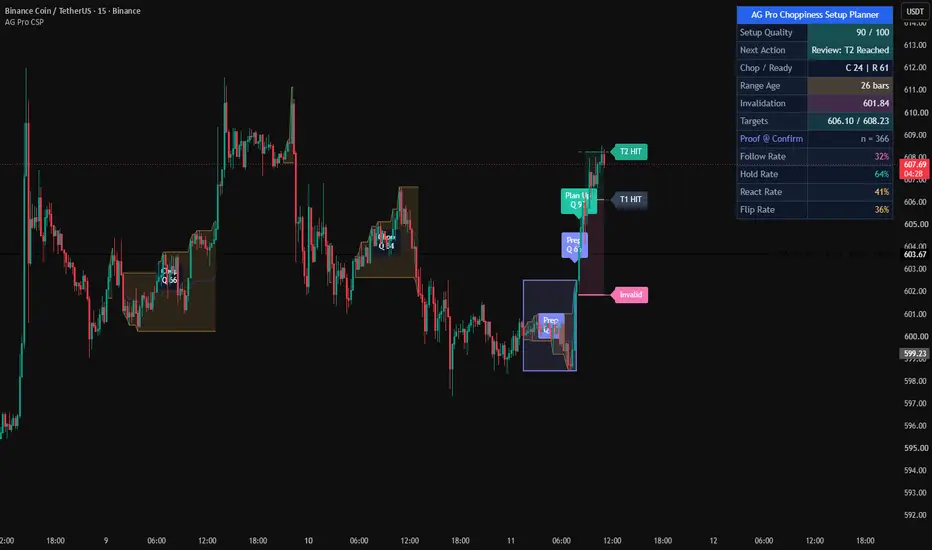
Choppiness Setup Planner [AGPro Series]
🧠 Core Idea
Is this choppy market still a no-trade environment, or has it matured into a valid setup with defined risk, invalidation, and targets?
📌 Overview / What it does
Choppiness Setup Planner [AGPro Series] is a planner-style overlay built for one of the most common decision problems in technical analysis: what should a trader do when price is trapped inside a choppy range, but pressure starts building near the edge?
The script detects no-trade chop conditions, builds a decision range around the active structure, scores setup quality from 0 to 100, and turns a mature range release into a clear planning map with invalidation and target levels. Instead of only saying "the market is choppy," it answers whether the setup is still avoidable, preparing, weak, valid, active, or invalidated.
The cleanest visual use case is higher-timeframe planning. Weekly and daily charts allow the full range-to-plan lifecycle to breathe: no-trade structure, preparation, release, target, and invalidation can all be read without the chart feeling crowded.
It does not automate execution, predict future price, or replace personal trade selection. It is an analytical planner designed to organize context, risk, and next-action state directly on the chart.
🎯 Purpose & Design Philosophy
This script was built because many market-state tools show information without helping the user make a decision. A Choppiness Index value, ADX filter, or range box can be useful, but those outputs often stop before the practical question: what now?
Choppiness Setup Planner fills that gap by connecting chop detection with a structured planning workflow. It is intended for discretionary traders, breakout traders, and range-to-expansion traders who want to avoid low-quality noise while preparing for stronger releases from mature ranges.
The design philosophy is simple: first protect attention, then qualify the setup, then map risk only when the structure deserves it.
⚡ Why This Script Is Different
Most tools focus on detecting chop, drawing a box, or marking a breakout.
This script does NOT act like a generic signal indicator, generic support/resistance tool, or simple Choppiness Index panel.
Instead, it turns a choppy market into a decision sequence:
1. Detect the no-trade environment.
2. Track range age and pressure.
3. Grade setup validity with a 0-100 score.
4. Define the next action state.
5. Map invalidation and targets only after a valid release.
That makes the script closer to a decision engine than a visual marker. It is also intentionally separated from manual position planners: users do not enter their own position parameters. The script derives its planning levels from the detected chop range and the release quality model.
⚙️ Methodology
1. Context Detection
The engine blends Choppiness Index, directional weakness, path efficiency, range tightness, wick noise, and volatility behavior to determine whether the market is inefficient enough to qualify as a no-trade chop environment.
2. Reference Mapping
When chop persists long enough, the script builds a decision range around the active structure. This range is not a generic support/resistance zone; it is a planning container for the current no-trade condition.
3. Reaction Evaluation
The script evaluates whether pressure is improving through range age, chop release, ADX lift, path-efficiency improvement, ATR lift, edge pressure, candle body quality, close quality, and optional volume participation.
4. Visual Output
The chart displays the no-trade ribbon, decision range box, centered zone label, preparation markers, valid plan markers, weak-release markers, invalidation level, target levels, and a compact AGPro planner panel.
🗺️ How to Read the Chart
Zones represent the active no-trade decision range. A centered label inside the box shows whether the structure is still a no-trade zone or has moved into preparation mode.
Labels represent state changes. PREP marks a mature range with improving setup quality. PLAN UP and PLAN DN mark valid releases. SKIP marks a release that happened but failed the minimum plan-quality threshold. T1, T2, and INVALID track the active plan lifecycle.
Colors follow the AGPro state palette. Teal is used for stronger upside planning states, pink for downside or invalidation states, amber for caution and no-trade states, and indigo for preparation/readiness.
The panel shows Setup Quality, Next Action, Chop / Ready, Range Age, Invalidation, and Targets.
🚦 Signals & States
• Avoid: Chop → the market is inefficient and still belongs in no-trade mode.
• Prepare: Edge Watch → the range has matured and internal readiness is improving.
• Skip: Low Quality → price released from the range, but the quality score was not strong enough.
• Track Upside Plan → upside release met the minimum valid plan score.
• Track Downside Plan → downside release met the minimum valid plan score.
• Manage: T1 Reached → the active plan reached its first target level.
• Review: T2 Reached → the active plan reached its second target level.
• Reset: Invalidated → the active plan crossed its invalidation level.
🔔 Alerts Logic
Alerts are available for preparation state, valid upside plan, valid downside plan, weak release, Target 1 reached, Target 2 reached, and invalidation.
Each alert is an attention marker. Alerts are not trade instructions, not automation rules, and not execution commands.
🧩 Confluence Logic
The setup becomes stronger when a mature chop range aligns with improving readiness, edge pressure, candle body participation, release distance, and optional volume participation.
When these components align, the script can convert the release into a valid plan. When price releases without enough score, the script marks the event as SKIP instead of treating every breakout as useful.
📊 When to Use
• Choppy markets where the user needs a no-trade filter.
• Weekly, daily, and 4H planning where range structure matters more than micro-noise.
• Mature ranges that may be preparing for expansion.
• Breakout-preparation workflows.
• Range-to-trend transition monitoring.
• Symbols where invalidation and target structure should be visible before acting.
⚠️ When NOT to Use
• Extremely illiquid markets with unreliable candles.
• Symbols where volume data is misleading, unless volume participation is disabled.
• News-driven spikes where a single candle can distort range logic.
• Very low timeframes with excessive spread noise.
• Scalping workflows that require rapid-fire signals instead of structural planning.
• Markets where the user has no broader context for trend, liquidity, or session behavior.
🎛️ Key Inputs
• Choppiness Length → controls the chop-detection backbone.
• Decision Range Length → controls how the active no-trade range is framed.
• Minimum Range Age → controls how long chop must persist before planning begins.
• Preparation Threshold → controls when the range moves from avoid mode to preparation mode.
• Minimum Valid Plan Score → controls how selective valid plan labels should be.
• Release Buffer ATR → controls how far price must move beyond the range boundary.
• Invalidation Buffer ATR → controls the distance behind the released boundary used for invalidation.
• Target 1 / Target 2 R Multiples → control target projection from the plan risk.
• Panel Location / Theme / Font Size → control the AGPro panel interface.
• Label Font Size / Cooldown / Maximum Visible Labels → control chart readability.
🖥️ Interface & Visual Design
The interface is designed around fast decision reading. The chart carries the range box, no-trade ribbon, centered zone label, event labels, and active risk/target levels. The panel summarizes the same workflow without becoming a large dashboard.
The first panel row follows the AGPro standard: one merged blue header row containing only the script name.
Visual density is intentionally moderate. The chart should not look empty, but it should also avoid crowded signal spam.
🧪 Practical Usage Workflow
1. Read the panel.
Check Setup Quality and Next Action first.
2. Check the decision range.
If the box says NO-TRADE, the structure is still inefficient. If it says PREP, the range is maturing.
3. Evaluate the release.
A valid PLAN label means the release met the quality threshold. A SKIP label means the release was not strong enough.
4. Review invalidation and targets.
When a plan is active, use the plotted levels to understand structure, not as automatic orders.
5. Confirm broader context.
Combine the planner output with trend, liquidity, timeframe, session, and personal execution rules.
For publication screenshots, higher-timeframe examples are usually the cleanest because they show the complete planning sequence without compressing labels and boxes into a noisy layout.
🔍 Interpretation Guidelines
Think in states, not isolated signals.
NO-TRADE protects attention.
PREP means the market is becoming more interesting.
PLAN means the release has enough structure to track.
SKIP means the release happened but did not earn quality.
INVALID means the plan lost its structural premise.
🚫 What This Script Is NOT
This script is not a prediction engine.
It is not financial advice.
It is not auto trading.
It is not guaranteed signals.
It is not a strategy tester.
It is not a replacement for independent analysis.
⚠️ Limitations & Transparency
The script is rule-based and depends on selected inputs, timeframe, volatility, and available market data.
Different symbols and sessions can produce different behavior. Low liquidity, sudden volatility shocks, and abnormal gaps can reduce the usefulness of range-based planning.
Volume participation is optional because volume quality differs across markets and feeds.
🧠 Market Context Notes
Chop is not always weakness. Sometimes it is absorption, sometimes indecision, and sometimes simple noise. The script does not claim to know the cause. It organizes the observable structure so the user can decide whether the environment is worth attention.
🧾 Use Case Examples
When price spends several bars inside a tight inefficient range and the panel says Avoid: Chop, the script is acting as a no-trade filter.
When the range matures and the centered label changes to PREP, the script is showing that pressure has improved enough to monitor the edge.
When price releases and receives PLAN UP or PLAN DN, the script maps invalidation and targets from the structure.
When price releases but receives SKIP, the script is saying the event did not meet the model's quality threshold.
On weekly charts, a single valid plan can show the entire decision chain: range maturity, preparation, release, target reaction, and invalidation. This is the strongest showcase environment for the script.
🧱 System Philosophy
AGPro tools are built around structured decision support: define the condition, score the quality, map the relevant structure, and keep the chart readable.
Choppiness Setup Planner follows that philosophy by turning a noisy no-trade environment into a cleaner decision workflow.
🔐 Non-Promise Statement
No script can provide certainty.
No score guarantees follow-through.
No label guarantees an outcome.
📉 Risk Disclosure
Trading involves risk. Market conditions can change quickly, planned setups can fail, and losses can occur. This script is provided for educational and analytical use only. It does not provide financial advice or guaranteed trading outcomes. Users remain responsible for their own analysis, decisions, risk management, and execution.
📚 Educational Note
Use this script to study how choppy markets mature, how range releases differ in quality, and how invalidation and target logic can be organized visually before a decision is made.
🧠 Core Idea
Is this choppy market still a no-trade environment, or has it matured into a valid setup with defined risk, invalidation, and targets?
📌 Overview / What it does
Choppiness Setup Planner [AGPro Series] is a planner-style overlay built for one of the most common decision problems in technical analysis: what should a trader do when price is trapped inside a choppy range, but pressure starts building near the edge?
The script detects no-trade chop conditions, builds a decision range around the active structure, scores setup quality from 0 to 100, and turns a mature range release into a clear planning map with invalidation and target levels. Instead of only saying "the market is choppy," it answers whether the setup is still avoidable, preparing, weak, valid, active, or invalidated.
The cleanest visual use case is higher-timeframe planning. Weekly and daily charts allow the full range-to-plan lifecycle to breathe: no-trade structure, preparation, release, target, and invalidation can all be read without the chart feeling crowded.
It does not automate execution, predict future price, or replace personal trade selection. It is an analytical planner designed to organize context, risk, and next-action state directly on the chart.
🎯 Purpose & Design Philosophy
This script was built because many market-state tools show information without helping the user make a decision. A Choppiness Index value, ADX filter, or range box can be useful, but those outputs often stop before the practical question: what now?
Choppiness Setup Planner fills that gap by connecting chop detection with a structured planning workflow. It is intended for discretionary traders, breakout traders, and range-to-expansion traders who want to avoid low-quality noise while preparing for stronger releases from mature ranges.
The design philosophy is simple: first protect attention, then qualify the setup, then map risk only when the structure deserves it.
⚡ Why This Script Is Different
Most tools focus on detecting chop, drawing a box, or marking a breakout.
This script does NOT act like a generic signal indicator, generic support/resistance tool, or simple Choppiness Index panel.
Instead, it turns a choppy market into a decision sequence:
1. Detect the no-trade environment.
2. Track range age and pressure.
3. Grade setup validity with a 0-100 score.
4. Define the next action state.
5. Map invalidation and targets only after a valid release.
That makes the script closer to a decision engine than a visual marker. It is also intentionally separated from manual position planners: users do not enter their own position parameters. The script derives its planning levels from the detected chop range and the release quality model.
⚙️ Methodology
1. Context Detection
The engine blends Choppiness Index, directional weakness, path efficiency, range tightness, wick noise, and volatility behavior to determine whether the market is inefficient enough to qualify as a no-trade chop environment.
2. Reference Mapping
When chop persists long enough, the script builds a decision range around the active structure. This range is not a generic support/resistance zone; it is a planning container for the current no-trade condition.
3. Reaction Evaluation
The script evaluates whether pressure is improving through range age, chop release, ADX lift, path-efficiency improvement, ATR lift, edge pressure, candle body quality, close quality, and optional volume participation.
4. Visual Output
The chart displays the no-trade ribbon, decision range box, centered zone label, preparation markers, valid plan markers, weak-release markers, invalidation level, target levels, and a compact AGPro planner panel.
🗺️ How to Read the Chart
Zones represent the active no-trade decision range. A centered label inside the box shows whether the structure is still a no-trade zone or has moved into preparation mode.
Labels represent state changes. PREP marks a mature range with improving setup quality. PLAN UP and PLAN DN mark valid releases. SKIP marks a release that happened but failed the minimum plan-quality threshold. T1, T2, and INVALID track the active plan lifecycle.
Colors follow the AGPro state palette. Teal is used for stronger upside planning states, pink for downside or invalidation states, amber for caution and no-trade states, and indigo for preparation/readiness.
The panel shows Setup Quality, Next Action, Chop / Ready, Range Age, Invalidation, and Targets.
🚦 Signals & States
• Avoid: Chop → the market is inefficient and still belongs in no-trade mode.
• Prepare: Edge Watch → the range has matured and internal readiness is improving.
• Skip: Low Quality → price released from the range, but the quality score was not strong enough.
• Track Upside Plan → upside release met the minimum valid plan score.
• Track Downside Plan → downside release met the minimum valid plan score.
• Manage: T1 Reached → the active plan reached its first target level.
• Review: T2 Reached → the active plan reached its second target level.
• Reset: Invalidated → the active plan crossed its invalidation level.
🔔 Alerts Logic
Alerts are available for preparation state, valid upside plan, valid downside plan, weak release, Target 1 reached, Target 2 reached, and invalidation.
Each alert is an attention marker. Alerts are not trade instructions, not automation rules, and not execution commands.
🧩 Confluence Logic
The setup becomes stronger when a mature chop range aligns with improving readiness, edge pressure, candle body participation, release distance, and optional volume participation.
When these components align, the script can convert the release into a valid plan. When price releases without enough score, the script marks the event as SKIP instead of treating every breakout as useful.
📊 When to Use
• Choppy markets where the user needs a no-trade filter.
• Weekly, daily, and 4H planning where range structure matters more than micro-noise.
• Mature ranges that may be preparing for expansion.
• Breakout-preparation workflows.
• Range-to-trend transition monitoring.
• Symbols where invalidation and target structure should be visible before acting.
⚠️ When NOT to Use
• Extremely illiquid markets with unreliable candles.
• Symbols where volume data is misleading, unless volume participation is disabled.
• News-driven spikes where a single candle can distort range logic.
• Very low timeframes with excessive spread noise.
• Scalping workflows that require rapid-fire signals instead of structural planning.
• Markets where the user has no broader context for trend, liquidity, or session behavior.
🎛️ Key Inputs
• Choppiness Length → controls the chop-detection backbone.
• Decision Range Length → controls how the active no-trade range is framed.
• Minimum Range Age → controls how long chop must persist before planning begins.
• Preparation Threshold → controls when the range moves from avoid mode to preparation mode.
• Minimum Valid Plan Score → controls how selective valid plan labels should be.
• Release Buffer ATR → controls how far price must move beyond the range boundary.
• Invalidation Buffer ATR → controls the distance behind the released boundary used for invalidation.
• Target 1 / Target 2 R Multiples → control target projection from the plan risk.
• Panel Location / Theme / Font Size → control the AGPro panel interface.
• Label Font Size / Cooldown / Maximum Visible Labels → control chart readability.
🖥️ Interface & Visual Design
The interface is designed around fast decision reading. The chart carries the range box, no-trade ribbon, centered zone label, event labels, and active risk/target levels. The panel summarizes the same workflow without becoming a large dashboard.
The first panel row follows the AGPro standard: one merged blue header row containing only the script name.
Visual density is intentionally moderate. The chart should not look empty, but it should also avoid crowded signal spam.
🧪 Practical Usage Workflow
1. Read the panel.
Check Setup Quality and Next Action first.
2. Check the decision range.
If the box says NO-TRADE, the structure is still inefficient. If it says PREP, the range is maturing.
3. Evaluate the release.
A valid PLAN label means the release met the quality threshold. A SKIP label means the release was not strong enough.
4. Review invalidation and targets.
When a plan is active, use the plotted levels to understand structure, not as automatic orders.
5. Confirm broader context.
Combine the planner output with trend, liquidity, timeframe, session, and personal execution rules.
For publication screenshots, higher-timeframe examples are usually the cleanest because they show the complete planning sequence without compressing labels and boxes into a noisy layout.
🔍 Interpretation Guidelines
Think in states, not isolated signals.
NO-TRADE protects attention.
PREP means the market is becoming more interesting.
PLAN means the release has enough structure to track.
SKIP means the release happened but did not earn quality.
INVALID means the plan lost its structural premise.
🚫 What This Script Is NOT
This script is not a prediction engine.
It is not financial advice.
It is not auto trading.
It is not guaranteed signals.
It is not a strategy tester.
It is not a replacement for independent analysis.
⚠️ Limitations & Transparency
The script is rule-based and depends on selected inputs, timeframe, volatility, and available market data.
Different symbols and sessions can produce different behavior. Low liquidity, sudden volatility shocks, and abnormal gaps can reduce the usefulness of range-based planning.
Volume participation is optional because volume quality differs across markets and feeds.
🧠 Market Context Notes
Chop is not always weakness. Sometimes it is absorption, sometimes indecision, and sometimes simple noise. The script does not claim to know the cause. It organizes the observable structure so the user can decide whether the environment is worth attention.
🧾 Use Case Examples
When price spends several bars inside a tight inefficient range and the panel says Avoid: Chop, the script is acting as a no-trade filter.
When the range matures and the centered label changes to PREP, the script is showing that pressure has improved enough to monitor the edge.
When price releases and receives PLAN UP or PLAN DN, the script maps invalidation and targets from the structure.
When price releases but receives SKIP, the script is saying the event did not meet the model's quality threshold.
On weekly charts, a single valid plan can show the entire decision chain: range maturity, preparation, release, target reaction, and invalidation. This is the strongest showcase environment for the script.
🧱 System Philosophy
AGPro tools are built around structured decision support: define the condition, score the quality, map the relevant structure, and keep the chart readable.
Choppiness Setup Planner follows that philosophy by turning a noisy no-trade environment into a cleaner decision workflow.
🔐 Non-Promise Statement
No script can provide certainty.
No score guarantees follow-through.
No label guarantees an outcome.
📉 Risk Disclosure
Trading involves risk. Market conditions can change quickly, planned setups can fail, and losses can occur. This script is provided for educational and analytical use only. It does not provide financial advice or guaranteed trading outcomes. Users remain responsible for their own analysis, decisions, risk management, and execution.
📚 Educational Note
Use this script to study how choppy markets mature, how range releases differ in quality, and how invalidation and target logic can be organized visually before a decision is made.
Note di rilascio
UPDATE NOTES - V1.1This update focuses on visual hierarchy, no-trade range clarity, label control, panel conformity, and publication-ready chart presentation.
The core purpose of the script remains unchanged.
This release improves how the existing choppiness and range-release logic is presented, organized, and interpreted on the chart.
This script continues to function as an analytical and visualization tool.
It does not attempt to predict price direction or provide guaranteed outcomes.
------------------------
What Changed
------------------------
* Added Engine Presets
Balanced Planner, Cleaner Swing, Active Intraday, and Custom profiles were added so users can tune the model for cleaner swing charts or faster intraday preparation.
* Refined no-trade decision range visuals
The active choppy range now has a stronger concept-native box structure with clearer preparation-state styling.
* Added centered range labels
The decision range can now display a centered label that explains whether the structure is still no-trade or has moved into preparation state.
* Improved label discipline
Marker cooldowns were adjusted, maximum retained labels were reduced, and right-side plan level tags are disabled by default to reduce overlap.
* Improved plan-level presentation
Entry, invalidation, and target areas remain visible through clean projected lines and fills without forcing extra right-side tags.
* Updated AG Pro panel structure
The panel now follows the standard merged blue header format, includes configurable location, theme, and font size, and adds a Best View row.
* Updated script naming format
The public script title keeps the clean script name with [AGPro Series], while the panel title preserves the AG Pro brand presentation.
------------------------
Visual Improvements
------------------------
* Improved chart readability by refining no-trade boxes, preparation boxes, plan levels, and centered labels.
* Reduced visual clutter by making the centered decision-range label the primary information layer.
* Refined visual hierarchy so avoid, prepare, release, target, and invalidation states are easier to separate.
* Adjusted label spacing and defaults to reduce overlap with candles and plan lines.
* Preserved enough visual structure for stronger first-glance interpretation without turning the chart into a noisy signal map.
------------------------
Interface & Usability
------------------------
* Optimized panel layout for clearer information flow.
* Added configurable panel position, theme, and font size.
* Added configurable chart label font size with Normal as the default.
* Added Best View guidance for intraday, 4H, and daily range-planning workflows.
* Added separate alert toggles for preparation, valid plans, and post-plan target or invalidation events.
------------------------
Behavior Notes
------------------------
This update does not change the core analytical purpose of the script.
The model still focuses on choppiness, range-bound conditions, preparation quality, release quality, invalidation, and target projection.
The goal is to improve clarity and usability, not to introduce new predictive behavior.
Users should interpret outputs the same way as before, but with improved visual structure and more disciplined label behavior.
------------------------
Limitations Reminder
------------------------
The script remains a rule-based analytical tool.
Market conditions such as volatility, liquidity, timeframe differences, and sudden news expansion may affect how no-trade ranges and release states appear.
Choppy conditions can persist longer than expected, and range releases can fail even after quality improves.
Outputs should always be interpreted within broader market context.
------------------------
Risk Reminder
------------------------
This script is for educational and analytical purposes only.
It does not provide financial advice or guaranteed trading outcomes.
Users remain responsible for their own decisions.
Note di rilascio
🔧 UPDATE NOTES - V1.3This update focuses on plan-level ownership, active guide clarity, and cleaner historical chart memory.
The core purpose of the script remains unchanged.
This release improves how active plan levels are connected to their visible chart tags so no level appears detached or ownerless.
This script continues to function as an analytical and visualization tool.
It does not attempt to predict price direction or provide guaranteed outcomes.
------------------------
What Changed
------------------------
• Enabled plan level tags by default
Entry, invalidation, T1, and T2 now appear as right-edge tags for active plans.
• Added Plan Tag Offset Bars
Users can control how far active plan level tags sit to the right of the latest bar.
• Added owned guide lines for active plan levels
Entry, invalidation, T1, and T2 guide lines now extend to their visible tags.
• Reduced historical chart memory further
Maximum Historical Boxes now defaults to 1, and Maximum Visible Labels now defaults to 6 for a more selective publication view.
------------------------
Visual Improvements
------------------------
• Active plan levels now read as owned references instead of floating horizontal lines
• Reduced old chop-box clutter on lower timeframes
• Preserved the clean V1.2 label language and weak-release marker control
• Improved first-glance readability of active setup, invalidation, and target structure
------------------------
Interface & Usability
------------------------
• Plan level tags are visible by default
• Plan Tag Offset Bars can be adjusted by the user
• Historical box and label counts remain adjustable
• Panel show/hide, panel location, panel theme, panel font size, and label font size controls remain available
------------------------
Behavior Notes
------------------------
This update does not change the core analytical logic of the script.
Choppiness detection, directional weakness, efficiency scoring, range tracking, setup quality, release validation, invalidation, target logic, alerts, and hidden exports remain unchanged.
The goal is only to clarify visual ownership and reduce historical clutter.
------------------------
Limitations Reminder
------------------------
The script remains a rule-based analytical tool.
Market conditions such as volatility, liquidity, timeframe differences, and data quality may affect how states and labels appear.
Outputs should always be interpreted within broader market context.
------------------------
Risk Reminder
------------------------
This script is for educational and analytical purposes only.
It does not provide financial advice or guaranteed trading outcomes.
Users remain responsible for their own decisions.
Note di rilascio
UPDATE NOTES - Version 1.4This update focuses on adding a confirmation-anchored proof layer to the planner.
The core purpose of the script remains unchanged.
This release adds a proof layer that measures how often chop-range releases reached their first
target before the invalidation level, and it removes the redundant best-view panel row.
This script continues to function as an analytical and visualization tool.
It does not attempt to predict price direction or provide guaranteed outcomes.
------------------------
What Changed
------------------------
* Added a Proof Layer (Follow / Hold / React / Flip)
The panel now reports how reliably chop-range releases followed through on the current symbol
and timeframe. Each time a mature no-trade range releases beyond its boundary, that release is
tracked forward over a configurable horizon, using the same release entry, boundary-based
invalidation, and first target the planner already builds:
- Follow Rate : share of releases that reached the first target before the invalidation level
- Hold Rate : share whose invalidation level was not lost through resolution
- React Rate : share that produced an early favorable follow-through reaction
- Flip Rate : share whose invalidation level was lost within the horizon (the release failed)
A sample size (n) is shown so the rates are read in context, and they display as "building" only
until the first release resolves. The proof is anchored on every qualifying range release, so it
populates across timeframes rather than waiting only on the rarer top-quality plans.
* Removed the redundant best-view row
The panel previously ended with a static best-view timeframe hint. It has been removed, and the
freed space now carries the proof layer, keeping the panel focused on quality, action, risk,
targets, and proof.
* Added hidden proof outputs
Follow, Hold, React, and Flip rates are exported as hidden plots so they can be used in alerts
and screeners without adding chart clutter.
------------------------
Visual Improvements
------------------------
* Reduced panel redundancy by removing the static best-view row.
* Preserved the no-trade decision range box, centered range badge, no-trade ribbon, plan entry,
invalidation, target levels, owned right-edge plan tags and guide lines, and all markers.
* Kept label and box density controlled with the existing cooldown and retention limits.
------------------------
Behavior Notes
------------------------
This update does not change the core planner logic of the script.
The proof rates are descriptive statistics of chop-range releases on the current symbol and
timeframe. They measure how often a release reached its first target before invalidation, not
trade performance, and they do not change how chop, readiness, setup quality, ranges, plans, or
target and invalidation levels are produced.
Users should interpret outputs the same way as before, now with added reliability context.
------------------------
Limitations Reminder
------------------------
The script remains a rule-based analytical tool.
Proof rates depend on the available history and on how many range releases occurred on the
current symbol and timeframe; a small sample (low n) should be treated with caution. Each
release is counted once, with the release entry, boundary-based invalidation, and first target
frozen at the release bar. Market conditions such as volatility, liquidity, and timeframe
differences may affect how releases and rates appear.
Outputs should always be interpreted within broader market context.
------------------------
Risk Reminder
------------------------
This script is for educational and analytical purposes only.
It does not provide financial advice or guaranteed trading outcomes.
Users remain responsible for their own decisions.
Note di rilascio
Version 1.5 – Range-to-Plan HandoffThis release sharpens the transition from a completed choppy range into an active, stage-aware plan map while preserving the existing chop, readiness, quality, risk, target, and proof models.
• Completed chop boxes now stop at the actual range boundary instead of projecting into the active plan.
• Added Focused and All plan-map density modes, with Focused selected by default.
• Focused mode shows Entry, Invalidation, and T1 before the first objective, then advances to T1 Hit, Invalidation, and T2.
• Plan plots, guide lines, and filled badges now follow the same lifecycle stage so no visible level is left without an owner.
• Release, preparation, target, invalidation, expiry, and related alert events now require a confirmed bar.
• Closed range badges are recentered inside their final historical boxes for a cleaner range-to-release narrative.
Script open-source
Nello spirito di TradingView, l'autore di questo script lo ha reso open source, in modo che i trader possano esaminarne e verificarne la funzionalità. Complimenti all'autore! Sebbene sia possibile utilizzarlo gratuitamente, ricordiamo che la ripubblicazione del codice è soggetta al nostro Regolamento.

Trading Suite | Flagship Workflow :
tradingview.com/script/XJmX3p98-Trading-Suite-AGPro-Series/
Crypto Setup Planner | Multi-Symbol Analysis :
tradingview.com/script/LgVRo7Ql-Crypto-Setup-Planner-AGPro-Series/
tradingview.com/script/XJmX3p98-Trading-Suite-AGPro-Series/
Crypto Setup Planner | Multi-Symbol Analysis :
tradingview.com/script/LgVRo7Ql-Crypto-Setup-Planner-AGPro-Series/
Declinazione di responsabilità
Le informazioni e le pubblicazioni non sono intese come, e non costituiscono, consulenza o raccomandazioni finanziarie, di investimento, di trading o di altro tipo fornite o approvate da TradingView. Per ulteriori informazioni, consultare i Termini di utilizzo.
Script open-source
Nello spirito di TradingView, l'autore di questo script lo ha reso open source, in modo che i trader possano esaminarne e verificarne la funzionalità. Complimenti all'autore! Sebbene sia possibile utilizzarlo gratuitamente, ricordiamo che la ripubblicazione del codice è soggetta al nostro Regolamento.
Trading Suite | Flagship Workflow :
tradingview.com/script/XJmX3p98-Trading-Suite-AGPro-Series/
Crypto Setup Planner | Multi-Symbol Analysis :
tradingview.com/script/LgVRo7Ql-Crypto-Setup-Planner-AGPro-Series/
tradingview.com/script/XJmX3p98-Trading-Suite-AGPro-Series/
Crypto Setup Planner | Multi-Symbol Analysis :
tradingview.com/script/LgVRo7Ql-Crypto-Setup-Planner-AGPro-Series/
Declinazione di responsabilità
Le informazioni e le pubblicazioni non sono intese come, e non costituiscono, consulenza o raccomandazioni finanziarie, di investimento, di trading o di altro tipo fornite o approvate da TradingView. Per ulteriori informazioni, consultare i Termini di utilizzo.