Aggiornato
Seasonality Tables Stock vs Sector vs Commodity
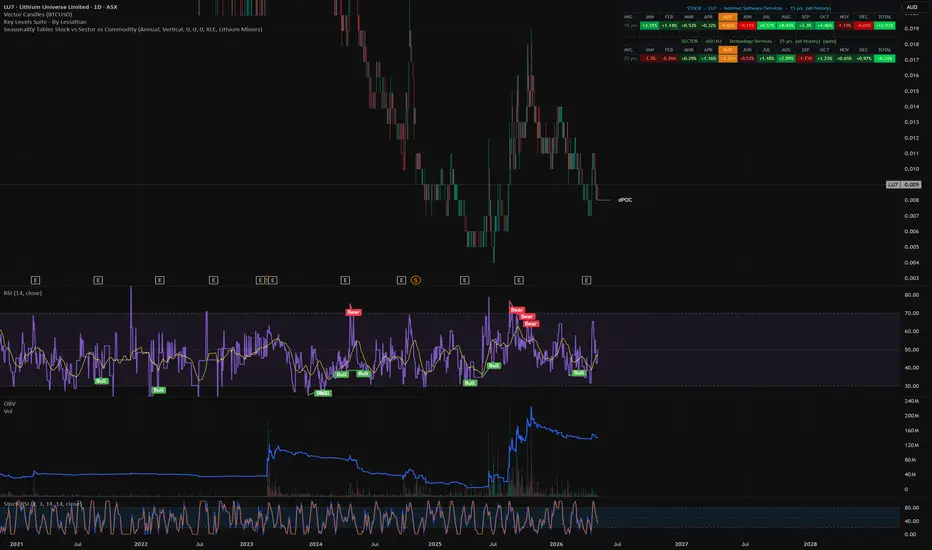
Seasonality Tables — Stock vs Sector vs Commodity
What it does
This indicator overlays a unified, three-panel seasonality table directly on your chart, showing the historical average return for the current stock, its matched sector ETF, and its most-correlated commodity — side by side, on the same time axis (annual or monthly). Every cell is a real historical average computed bar-by-bar from the chart's full price history; nothing is precomputed or cached from an external dataset.
Three tables:
How it differs from other seasonality scripts
Most seasonality indicators on TradingView do one of two things: (a) show seasonality for just the symbol on the chart, or (b) hard-code an index (S&P 500, BTC) and ignore what you're actually looking at. This script is built around comparative context:
How to use it
The strategy behind it
Seasonality is most useful as a bias filter, not a signal. The premise of the three-table layout:
When all three line up, you have a higher-conviction seasonal window. When they disagree, you've identified an idiosyncratic pattern — which can still be tradeable, but warrants closer inspection (is it earnings-driven? Index rebalance? A one-off?). The script doesn't tell you to enter or exit; it gives you the historical context to time discretionary entries, choose between candidates in the same sector, or simply avoid fighting a strong negative seasonal alignment.
Use it alongside your normal setup as a context layer, not a system or a buy/sell signal.
What it does
This indicator overlays a unified, three-panel seasonality table directly on your chart, showing the historical average return for the current stock, its matched sector ETF, and its most-correlated commodity — side by side, on the same time axis (annual or monthly). Every cell is a real historical average computed bar-by-bar from the chart's full price history; nothing is precomputed or cached from an external dataset.
Three tables:
- Stock seasonality — average return of the symbol on your chart, broken down by month (annual view) or by trading day-of-month (monthly view).
- Sector seasonality — same calculation applied to the sector ETF that matches the stock's syminfo.sector. The mapping covers ASX sector indices (XEJ, XMJ, XFJ, XHJ, XNJ, XSJ, XIJ, XDJ, XTJ, XUJ, XPJ) and US SPDR sectors (XLE, XLB, XLF, XLV, XLI, XLP, XLK, XLY, XLC, XLU, XLRE, XLC), auto-selected by the stock's listed country. You can override with any ticker you want.
- Commodity seasonality — auto-picked from a 23-commodity basket (Gold, Silver, Crude, Copper, Iron Ore, Lithium, Uranium, Nat Gas, Wheat, etc.) by computing rolling price correlation between the stock and each commodity over the stock's full available history. The strongest correlation wins and loads automatically. You can override the pick from a dropdown if you'd rather see a specific commodity.
How it differs from other seasonality scripts
Most seasonality indicators on TradingView do one of two things: (a) show seasonality for just the symbol on the chart, or (b) hard-code an index (S&P 500, BTC) and ignore what you're actually looking at. This script is built around comparative context:
- Stock × Sector × Commodity in one view. You don't have to flip charts to ask "is this stock's June weakness actually a sector pattern, or is it idiosyncratic?" — both rows are on screen, aligned to the same months.
- Auto sector mapping. The sector ETF is resolved from syminfo.sector and syminfo.country, so flipping from BHP → CBA → MSFT automatically reloads the right ETF (XMJ → XFJ → XLK). No manual config per symbol.
- Correlation-driven commodity selection. Other scripts that overlay commodities make you pick one. This one measures which commodity best tracks the stock and loads it for you. For a copper miner you'll get HG; for a gold miner, GC; for an LNG name, NG. The auto-selection is shown in the commodity table title so you can see what it chose.
- Magnitude-scaled colour intensity. Cells aren't binary green/red. Saturation scales linearly with return magnitude up to ±5%, so a +0.3% month looks faded and a −4% month is fully red. Pattern strength is visible at a glance, not just direction.
- Honest about new listings. Correlation and seasonality both use a cumulative-sum approach over the stock's actual available history (gated at min 30 valid bars), rather than a fixed 252-bar window. A stock that listed 8 months ago shows 8 months of data; a 20-year stock uses 20 years.
- Lookback caps per table. Independent "years to include" inputs for stock, sector, and commodity (0 = all). Useful when you want the stock on its full life but the sector ETF capped at, say, 10 years to avoid a regime that no longer applies.
How to use it
- Add to a daily chart. The commodity table uses inline accumulation over chart bars (a workaround for Pine's 40-call request.security budget), so it assumes a Daily timeframe. Weekly+ will under-sample the commodity row.
- Pick a scale.
- Annual → 12 rows (Jan–Dec), each cell is the average monthly return.
- Monthly → 31 rows (1–31), each cell is the average return on that trading day-of-month for the currently displayed month.
- Read the columns side-by-side. Look for agreement and divergence:
- Stock + Sector + Commodity all green in the same month → strong seasonal tailwind, broad-based.
- Stock green but Sector and Commodity red → idiosyncratic; the seasonality may not survive a sector drawdown.
- Sector and Commodity strong but Stock weak → potential mean-reversion candidate, or a sign the stock has structural issues.
- The current period is highlighted (orange) so you can immediately see "where am I right now in the seasonal cycle, and what's coming next month?"
- Override when needed. Toggle "Override Auto ETF" or "Override Auto Commodity" if you disagree with the mapping (e.g. a gold royalty company auto-maps to Materials/XMJ but you'd rather compare it to the Gold ETF and Silver).
The strategy behind it
Seasonality is most useful as a bias filter, not a signal. The premise of the three-table layout:
- A standalone seasonal pattern in a single stock is fragile — could be 3–4 random earnings dates clustered in one month.
- A pattern that's also present in the sector suggests a real demand/inventory/fiscal-year cycle (e.g. retailers in November, energy in winter, miners around Chinese New Year).
- A pattern that also shows in the correlated commodity suggests an underlying physical-market driver (e.g. gold's Q1 strength, oil's summer demand, gas's winter demand).
When all three line up, you have a higher-conviction seasonal window. When they disagree, you've identified an idiosyncratic pattern — which can still be tradeable, but warrants closer inspection (is it earnings-driven? Index rebalance? A one-off?). The script doesn't tell you to enter or exit; it gives you the historical context to time discretionary entries, choose between candidates in the same sector, or simply avoid fighting a strong negative seasonal alignment.
Use it alongside your normal setup as a context layer, not a system or a buy/sell signal.
Note di rilascio
Updated commodities table to include a few commodity ETFs including: REMX / GDX / GDXJ / SIL / SILJ / LIT/ COPX / URAMade some script optimisations to improve performance

Declinazione di responsabilità
Le informazioni e le pubblicazioni non sono intese come, e non costituiscono, consulenza o raccomandazioni finanziarie, di investimento, di trading o di altro tipo fornite o approvate da TradingView. Per ulteriori informazioni, consultare i Termini di utilizzo.
Declinazione di responsabilità
Le informazioni e le pubblicazioni non sono intese come, e non costituiscono, consulenza o raccomandazioni finanziarie, di investimento, di trading o di altro tipo fornite o approvate da TradingView. Per ulteriori informazioni, consultare i Termini di utilizzo.