OPEN-SOURCE SCRIPT
Futures Tick & Point Specs
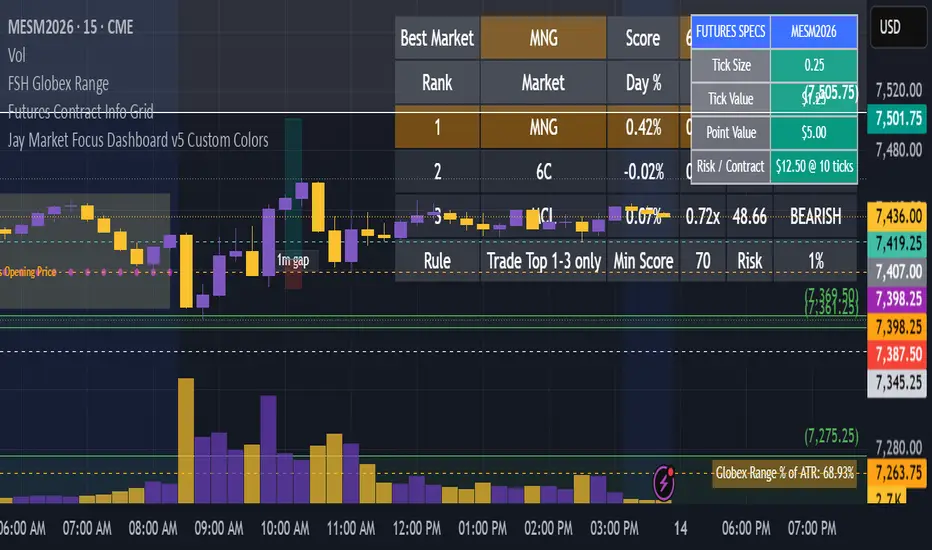
Futures Tick & Point Specs is a professional futures trading utility that provides instant access to critical contract specifications directly on your TradingView chart.
The indicator displays verified contract information for a wide range of futures markets, including equity indexes, commodities, currencies, treasuries, agricultural products, and livestock contracts.
Instead of searching exchange specification sheets or calculating contract values manually, traders can instantly view:
* Tick Size
* Tick Value
* Point Value
* Risk Per Contract (optional)
* Contract Category
* Verified Contract Specifications
The indicator automatically updates as you switch between futures markets and provides a clean, customizable table that can be positioned anywhere on the chart.
*Key Features*
✓ Verified contract specifications for major futures products
✓ Instant display of tick size, tick value, and point value
✓ Built-in risk calculator based on user-defined stop size
✓ Adjustable table position
✓ Customizable colors and text sizes
✓ Compact, Standard, and Detailed display modes
✓ Supports equity index, energy, metals, currency, treasury, grain, and livestock futures
Designed For:
* Futures traders
* Prop firm traders
* Day traders
* Swing traders
* Multi-market traders
* Traders learning futures contract specifications
Whether you're trading ES, NQ, CL, GC, 6E, ZC, ZW, NG, or dozens of other futures products, Futures Tick & Point Specs provides the information you need directly on the chart so you can make faster and more informed trading decisions.
The indicator displays verified contract information for a wide range of futures markets, including equity indexes, commodities, currencies, treasuries, agricultural products, and livestock contracts.
Instead of searching exchange specification sheets or calculating contract values manually, traders can instantly view:
* Tick Size
* Tick Value
* Point Value
* Risk Per Contract (optional)
* Contract Category
* Verified Contract Specifications
The indicator automatically updates as you switch between futures markets and provides a clean, customizable table that can be positioned anywhere on the chart.
*Key Features*
✓ Verified contract specifications for major futures products
✓ Instant display of tick size, tick value, and point value
✓ Built-in risk calculator based on user-defined stop size
✓ Adjustable table position
✓ Customizable colors and text sizes
✓ Compact, Standard, and Detailed display modes
✓ Supports equity index, energy, metals, currency, treasury, grain, and livestock futures
Designed For:
* Futures traders
* Prop firm traders
* Day traders
* Swing traders
* Multi-market traders
* Traders learning futures contract specifications
Whether you're trading ES, NQ, CL, GC, 6E, ZC, ZW, NG, or dozens of other futures products, Futures Tick & Point Specs provides the information you need directly on the chart so you can make faster and more informed trading decisions.
Script open-source
Nello spirito di TradingView, l'autore di questo script lo ha reso open source, in modo che i trader possano esaminarne e verificarne la funzionalità. Complimenti all'autore! Sebbene sia possibile utilizzarlo gratuitamente, ricordiamo che la ripubblicazione del codice è soggetta al nostro Regolamento.

Declinazione di responsabilità
Le informazioni e le pubblicazioni non sono intese come, e non costituiscono, consulenza o raccomandazioni finanziarie, di investimento, di trading o di altro tipo fornite o approvate da TradingView. Per ulteriori informazioni, consultare i Termini di utilizzo.
Script open-source
Nello spirito di TradingView, l'autore di questo script lo ha reso open source, in modo che i trader possano esaminarne e verificarne la funzionalità. Complimenti all'autore! Sebbene sia possibile utilizzarlo gratuitamente, ricordiamo che la ripubblicazione del codice è soggetta al nostro Regolamento.
Declinazione di responsabilità
Le informazioni e le pubblicazioni non sono intese come, e non costituiscono, consulenza o raccomandazioni finanziarie, di investimento, di trading o di altro tipo fornite o approvate da TradingView. Per ulteriori informazioni, consultare i Termini di utilizzo.