
PURPOSE OF THIS HOW-TO
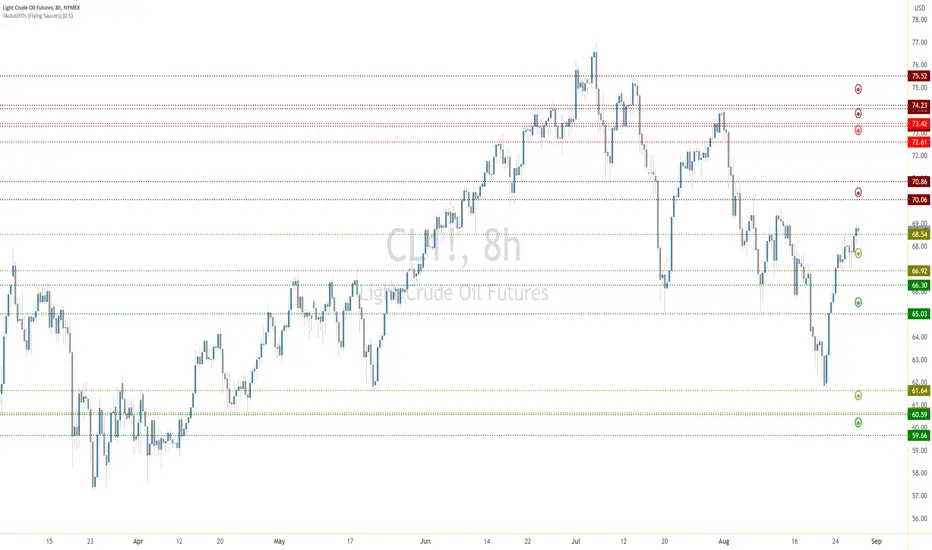
This HOW-TO explains how AutoUFOs® can be incorporated into a structured trade-planning process. The indicator identifies model-derived price areas associated with potential Un-Filled Orders (UFOs). Those areas can provide location context for entries, invalidation levels, protective stops, and targets.
The areas are analytical references—not automatic instructions to buy or sell. Market direction, execution criteria, position size, and maximum acceptable risk remain the user's responsibility.
STEP 1 — SELECT THE MARKET AND TIMEFRAME
Begin with the market and chart interval relevant to the intended trade duration. Higher intervals generally provide broader price structures, while lower intervals provide more granular areas. The selected interval affects which UFOs are identified and how they should be interpreted within the user's plan.
A chart interval does not guarantee how long a trade will last. It establishes the analytical horizon from which the price areas are calculated.
STEP 2 — ESTABLISH DIRECTION AND CONDITIONS
Determine whether the trading plan is currently seeking long opportunities, short opportunities, or no trade. This decision should be made with an independent process for market direction and conditions before using UFO areas to plan execution.
This directional framework prevents every displayed area from being treated as a trade signal.
STEP 3 — INTERPRET THE DISPLAY
The indicator infers potential order interest from market data surrounding strong price movements. It does not read the live order book or confirm that specific pending orders exist.
STEP 4 — BUILD THE TRADE PLAN
Before acting, define each part of the proposed trade:
For example, a trader with an independently established long bias might monitor a green UFO for a potential buy-side reaction or consider a bullish breakout if price trades through a red UFO. A trader with a short bias might monitor a red UFO for a potential sell-side reaction or consider a bearish breakout if price trades through a green UFO. In every case, the UFOs define areas to evaluate; they do not guarantee a reaction, breakout continuation, or profitable outcome.
STEP 5 — CALIBRATE AND VALIDATE
Calibration changes which price areas the methodology identifies. Evaluate the available setting on the intended symbol, timeframe, session, and data feed before relying on it in a live workflow.
Historical charts and TradingView's Bar Replay can help users observe how different settings behaved across a representative range of conditions. This is a validation exercise, not proof of future performance. Avoid selecting a calibration from only a few favorable examples, and retest when the market, timeframe, feed, or trading rules change.
STEP 6 — REASSESS AS NEW DATA ARRIVES
UFO areas can fail, disappear, or become irrelevant as new market data changes the analysis. Recheck the current chart before acting and apply the contingency rules established in the trade plan rather than assuming that an earlier area remains valid.
IMPORTANT LIMITATIONS
Trading involves risk. Users remain responsible for determining suitability, validating the analysis, and applying their own execution and risk-management rules. Nothing in this publication constitutes financial, investment, or trading advice.
This HOW-TO explains how AutoUFOs® can be incorporated into a structured trade-planning process. The indicator identifies model-derived price areas associated with potential Un-Filled Orders (UFOs). Those areas can provide location context for entries, invalidation levels, protective stops, and targets.
The areas are analytical references—not automatic instructions to buy or sell. Market direction, execution criteria, position size, and maximum acceptable risk remain the user's responsibility.
STEP 1 — SELECT THE MARKET AND TIMEFRAME
Begin with the market and chart interval relevant to the intended trade duration. Higher intervals generally provide broader price structures, while lower intervals provide more granular areas. The selected interval affects which UFOs are identified and how they should be interpreted within the user's plan.
A chart interval does not guarantee how long a trade will last. It establishes the analytical horizon from which the price areas are calculated.
STEP 2 — ESTABLISH DIRECTION AND CONDITIONS
Determine whether the trading plan is currently seeking long opportunities, short opportunities, or no trade. This decision should be made with an independent process for market direction and conditions before using UFO areas to plan execution.
- For a long plan, green UFOs may provide candidate areas for buying a reaction. Red UFOs may provide candidate exit or target areas while they remain intact; if price trades through a red UFO, the area may also be used to structure a bullish breakout entry.
- For a short plan, red UFOs may provide candidate areas for selling a reaction. Green UFOs may provide candidate exit or target areas while they remain intact; if price trades through a green UFO, the area may also be used to structure a bearish breakout entry.
This directional framework prevents every displayed area from being treated as a trade signal.
STEP 3 — INTERPRET THE DISPLAY
- Green UFOs represent price areas associated with potential buy-side interest.
- Red UFOs represent price areas associated with potential sell-side interest.
- UFO Bands show the complete price range assigned to each identified area.
- Each Flying Saucer contains two circles. The outer circle represents the full UFO area. The inner circle identifies a smaller area where the methodology expects a higher concentration of potential orders.
- Color intensity communicates the methodology's relative assessment of an individual UFO area.
- The displayed statistics are separate from color intensity. They summarize every UFO identified within the chart history available to the indicator, including green, red, lighter, and darker areas.
The indicator infers potential order interest from market data surrounding strong price movements. It does not read the live order book or confirm that specific pending orders exist.
STEP 4 — BUILD THE TRADE PLAN
Before acting, define each part of the proposed trade:
- Choose whether the setup is based on a reaction from a UFO or a breakout through an opposing UFO.
- Identify the UFO area that is consistent with that setup and the independently established market direction.
- Define the condition that must occur before an entry is permitted. Merely touching or trading through a UFO does not have to constitute an entry.
- Choose an invalidation level and protective-stop method. This should reflect the price area, the instrument's behavior, and the maximum loss permitted by the user's plan.
- Select one or more opposing UFO areas as candidate targets or locations at which risk may be reduced.
- Calculate position size from the planned entry, stop, and maximum acceptable risk.
- Decide in advance how the position will be managed if price does not react as expected.
For example, a trader with an independently established long bias might monitor a green UFO for a potential buy-side reaction or consider a bullish breakout if price trades through a red UFO. A trader with a short bias might monitor a red UFO for a potential sell-side reaction or consider a bearish breakout if price trades through a green UFO. In every case, the UFOs define areas to evaluate; they do not guarantee a reaction, breakout continuation, or profitable outcome.
STEP 5 — CALIBRATE AND VALIDATE
Calibration changes which price areas the methodology identifies. Evaluate the available setting on the intended symbol, timeframe, session, and data feed before relying on it in a live workflow.
Historical charts and TradingView's Bar Replay can help users observe how different settings behaved across a representative range of conditions. This is a validation exercise, not proof of future performance. Avoid selecting a calibration from only a few favorable examples, and retest when the market, timeframe, feed, or trading rules change.
STEP 6 — REASSESS AS NEW DATA ARRIVES
UFO areas can fail, disappear, or become irrelevant as new market data changes the analysis. Recheck the current chart before acting and apply the contingency rules established in the trade plan rather than assuming that an earlier area remains valid.
IMPORTANT LIMITATIONS
- A UFO is a model-derived area of potential order interest, not confirmation of an actual pending order.
- Price can move through an identified area without reacting.
- Color intensity is a relative assessment, not a probability or guarantee.
- Historical behavior and calibration results do not predict future performance.
- Different symbols, feeds, sessions, chart types, intervals, available history, and settings can produce different results.
- The indicator should not be the sole basis for a trading, investment, or hedging decision.
Trading involves risk. Users remain responsible for determining suitability, validating the analysis, and applying their own execution and risk-management rules. Nothing in this publication constitutes financial, investment, or trading advice.

Trade Smarter — See What Most Traders Don’t. Explore AutoClimate™ and AutoUFOs® (patented) in the UFO Trading Suite: tradingview.com/spaces/traddictiv/
関連の投稿
免責事項
これらの情報および投稿は、TradingViewが提供または承認する金融、投資、取引、またはその他の種類の助言もしくは推奨であることを意図したものではなく、またこれらに該当するものでもありません。詳細は利用規約をご覧ください。
Trade Smarter — See What Most Traders Don’t. Explore AutoClimate™ and AutoUFOs® (patented) in the UFO Trading Suite: tradingview.com/spaces/traddictiv/
関連の投稿
免責事項
これらの情報および投稿は、TradingViewが提供または承認する金融、投資、取引、またはその他の種類の助言もしくは推奨であることを意図したものではなく、またこれらに該当するものでもありません。詳細は利用規約をご覧ください。