Daily Volatility Breakout - Anchored Range Trigger and Time Exit
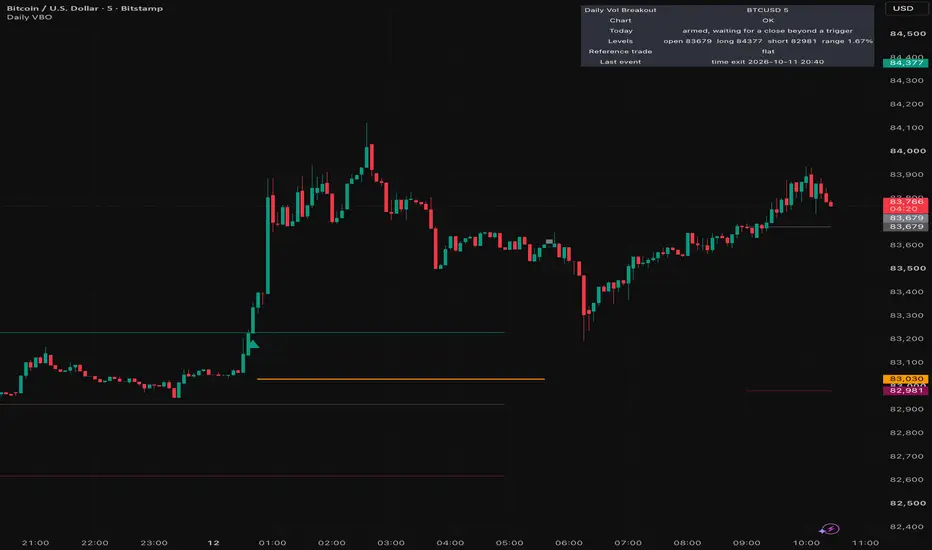
Daily Volatility Breakout marks one breakout per day. At a fixed UTC anchor time it measures how far price travelled over the look-back that just ended, puts a long trigger and a short trigger a fraction of that distance away from the anchor bar's open, and flags the first bar that closes beyond either one. For that signal it draws a reference stop and a reference time exit, and follows the reference trade until one of them is reached.
The question it answers: has today already moved further from its opening price than a meaningful share of yesterday's whole range, and in which direction?
How the Levels Are Calculated
Anchor - every day at the configured UTC time (default 00:00). The anchor open is the open of the bar that starts exactly at that time.
Range - the highest high minus the lowest low of the completed bars in the look-back window that ends at the anchor (default: the prior 24 hours). If too few bars exist in that window, for example after a data gap, the day is skipped and the panel says so.
Triggers - long trigger = anchor open + k x range, short trigger = anchor open - k x range (default k = 0.5).
Signal - the first bar whose close is at or beyond a trigger, among the bars that close inside the signal window (default: the 20 hours after the anchor). Only one signal per day is possible. If the first breakout is in a direction you have filtered out, the day is used up and is not re-armed for the other side. The same happens if the previous reference trade is still open when the breakout comes, which is only possible when the time exit is set later than the next anchor. The status panel records either case as the last event.
Reference entry - the open of the bar after the signal, which is where a market order placed on the signal bar's close would be filled.
Reference stop - stop distance x range away from the reference entry (default 0.5). With the defaults this puts the stop roughly back at the anchor open: a breakout that gives back its whole move has failed.
Reference time exit - the first bar that opens at or after the anchor plus the exit time (default 20.75 hours, which is 20:45 UTC with a 00:00 anchor). There is no profit target.
What Is Different From a Classic Volatility Breakout
Adding a fraction of the previous range to the open is the volatility-breakout idea popularised by Larry Williams. Classic versions read the previous daily bar and enter intrabar on a stop order. This script changes four things:
- The range is a rolling look-back ending at a UTC time you choose, not a calendar day's bar, so it behaves the same on markets that never close and on any intraday timeframe.
- A breakout needs a bar close beyond the trigger, not a touch. A wick that pierces the level and snaps back is not a signal.
- The stop is a fraction of the same range, so the risk unit widens on volatile days and tightens on quiet ones, in proportion to the triggers.
- The reference trade ends at a fixed time of day instead of at a target or on the next session, so every signal has a known maximum holding time.
No code from any other publication is used.
What It Draws
- Anchor open (grey) and the long and short triggers for the signal window.
- Up and down triangles on the bar whose close confirmed a breakout.
- The reference stop (orange) while the reference trade is open.
- A cross on the bar where the stop was touched. A square on the last bar before the time exit; the reference exit itself is the next bar's open.
- A status panel: whether today is armed, skipped or used, the levels with the range as a percentage of price, the open reference trade and the last event.
How to Use It
Use a minute chart, 1-minute to 15-minute; the defaults were designed on 5-minute bars. Seconds charts are not supported. The anchor time must coincide with a bar open on your timeframe, or no day will arm; the panel warns you when that happens, and also when no bar has opened at the anchor for over a day.
The levels are reference points, not instructions. Read the status panel before you act on a triangle: a signal late in the window has much less time left before the exit. What the reference stop and exit are worth depends on your spread, your fees, your financing charges and your own risk rules. The script does not know any of those.
The defaults were designed around 24/7 crypto markets such as Bitcoin and Ether. On markets that close daily or for the weekend, set the anchor and the exit inside trading hours, and expect skipped days around closures.
Settings
Rule - day anchor hour and minute (UTC, default 00:00), range look-back (24 hours), trigger distance (0.5 x range), reference stop distance (0.5 x range), signal window (20 hours), time exit (20.75 hours), minimum look-back coverage (41.7 percent of the expected bars).
Signals - Both, Long only or Short only.
Display - anchor and trigger levels, reference stop, status panel and its position, and colours.
Alerts - "Send detailed alert() messages" (on by default) sends one message per breakout, stop touch and time exit, with the levels filled in. Create the alert with "Any alert() function call". The script also defines four named conditions: Long breakout, Short breakout, Reference stop touched, Reference time exit.
Repaint Policy
The triggers are fixed on the anchor bar from that bar's open and from bars that had already closed. They do not move during the day. Breakouts, stop touches and time exits are evaluated only on confirmed bar closes and are never removed afterwards. Alerts fire once per bar close. Nothing is plotted into the past.
The stop touch is judged on the bar's high and low at its close, so on a live bar the cross appears when the bar closes, not at the moment of the touch.
The script never revises a decision it has made. TradingView itself can rebuild historical bars from its stored data when a chart is reloaded, and those bars can differ slightly from what a live bar showed; that is a property of the data feed, not of this script.
Limitations, Stated Plainly
- One signal per day by design. Many days have no signal at all.
- A rule with one entry a day, a stop and no profit target takes repeated losses in ranging conditions, and its outcome can be dominated by a small number of large moves. Long runs without a winning reference trade are possible.
- The reference entry, stop and exit use chart prices. Real fills include the spread, fees, slippage and, if held past rollover, financing.
- Different data feeds for the same instrument produce slightly different highs, lows and closes, so levels and signals can differ between feeds.
- The anchor and exit are fixed UTC clock times and do not follow daylight-saving changes.
- History is limited by how many bars your TradingView plan loads.
What It Is Not
It does not place orders, size positions or manage risk. It does not know your account, your broker or your costs. A reference trade on the chart is a description of what the rule would do, not a record of a trade.
Disclaimer
This script is a technical indicator. It is NOT financial advice, NOT investment advice and NOT a recommendation to enter or exit any position. Trading leveraged products such as CFDs and crypto derivatives carries a high level of risk and you may lose more than your initial deposit. You are solely responsible for your own trading decisions and their outcomes.
The question it answers: has today already moved further from its opening price than a meaningful share of yesterday's whole range, and in which direction?
How the Levels Are Calculated
Anchor - every day at the configured UTC time (default 00:00). The anchor open is the open of the bar that starts exactly at that time.
Range - the highest high minus the lowest low of the completed bars in the look-back window that ends at the anchor (default: the prior 24 hours). If too few bars exist in that window, for example after a data gap, the day is skipped and the panel says so.
Triggers - long trigger = anchor open + k x range, short trigger = anchor open - k x range (default k = 0.5).
Signal - the first bar whose close is at or beyond a trigger, among the bars that close inside the signal window (default: the 20 hours after the anchor). Only one signal per day is possible. If the first breakout is in a direction you have filtered out, the day is used up and is not re-armed for the other side. The same happens if the previous reference trade is still open when the breakout comes, which is only possible when the time exit is set later than the next anchor. The status panel records either case as the last event.
Reference entry - the open of the bar after the signal, which is where a market order placed on the signal bar's close would be filled.
Reference stop - stop distance x range away from the reference entry (default 0.5). With the defaults this puts the stop roughly back at the anchor open: a breakout that gives back its whole move has failed.
Reference time exit - the first bar that opens at or after the anchor plus the exit time (default 20.75 hours, which is 20:45 UTC with a 00:00 anchor). There is no profit target.
What Is Different From a Classic Volatility Breakout
Adding a fraction of the previous range to the open is the volatility-breakout idea popularised by Larry Williams. Classic versions read the previous daily bar and enter intrabar on a stop order. This script changes four things:
- The range is a rolling look-back ending at a UTC time you choose, not a calendar day's bar, so it behaves the same on markets that never close and on any intraday timeframe.
- A breakout needs a bar close beyond the trigger, not a touch. A wick that pierces the level and snaps back is not a signal.
- The stop is a fraction of the same range, so the risk unit widens on volatile days and tightens on quiet ones, in proportion to the triggers.
- The reference trade ends at a fixed time of day instead of at a target or on the next session, so every signal has a known maximum holding time.
No code from any other publication is used.
What It Draws
- Anchor open (grey) and the long and short triggers for the signal window.
- Up and down triangles on the bar whose close confirmed a breakout.
- The reference stop (orange) while the reference trade is open.
- A cross on the bar where the stop was touched. A square on the last bar before the time exit; the reference exit itself is the next bar's open.
- A status panel: whether today is armed, skipped or used, the levels with the range as a percentage of price, the open reference trade and the last event.
How to Use It
Use a minute chart, 1-minute to 15-minute; the defaults were designed on 5-minute bars. Seconds charts are not supported. The anchor time must coincide with a bar open on your timeframe, or no day will arm; the panel warns you when that happens, and also when no bar has opened at the anchor for over a day.
The levels are reference points, not instructions. Read the status panel before you act on a triangle: a signal late in the window has much less time left before the exit. What the reference stop and exit are worth depends on your spread, your fees, your financing charges and your own risk rules. The script does not know any of those.
The defaults were designed around 24/7 crypto markets such as Bitcoin and Ether. On markets that close daily or for the weekend, set the anchor and the exit inside trading hours, and expect skipped days around closures.
Settings
Rule - day anchor hour and minute (UTC, default 00:00), range look-back (24 hours), trigger distance (0.5 x range), reference stop distance (0.5 x range), signal window (20 hours), time exit (20.75 hours), minimum look-back coverage (41.7 percent of the expected bars).
Signals - Both, Long only or Short only.
Display - anchor and trigger levels, reference stop, status panel and its position, and colours.
Alerts - "Send detailed alert() messages" (on by default) sends one message per breakout, stop touch and time exit, with the levels filled in. Create the alert with "Any alert() function call". The script also defines four named conditions: Long breakout, Short breakout, Reference stop touched, Reference time exit.
Repaint Policy
The triggers are fixed on the anchor bar from that bar's open and from bars that had already closed. They do not move during the day. Breakouts, stop touches and time exits are evaluated only on confirmed bar closes and are never removed afterwards. Alerts fire once per bar close. Nothing is plotted into the past.
The stop touch is judged on the bar's high and low at its close, so on a live bar the cross appears when the bar closes, not at the moment of the touch.
The script never revises a decision it has made. TradingView itself can rebuild historical bars from its stored data when a chart is reloaded, and those bars can differ slightly from what a live bar showed; that is a property of the data feed, not of this script.
Limitations, Stated Plainly
- One signal per day by design. Many days have no signal at all.
- A rule with one entry a day, a stop and no profit target takes repeated losses in ranging conditions, and its outcome can be dominated by a small number of large moves. Long runs without a winning reference trade are possible.
- The reference entry, stop and exit use chart prices. Real fills include the spread, fees, slippage and, if held past rollover, financing.
- Different data feeds for the same instrument produce slightly different highs, lows and closes, so levels and signals can differ between feeds.
- The anchor and exit are fixed UTC clock times and do not follow daylight-saving changes.
- History is limited by how many bars your TradingView plan loads.
What It Is Not
It does not place orders, size positions or manage risk. It does not know your account, your broker or your costs. A reference trade on the chart is a description of what the rule would do, not a record of a trade.
Disclaimer
This script is a technical indicator. It is NOT financial advice, NOT investment advice and NOT a recommendation to enter or exit any position. Trading leveraged products such as CFDs and crypto derivatives carries a high level of risk and you may lose more than your initial deposit. You are solely responsible for your own trading decisions and their outcomes.

Quant developer and Entrepreneur running kenkem.biz
I provide Trading View strategies and MT5 EAs for XAUUSD, BTCUSD with Free Trials.
Just open the Strategy Tester, look at the PF, drawdown, and trade count, then judge my work 🙂
I provide Trading View strategies and MT5 EAs for XAUUSD, BTCUSD with Free Trials.
Just open the Strategy Tester, look at the PF, drawdown, and trade count, then judge my work 🙂
免責事項
これらの情報および投稿は、TradingViewが提供または承認する金融、投資、取引、またはその他の種類の助言もしくは推奨であることを意図したものではなく、またこれらに該当するものでもありません。詳細は利用規約をご覧ください。
Quant developer and Entrepreneur running kenkem.biz
I provide Trading View strategies and MT5 EAs for XAUUSD, BTCUSD with Free Trials.
Just open the Strategy Tester, look at the PF, drawdown, and trade count, then judge my work 🙂
I provide Trading View strategies and MT5 EAs for XAUUSD, BTCUSD with Free Trials.
Just open the Strategy Tester, look at the PF, drawdown, and trade count, then judge my work 🙂
免責事項
これらの情報および投稿は、TradingViewが提供または承認する金融、投資、取引、またはその他の種類の助言もしくは推奨であることを意図したものではなく、またこれらに該当するものでもありません。詳細は利用規約をご覧ください。