OPEN-SOURCE SCRIPT
GFG Candle Countdown MM:SS by Agaam
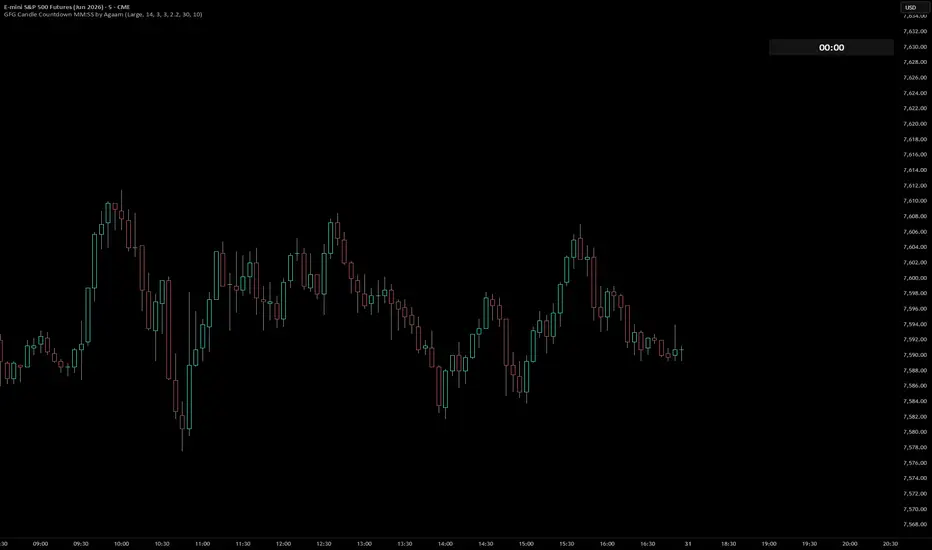
## GFG Candle Countdown MM:SS
**GFG Candle Countdown MM:SS** is a clean chart utility that displays the remaining time of the current candle in a simple **minutes:seconds** format.
The purpose of this script is to help traders quickly see how much time is left before the current candle closes without adding extra labels, signals, arrows, or unnecessary chart clutter. The countdown is displayed in a table on the top-right side of the chart and can be moved lower using the vertical offset settings.
## What This Indicator Does
This indicator calculates the time remaining until the current candle closes by comparing the candle close time with the current real-time clock. The result is shown as a simple countdown in this format:
**MM:SS**
For example:
**02:45**
means there are 2 minutes and 45 seconds left before the current candle closes.
## Why This Script Is Useful
Many traders make decisions near candle close, especially when waiting for confirmation from the current bar. This countdown helps traders see the remaining candle time clearly without needing to look away from the chart.
It can be useful for:
* Waiting for candle close confirmation
* Managing entries near the end of a bar
* Avoiding rushed decisions before a candle finishes
* Monitoring short timeframes during active trading
* Keeping the chart clean while still showing important timing information
## Clean Chart Design
This script is intentionally simple. It does not print candle labels, buy signals, sell signals, trend signals, or extra text. It only shows the countdown timer.
The visual design is meant to stay clean and easy to read:
* Right-side table display
* Only MM:SS text
* Adjustable size
* Adjustable cell width and height
* Adjustable vertical position
* Custom background color
* Custom number color
## Warning Color Option
The indicator includes optional warning colors for traders who want the countdown to change color as the candle gets close to closing.
Users can set:
* Warning color
* Danger color
* Warning seconds
* Danger seconds
For example, the countdown can turn yellow when less than 30 seconds remain and red when less than 10 seconds remain.
This feature is optional and can be turned off for a simple one-color countdown.
## Customization
Users can customize:
* Show or hide the countdown
* Countdown text size
* Table cell width
* Table cell height
* Vertical offset position
* Background color
* Countdown number color
* Warning and danger colors
* Warning and danger timing thresholds
These options allow traders to place the countdown where it fits best on their chart layout.
## Important Notes
This script is a timing utility only. It does not predict price direction, generate trade signals, or provide buy/sell recommendations.
The countdown works on time-based charts where candle close time is available. On chart types where candle close time is not available, the script may display **N/A**.
## Disclaimer
This indicator is for educational and informational purposes only. It is not financial advice and does not guarantee trading results. Trading involves risk, and every trader is responsible for their own decisions.
**GFG Candle Countdown MM:SS** is a clean chart utility that displays the remaining time of the current candle in a simple **minutes:seconds** format.
The purpose of this script is to help traders quickly see how much time is left before the current candle closes without adding extra labels, signals, arrows, or unnecessary chart clutter. The countdown is displayed in a table on the top-right side of the chart and can be moved lower using the vertical offset settings.
## What This Indicator Does
This indicator calculates the time remaining until the current candle closes by comparing the candle close time with the current real-time clock. The result is shown as a simple countdown in this format:
**MM:SS**
For example:
**02:45**
means there are 2 minutes and 45 seconds left before the current candle closes.
## Why This Script Is Useful
Many traders make decisions near candle close, especially when waiting for confirmation from the current bar. This countdown helps traders see the remaining candle time clearly without needing to look away from the chart.
It can be useful for:
* Waiting for candle close confirmation
* Managing entries near the end of a bar
* Avoiding rushed decisions before a candle finishes
* Monitoring short timeframes during active trading
* Keeping the chart clean while still showing important timing information
## Clean Chart Design
This script is intentionally simple. It does not print candle labels, buy signals, sell signals, trend signals, or extra text. It only shows the countdown timer.
The visual design is meant to stay clean and easy to read:
* Right-side table display
* Only MM:SS text
* Adjustable size
* Adjustable cell width and height
* Adjustable vertical position
* Custom background color
* Custom number color
## Warning Color Option
The indicator includes optional warning colors for traders who want the countdown to change color as the candle gets close to closing.
Users can set:
* Warning color
* Danger color
* Warning seconds
* Danger seconds
For example, the countdown can turn yellow when less than 30 seconds remain and red when less than 10 seconds remain.
This feature is optional and can be turned off for a simple one-color countdown.
## Customization
Users can customize:
* Show or hide the countdown
* Countdown text size
* Table cell width
* Table cell height
* Vertical offset position
* Background color
* Countdown number color
* Warning and danger colors
* Warning and danger timing thresholds
These options allow traders to place the countdown where it fits best on their chart layout.
## Important Notes
This script is a timing utility only. It does not predict price direction, generate trade signals, or provide buy/sell recommendations.
The countdown works on time-based charts where candle close time is available. On chart types where candle close time is not available, the script may display **N/A**.
## Disclaimer
This indicator is for educational and informational purposes only. It is not financial advice and does not guarantee trading results. Trading involves risk, and every trader is responsible for their own decisions.
オープンソーススクリプト
TradingViewの精神に則り、このスクリプトの作者はコードをオープンソースとして公開してくれました。トレーダーが内容を確認・検証できるようにという配慮です。作者に拍手を送りましょう!無料で利用できますが、コードの再公開はハウスルールに従う必要があります。

免責事項
これらの情報および投稿は、TradingViewが提供または承認する金融、投資、取引、またはその他の種類の助言もしくは推奨であることを意図したものではなく、またこれらに該当するものでもありません。詳細は利用規約をご覧ください。
オープンソーススクリプト
TradingViewの精神に則り、このスクリプトの作者はコードをオープンソースとして公開してくれました。トレーダーが内容を確認・検証できるようにという配慮です。作者に拍手を送りましょう!無料で利用できますが、コードの再公開はハウスルールに従う必要があります。
免責事項
これらの情報および投稿は、TradingViewが提供または承認する金融、投資、取引、またはその他の種類の助言もしくは推奨であることを意図したものではなく、またこれらに該当するものでもありません。詳細は利用規約をご覧ください。