OPEN-SOURCE SCRIPT
Asset Balance Allocator | TR
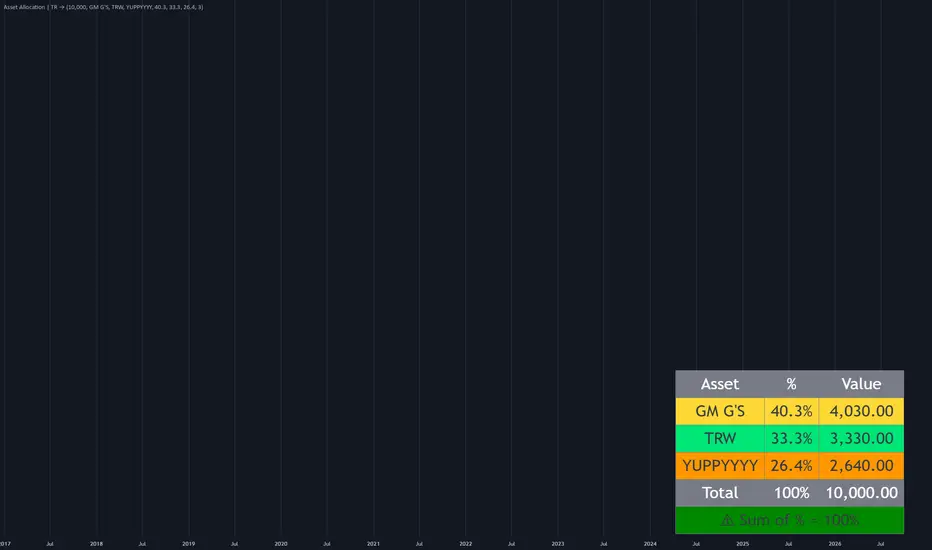
🧾 Asset Balance Allocator – Visual Portfolio Weighting Tool
Asset Balance Allocator is a lightweight, on-chart utility designed for traders, investors, and analysts who need to visualize portfolio allocations instantly. It takes a total cash value and a set of user-defined percentage weights, then calculates and displays the exact monetary amount to allocate to each asset. All information is presented in a clean, color‑coded table positioned at the bottom‑right corner of the chart, making portfolio tracking and hypothetical position sizing simple and accessible without leaving your TradingView workspace.
⚙️ Core Calculations
Total Value (Cash Basis)
User‑defined total portfolio capital (default: $10,000). Used as the base for all allocation calculations.
Percentage Allocation
Each asset is assigned a percentage weight (defaults: Asset 1 = 40.3%, Asset 2 = 33.3%, Asset 3 = 26.4%).
The sum of all percentages must equal 100% for a valid portfolio.
Monetary Amount per Asset
Calculated as:
Amount = (Percentage × Total Value) / 100
Sum Validation (Error Checking)
The indicator automatically verifies that the sum of all percentages is within 0.001 of 100%.
If the sum deviates, a prominent red warning is displayed directly in the table.
🎨 Visual Features
Position & Layout
A compact 3‑column table (Asset, %, Value) anchored to the bottom‑right corner of the chart.
The table includes a header row, individual asset rows, a total row, and a validation status row.
Color‑Coded Asset Rows
Asset 1 – Yellow background
Asset 2 – Lime background
Asset 3 – Orange background (only visible when enabled)
Each cell uses large, highly legible text with high‑contrast black font.
Dynamic Row Visibility
The table dynamically adapts to the user‑selected number of assets (2 or 3).
When only 2 assets are selected, the third row is automatically hidden with empty white cells, keeping the display tidy.
Total Row
A gray‑backed summary row displaying the total combined percentage and the total cash value.
Built‑in Validation Feedback
The final row provides instant visual feedback:
✅ Green background + "⚠ Sum of % = 100%" – configuration is valid.
❌ Red background + "⚠ Sum of % ≠ 100%" – alerts the user to adjust percentages until the sum equals exactly 100%.
🧩 Configuration (User Inputs)
The indicator is highly customizable through the settings panel:
Input Description Default
Total Value (CASH) The total portfolio capital to allocate. $10,000
Number of Assets Toggle between 2 or 3 assets. 3
Asset 1 / 2 / 3 Name Customizable labels for each position. "Asset 1", "Asset 2", "Asset 3"
Percentage % (1–3) Weight of each asset in the portfolio. 40.3 / 33.3 / 26.4
📋 Interpretation & Use Cases
Portfolio Tracking
Instantly see how much capital (in absolute dollars) should be deployed into each asset based on your target weights.
Hypothetical / Simulation
Adjust the total value to simulate different account sizes and instantly see the corresponding position sizes.
Rebalancing Aid
Use the displayed weights to compare against current market values and identify which assets are over/under‑weighted.
Educational Tool
Excellent for teaching beginners how percentage‑based capital allocation translates into real monetary values.
⚠️ Important Notes & Limitations
Static Display
The indicator calculates values only once, on the last historical bar (barstate.islast). It does not plot lines or update dynamically across time – it is purely a snapshot tool for the current configuration.
No Market Data
The allocation is based entirely on user inputs (cash and percentages). It does not fetch live prices, current holdings, or unrealized P&L. It models a target allocation, not a current portfolio state.
Asset Limit
Supports a maximum of 3 assets. For larger portfolios, the code can be extended, but the current UI is optimized for simplicity and clarity.
Rounding
Amounts are formatted to two decimal places (e.g., 4,030.00) using standard currency rounding.
🚀 Summary
Feature Description
Purpose Convert target percentages into cash amounts for up to 3 assets.
Table Position Bottom‑right corner of the chart.
Validation Automatically checks if percentages sum to 100%.
Customization Total cash, asset names, percentages, and number of assets.
Output Displays Asset, %, and $ Amount for each asset, plus a total and status row.
This indicator is the perfect companion for systematic traders who want a quick, no‑nonsense reference for their planned capital allocation, right on their main chart view.
Asset Balance Allocator is a lightweight, on-chart utility designed for traders, investors, and analysts who need to visualize portfolio allocations instantly. It takes a total cash value and a set of user-defined percentage weights, then calculates and displays the exact monetary amount to allocate to each asset. All information is presented in a clean, color‑coded table positioned at the bottom‑right corner of the chart, making portfolio tracking and hypothetical position sizing simple and accessible without leaving your TradingView workspace.
⚙️ Core Calculations
Total Value (Cash Basis)
User‑defined total portfolio capital (default: $10,000). Used as the base for all allocation calculations.
Percentage Allocation
Each asset is assigned a percentage weight (defaults: Asset 1 = 40.3%, Asset 2 = 33.3%, Asset 3 = 26.4%).
The sum of all percentages must equal 100% for a valid portfolio.
Monetary Amount per Asset
Calculated as:
Amount = (Percentage × Total Value) / 100
Sum Validation (Error Checking)
The indicator automatically verifies that the sum of all percentages is within 0.001 of 100%.
If the sum deviates, a prominent red warning is displayed directly in the table.
🎨 Visual Features
Position & Layout
A compact 3‑column table (Asset, %, Value) anchored to the bottom‑right corner of the chart.
The table includes a header row, individual asset rows, a total row, and a validation status row.
Color‑Coded Asset Rows
Asset 1 – Yellow background
Asset 2 – Lime background
Asset 3 – Orange background (only visible when enabled)
Each cell uses large, highly legible text with high‑contrast black font.
Dynamic Row Visibility
The table dynamically adapts to the user‑selected number of assets (2 or 3).
When only 2 assets are selected, the third row is automatically hidden with empty white cells, keeping the display tidy.
Total Row
A gray‑backed summary row displaying the total combined percentage and the total cash value.
Built‑in Validation Feedback
The final row provides instant visual feedback:
✅ Green background + "⚠ Sum of % = 100%" – configuration is valid.
❌ Red background + "⚠ Sum of % ≠ 100%" – alerts the user to adjust percentages until the sum equals exactly 100%.
🧩 Configuration (User Inputs)
The indicator is highly customizable through the settings panel:
Input Description Default
Total Value (CASH) The total portfolio capital to allocate. $10,000
Number of Assets Toggle between 2 or 3 assets. 3
Asset 1 / 2 / 3 Name Customizable labels for each position. "Asset 1", "Asset 2", "Asset 3"
Percentage % (1–3) Weight of each asset in the portfolio. 40.3 / 33.3 / 26.4
📋 Interpretation & Use Cases
Portfolio Tracking
Instantly see how much capital (in absolute dollars) should be deployed into each asset based on your target weights.
Hypothetical / Simulation
Adjust the total value to simulate different account sizes and instantly see the corresponding position sizes.
Rebalancing Aid
Use the displayed weights to compare against current market values and identify which assets are over/under‑weighted.
Educational Tool
Excellent for teaching beginners how percentage‑based capital allocation translates into real monetary values.
⚠️ Important Notes & Limitations
Static Display
The indicator calculates values only once, on the last historical bar (barstate.islast). It does not plot lines or update dynamically across time – it is purely a snapshot tool for the current configuration.
No Market Data
The allocation is based entirely on user inputs (cash and percentages). It does not fetch live prices, current holdings, or unrealized P&L. It models a target allocation, not a current portfolio state.
Asset Limit
Supports a maximum of 3 assets. For larger portfolios, the code can be extended, but the current UI is optimized for simplicity and clarity.
Rounding
Amounts are formatted to two decimal places (e.g., 4,030.00) using standard currency rounding.
🚀 Summary
Feature Description
Purpose Convert target percentages into cash amounts for up to 3 assets.
Table Position Bottom‑right corner of the chart.
Validation Automatically checks if percentages sum to 100%.
Customization Total cash, asset names, percentages, and number of assets.
Output Displays Asset, %, and $ Amount for each asset, plus a total and status row.
This indicator is the perfect companion for systematic traders who want a quick, no‑nonsense reference for their planned capital allocation, right on their main chart view.
オープンソーススクリプト
TradingViewの精神に則り、このスクリプトの作者はコードをオープンソースとして公開してくれました。トレーダーが内容を確認・検証できるようにという配慮です。作者に拍手を送りましょう!無料で利用できますが、コードの再公開はハウスルールに従う必要があります。

免責事項
これらの情報および投稿は、TradingViewが提供または承認する金融、投資、取引、またはその他の種類の助言もしくは推奨であることを意図したものではなく、またこれらに該当するものでもありません。詳細は利用規約をご覧ください。
オープンソーススクリプト
TradingViewの精神に則り、このスクリプトの作者はコードをオープンソースとして公開してくれました。トレーダーが内容を確認・検証できるようにという配慮です。作者に拍手を送りましょう!無料で利用できますが、コードの再公開はハウスルールに従う必要があります。
免責事項
これらの情報および投稿は、TradingViewが提供または承認する金融、投資、取引、またはその他の種類の助言もしくは推奨であることを意図したものではなく、またこれらに該当するものでもありません。詳細は利用規約をご覧ください。