Event Window - Prop Rules
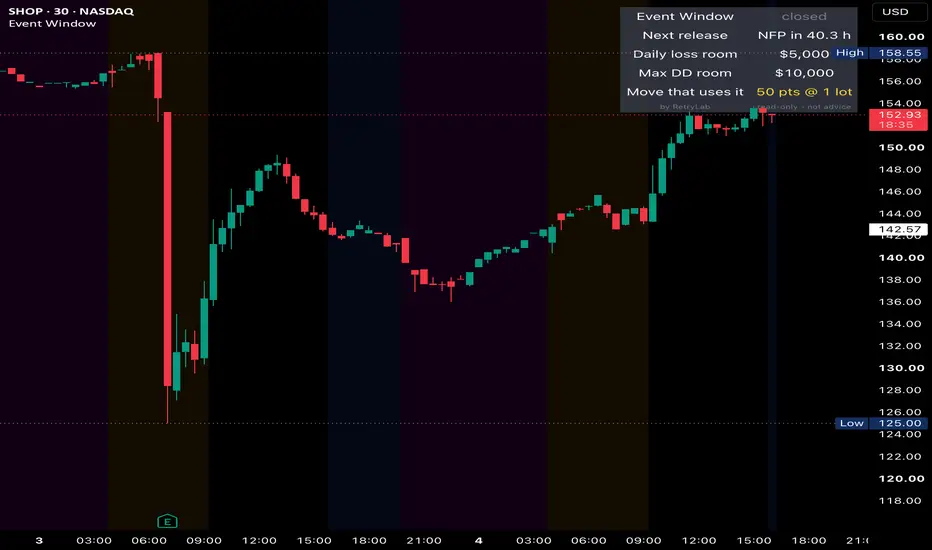
This indicator highlights the period around scheduled economic releases such as NFP, CPI and FOMC. Next to the chart it shows how much room your prop account has left before the daily loss limit or the max drawdown.
What it does
- Shades the chart from a set number of minutes before each release to a set number of minutes after it (15 minutes before and 2 hours after by default).
- Marks the exact release time on the chart.
- Sends an alert when a window opens and when it closes.
- Shows a panel with the next release and a countdown, the room left to your daily loss limit, the room left to your max drawdown, and the price move that would use up that room at your current position size.
How to use it
1. Enter up to four release times in UTC (NFP, CPI and FOMC are preset, and there is one custom slot). Check the official economic calendar and update the dates before each release.
2. Fill in your account size, daily loss limit %, max drawdown %, today's P&L and the drawdown you've already used. The indicator can't read your account, so these values are manual and you update them yourself.
3. Set your position size and the dollar value of a 1.0 price move per contract or lot. Examples: XAUUSD on most brokers is $100 per 1.0 move per lot, NQ is $20 per point, MNQ $2, ES $50, MES $5.
4. For alerts, create one alert on the indicator with "Any alert() function call".
Notes
- It is read-only and never places, changes or closes trades.
- Event times aren't loaded automatically. If a release is moved, update the time by hand.
- The room-to-limit numbers depend entirely on the values you enter, so check them against your prop firm's dashboard.
- For education only, not financial advice.
Original code by RetryLab, published under the Mozilla Public License 2.0.
What it does
- Shades the chart from a set number of minutes before each release to a set number of minutes after it (15 minutes before and 2 hours after by default).
- Marks the exact release time on the chart.
- Sends an alert when a window opens and when it closes.
- Shows a panel with the next release and a countdown, the room left to your daily loss limit, the room left to your max drawdown, and the price move that would use up that room at your current position size.
How to use it
1. Enter up to four release times in UTC (NFP, CPI and FOMC are preset, and there is one custom slot). Check the official economic calendar and update the dates before each release.
2. Fill in your account size, daily loss limit %, max drawdown %, today's P&L and the drawdown you've already used. The indicator can't read your account, so these values are manual and you update them yourself.
3. Set your position size and the dollar value of a 1.0 price move per contract or lot. Examples: XAUUSD on most brokers is $100 per 1.0 move per lot, NQ is $20 per point, MNQ $2, ES $50, MES $5.
4. For alerts, create one alert on the indicator with "Any alert() function call".
Notes
- It is read-only and never places, changes or closes trades.
- Event times aren't loaded automatically. If a release is moved, update the time by hand.
- The room-to-limit numbers depend entirely on the values you enter, so check them against your prop firm's dashboard.
- For education only, not financial advice.
Original code by RetryLab, published under the Mozilla Public License 2.0.

PropTraderz
免責事項
これらの情報および投稿は、TradingViewが提供または承認する金融、投資、取引、またはその他の種類の助言もしくは推奨であることを意図したものではなく、またこれらに該当するものでもありません。詳細は利用規約をご覧ください。
PropTraderz
免責事項
これらの情報および投稿は、TradingViewが提供または承認する金融、投資、取引、またはその他の種類の助言もしくは推奨であることを意図したものではなく、またこれらに該当するものでもありません。詳細は利用規約をご覧ください。