FullerOSOBSQZ v1.1.22
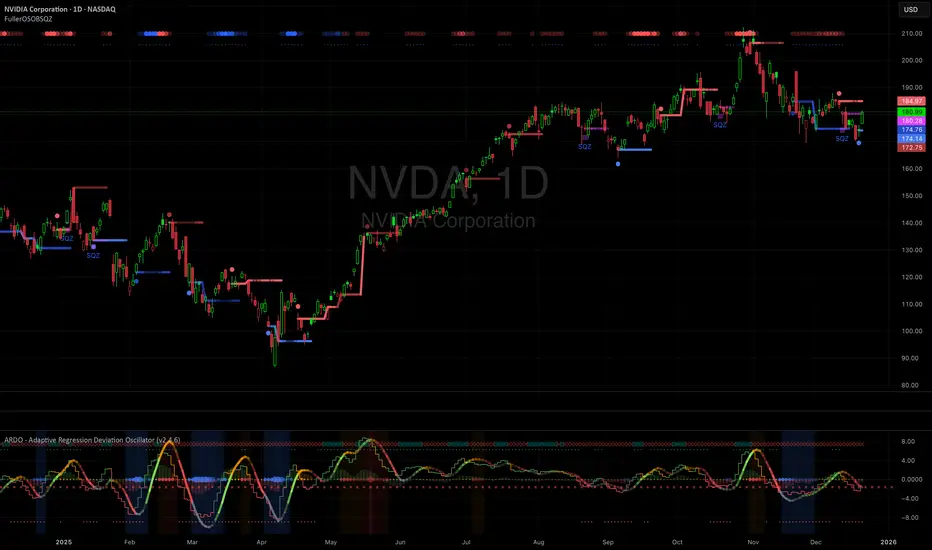
FullerOSOBSQZ v1.1.x — OS/OB Levels + Squeeze Anchor + Slope Accel + Alerts
Core Concepts
How to read the plots
Settings — What they do and how changing them affects signals
1) Base Triggers
2) Base Lines
3) Refined Triggers
4) Refined Colors + Widths
5) Trend Context
6) Squeeze
7) Markers
Alerts (built-in alertconditions)
Suggested workflows
Notes
- What this script does
- Plots Oversold (OS) and Overbought (OB) price levels as horizontal segments (line breaks) that persist for a configurable number of bars.
- Tracks two layers of OS/OB logic:
- Base triggers (broader detection)
- Refined triggers (stricter pattern match layered on top of Base)
- Plots a Squeeze anchor level during squeeze “ON” runs and provides squeeze lifecycle alerts (start/release + bull/bear release).
- Optionally plots OS/OB start markers (seed points) and slope-acceleration markers for momentum context.
- Provides alertconditions for starts, active lines, price interactions, within-N-bar follow-through, squeeze lifecycle, and hold/confirm.
Core Concepts
- Mutually inclusive Base + Refined
- Refined logic is not a competing system. It is a stricter confirmation layer on top of the Base logic.
- You can use Base levels as the “watch” context, and Refined levels as a higher-confidence confirmation (or display both).
- Line segments (line breaks)
- OS/OB levels are drawn as horizontal segments using line-break style plotting. Each segment represents a “reference level” that remains valid for a limited number of bars after it triggers.
- If a new, more extreme OS/OB triggers while a prior one is active, the plot will step to the new level (by design).
How to read the plots
- OS Levels (below price)
- These are support reference levels. Common reads:
- Touch: price trades into the OS line.
- Reclaim: close crosses back above the OS line.
- Bounce: price dips below OS intrabar but closes above it (same bar).
- Hold/Confirm: close stays above OS for N consecutive bars.
- These are support reference levels. Common reads:
- OB Levels (above price)
- These are resistance reference levels. Common reads:
- Touch: price trades into the OB line.
- Reject: price trades above/into OB but closes back below it.
- Breakout: close crosses above OB.
- Hold/Confirm: close stays below OB for N consecutive bars (bear confirmation) or use breakout/hold logic for bull continuation.
- These are resistance reference levels. Common reads:
- Squeeze Anchor
- When squeeze is ON, the script anchors a reference line from the first ON bar and holds it for the duration of the continuous squeeze run.
- On squeeze release (OFF), you can interpret direction by where price closes relative to the anchor.
- Slope Acceleration Markers
- These markers highlight momentum inflection behavior derived from the internal regression/slope logic.
- If you see fewer markers than another script, it usually means the underlying trend-gate and/or slope parameters differ (not that the feature is “missing”).
Settings — What they do and how changing them affects signals
1) Base Triggers
- Controls the Base OS/OB detection layer.
- Changing Base thresholds generally affects:
- Frequency: looser = more lines; stricter = fewer lines
- Quality: stricter = fewer but cleaner levels
- Responsiveness: shorter lookbacks = faster reacting, more noise; longer = slower, smoother
2) Base Lines
- Controls the Base OS/OB plotted appearance and segmentation length.
- Segment length (forward bars): longer = level remains visible/valid longer; shorter = faster turnover and fewer active segments.
- Line width: purely visual emphasis (does not change the underlying detection).
3) Refined Triggers
- Controls the stricter confirmation layer (Refined OS/OB).
- Refined triggers typically reduce false positives but may occur later than Base.
- Use Refined when you want: “Only alert me on the higher-confidence pattern.”
4) Refined Colors + Widths
- Color and width controls for Refined levels.
- Recommended usage:
- Keep Base slightly lighter/less prominent.
- Make Refined more prominent so confirmations stand out.
5) Trend Context
- Trend SMA length (default 62)
- Shorter SMA = more sensitive trend context (more “below trend” flips).
- Longer SMA = slower trend context (fewer flips, more stability).
- Trend mode affects how some context cues render (for example, whether certain momentum markers appear in “below-trend” context).
6) Squeeze
- Squeeze ON indicates compression conditions. The script plots a held anchor line during the ON run.
- Per-bar render vs static
- Per-bar render updates opacity per bar while squeeze is ON (based on your selected strength model).
- Static render keeps the anchor appearance constant through the run.
- Squeeze opacity model selection
- Compression ratio: based on 1 − (BB width / KC width). Higher = tighter squeeze.
- Z-score style: normalizes the BB/KC ratio over a lookback and maps extremes to opacity.
- Duration boost: increases opacity with consecutive ON bars up to a cap.
- Changing squeeze settings affects:
- How early/late squeeze turns ON/OFF
- How aggressively “tightness” is visually emphasized
- How frequently bull/bear release alerts fire
7) Markers
- OS/OB Start markers
- Shows the first bar where an OS/OB segment begins (Base and/or Refined).
- Useful for “N bars after start” logic and for validating what bar started a segment.
Alerts (built-in alertconditions)
- Start alerts
- OS Start (Any) — Base OR Refined start.
- OB Start (Any) — Base OR Refined start.
- Active line alerts (true while a line is plotted)
- OS Active (Any line)
- OB Active (Any line)
- Price interaction alerts
- OS Touch (Any)
- OS Reclaim (Any) — close crosses above OS line
- OS Bounce (Any) — low below OS line and close above
- OS Breakdown (Any) — close crosses below OS line
- OB Touch (Any)
- OB Reject (Any) — price probes above/into OB and closes below
- OB Breakout (Any) — close crosses above OB line
- OB Breakdown (Any)
- Within N bars after start alerts
- Uses the setting: Within N bars after start (default 5).
- OS Reclaim within N bars
- OS Bounce within N bars
- OS Breakdown within N bars
- OB Reject within N bars
- OB Breakout within N bars
- OB Breakdown within N bars
- Hold/Confirm alerts
- OS Hold/Confirm (N closes above) — first bar where close stayed above OS for N consecutive bars.
- OB Hold/Confirm (N closes below) — first bar where close stayed below OB for N consecutive bars.
- SQZ lifecycle alerts
- SQZ Start
- SQZ Release
- SQZ Bull Release — release bar close > SQZ anchor
- SQZ Bear Release — release bar close < SQZ anchor
Suggested workflows
- Bottom / bounce workflow
- Watch: OS Start (Any) or OS Touch (Any)
- Confirm: OS Reclaim within N bars + OS Hold/Confirm
- Context: SQZ ON and/or SQZ Bull Release to time expansion
- Top / rejection workflow
- Watch: OB Start (Any) or OB Touch (Any)
- Confirm: OB Reject within N bars (or OB Breakdown)
- Context: SQZ Bear Release to time expansion lower
Notes
- “Active line” alerts will be true on every bar while the line is present. For one-shot alerts, prefer the Start or Within-N-bar alerts.
- If you change trend, slope, or squeeze parameters compared to a framework strategy script, you should expect differences in marker density and background behavior. The signal is highly parameter-dependent.
- “Oversold/Overbought” levels are currently hardcoded, future version will open up configuration settings.

免責事項
これらの情報および投稿は、TradingViewが提供または承認する金融、投資、取引、またはその他の種類の助言もしくは推奨であることを意図したものではなく、またこれらに該当するものでもありません。詳細は利用規約をご覧ください。
免責事項
これらの情報および投稿は、TradingViewが提供または承認する金融、投資、取引、またはその他の種類の助言もしくは推奨であることを意図したものではなく、またこれらに該当するものでもありません。詳細は利用規約をご覧ください。