アップデート済
L1 Moving Average Fingerprint for Long Entry
Level: 1
Background
This script combines moving average processing with highest high and lowest low to disclose the "fingerprint" of a specific trading pair to describe its unique behavior.
Function
Moving Average Fingerprint for Long Entry is a Level 1 pine script. It utilize several moving average of inherent highest high and lowest low and combine them with customized fingerprint coefficients to depict the unique behavior of a specific trading pair across multiple markets for long entry point identification.
Key Signal
Pros and Cons
Pros:
*1. Combine moving average and extreme points to disclose a trading pair behavior.
*2. Smart to tune specific set of parameters to obtain unique fingerprints of trading pairs.
*3. Smart position sizing scheme by adjusting the threshold values.
Cons:
*1. Require tune input parameters for each trading pair in a specific period and time frame.
*2. Only long entry was studied, no short entry and re-entry are available yet to form as a trading system.
*3. "ReadytoLong" is an inaccurate range where multiple long entries may happen at improper points in chop market.
*4. Complex input parameters to obtain a unique fingerprint set.
Remarks
Although I wrote pine script for more than two years, this is the first script published in the community. I will publish more with my works in this platform.
Hope the community can improve this concept and make it as a trading system.
Readme
In real life, I am a prolific inventor. I have successfully applied for more than 60 international and regional patents in the past 12 years. But in the past two years or so, I have tried to transfer my creativity to the development of trading strategies. Tradingview is the ideal platform for me. I am selecting and contributing some of the hundreds of scripts to publish in Tradingview community. Welcome everyone to interact with me to discuss these interesting pine scripts.
The scripts posted are categorized into 5 levels according to my efforts or manhours put into these works.
Level 1 : interesting script snippets or distinctive improvement from classic indicators or strategy. Level 1 scripts can usually appear in more complex indicators as a function module or element.
Level 2 : composite indicator/strategy. By selecting or combining several independent or dependent functions or sub indicators in proper way, the composite script exhibits a resonance phenomenon which can filter out noise or fake trading signal to enhance trading confidence level.
Level 3 : comprehensive indicator/strategy. They are simple trading systems based on my strategies. They are commonly containing several or all of entry signal, close signal, stop loss, take profit, re-entry, risk management, and position sizing techniques. Even some interesting fundamental and mass psychological aspects are incorporated.
Level 4 : script snippets or functions that do not disclose source code. Interesting element that can reveal market laws and work as raw material for indicators and strategies. If you find Level 1~2 scripts are helpful, Level 4 is a private version that took me far more efforts to develop.
Level 5 : indicator/strategy that do not disclose source code. private version of Level 3 script with my accumulated script processing skills or a large number of custom functions. I had a private function library built in past two years. Level 5 scripts use many of them to achieve private trading strategy.
Background
This script combines moving average processing with highest high and lowest low to disclose the "fingerprint" of a specific trading pair to describe its unique behavior.
Function
Moving Average Fingerprint for Long Entry is a Level 1 pine script. It utilize several moving average of inherent highest high and lowest low and combine them with customized fingerprint coefficients to depict the unique behavior of a specific trading pair across multiple markets for long entry point identification.
Key Signal
- FingerPrint1~6 are basic-level fingerprints with moving average of highest high and lowest low.
- FingerPrint7~8 are composite fingerprint definitions with coefficients/weights,where coefficients/weights need to be tuned to discover the inherent "fingerprint" of a specific trading pair.
- FingerPrint10~12 are composite fingerprint calculation for long entry alerts
- ReadytoLong is a long entry filter where long entry point may happen within it. By using crossover() function to a customized threshold value, you can define accurate long entries.
Pros and Cons
Pros:
*1. Combine moving average and extreme points to disclose a trading pair behavior.
*2. Smart to tune specific set of parameters to obtain unique fingerprints of trading pairs.
*3. Smart position sizing scheme by adjusting the threshold values.
Cons:
*1. Require tune input parameters for each trading pair in a specific period and time frame.
*2. Only long entry was studied, no short entry and re-entry are available yet to form as a trading system.
*3. "ReadytoLong" is an inaccurate range where multiple long entries may happen at improper points in chop market.
*4. Complex input parameters to obtain a unique fingerprint set.
Remarks
Although I wrote pine script for more than two years, this is the first script published in the community. I will publish more with my works in this platform.
Hope the community can improve this concept and make it as a trading system.
Readme
In real life, I am a prolific inventor. I have successfully applied for more than 60 international and regional patents in the past 12 years. But in the past two years or so, I have tried to transfer my creativity to the development of trading strategies. Tradingview is the ideal platform for me. I am selecting and contributing some of the hundreds of scripts to publish in Tradingview community. Welcome everyone to interact with me to discuss these interesting pine scripts.
The scripts posted are categorized into 5 levels according to my efforts or manhours put into these works.
Level 1 : interesting script snippets or distinctive improvement from classic indicators or strategy. Level 1 scripts can usually appear in more complex indicators as a function module or element.
Level 2 : composite indicator/strategy. By selecting or combining several independent or dependent functions or sub indicators in proper way, the composite script exhibits a resonance phenomenon which can filter out noise or fake trading signal to enhance trading confidence level.
Level 3 : comprehensive indicator/strategy. They are simple trading systems based on my strategies. They are commonly containing several or all of entry signal, close signal, stop loss, take profit, re-entry, risk management, and position sizing techniques. Even some interesting fundamental and mass psychological aspects are incorporated.
Level 4 : script snippets or functions that do not disclose source code. Interesting element that can reveal market laws and work as raw material for indicators and strategies. If you find Level 1~2 scripts are helpful, Level 4 is a private version that took me far more efforts to develop.
Level 5 : indicator/strategy that do not disclose source code. private version of Level 3 script with my accumulated script processing skills or a large number of custom functions. I had a private function library built in past two years. Level 5 scripts use many of them to achieve private trading strategy.
リリースノート
UP GRADE TO PINE V6:OVERVIEW This indicator identifies optimal conditions for initiating long trades by analyzing smoothed moving average fingerprints derived from price action patterns across multiple timeframes. It provides tiered readiness scores displayed visually with color-coded backgrounds and directional icons signaling small/middle/large position sizing opportunities.
FEATURES
• Utilizes proprietary XSA (eXponential Smoothing Adaptation) algorithm for robust averaging calculations
• Generates twelve progressive fingerprint layers combining highest highs/lowest lows with weighted coefficients
• Creates three distinct entry tiers through threshold-based crossover triggers
• Includes fully customizable parameter controls for gene lengths (MAGene#), coefficient weights (FPCoeff#), and lookback windows
• Dynamic visualization system highlights market preparedness states
HOW TO USE
Add the script to your trading view chart
Fine-tune parameters according to desired risk profile and timeframe analysis • Shorter MAGene values increase responsiveness → higher false signals risk • Longer FPLookback extends historical pattern recognition window
Monitor colored backdrop for baseline sentiment indication: [color=#00FF00]Green[/color] – Increasing long opportunity likelihood
Initiate orders upon arrow appearance below candlesticks:
Yellow ▲: Risk 1% capital (low confidence)
Lime ▲▲: Risk 2% (moderate confidence)
Green ▲▲▲: Risk 3%+ (high confidence)
LIMITATIONS
• Heavy reliance on past volatility patterns may delay responses during sudden trend reversals
• Optimal performance observed in trending markets rather than ranging conditions
• Requires iterative backtesting to calibrate parameter combinations effectively
NOTES
• Critical to maintain consistent parameter relationships between MAGene# and corresponding FP Coefficients groups
• Backtesting recommended with 'What If' scenarios for varying market regimes
リリースノート
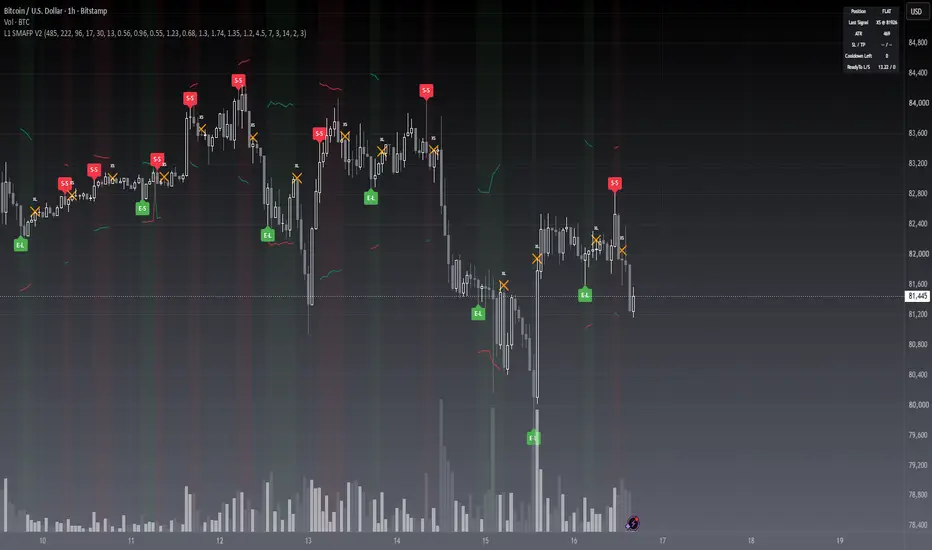
█ OVERVIEWThis indicator converts a smoothed fingerprint of price extremes into tiered long and short entry signals with matching exit markers. It displays entry labels, exit crosses, ATR-based stop-loss and take-profit reference lines, position shading, and a status dashboard directly on the price chart.
█ CONCEPTS
This indicator utilizes a smoothed extreme-price fingerprint engine to identify potential entry and exit points in both market directions.
Key principles:
• Fingerprint Engine: bands built from smoothed highest-high and lowest-low extremes are blended into a composite pulse line.
• Tiered Triggers: three ascending thresholds classify each signal as Small, Middle, or Large strength.
• Signal Governance: position-state tracking, a cooldown between signals, and same-bar entry/exit exclusivity suppress signal noise.
• ATR Risk Levels: stop-loss and take-profit references adapt to current volatility.
█ HOW TO USE
1 — Add the script to a standard candlestick chart and observe its default behavior first.
2 — Track the Status Dashboard (top-right) for position state, last signal, ATR, and SL/TP levels.
3 — For long-only trading (e.g. spot accounts), disable "Enable Short Signals"; long exits will then rely on the fingerprint-fade condition.
4 — Create alerts from the four exposed conditions: Long Entry, Short Entry, Long Exit, Short Exit.
Input Parameters
• MAGene1 / MAGene2 / MAGene3: lookback lengths of the three extreme-high and extreme-low fingerprint bands (defaults 485 / 222 / 96).
• MALookback: smoothing length applied to every fingerprint band (default 17).
• FPLookback: lookback of the highest/lowest envelope of the composite fingerprint (default 30).
• Extreme Lookback (Signal Gate): short extreme-length that gates when a fingerprint pulse may form (default 13).
• FPCoeff1 .. FPCoeff8: weighting coefficients that blend the fingerprint bands into the composite line; defaults preserve the original calibration.
• Small / Middle / Large Order Threshold: the three entry trigger levels in ascending strength (defaults 1.2 / 4.5 / 7.0).
• Enable Short Signals: turn off to restrict the script to long entries and long exits only (default on).
• Cooldown Bars: minimum number of bars between two state changes; 0 disables the cooldown (default 3).
• Same-bar Entry/Exit Exclusivity: when on, exits take priority over entries on the same bar (default on).
• Show TP/SL Levels: show or hide the stop-loss and take-profit lines (default on).
• ATR Length: averaging length of the ATR used for SL/TP distances (default 14).
• Stop Loss (xATR) / Take Profit (xATR): SL and TP distances as multiples of ATR from entry (defaults 2.0 / 3.0).
• Legacy plotchar Markers: re-display the V1-style S/M/L triangle markers as a fallback (default off; labels replace them).
• Show Position Background: green/red chart background tint while a long/short state is active (default on).
• Show Dashboard: the top-right status table (default on).
█ SIGNALS
Entry and Exit Labels
• Green E-S / E-M / E-L below a bar: long entry, tier Small / Middle / Large (ascending strength).
• Red S-S / S-M / S-L above a bar: short entry, same tiering.
• Orange cross XL / XS: long / short exit; the position state returns to flat.
Background and Lines
• Light green tint: long position state active; light red tint: short state active; no tint: flat.
• Red stepped line: ATR-based stop-loss reference from the entry price.
• Teal stepped line: ATR-based take-profit reference from the entry price.
• Both lines are planning references only — they disappear after an exit and never place orders.
Dashboard and Data Window
• Position: LONG / SHORT / FLAT; Last Signal: most recent event with its price.
• ATR and SL / TP: current volatility and reference levels ("—" while flat).
• Cooldown Left: bars remaining before a new state change is allowed.
• ReadyTo L/S: raw pulse values, also visible in the Data Window; Position State: +1 long / -1 short / 0 flat.
Alerts
• Long Entry / Short Entry / Long Exit / Short Exit — all evaluated on bar close, so messages reference confirmed prices; in-trade messages include the signal tier and price.
█ LIMITATIONS
• Calibrated for timeframes of one hour and above; the long default lookbacks need substantial chart history and may stay blank on very short timeframes.
• Ranging, choppy markets produce more whipsaw exits; the cooldown and exclusivity filters reduce but do not eliminate this.
• TP/SL lines are visualization references only — the script places no orders and models no slippage or gaps.
• The first bars of a chart show blank values while the lookbacks warm up.
█ NOTES
• Recommended markets: liquid trending instruments (major crypto pairs, index futures, large-cap FX); disable shorts for long-only accounts.
• Signal tiers (S/M/L) can be used to scale position size; combine the SL/TP lines with your own risk rules.
• All thresholds are exposed as inputs with the original calibration as defaults, so behavior can be tuned or reverted without editing code.
• This script is for educational and informational purposes only and is not financial advice. Always test on a demo environment and manage your own risk before trading real capital.
════════════════════════════════════════════════════════════════════════
For questions or feedback, please use the comments section below.

Don't miss out! The first and most important thing to do is to join my Discord chat now! Click here to start your adventure: discord.com/invite/ZTGpQJq My new github for more pine development soon: github.com/wxt-coder
免責事項
これらの情報および投稿は、TradingViewが提供または承認する金融、投資、取引、またはその他の種類の助言もしくは推奨であることを意図したものではなく、またこれらに該当するものでもありません。詳細は利用規約をご覧ください。
Don't miss out! The first and most important thing to do is to join my Discord chat now! Click here to start your adventure: discord.com/invite/ZTGpQJq My new github for more pine development soon: github.com/wxt-coder
免責事項
これらの情報および投稿は、TradingViewが提供または承認する金融、投資、取引、またはその他の種類の助言もしくは推奨であることを意図したものではなく、またこれらに該当するものでもありません。詳細は利用規約をご覧ください。