OPEN-SOURCE SCRIPT
SkaleHub Zones [Level 2]
Overview
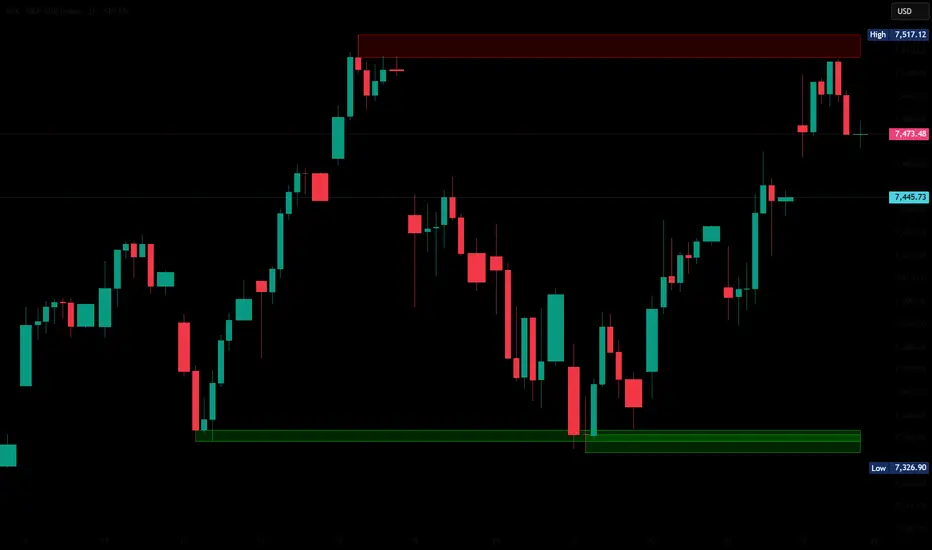
The first premium tool in the SkaleHub Advanced progression suite. This algorithm mathematically identifies historical pivot points and automatically draws institutional Supply and Demand (Support and Resistance) zones across your chart.
The Edge
Amateurs trade in the middle of nowhere; professionals wait for price to come to areas of high liquidity. This script automates that patience, eliminating the tedious daily routine of manually drawing support and resistance lines, and dynamically adapting as new price action unfolds.
Key Features:
Automated Zone Plotting: Accurately maps out historical swing highs and lows, drawing clean, shaded areas that represent real institutional order blocks.
Smart Mitigation (Auto-Delete): The algorithm extends active zones indefinitely but immediately stops plotting them the moment a candle closes beyond the zone, keeping your chart free of broken, obsolete lines.
Patience Enforcer: Systemizes your trading by visually showing you exactly where to do business. No trades should be taken unless price enters one of these auto-drawn SkaleHub Zones.
How to Use
Apply the indicator to your chart.
Wait for the market to enter a drawn zone.
Do not trade immediately upon entry. Once price enters a Level 2 Zone, drop to a lower timeframe and wait for momentum to shift in your favor before executing.
If a candle closes completely outside a zone, the zone will stop extending. This represents a breakout and a shift in market structure.
Author's Note
This is a premium, Invite-Only script. It is Level 2 of the SkaleHub Training System. To gain access to this script and the subsequent algorithmic trigger tools, your TradingView username must be explicitly authorized through the SkaleHub Academy.
The first premium tool in the SkaleHub Advanced progression suite. This algorithm mathematically identifies historical pivot points and automatically draws institutional Supply and Demand (Support and Resistance) zones across your chart.
The Edge
Amateurs trade in the middle of nowhere; professionals wait for price to come to areas of high liquidity. This script automates that patience, eliminating the tedious daily routine of manually drawing support and resistance lines, and dynamically adapting as new price action unfolds.
Key Features:
Automated Zone Plotting: Accurately maps out historical swing highs and lows, drawing clean, shaded areas that represent real institutional order blocks.
Smart Mitigation (Auto-Delete): The algorithm extends active zones indefinitely but immediately stops plotting them the moment a candle closes beyond the zone, keeping your chart free of broken, obsolete lines.
Patience Enforcer: Systemizes your trading by visually showing you exactly where to do business. No trades should be taken unless price enters one of these auto-drawn SkaleHub Zones.
How to Use
Apply the indicator to your chart.
Wait for the market to enter a drawn zone.
Do not trade immediately upon entry. Once price enters a Level 2 Zone, drop to a lower timeframe and wait for momentum to shift in your favor before executing.
If a candle closes completely outside a zone, the zone will stop extending. This represents a breakout and a shift in market structure.
Author's Note
This is a premium, Invite-Only script. It is Level 2 of the SkaleHub Training System. To gain access to this script and the subsequent algorithmic trigger tools, your TradingView username must be explicitly authorized through the SkaleHub Academy.
オープンソーススクリプト
TradingViewの精神に則り、このスクリプトの作者はコードをオープンソースとして公開してくれました。トレーダーが内容を確認・検証できるようにという配慮です。作者に拍手を送りましょう!無料で利用できますが、コードの再公開はハウスルールに従う必要があります。

Beau Green
Founder of SkaleHub
Founder of SkaleHub
免責事項
これらの情報および投稿は、TradingViewが提供または承認する金融、投資、取引、またはその他の種類の助言もしくは推奨であることを意図したものではなく、またこれらに該当するものでもありません。詳細は利用規約をご覧ください。
オープンソーススクリプト
TradingViewの精神に則り、このスクリプトの作者はコードをオープンソースとして公開してくれました。トレーダーが内容を確認・検証できるようにという配慮です。作者に拍手を送りましょう!無料で利用できますが、コードの再公開はハウスルールに従う必要があります。
Beau Green
Founder of SkaleHub
Founder of SkaleHub
免責事項
これらの情報および投稿は、TradingViewが提供または承認する金融、投資、取引、またはその他の種類の助言もしくは推奨であることを意図したものではなく、またこれらに該当するものでもありません。詳細は利用規約をご覧ください。