OPEN-SOURCE SCRIPT
N-Touch Trendline Breakout
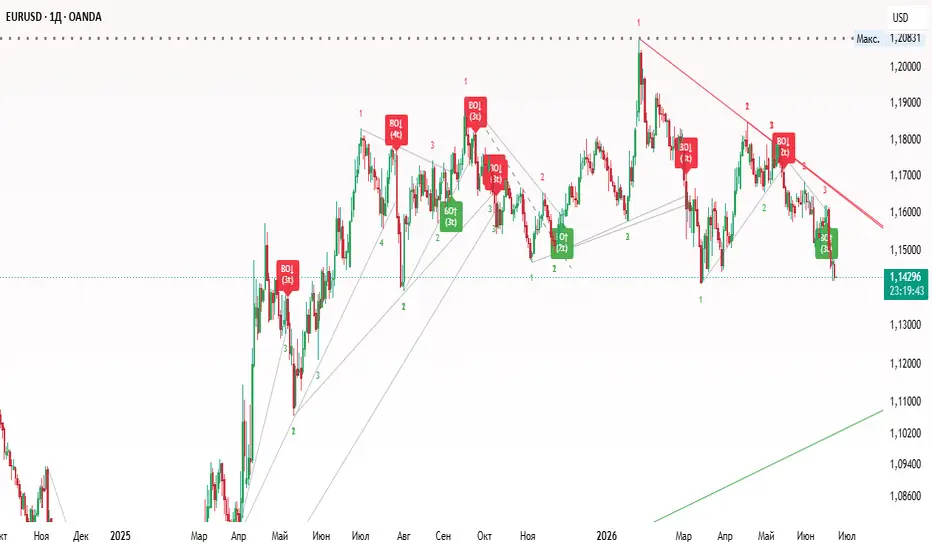
I've created an indicator that identifies support and resistance levels based on pivots and tracks how many times price interacts with them before breaking out.
Here is how it works:
1. Pivot Identification: It looks for pivot highs (resistance) and pivot lows (support) to establish levels.
2. Touch Tracking: When the price comes within the Touch Tolerance % of an active level (but doesn't break and close past it), it registers a "touch" and displays the count as tiny text on the chart.
3. Breakout Detection: If the price breaks through the level (closing above resistance or below support), it checks the touch count. If the required number of touches (default is 3) has been met or exceeded, it triggers a "BO" (Breakout) label with an arrow.
You can customize the following settings in the indicator inputs:
1. Pivot Length: Adjusts how many bars are used to define a pivot. A higher value will find more significant long-term levels.
2. Required Touches: The minimum number of interactions required before a breakout signal is valid.
3. Touch Tolerance %: Defines how close the price must get to the level to be considered a touch.
-Initial Touches: The two pivot points used to create the trendline automatically count as the first 2 touches.
-Future Touches: As the trendline extends into the future, any time the price comes within the Touch Tolerance % of the line without breaking it, a new touch is registered and displayed as a small number on the chart.
-Breakout Detection: If the price breaks through the extended trendline (closing above resistance or below support), the script checks the touch count. If it meets or exceeds your Required Touches setting (default is 3, which means the 2 pivots + 1 additional touch), it signals a breakout.
Clean Touch Numbers: The number 3 (and any subsequent numbers) will only print once per actual swing touch, keeping your chart nice and clean.
Here is how it works:
1. Pivot Identification: It looks for pivot highs (resistance) and pivot lows (support) to establish levels.
2. Touch Tracking: When the price comes within the Touch Tolerance % of an active level (but doesn't break and close past it), it registers a "touch" and displays the count as tiny text on the chart.
3. Breakout Detection: If the price breaks through the level (closing above resistance or below support), it checks the touch count. If the required number of touches (default is 3) has been met or exceeded, it triggers a "BO" (Breakout) label with an arrow.
You can customize the following settings in the indicator inputs:
1. Pivot Length: Adjusts how many bars are used to define a pivot. A higher value will find more significant long-term levels.
2. Required Touches: The minimum number of interactions required before a breakout signal is valid.
3. Touch Tolerance %: Defines how close the price must get to the level to be considered a touch.
-Initial Touches: The two pivot points used to create the trendline automatically count as the first 2 touches.
-Future Touches: As the trendline extends into the future, any time the price comes within the Touch Tolerance % of the line without breaking it, a new touch is registered and displayed as a small number on the chart.
-Breakout Detection: If the price breaks through the extended trendline (closing above resistance or below support), the script checks the touch count. If it meets or exceeds your Required Touches setting (default is 3, which means the 2 pivots + 1 additional touch), it signals a breakout.
Clean Touch Numbers: The number 3 (and any subsequent numbers) will only print once per actual swing touch, keeping your chart nice and clean.
オープンソーススクリプト
TradingViewの精神に則り、このスクリプトの作者はコードをオープンソースとして公開してくれました。トレーダーが内容を確認・検証できるようにという配慮です。作者に拍手を送りましょう!無料で利用できますが、コードの再公開はハウスルールに従う必要があります。

免責事項
これらの情報および投稿は、TradingViewが提供または承認する金融、投資、取引、またはその他の種類の助言もしくは推奨であることを意図したものではなく、またこれらに該当するものでもありません。詳細は利用規約をご覧ください。
オープンソーススクリプト
TradingViewの精神に則り、このスクリプトの作者はコードをオープンソースとして公開してくれました。トレーダーが内容を確認・検証できるようにという配慮です。作者に拍手を送りましょう!無料で利用できますが、コードの再公開はハウスルールに従う必要があります。
免責事項
これらの情報および投稿は、TradingViewが提供または承認する金融、投資、取引、またはその他の種類の助言もしくは推奨であることを意図したものではなく、またこれらに該当するものでもありません。詳細は利用規約をご覧ください。