PROTECTED SOURCE SCRIPT
アップデート済 Anchored Volume Profile by DGT
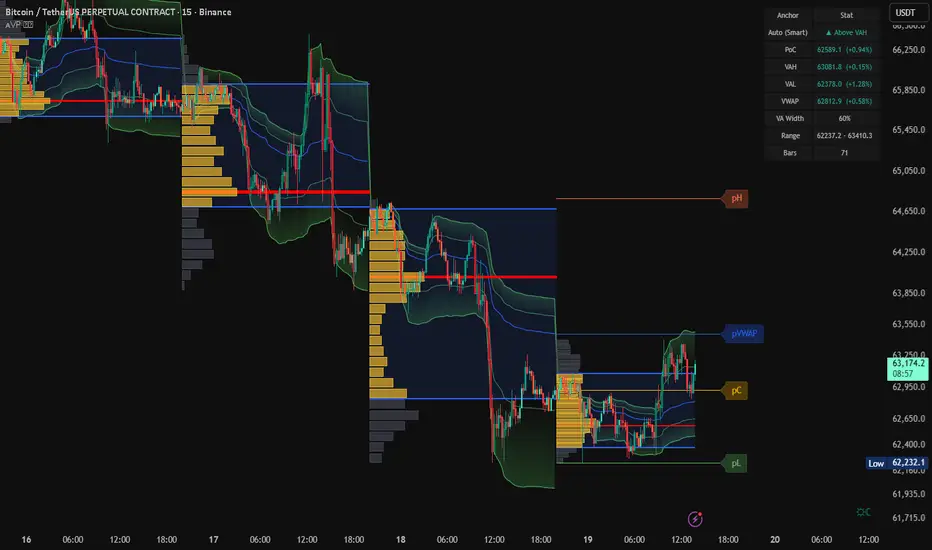
Anchored Volume Profile aims to display trading activity at specific price levels over specified anchored periods of trading, where anchor period can be set to auto or users can specify anchor periods of their interest (Day (Session), Week, Quarter or Year)
Anchored Volume Profile is plotted as two horizontal histograms on the finacial isntrumnet's chart that highlights the trader's common interest at specific price levels as well as aims to reveal dominant party, bulls or bears
You are invited to glance at Vol Profile and Price Action-Support-Resistance studies
Disclaimer: Trading success is all about following your trading strategy and the indicators should fit within your trading strategy, and not to be traded upon solely
The script is for informational and educational purposes only. Use of the script does not constitutes professional and/or financial advice. You alone the sole responsibility of evaluating the script output and risks associated with the use of the script. In exchange for using the script, you agree not to hold dgtrd TradingView user liable for any possible claim for damages arising from any decision you make based on use of the script
Anchored Volume Profile is plotted as two horizontal histograms on the finacial isntrumnet's chart that highlights the trader's common interest at specific price levels as well as aims to reveal dominant party, bulls or bears
You are invited to glance at Vol Profile and Price Action-Support-Resistance studies
Disclaimer: Trading success is all about following your trading strategy and the indicators should fit within your trading strategy, and not to be traded upon solely
The script is for informational and educational purposes only. Use of the script does not constitutes professional and/or financial advice. You alone the sole responsibility of evaluating the script output and risks associated with the use of the script. In exchange for using the script, you agree not to hold dgtrd TradingView user liable for any possible claim for damages arising from any decision you make based on use of the script
リリースノート
Update plus Bug FixBug Fix :
historical volume profiles used to include the first bar of the following day . Special thanks to happynomatterwhat for providing the feedback with the issue
Update :
Volume data is not provided or not available for some instruments such as Indices, as it is the case for NIFTY 50 - Indian stock market index
In case of any custom index volume indicator presence, than their output can be integrated to other volume related indicators as in this example.
How to use a custom indicator as a volume source with the Volume Profile
* First it is required to have the custom indicator enabled
* Then, enable "Use External Volume Indicator" option of the Volume Profile and select as a Source the custom indicator.
Disclaimer: Use of the script does not constitutes professional and/or financial advice. You alone the sole responsibility of choosing the external source and evaluating the script output and risks associated with the use of the script
リリースノート
aesthetic tweak リリースノート
update * added Anchored VWAP, option Anchor Period is commen setting for both Volume Profile and VWAP
Volume Weighted Average Price (VWAP) is a technical analysis tool used to measure the average price weighted by volume. VWAP is typically used with intraday charts as a way to determine the general direction of intraday prices. It's similar to a moving average in that when price is above VWAP, prices are rising and when price is below VWAP, prices are falling. VWAP is primarily used by technical analysts to identify market trend.
* enhanced calculation method for intraday charts, premarket and postmarket data is included within the same day
* bug correction - step must be greater then zero error apread on some stock instruments, resolved
* aesthetic tweaks in input dialog box
* added tooltips to input options
リリースノート
major updateadded another perspective to volume profile, added an option to display only the developing anchored period, session (day), week, moth etc,. Option will be applicable for volume profile (common interest and bull/bear dominance) and VWAP
リリースノート
quick update - extend PoC line option addedリリースノート
major update - added Value Area (VA) optionthanks to everyone who presented their valuable suggestions
リリースノート
A trading session is a period of time that matches the primary daytime trading hours for a given asset. In addition to regular trading hours, some markets may have pre-market or after-hours trading sessions. Futures markets, meanwhile, have different trading hours, depending upon the exchange and the type of commodity being traded.In many cases Session is equal to Day anchored period, but for Futures a trading session may extend to next day, so this update is introduced to cover such cases. Auto option will assumes Session as default and users shall explicitly define Day anchored period per their needs.
リリースノート
update* Extend POC functionality improved - now available options 'Until Last Bar', 'Until Bar Cross' and 'None'. 'Until Bar Cross' option allows the users to determine Virgin PoC's
* Extend VAL and VAH added with the same features as for the PoC
* Label tooltips extended with Value Area Width relative to Profile High/Low Range
リリースノート
⯌ Community-Driven Enhancements & FixesThe following improvements were implemented directly in response to user requests and real-world usage feedback. Many thanks to everyone who shared observations, suggestions, and edge cases — your input continues to shape and refine this tool.
⯌ Earnings Event Anchoring (Enhancement)
Earnings-based anchoring has been added to better support stock analysis. Volume Profile and VWAP can now automatically re-anchor on confirmed earnings events, allowing traders to evaluate post-earnings participation, value migration, and acceptance or rejection behavior from a fundamentally meaningful reset point.
This enhancement applies to stocks only and is safely ignored on unsupported markets.
⯌ VWAP Line Customization (Enhancement)
VWAP visualization has been expanded with additional customization controls. Users can now independently adjust VWAP line color, band color, and fill opacity, improving clarity and alignment with individual chart themes and workflows.
⯌ Developing-Only Mode Separation (Enhancement)
Developing-only behavior has been refined and separated for Volume Profile and VWAP. Each component can now display only the active anchored period independently, providing greater flexibility when monitoring real-time value development without unintended coupling.
⯌ VAH / VAL Calculation & Rendering Fix (Bug Fix)
An issue affecting Value Area High (VAH) and Value Area Low (VAL) consistency under certain anchoring and resolution scenarios has been resolved. Calculations and rendering have been stabilized to ensure precise alignment with computed value-area boundaries.
⯌ Improved Contextual Tooltips (Enhancement)
Tooltips across Volume Profile, VWAP, and Value Area components have been enhanced for clarity and educational value. Each tooltip now provides clearer explanations of functionality, behavior, and practical use cases, reducing ambiguity and improving usability.
Thank you to all users who contributed feedback and feature requests — your insights are invaluable and directly help improve the quality, clarity, and robustness of this tool.
リリースノート
⯌ Input Organization Refinement (Enhancement)Input options have been slightly reorganized to improve clarity and usability. Related settings are now grouped more intuitively, making common controls easier to locate while keeping advanced options neatly structured.
This refinement does not change indicator behavior and was made to improve overall user experience.
リリースノート
⯌ VWAP Fill Color Control (Enhancement)VWAP band fill color control has been restored based on user feedback. The setting is now fully functional again, allowing users to adjust VWAP fill visibility to better match their chart preferences.
リリースノート
⯌ Volume Check Refinement (Enhancement)Small tweak to volume check logic based on user feedback.
リリースノート
This release enhances the Anchored VWAP framework, expanding deviation analysis beyond the classic single-band model. Dual deviation bands and flexible deviation modes allow value, balance, and directional pressure to be evaluated with greater precision.Key improvements include:
⯌ Dual VWAP Deviation Bands
Two independent VWAP deviation layers (inner & outer) provide clearer distinction between balance zones and price extension, improving interpretation of acceptance vs overextension.
⯌ New: Asymmetric VWAP Deviation Mode
Adds a directional deviation model alongside the traditional symmetric calculation.
• Upper and lower VWAP deviations are computed independently using volume-weighted variance
• VWAP bands can expand asymmetrically above and below VWAP, reflecting directional pressure
⯌ Deviation Models Explained
• Symmetric VWAP Deviation → volume-weighted deviation applied equally above and below VWAP (classic statistical model)
• Asymmetric VWAP Deviation → independent upper and lower deviation calculations based on directional, volume-weighted variance
⯌ Market Insight Improvements
• Reveals directional pressure and absorption
• Highlights skewed participation around value
• Produces more realistic deviation behavior in trending or imbalanced markets
⯌ Improved Visual Control & Clarity
• Inner and outer deviation bands can be toggled independently
• Band fills adapt cleanly when using one or both deviation layers
• Clear separation between VWAP, balance zones, and extension zones
リリースノート
⯌ Issue Fix: Volume Analysis ExtensionCorrected an issue where the Volume Analysis (VA) was not extending on the latest update.
リリースノート
What’s NewThis update introduces Previous Anchor Close, High, Low, and VWAP reference levels, providing clearer higher-timeframe context directly on the chart. The Previous Anchor Close functions as a market memory level, representing where the prior session or anchor period finished and often acting as a reference for price acceptance or rejection at the open. Together with the prior anchor High, Low, and VWAP, these levels help frame intraday bias, gap behavior, and potential support or resistance zones, where price may pause, react, or accelerate relative to prior value and extremes.
リリースノート
⯌ Recent EnhancementsSeveral new features have been added to improve usability, customization, and alerting capabilities of the Anchored Volume Profile framework.
- Volume Profile Level Alerts - Receive notifications when price crosses key Volume Profile levels. Alerts can be configured for PoC (Point of Control), VAH (Value Area High), and VAL (Value Area Low), allowing you to monitor important market acceptance and rejection zones automatically.
- Profile Statistics Table - An optional statistics panel provides a quick overview of the active profile, displaying important information such as profile range, value area boundaries, Point of Control, and other key metrics without requiring manual inspection of the profile itself.
- Dedicated Developing Profile Resolution - When Show Developing Anchor Only is enabled, a separate Number of Rows setting becomes available. This allows the developing profile to use a different resolution than historical profiles, providing greater control over detail, precision, and performance during real-time analysis.
These enhancements are designed to improve workflow efficiency while providing greater flexibility for both discretionary and systematic traders.
保護スクリプト
このスクリプトのソースコードは非公開で投稿されています。 ただし、制限なく自由に使用できます – 詳細はこちらでご確認ください。

SoleMare Analytics | MarketMastery™ Tools | Exclusively on TradingView
免責事項
これらの情報および投稿は、TradingViewが提供または承認する金融、投資、取引、またはその他の種類の助言もしくは推奨であることを意図したものではなく、またこれらに該当するものでもありません。詳細は利用規約をご覧ください。
保護スクリプト
このスクリプトのソースコードは非公開で投稿されています。 ただし、制限なく自由に使用できます – 詳細はこちらでご確認ください。
免責事項
これらの情報および投稿は、TradingViewが提供または承認する金融、投資、取引、またはその他の種類の助言もしくは推奨であることを意図したものではなく、またこれらに該当するものでもありません。詳細は利用規約をご覧ください。