[Viprasol] Higher Timeframe Peak Session Volume
🔵 OVERVIEW
🔵 HOW IT WORKS
🔵 KEY FEATURES
🔵 HOW TO USE
🔵 SETTINGS
🔵 ALERTS
🔵 LIMITATIONS & DISCLAIMER
🔵 HOUSE RULES & PURPOSE
Published open-source by Viprasol.
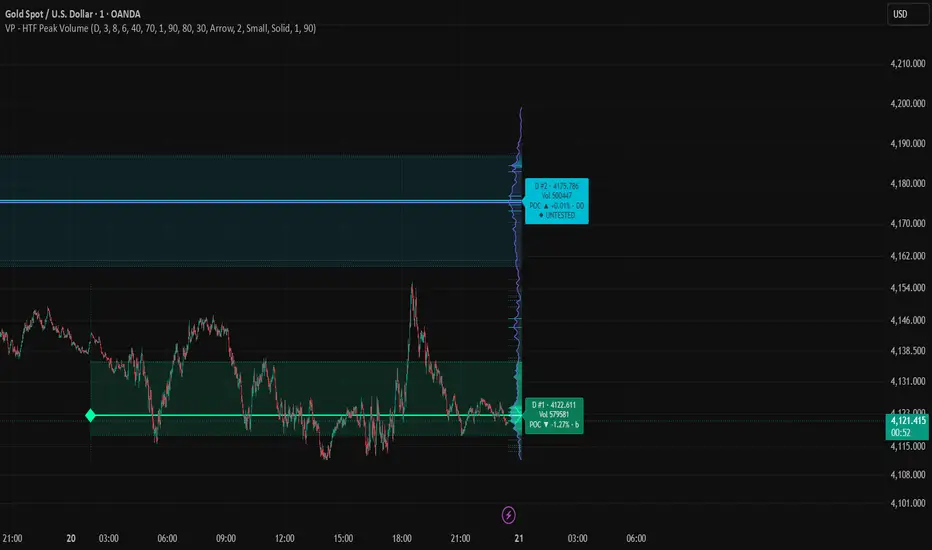
Higher Timeframe Peak Session Volume [Viprasol] builds one volume profile per higher-timeframe period (daily by default) and overlays up to five of them in the right margin of the chart. Each profile is binned by ATR, smoothed with a Gaussian kernel, and marked with its Point of Control, which is drawn back to the bar where that period began. Each period also carries its Value Area, the price band around the POC that holds a chosen share of the period's volume. Completed periods whose POC has not been revisited are flagged as naked POCs, secondary high and low volume nodes are marked on each profile, the period label reports how the POC migrated from the previous period and the profile's shape (P, b, D or double distribution), and bins can be coloured by buy / sell delta. A filled silhouette outlines the combined profile of all displayed periods.
It is built for intraday and swing traders who want to see where each day's (or week's) volume concentrated, which old peaks are still untested, how value is migrating from period to period, and where the current period's acceptance zone sits.
🔵 HOW IT WORKS
The indicator tracks period boundaries bar by bar, then on the last bar rebuilds every profile from the chart's own bars:
1 — Period TrackingPine Script®
- Fixed bin size per period: the bin height is locked at the start of each period, so the profile does not re-grid while the period is still running.
2 — Volume BinningPine Script®
- Chart-timeframe resolution: each bar's full volume is assigned to the bin of its close, so a 5-minute chart gives a finer profile than a 1-hour chart of the same day.
3 — Gaussian SmoothingPine Script®
4 — Point of ControlPine Script®
5 — Value Area (Viprasol addition)Pine Script®
- Drawing: two dashed lines in the period's colour from the period start to the right margin, with a light fill between them.
- Reading: price inside the band is trading where the period found acceptance; price outside it is extended relative to that period's volume.
6 — Untested (Naked) POC (Viprasol addition)Pine Script®
- Drawing: an untested POC keeps its line and its right-margin tag turns solid with a ◆ UNTESTED line. Tested POCs are drawn normally.
- Reading: an untested prior POC is a common destination and reaction level; the first return to it is the moment to watch, and the Untested POC Touched alert fires on that bar.
7 — High and Low Volume Nodes (Viprasol addition)Pine Script®
- HVN (short solid tick): a second area of agreement; price tends to slow down and rotate there.
- LVN (short dotted tick): a thin spot the market moved through quickly; price tends to pass through fast or reject.
8 — POC Migration and Profile Shape (Viprasol addition)Pine Script®
- Reading: consecutive periods with the POC migrating up and P or D shapes describe value moving higher; a DD shape marks a period that moved between two value areas.
9 — Delta-Coloured Bins (Viprasol addition, off by default)Pine Script®
- Reading: shows whether a peak was built by up-closing or down-closing bars. POC and Value Area lines keep the period colour so the period is still identifiable.
10 — Right-Margin HistogramPine Script®
11 — Total Polyline Profile
All displayed periods are binned on one shared grid, smoothed with the same kernel, and drawn as one filled silhouette whose width at each price is proportional to the combined volume there.
🔵 KEY FEATURES
- Per-period profiles: up to five higher-timeframe periods overlaid in the right margin, each in its own colour
- POC lines: every period's Point of Control traced back to the bar the period started on, arrow-headed by default, with the POC row highlighted in an accent colour
- Value Area: configurable percentage band (default 70%) per period with high / low lines and fill
- Untested POC: completed-period POCs that price has not revisited are tagged UNTESTED and alerted when touched
- Volume nodes: secondary high volume nodes and low volume nodes marked on each profile with adjustable thresholds
- Migration and shape: each label reports the POC change versus the previous period and the profile shape (P, b, D, DD)
- Delta bins: optional colouring of bins by buy / sell volume share
- Composite silhouette: filled outline of all displayed periods combined, with selectable style, width and fill
- ATR binning: bin height adapts to volatility and is fixed per period
- Gaussian smoothing: adjustable radius, 0 to disable
- Tags and separators: diamond marker at each period's first bar, info tag at the right margin, dotted separator spanning each period's range
- Alerts: five conditions with dynamic messages
🔵 HOW TO USE
Setup
- Chart: any symbol with volume data, standard candlesticks, on a timeframe below the profile timeframe (15m or 1H for daily profiles, 4H for weekly).
- Defaults: daily periods, 3 profiles, ATR divisor 8, smoothing radius 6, Value Area 70%.
- Right margin: increase the width if the longest row is cut off; the margin must have room for it.
Reading the Chart
- Arrow line from a diamond: a period's POC, running from the period's first bar to its histogram. Its colour tells you which period it belongs to.
- Dotted pair with a light fill: that period's Value Area High and Low.
- Faint dotted vertical line: the first bar of a period, spanning its range.
- Histogram in the right margin: the longest row is the POC and is drawn in the accent colour; rows brighten with volume and rows outside the Value Area are faded.
- Short solid / dotted ticks across a histogram: High Volume Nodes / Low Volume Nodes.
- Filled silhouette: the combined profile of every displayed period.
- Tag at the right margin: period name, index (#1 is the current period), POC price, total volume, POC migration versus the previous period, profile shape, and ◆ UNTESTED when the POC has not been revisited. The tag is solid-filled for untested POCs.
Recommended Starting Points
- Intraday (5m-15m): Profile Timeframe 240 or D, 3 profiles, ATR divisor 10, radius 4
- Day trading (15m-1H): Profile Timeframe D, 3 profiles, ATR divisor 8, radius 6
- Swing (4H-D): Profile Timeframe W, 4 profiles, ATR divisor 6, radius 6
These are starting points only. Adjust the divisor and radius until the profile shape is readable on your symbol.
🔵 SETTINGS
- 1 Session Profile: session timeframe, sessions shown, ATR divisor, blur radius, right margin width.
- 2 Value Area: shade, percentage of session volume, edge width, fill transparency.
- 3 Untested Peaks, Nodes & Delta: flag untested POCs, HVN marks and threshold, LVN marks and threshold, migration and shape in tags, delta tint.
- 4 Visibility & Style: histograms, POC row accent, POC lines, style and width, session separators, tags and size, row outline, composite outline.
- 5 Session Hues: one hue per session, composite colour, line style, width and fill.
🔵 ALERTS
- New Session: a new higher-timeframe period has started
- Price Crossed Current POC: close crossed the current period's Point of Control
- Price Entered Value Area: close moved inside the current period's Value Area
- Price Left Value Area: close moved outside the current period's Value Area
- Untested POC Touched: the current bar is trading through a previously untested POC
All alerts include {{ticker}}, {{close}} and {{interval}} placeholders.
🔵 LIMITATIONS & DISCLAIMER
- Last-bar drawing: the profiles are rebuilt on the last bar from the chart's own history. The current period's profile, POC and Value Area update as new bars arrive and are not fixed until the period ends.
- Chart-timeframe resolution: each bar's volume is placed at its close. A coarser chart timeframe gives a coarser profile of the same period.
- History depth: the script looks back up to 5000 bars. On very low chart timeframes with a weekly profile, the oldest displayed period may be truncated.
- Alerts: the POC, Value Area and naked POC alerts use the levels as drawn on the live bar, so they are active from the live bar onward and do not fire on historical bars.
- Untested POC scope: only the displayed completed periods (up to four) are checked, so older untested POCs outside the displayed set are not shown.
- Nodes and shape are heuristics: HVN / LVN thresholds and the P / b / D / DD classification are conventions from auction market practice, not statistically validated signals. Adjust the thresholds to your symbol.
- Delta is bar-based: up and down volume is split by whether each chart bar closed above or below its open, not by tick data.
- Volume data: on symbols without volume (some forex and index feeds) the profile cannot be built.
- No guarantees: a volume profile shows where trading happened, not where price will go. Always use proper risk management and do your own analysis before trading.
🔵 HOUSE RULES & PURPOSE
- Educational purpose only: this indicator is published for educational and analytical purposes. It is not financial advice, not a trading recommendation and not a solicitation to buy or sell any asset. Nothing on the chart or in the alerts should be taken as a promise of results.
- TradingView House Rules: this script is published open-source and in line with the TradingView House Rules. The description explains how every level and read-out is calculated, makes no performance or win-rate claims, uses standard candlestick charts only, and the chart shown is clean with the symbol and timeframe visible.
- Your responsibility: test the indicator on historical data, understand each setting before changing it, and never risk more than you can afford to lose.
Published open-source by Viprasol.

Trading-systems engineers. We build custom MT4/MT5 expert advisors, prop-firm-compliant EAs, TradingView indicators, Pine-to-MQL5 ports and webhook-to-broker bridges. Backtested, forward-tested, source code yours. viprasol.com · WhatsApp +91 96336 52112
免責事項
これらの情報および投稿は、TradingViewが提供または承認する金融、投資、取引、またはその他の種類の助言もしくは推奨であることを意図したものではなく、またこれらに該当するものでもありません。詳細は利用規約をご覧ください。
Trading-systems engineers. We build custom MT4/MT5 expert advisors, prop-firm-compliant EAs, TradingView indicators, Pine-to-MQL5 ports and webhook-to-broker bridges. Backtested, forward-tested, source code yours. viprasol.com · WhatsApp +91 96336 52112
免責事項
これらの情報および投稿は、TradingViewが提供または承認する金融、投資、取引、またはその他の種類の助言もしくは推奨であることを意図したものではなく、またこれらに該当するものでもありません。詳細は利用規約をご覧ください。