OPEN-SOURCE SCRIPT
Big Trades (Intrabar Approximation)
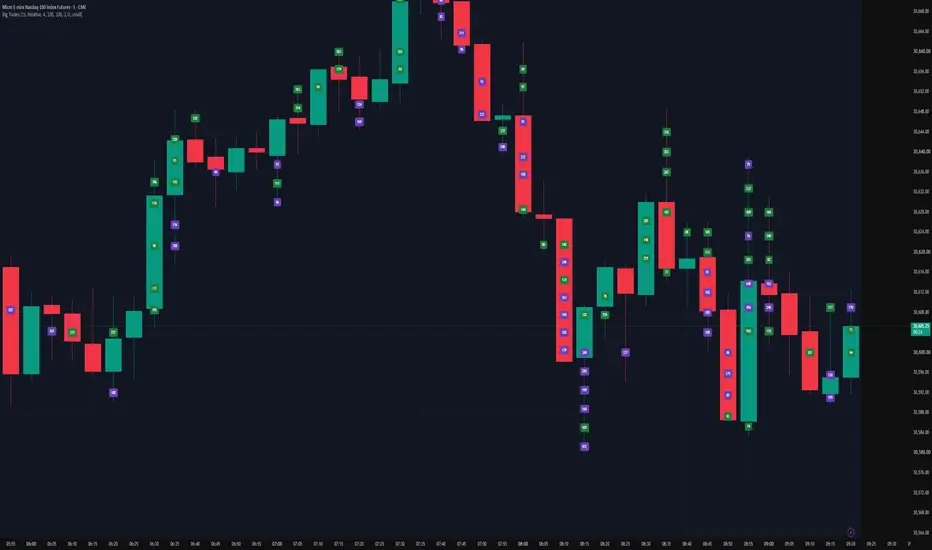
Big Trades (Intrabar Approximation)
WHAT IT DOES
This indicator highlights moments of unusually high volume inside each bar and prints the volume directly on the chart at the price where it happened. It is inspired by the "big trades" displays found on order-flow platforms, rebuilt using the data available in Pine Script.
HOW IT WORKS
Pine Script does not provide individual trades (tick-by-tick prints). Instead, the script splits every chart bar into lower-timeframe intrabars (1 second by default) using request.security_lower_tf(), and flags the intrabars whose volume stands out.
- Each flagged intrabar is placed at the midpoint of its high and low.
- Green = the intrabar closed at or above its open (up-intrabar). Purple = it closed below its open (down-intrabar).
- Flagged intrabars that sit close to each other inside the same bar are merged into a single label, colored by whichever side had more volume. Hover a label to see the up/down breakdown.
THRESHOLD MODES
- Relative (default): shows intrabars whose volume is greater than a multiple (default 4x) of the recent average intrabar volume. The threshold adapts automatically, so it works in both quiet overnight sessions and busy cash-session opens.
- Absolute: a fixed volume threshold.
- Top N: always shows the N largest intrabars of every bar. Useful for studying structure, but in quiet bars these are not necessarily "big".
SETTINGS
- Intrabar timeframe: 1S gives the most detail. Seconds timeframes are only available on plans that support them; otherwise use a minute timeframe that is lower than your chart timeframe.
- Merge distance: in ticks. Auto uses 20% of ATR(14). Increase it if labels overlap, decrease it for more detail.
- Show buy/sell split: displays levels with both sides as up/down (for example 120/45).
LIMITATIONS
- Numbers are the total volume of an intrabar, not a single order. A 300 label on a 1-second intrabar can be one large order or many small ones.
- Up/down color is based on the intrabar's close versus open, not on the true aggressor side of each trade.
- TradingView keeps at most 500 labels per script, so labels on older bars are removed as new ones appear.
- Intrabar history is limited, so very old bars may show no labels.
- Empty bars simply mean no intrabar passed the threshold.
This script is for chart analysis and education only. It is not a trading signal and does not provide financial advice.
WHAT IT DOES
This indicator highlights moments of unusually high volume inside each bar and prints the volume directly on the chart at the price where it happened. It is inspired by the "big trades" displays found on order-flow platforms, rebuilt using the data available in Pine Script.
HOW IT WORKS
Pine Script does not provide individual trades (tick-by-tick prints). Instead, the script splits every chart bar into lower-timeframe intrabars (1 second by default) using request.security_lower_tf(), and flags the intrabars whose volume stands out.
- Each flagged intrabar is placed at the midpoint of its high and low.
- Green = the intrabar closed at or above its open (up-intrabar). Purple = it closed below its open (down-intrabar).
- Flagged intrabars that sit close to each other inside the same bar are merged into a single label, colored by whichever side had more volume. Hover a label to see the up/down breakdown.
THRESHOLD MODES
- Relative (default): shows intrabars whose volume is greater than a multiple (default 4x) of the recent average intrabar volume. The threshold adapts automatically, so it works in both quiet overnight sessions and busy cash-session opens.
- Absolute: a fixed volume threshold.
- Top N: always shows the N largest intrabars of every bar. Useful for studying structure, but in quiet bars these are not necessarily "big".
SETTINGS
- Intrabar timeframe: 1S gives the most detail. Seconds timeframes are only available on plans that support them; otherwise use a minute timeframe that is lower than your chart timeframe.
- Merge distance: in ticks. Auto uses 20% of ATR(14). Increase it if labels overlap, decrease it for more detail.
- Show buy/sell split: displays levels with both sides as up/down (for example 120/45).
LIMITATIONS
- Numbers are the total volume of an intrabar, not a single order. A 300 label on a 1-second intrabar can be one large order or many small ones.
- Up/down color is based on the intrabar's close versus open, not on the true aggressor side of each trade.
- TradingView keeps at most 500 labels per script, so labels on older bars are removed as new ones appear.
- Intrabar history is limited, so very old bars may show no labels.
- Empty bars simply mean no intrabar passed the threshold.
This script is for chart analysis and education only. It is not a trading signal and does not provide financial advice.
オープンソーススクリプト
TradingViewの精神に則り、このスクリプトの作者はコードをオープンソースとして公開してくれました。トレーダーが内容を確認・検証できるようにという配慮です。作者に拍手を送りましょう!無料で利用できますが、コードの再公開はハウスルールに従う必要があります。

免責事項
これらの情報および投稿は、TradingViewが提供または承認する金融、投資、取引、またはその他の種類の助言もしくは推奨であることを意図したものではなく、またこれらに該当するものでもありません。詳細は利用規約をご覧ください。
オープンソーススクリプト
TradingViewの精神に則り、このスクリプトの作者はコードをオープンソースとして公開してくれました。トレーダーが内容を確認・検証できるようにという配慮です。作者に拍手を送りましょう!無料で利用できますが、コードの再公開はハウスルールに従う必要があります。
免責事項
これらの情報および投稿は、TradingViewが提供または承認する金融、投資、取引、またはその他の種類の助言もしくは推奨であることを意図したものではなく、またこれらに該当するものでもありません。詳細は利用規約をご覧ください。