OPEN-SOURCE SCRIPT
SignalForge
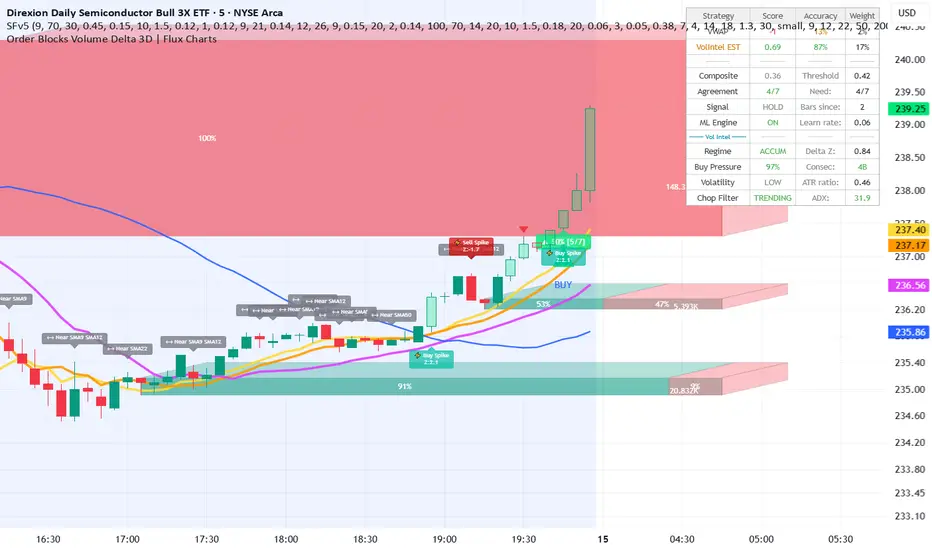
# SignalForge v5 — Volume Intelligence (Updated)
Pine Script v6 indicator that generates BUY/SELL signals from a
7-strategy composite score (RSI, Volume/OBV, VWAP, EMA trend, MACD, Bollinger Bands,
and a Volume Intelligence delta engine), with ML-style adaptive weighting and
candlestick/chart pattern detection.
This document covers what changed in this update.
---
## 1. Chart decluttering — overlay plots removed
The following lines, which previously drew directly on the price chart, have been
**removed** (the underlying calculations are kept — they still feed the composite
score, only the visual plots are gone):
- VWAP line + upper/lower deviation bands (3 lines)
- EMA Fast (9) / EMA Slow (21) lines (2 lines)
- Bollinger Band upper / lower / mid lines (3 lines)
The chart now only shows: candles, BUY/SELL signal markers, bar coloring,
pattern labels, the new SMA lines (below), and the new proximity labels.
---
## 2. Configurable SMA levels + proximity labels
A new **"SMA Levels"** input group adds five independently configurable SMAs:
| SMA slot | Default length | Toggle input | Length input |
|----------|----------------|--------------|--------------|
| SMA 1 | 9 | Show SMA 1 | Length |
| SMA 2 | 12 | Show SMA 2 | Length |
| SMA 3 | 22 | Show SMA 3 | Length |
| SMA 4 | 50 | Show SMA 4 | Length |
| SMA 5 | 200 | Show SMA 5 | Length |
Each is plotted in its own color (yellow, orange, fuchsia, blue, maroon) and can be
shown/hidden or resized independently — change the length to anything from 2 to 400 bars.
### Proximity labels
- **Proximity Threshold (%)** (default `0.15%`) — how close price must get to an SMA
(as a % of price) before it's considered a "touch."
- **Show SMA Proximity Labels** (default ON) — when price first enters the proximity
zone of one or more SMAs, a single combined label appears above the bar, e.g.:
```
⟷ Near SMA50 SMA200
```
The label only fires on the bar price *first* enters the zone (not every bar it
stays there), so it won't spam the chart.
---
## 3. False-signal reduction (Signal Gate)
Three new controls were added to the **"Signal Gate"** group, specifically aimed at
reducing false BUY/SELL signals:
### a) ADX Chop Filter
- **Filter Signals in Choppy Markets (ADX)** — default **ON**
- **ADX Length** — default 14
- **Minimum ADX to Allow Signals** — default 18.0
When enabled, BUY/SELL signals are suppressed whenever ADX is below the threshold —
i.e. the market isn't trending. Range-bound chop is the single biggest source of
false signals in composite-oscillator systems like this one.
### b) Anti-whipsaw Reversal Guard
- **Reversal Strength Multiplier** — default **1.3**
If a signal fires in the *opposite* direction of the last signal within
`2 × Min Bars Between Signals`, the composite score must exceed the adaptive
threshold by this multiplier to fire. This stops rapid BUY→SELL→BUY flip-flopping
during noisy/whipsaw conditions, while still allowing a genuinely strong reversal
through.
### c) ML Accuracy Noise Filter
- **Min Move to Count (% of price)** — default **0.05%** (in the "ML Engine" group)
The rolling accuracy tracker that drives the ML weight-adaptation engine now ignores
price moves smaller than this threshold when scoring whether a past signal was
"correct." Previously, even a 0.01% tick counted as a win/loss, which added noise to
the weight adjustments — especially on lower timeframes.
### Dashboard
If **Show Dashboard** is enabled, a new row **"Chop Filter / ADX"** shows live
`TRENDING` / `CHOPPY` status and the current ADX value, color-coded against your
threshold.
---
Pine Script v6 indicator that generates BUY/SELL signals from a
7-strategy composite score (RSI, Volume/OBV, VWAP, EMA trend, MACD, Bollinger Bands,
and a Volume Intelligence delta engine), with ML-style adaptive weighting and
candlestick/chart pattern detection.
This document covers what changed in this update.
---
## 1. Chart decluttering — overlay plots removed
The following lines, which previously drew directly on the price chart, have been
**removed** (the underlying calculations are kept — they still feed the composite
score, only the visual plots are gone):
- VWAP line + upper/lower deviation bands (3 lines)
- EMA Fast (9) / EMA Slow (21) lines (2 lines)
- Bollinger Band upper / lower / mid lines (3 lines)
The chart now only shows: candles, BUY/SELL signal markers, bar coloring,
pattern labels, the new SMA lines (below), and the new proximity labels.
---
## 2. Configurable SMA levels + proximity labels
A new **"SMA Levels"** input group adds five independently configurable SMAs:
| SMA slot | Default length | Toggle input | Length input |
|----------|----------------|--------------|--------------|
| SMA 1 | 9 | Show SMA 1 | Length |
| SMA 2 | 12 | Show SMA 2 | Length |
| SMA 3 | 22 | Show SMA 3 | Length |
| SMA 4 | 50 | Show SMA 4 | Length |
| SMA 5 | 200 | Show SMA 5 | Length |
Each is plotted in its own color (yellow, orange, fuchsia, blue, maroon) and can be
shown/hidden or resized independently — change the length to anything from 2 to 400 bars.
### Proximity labels
- **Proximity Threshold (%)** (default `0.15%`) — how close price must get to an SMA
(as a % of price) before it's considered a "touch."
- **Show SMA Proximity Labels** (default ON) — when price first enters the proximity
zone of one or more SMAs, a single combined label appears above the bar, e.g.:
```
⟷ Near SMA50 SMA200
```
The label only fires on the bar price *first* enters the zone (not every bar it
stays there), so it won't spam the chart.
---
## 3. False-signal reduction (Signal Gate)
Three new controls were added to the **"Signal Gate"** group, specifically aimed at
reducing false BUY/SELL signals:
### a) ADX Chop Filter
- **Filter Signals in Choppy Markets (ADX)** — default **ON**
- **ADX Length** — default 14
- **Minimum ADX to Allow Signals** — default 18.0
When enabled, BUY/SELL signals are suppressed whenever ADX is below the threshold —
i.e. the market isn't trending. Range-bound chop is the single biggest source of
false signals in composite-oscillator systems like this one.
### b) Anti-whipsaw Reversal Guard
- **Reversal Strength Multiplier** — default **1.3**
If a signal fires in the *opposite* direction of the last signal within
`2 × Min Bars Between Signals`, the composite score must exceed the adaptive
threshold by this multiplier to fire. This stops rapid BUY→SELL→BUY flip-flopping
during noisy/whipsaw conditions, while still allowing a genuinely strong reversal
through.
### c) ML Accuracy Noise Filter
- **Min Move to Count (% of price)** — default **0.05%** (in the "ML Engine" group)
The rolling accuracy tracker that drives the ML weight-adaptation engine now ignores
price moves smaller than this threshold when scoring whether a past signal was
"correct." Previously, even a 0.01% tick counted as a win/loss, which added noise to
the weight adjustments — especially on lower timeframes.
### Dashboard
If **Show Dashboard** is enabled, a new row **"Chop Filter / ADX"** shows live
`TRENDING` / `CHOPPY` status and the current ADX value, color-coded against your
threshold.
---
オープンソーススクリプト
TradingViewの精神に則り、このスクリプトの作者はコードをオープンソースとして公開してくれました。トレーダーが内容を確認・検証できるようにという配慮です。作者に拍手を送りましょう!無料で利用できますが、コードの再公開はハウスルールに従う必要があります。

免責事項
これらの情報および投稿は、TradingViewが提供または承認する金融、投資、取引、またはその他の種類の助言もしくは推奨であることを意図したものではなく、またこれらに該当するものでもありません。詳細は利用規約をご覧ください。
オープンソーススクリプト
TradingViewの精神に則り、このスクリプトの作者はコードをオープンソースとして公開してくれました。トレーダーが内容を確認・検証できるようにという配慮です。作者に拍手を送りましょう!無料で利用できますが、コードの再公開はハウスルールに従う必要があります。
免責事項
これらの情報および投稿は、TradingViewが提供または承認する金融、投資、取引、またはその他の種類の助言もしくは推奨であることを意図したものではなく、またこれらに該当するものでもありません。詳細は利用規約をご覧ください。