アップデート済
Ethereum ETF Tracker (EET)
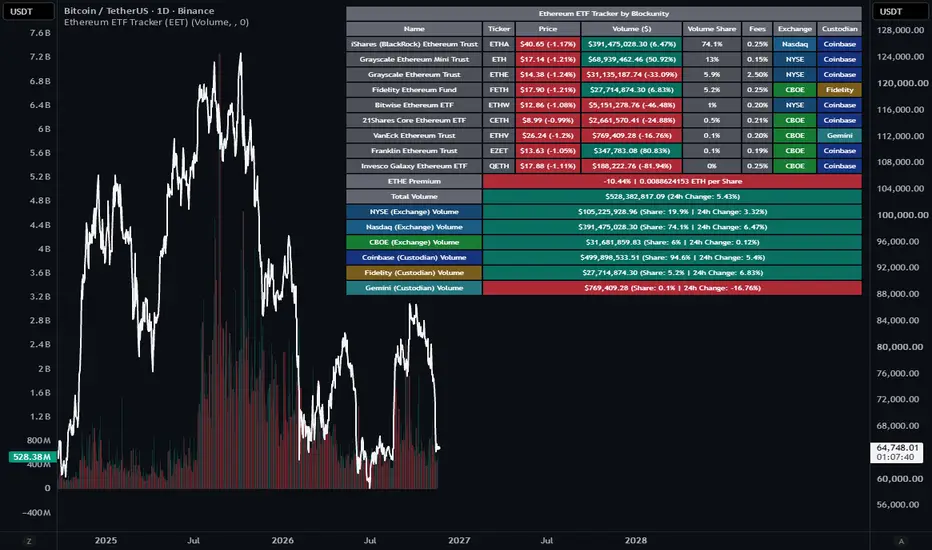
Get all the information you need about all the different Ethereum ETF.
With the Ethereum ETF Tracker, you can observe all possible Ethereum ETF data:
At the bottom of the table, you'll find the ETHE Premium (and ETH per Share), and day's total volume.
In addition, you can see the volume for the different Exchanges, as well as for the different Custodians.
If you don't want to display these lines to save space, you can uncheck "Show Additional Data" in the indicator settings.
The Idea
The goal is to provide the community with a tool for tracking all Ethereum ETF data in a synthesized way, directly in your TradingView chart.
How to Use
Simply read the information in the table. You can hover above the Fees and Exchanges cells for more details.
The table takes space on the chart, you can remove the extra lines by unchecking "Show Additional Data" in the indicator settings or reduce text size by changing the "Table Text Size" parameter.
Aggregate volume can be displayed directly on the graph (this volume can be displayed on any asset, such as Ethereum itself). The display can be disabled in the settings.

With the Ethereum ETF Tracker, you can observe all possible Ethereum ETF data:
- ETF name.
- Ticker.
- Price.
- Volume.
- Share of total ETF volume.
- Fees.
- Exchange.
- Custodian.
At the bottom of the table, you'll find the ETHE Premium (and ETH per Share), and day's total volume.
In addition, you can see the volume for the different Exchanges, as well as for the different Custodians.
If you don't want to display these lines to save space, you can uncheck "Show Additional Data" in the indicator settings.
The Idea
The goal is to provide the community with a tool for tracking all Ethereum ETF data in a synthesized way, directly in your TradingView chart.
How to Use
Simply read the information in the table. You can hover above the Fees and Exchanges cells for more details.
The table takes space on the chart, you can remove the extra lines by unchecking "Show Additional Data" in the indicator settings or reduce text size by changing the "Table Text Size" parameter.
Aggregate volume can be displayed directly on the graph (this volume can be displayed on any asset, such as Ethereum itself). The display can be disabled in the settings.
リリースノート
New- Dollar volume mode (Price × Shares) so volume can be shown as traded notional in USD instead of raw share count. Share volume remains available as an option.
- Compact table mode with Ticker, Price, Volume, and Share only. Full ETF name stays available on ticker hover.
- Table sorting options: Volume, Name, Ticker, or None.
- Safer ETHE premium controls: keep the automatic ETH-per-share estimate, or enter the official ETH-per-share value manually.
- Alert condition in TradingView’s alert UI for large total-volume moves (±50%), in addition to the runtime alert.
Improved
- Cleaner internal structure for easier maintenance and faster future ETF additions.
- Table updates only on the latest bar for better performance.
- Exchange-prefixed symbols (for example NASDAQ:ETHA, AMEX:ETHE, AMEX:ETH) to reduce wrong-symbol resolution.
- Clearer volume labeling: Volume ($) vs Volume (shares).
- Volume share shown with one decimal for better readability on smaller ETFs.
- More reliable percentage calculations when previous price/volume is missing or zero (n/a instead of broken values).
- Exchange tooltips corrected (NYSE Arca / Cboe BZX / Nasdaq).
- Fee tips refreshed to avoid outdated hard-coded waiver end dates.
- Summary and exchange/custodian rows adapt automatically to the ETF count.
Fixed
- Volume no longer displayed as currency when it was actually share volume (unless dollar volume mode is enabled).
- Removed unused/dead cumulative volume calculations.
- Hardened request.security usage with lookahead disabled for more consistent historical values.

Blockunity
app.blockunity.io/
unyx-data.com/
contact@blockunity.io
免責事項
これらの情報および投稿は、TradingViewが提供または承認する金融、投資、取引、またはその他の種類の助言もしくは推奨であることを意図したものではなく、またこれらに該当するものでもありません。詳細は利用規約をご覧ください。
Blockunity
app.blockunity.io/
unyx-data.com/
contact@blockunity.io
免責事項
これらの情報および投稿は、TradingViewが提供または承認する金融、投資、取引、またはその他の種類の助言もしくは推奨であることを意図したものではなく、またこれらに該当するものでもありません。詳細は利用規約をご覧ください。