OPEN-SOURCE SCRIPT
CDT Clock + Trade Timer
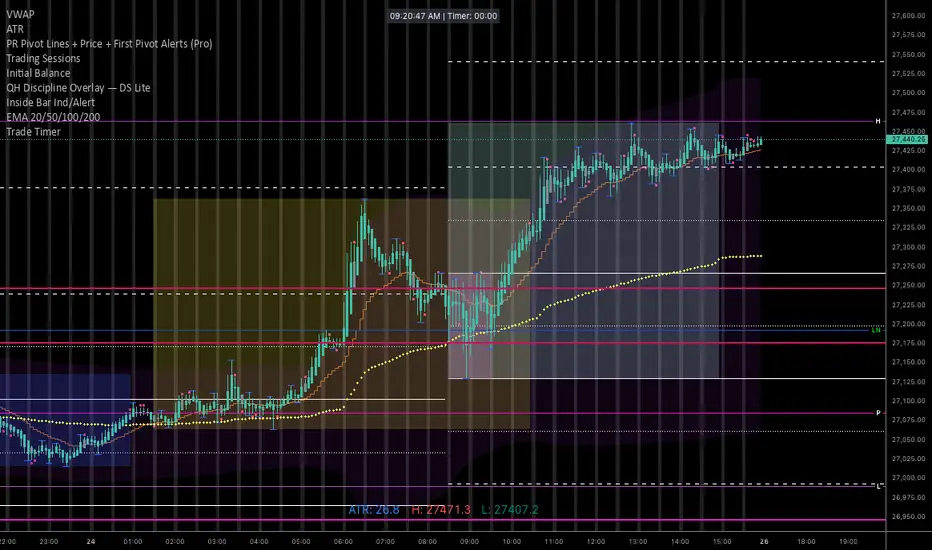
To keep it organized in your TradingView library, you’ll want a description that reminds you exactly how the logic works (especially the CDT offset and the manual timer).
Here is a concise description you can paste into the "Description" field when you save the script:
NQ Execution Clock & Patience Timer (CDT)
Overview:
A specialized execution tool designed for NQ/ES futures trading. This indicator provides a high-visibility digital clock synced to Central Daylight Time (CDT) and a manual "Trade Timer" to help manage trade duration and psychology during liquidity sweeps.
Key Features:
Live CDT Clock: Hardcoded to UTC-5 to stay synced with Chicago/San Antonio market hours.
Manual Trade Stopwatch: A "Start Trade Timer" toggle in the settings allows you to track exactly how many minutes/seconds you have been in a position.
Psychology Support: Specifically built to prevent early exits by providing a visual counter for the "10-minute rule" during NQ runs.
Customizable UI: Options to reposition the clock (Top Right, Bottom Left, etc.) and adjust font size/color to fit any chart layout.
Instructions:
Check "START TRADE TIMER" in the inputs as soon as your limit order is filled.
Uncheck to reset once the trade is closed.
Here is a concise description you can paste into the "Description" field when you save the script:
NQ Execution Clock & Patience Timer (CDT)
Overview:
A specialized execution tool designed for NQ/ES futures trading. This indicator provides a high-visibility digital clock synced to Central Daylight Time (CDT) and a manual "Trade Timer" to help manage trade duration and psychology during liquidity sweeps.
Key Features:
Live CDT Clock: Hardcoded to UTC-5 to stay synced with Chicago/San Antonio market hours.
Manual Trade Stopwatch: A "Start Trade Timer" toggle in the settings allows you to track exactly how many minutes/seconds you have been in a position.
Psychology Support: Specifically built to prevent early exits by providing a visual counter for the "10-minute rule" during NQ runs.
Customizable UI: Options to reposition the clock (Top Right, Bottom Left, etc.) and adjust font size/color to fit any chart layout.
Instructions:
Check "START TRADE TIMER" in the inputs as soon as your limit order is filled.
Uncheck to reset once the trade is closed.
オープンソーススクリプト
TradingViewの精神に則り、このスクリプトの作者はコードをオープンソースとして公開してくれました。トレーダーが内容を確認・検証できるようにという配慮です。作者に拍手を送りましょう!無料で利用できますが、コードの再公開はハウスルールに従う必要があります。

免責事項
これらの情報および投稿は、TradingViewが提供または承認する金融、投資、取引、またはその他の種類の助言もしくは推奨であることを意図したものではなく、またこれらに該当するものでもありません。詳細は利用規約をご覧ください。
オープンソーススクリプト
TradingViewの精神に則り、このスクリプトの作者はコードをオープンソースとして公開してくれました。トレーダーが内容を確認・検証できるようにという配慮です。作者に拍手を送りましょう!無料で利用できますが、コードの再公開はハウスルールに従う必要があります。
免責事項
これらの情報および投稿は、TradingViewが提供または承認する金融、投資、取引、またはその他の種類の助言もしくは推奨であることを意図したものではなく、またこれらに該当するものでもありません。詳細は利用規約をご覧ください。