OPEN-SOURCE SCRIPT
Malaysian SnR Levels [UAlgo]
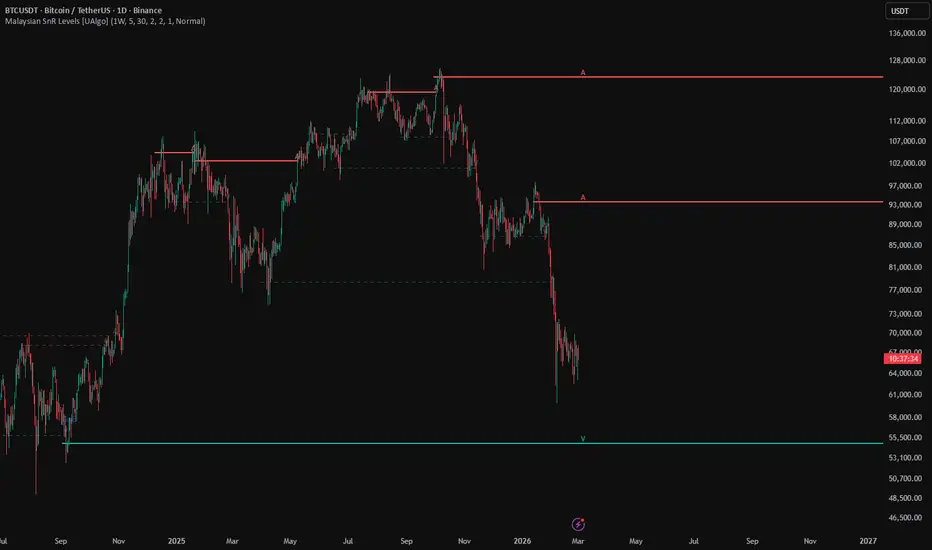
Malaysian SnR Levels is a structure based support and resistance overlay that automatically plots three level types on the chart:
A-Levels, which act as resistance
V-Levels, which act as support
Gap Levels, which mark qualifying candle to candle price gaps
The script is built for traders who want clean horizontal reference levels that stay active until price decisively crosses through them. Instead of drawing every pivot forever, the indicator manages each level as a stateful object with freshness and activity tracking. A newly created level begins as fresh, becomes unfresh after its first wick interaction, and remains active until price fully crosses through it. Once broken, the level stops extending and is archived on the chart.
A major strength of this implementation is its optional multi timeframe workflow. You can leave the timeframe input empty to detect levels on the current chart, or select a higher timeframe to project higher timeframe A, V, and Gap levels onto a lower timeframe execution chart. This makes the script useful for both local chart structure and top down level mapping.
The result is a practical support and resistance engine focused on:
Pivot based resistance and support
Gap based structural levels
Fresh versus unfresh state tracking
Automatic break detection
Optional MTF level projection
🔹 Features
🔸 1) Automatic A-Levels and V-Levels
The script detects pivot highs and pivot lows and converts them into horizontal support and resistance levels:
A-Levels come from confirmed pivot highs and behave as resistance
V-Levels come from confirmed pivot lows and behave as support
These are built from pivot calculations on close, not on raw high and low extremes, which gives the levels a close based structural character.
🔸 2) Automatic Gap Levels
In addition to pivots, the script detects directional gap style levels when two consecutive candles move in the same direction and the open to prior close gap exceeds a minimum tick distance.
Bullish gap logic creates a gap level at the previous close.
Bearish gap logic also creates a gap level at the previous close.
This gives the indicator a third structural layer beyond classic pivot based support and resistance.
🔸 3) Fresh and Unfresh State Tracking
Every new level starts as fresh. A fresh level is considered untouched. Once price interacts with the level by wick, it becomes unfresh:
The line style changes to dashed
The width becomes thinner
The color shifts to the unfresh color theme
This helps traders quickly distinguish untouched levels from levels that have already been tested.
🔸 4) Active Until Full Break
A level stays active until price crosses through it. Once broken, the level:
Stops extending
Fixes its endpoint at the break time
Keeps the historical line visible
Stops updating as an active level
This is useful because old levels remain visible for review, while current active levels continue projecting forward.
🔸 5) Multi Timeframe Detection (Optional)
The script supports a selectable detection timeframe:
Leave it empty to use the current chart timeframe
Set it to a higher timeframe to project higher timeframe levels onto the current chart
This is especially useful when traders want to execute on a lower timeframe while respecting higher timeframe structure.
🔸 6) Minimum Gap Filter in Ticks
Gap levels are filtered by a configurable minimum distance in ticks. This avoids plotting tiny micro gaps and helps keep only more meaningful dislocations.
🔸 7) Duplicate Level Protection
Before adding a new level, the script checks whether an active level already exists near the same price. If another active level is within a small tick range, the new one is skipped.
This reduces clutter and prevents nearly identical levels from stacking on top of each other.
🔸 8) Separate Visibility Controls
Users can independently choose whether to display:
A-Levels
V-Levels
Gap Levels
This makes the tool adaptable for different workflows, such as only plotting pivot levels or only monitoring gap structure.
🔸 9) Full Visual Customization
The script provides separate color controls for:
Fresh A-Levels
Unfresh A-Levels
Fresh V-Levels
Unfresh V-Levels
Fresh Gap Levels
Unfresh Gap Levels
It also allows customization of:
Fresh line width
Unfresh line width
Label size
This makes it easy to fit the indicator into different chart styles.
🔸 10) Label Projection to the Right
Each active level includes a compact label showing its type:
A
V
Gap
The label is automatically pushed several time steps to the right of current price so it stays readable and aligned with the level.
🔸 11) Automatic Level Count Management
The script keeps the number of stored levels under control using a maximum active limit. When capacity is exceeded, it tries to remove an older inactive level first.
This helps maintain chart cleanliness and stay within TradingView object limits.
🔹 Calculations
1) Pivot Based A-Level and V-Level Detection
The script calculates pivots using close, not high or low:
Pine Script®
Interpretation:
A-Level = confirmed close based pivot high
V-Level = confirmed close based pivot low
Because pivot confirmation requires bars on both sides, the level time is aligned to the true pivot bar using:
Pine Script®
2) Gap Level Detection Logic
The script defines bullish and bearish gap conditions using consecutive candles in the same direction plus a minimum gap size measured in ticks.
Bullish gap:
Pine Script®
Bearish gap:
Pine Script®
If either condition is true, the gap level is set at:
Pine Script®
So the reference price for the gap level is the previous candle’s close.
3) Multi Timeframe Data Selection
The script computes levels in a helper function and can either use:
Local chart data directly
Or higher timeframe data through request.security
Pine Script®
If the timeframe input is empty, local values are used. Otherwise, the security values are used:
Pine Script®
This gives flexible MTF projection while keeping one consistent logic engine.
4) New Level Event Detection
To prevent the same pivot or gap from being added multiple times, the script checks whether the timestamp of the detected event changed:
Pine Script®
This is an important implementation detail because it avoids a common Pine issue where na != na can propagate as na and block reliable detection.
5) Level Creation and Duplicate Protection
Before a new level is added, the script checks existing active levels and rejects duplicates that are too close:
Pine Script®
This means levels within 10 ticks of an existing active level are treated as duplicates and not added.
6) Level Initialization
When a level is created, it starts as:
Fresh = true
Active = true
A line is drawn from the source time and extended to the right:
Pine Script®
A label is also created and placed several time steps to the right:
Pine Script®
This keeps the label visually separated from the current candle.
7) Fresh to Unfresh Transition Logic
A level becomes unfresh when price first touches it by wick while the level is still active.
For A-Levels:
Pine Script®
For V-Levels:
Pine Script®
For Gap levels:
Pine Script®
Once touched:
The level remains active
isFresh becomes false
The line becomes dashed
The width changes to the unfresh width
The line and label colors switch to the unfresh palette
This means a wick touch weakens the level visually, but does not break it.
8) Break / Deactivation Logic
A level becomes inactive only when price crosses through it, not merely when it is touched.
Cross up condition:
Pine Script®
Cross down condition:
Pine Script®
If either is true:
Pine Script®
Interpretation:
The level stops projecting and is fixed at the break time.
9) Time Step Handling
The script uses the current bar’s time distance to position and extend labels:
Pine Script®
This is important because the script uses xloc.bar_time, so horizontal positioning is time based rather than bar index based.
10) Maximum Level Management
When the array exceeds the user defined maximum, the script tries to remove an inactive level first:
Pine Script®
Then it deletes that level’s line and label.
Important implementation note:
If no inactive level is found, removeIdx remains 0, so the oldest level in the array is removed.
11) A-Level, V-Level, and Gap Interpretation
In this script:
A-Levels are close based pivot highs and function like resistance
V-Levels are close based pivot lows and function like support
Gap Levels are prior close reference levels from qualifying directional gaps
All three share the same lifecycle framework:
Fresh
Unfresh after wick touch
Inactive after a full cross through
A-Levels, which act as resistance
V-Levels, which act as support
Gap Levels, which mark qualifying candle to candle price gaps
The script is built for traders who want clean horizontal reference levels that stay active until price decisively crosses through them. Instead of drawing every pivot forever, the indicator manages each level as a stateful object with freshness and activity tracking. A newly created level begins as fresh, becomes unfresh after its first wick interaction, and remains active until price fully crosses through it. Once broken, the level stops extending and is archived on the chart.
A major strength of this implementation is its optional multi timeframe workflow. You can leave the timeframe input empty to detect levels on the current chart, or select a higher timeframe to project higher timeframe A, V, and Gap levels onto a lower timeframe execution chart. This makes the script useful for both local chart structure and top down level mapping.
The result is a practical support and resistance engine focused on:
Pivot based resistance and support
Gap based structural levels
Fresh versus unfresh state tracking
Automatic break detection
Optional MTF level projection
🔹 Features
🔸 1) Automatic A-Levels and V-Levels
The script detects pivot highs and pivot lows and converts them into horizontal support and resistance levels:
A-Levels come from confirmed pivot highs and behave as resistance
V-Levels come from confirmed pivot lows and behave as support
These are built from pivot calculations on close, not on raw high and low extremes, which gives the levels a close based structural character.
🔸 2) Automatic Gap Levels
In addition to pivots, the script detects directional gap style levels when two consecutive candles move in the same direction and the open to prior close gap exceeds a minimum tick distance.
Bullish gap logic creates a gap level at the previous close.
Bearish gap logic also creates a gap level at the previous close.
This gives the indicator a third structural layer beyond classic pivot based support and resistance.
🔸 3) Fresh and Unfresh State Tracking
Every new level starts as fresh. A fresh level is considered untouched. Once price interacts with the level by wick, it becomes unfresh:
The line style changes to dashed
The width becomes thinner
The color shifts to the unfresh color theme
This helps traders quickly distinguish untouched levels from levels that have already been tested.
🔸 4) Active Until Full Break
A level stays active until price crosses through it. Once broken, the level:
Stops extending
Fixes its endpoint at the break time
Keeps the historical line visible
Stops updating as an active level
This is useful because old levels remain visible for review, while current active levels continue projecting forward.
🔸 5) Multi Timeframe Detection (Optional)
The script supports a selectable detection timeframe:
Leave it empty to use the current chart timeframe
Set it to a higher timeframe to project higher timeframe levels onto the current chart
This is especially useful when traders want to execute on a lower timeframe while respecting higher timeframe structure.
🔸 6) Minimum Gap Filter in Ticks
Gap levels are filtered by a configurable minimum distance in ticks. This avoids plotting tiny micro gaps and helps keep only more meaningful dislocations.
🔸 7) Duplicate Level Protection
Before adding a new level, the script checks whether an active level already exists near the same price. If another active level is within a small tick range, the new one is skipped.
This reduces clutter and prevents nearly identical levels from stacking on top of each other.
🔸 8) Separate Visibility Controls
Users can independently choose whether to display:
A-Levels
V-Levels
Gap Levels
This makes the tool adaptable for different workflows, such as only plotting pivot levels or only monitoring gap structure.
🔸 9) Full Visual Customization
The script provides separate color controls for:
Fresh A-Levels
Unfresh A-Levels
Fresh V-Levels
Unfresh V-Levels
Fresh Gap Levels
Unfresh Gap Levels
It also allows customization of:
Fresh line width
Unfresh line width
Label size
This makes it easy to fit the indicator into different chart styles.
🔸 10) Label Projection to the Right
Each active level includes a compact label showing its type:
A
V
Gap
The label is automatically pushed several time steps to the right of current price so it stays readable and aligned with the level.
🔸 11) Automatic Level Count Management
The script keeps the number of stored levels under control using a maximum active limit. When capacity is exceeded, it tries to remove an older inactive level first.
This helps maintain chart cleanliness and stay within TradingView object limits.
🔹 Calculations
1) Pivot Based A-Level and V-Level Detection
The script calculates pivots using close, not high or low:
Interpretation:
A-Level = confirmed close based pivot high
V-Level = confirmed close based pivot low
Because pivot confirmation requires bars on both sides, the level time is aligned to the true pivot bar using:
2) Gap Level Detection Logic
The script defines bullish and bearish gap conditions using consecutive candles in the same direction plus a minimum gap size measured in ticks.
Bullish gap:
Bearish gap:
If either condition is true, the gap level is set at:
So the reference price for the gap level is the previous candle’s close.
3) Multi Timeframe Data Selection
The script computes levels in a helper function and can either use:
Local chart data directly
Or higher timeframe data through request.security
If the timeframe input is empty, local values are used. Otherwise, the security values are used:
This gives flexible MTF projection while keeping one consistent logic engine.
4) New Level Event Detection
To prevent the same pivot or gap from being added multiple times, the script checks whether the timestamp of the detected event changed:
This is an important implementation detail because it avoids a common Pine issue where na != na can propagate as na and block reliable detection.
5) Level Creation and Duplicate Protection
Before a new level is added, the script checks existing active levels and rejects duplicates that are too close:
This means levels within 10 ticks of an existing active level are treated as duplicates and not added.
6) Level Initialization
When a level is created, it starts as:
Fresh = true
Active = true
A line is drawn from the source time and extended to the right:
A label is also created and placed several time steps to the right:
This keeps the label visually separated from the current candle.
7) Fresh to Unfresh Transition Logic
A level becomes unfresh when price first touches it by wick while the level is still active.
For A-Levels:
For V-Levels:
For Gap levels:
Once touched:
The level remains active
isFresh becomes false
The line becomes dashed
The width changes to the unfresh width
The line and label colors switch to the unfresh palette
This means a wick touch weakens the level visually, but does not break it.
8) Break / Deactivation Logic
A level becomes inactive only when price crosses through it, not merely when it is touched.
Cross up condition:
Cross down condition:
If either is true:
Interpretation:
The level stops projecting and is fixed at the break time.
9) Time Step Handling
The script uses the current bar’s time distance to position and extend labels:
This is important because the script uses xloc.bar_time, so horizontal positioning is time based rather than bar index based.
10) Maximum Level Management
When the array exceeds the user defined maximum, the script tries to remove an inactive level first:
Then it deletes that level’s line and label.
Important implementation note:
If no inactive level is found, removeIdx remains 0, so the oldest level in the array is removed.
11) A-Level, V-Level, and Gap Interpretation
In this script:
A-Levels are close based pivot highs and function like resistance
V-Levels are close based pivot lows and function like support
Gap Levels are prior close reference levels from qualifying directional gaps
All three share the same lifecycle framework:
Fresh
Unfresh after wick touch
Inactive after a full cross through
オープンソーススクリプト
TradingViewの精神に則り、このスクリプトの作者はコードをオープンソースとして公開してくれました。トレーダーが内容を確認・検証できるようにという配慮です。作者に拍手を送りましょう!無料で利用できますが、コードの再公開はハウスルールに従う必要があります。

Get exclusive indicators
All content provided by UAlgo is for informational & educational purposes only. Past performance does not guarantee future results.
All content provided by UAlgo is for informational & educational purposes only. Past performance does not guarantee future results.
免責事項
これらの情報および投稿は、TradingViewが提供または承認する金融、投資、取引、またはその他の種類の助言もしくは推奨であることを意図したものではなく、またこれらに該当するものでもありません。詳細は利用規約をご覧ください。
オープンソーススクリプト
TradingViewの精神に則り、このスクリプトの作者はコードをオープンソースとして公開してくれました。トレーダーが内容を確認・検証できるようにという配慮です。作者に拍手を送りましょう!無料で利用できますが、コードの再公開はハウスルールに従う必要があります。
Get exclusive indicators
All content provided by UAlgo is for informational & educational purposes only. Past performance does not guarantee future results.
All content provided by UAlgo is for informational & educational purposes only. Past performance does not guarantee future results.
免責事項
これらの情報および投稿は、TradingViewが提供または承認する金融、投資、取引、またはその他の種類の助言もしくは推奨であることを意図したものではなく、またこれらに該当するものでもありません。詳細は利用規約をご覧ください。