
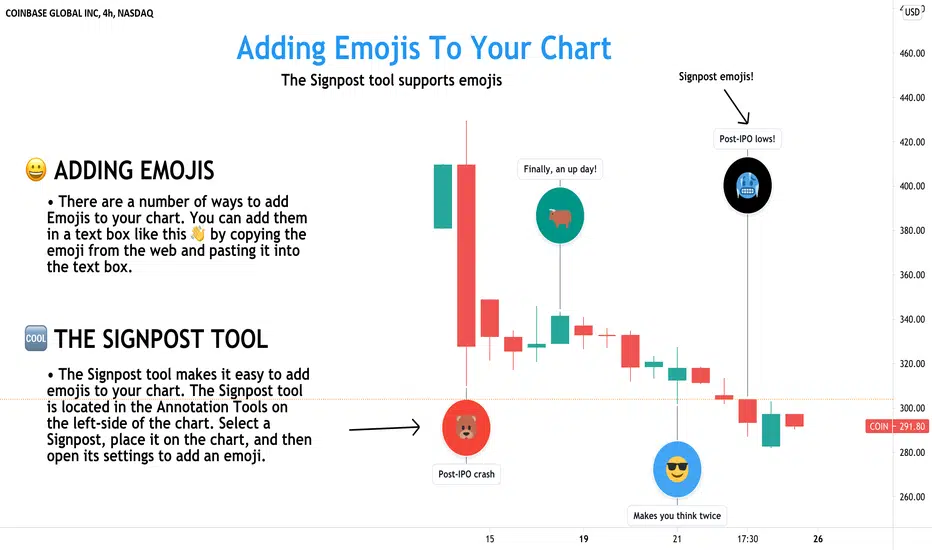
If you publish a lot of research from your TradingView account, emojis will give readers another way to engage with your work. Emojis are recognized globally and can help others better understand how you're thinking or feeling. They can also be used as quick reminders or notes.
Here's how you can add emojis to your chart:
1. Copy and paste an emoji directly into the text box tool like this 👋. If you need help finding an emoji to copy and paste, there are several websites that make this easy to do. You can add emojis to any text box or drawing tool that supports text.
2. The second method is to use the Signpost tool. The Signpost tool is located in the Annotation Tools menu on the left-side of the chart. Select the Signpost, place it on the chart, and then open its settings to add an emoji. The Signpost tool can be used to leave detailed notes at specific price levels. It is easy to use, fully customizable, and it can be dragged to any point on your chart. We've included a few examples on the chart above where we've also customized the background color of each Signpost. 😎🐻 🥶🐂
Thanks for reading! Let us know if you have any questions or comments. Our team is always listening and waiting to help.
Here's how you can add emojis to your chart:
1. Copy and paste an emoji directly into the text box tool like this 👋. If you need help finding an emoji to copy and paste, there are several websites that make this easy to do. You can add emojis to any text box or drawing tool that supports text.
2. The second method is to use the Signpost tool. The Signpost tool is located in the Annotation Tools menu on the left-side of the chart. Select the Signpost, place it on the chart, and then open its settings to add an emoji. The Signpost tool can be used to leave detailed notes at specific price levels. It is easy to use, fully customizable, and it can be dragged to any point on your chart. We've included a few examples on the chart above where we've also customized the background color of each Signpost. 😎🐻 🥶🐂
Thanks for reading! Let us know if you have any questions or comments. Our team is always listening and waiting to help.

Share TradingView with a friend:
tradingview.com/share-your-love/
Check out all #tradingviewtips
tradingview.com/ideas/tradingviewtips/?type=education
New Tools and Features:
tradingview.com/blog/en/
tradingview.com/share-your-love/
Check out all #tradingviewtips
tradingview.com/ideas/tradingviewtips/?type=education
New Tools and Features:
tradingview.com/blog/en/
면책사항
해당 정보와 게시물은 금융, 투자, 트레이딩 또는 기타 유형의 조언이나 권장 사항으로 간주되지 않으며, 트레이딩뷰에서 제공하거나 보증하는 것이 아닙니다. 자세한 내용은 이용 약관을 참조하세요.
Share TradingView with a friend:
tradingview.com/share-your-love/
Check out all #tradingviewtips
tradingview.com/ideas/tradingviewtips/?type=education
New Tools and Features:
tradingview.com/blog/en/
tradingview.com/share-your-love/
Check out all #tradingviewtips
tradingview.com/ideas/tradingviewtips/?type=education
New Tools and Features:
tradingview.com/blog/en/
면책사항
해당 정보와 게시물은 금융, 투자, 트레이딩 또는 기타 유형의 조언이나 권장 사항으로 간주되지 않으며, 트레이딩뷰에서 제공하거나 보증하는 것이 아닙니다. 자세한 내용은 이용 약관을 참조하세요.