Precision Progressive ORB
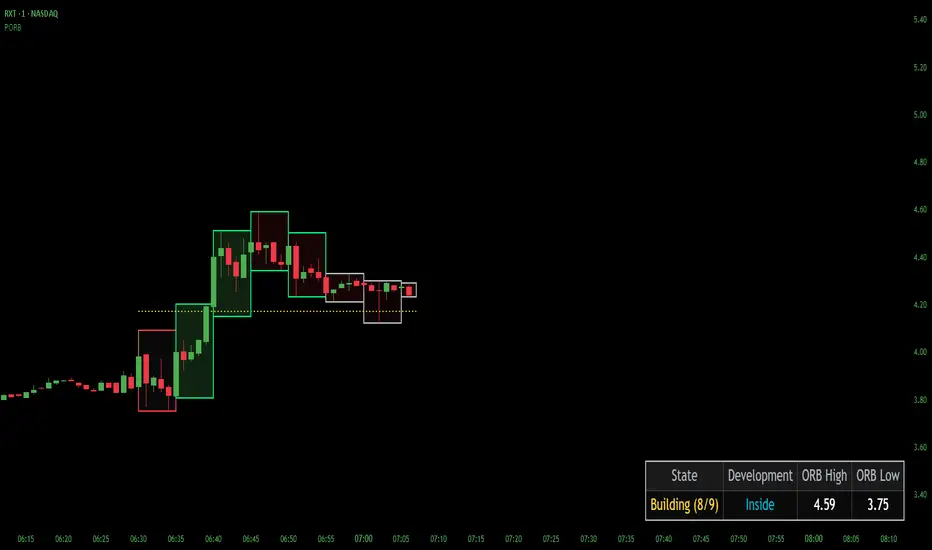
# Precision Progressive ORB (PORB)
A different approach to the Opening Range Breakout: instead of waiting for the full ORB window to complete before drawing anything, PORB builds the range progressively using smaller sub-boxes that develop live during the auction. You can watch the opening range form in real time rather than staring at empty space until the ORB completes.
> 🖼️ **[Main Image — sub-boxes during build]**

> *Above: a 45-minute ORB built progressively from nine 5-minute sub-boxes. Each sub-box shows where price was leaning during its window — red borders for holding low, green for holding high, white for neutral rotation. The dotted line is the live midpoint tracking the running aggregate. The status table on the right tracks state and classification in real time.*
---
## The problem this solves
A standard 15-minute ORB script draws nothing until 15 minutes have passed. On fast-moving small caps, the trade is often half over by the time the box appears. PORB shows you what's happening *inside* those 15 minutes by breaking them into smaller development windows — for example, three 5-minute sub-boxes that build the full ORB. You see the opening auction develop in stages instead of all at once.
---
## Quick setup
Default settings work out of the box for US stocks:
- **Timezone:** Exchange (auto-detects from the symbol)
- **Start time:** 9:30 (matches NYSE/NASDAQ market open via the Exchange timezone)
- **ORB duration:** 15 minutes
- **Sub-box duration:** 5 minutes (three sub-boxes per ORB)
**Important about timezone:** the Hour and Minute inputs are interpreted in the selected Timezone. With the default "Exchange" setting, 9:30 means 9:30 AM in the symbol's home exchange — Eastern Time for NASDAQ/NYSE, Central European Time for DAX, JST for Nikkei, etc. If you want to anchor to a non-native session (trading EUR/USD on the London FX open from a US chart, for example), pick a specific timezone from the dropdown — DST is handled automatically.
If you pick a sub-box duration that doesn't divide the ORB evenly (e.g., 15 / 7), PORB auto-snaps to the nearest valid divisor and shows a one-time notice.
---
## How it works
During the ORB window:
- Sub-boxes draw live, one at a time
- Two display modes: **Rolling** (only the current sub-box visible) or **Show All** (every sub-box stays visible through completion)
- Internally, PORB tracks the aggregate high/low across the entire ORB window — that's the real range being built
When the ORB completes:
- All sub-boxes sweep away (development is done)
- The final aggregate high/low locks in
- A bordered final box anchors the locked structure to its origin time
- High/low lines, midpoint, and optional buffer lines extend right for ongoing reference
> 🖼️ **[IMAGE 2 — locked state after ORB completion]**

> *Above: the same auction after the ORB locks. Sub-boxes are gone — the chart transitions from "watching the auction form" to "trading the resulting structure." The locked box, ORB high/low lines, and midpoint extend right as structural reference for the rest of the session.*
---
## Two display modes
**Show All Sub-Boxes** (the hero image at the top) keeps every completed sub-box visible through the ORB window, so you can see the full development sequence as it builds.
**Rolling Sub-Box Only** shows just the current developing sub-box — only one box visible at any time, moving forward as each new window begins. Less visual weight, more focus on the active auction phase.
> 🖼️ **[IMAGE 3 — rolling mode, single sub-box visible]**

> *Above: PORB in rolling mode. Only the currently developing sub-box is drawn — prior sub-boxes disappear as new ones begin. Cleaner look for traders who want minimal chart clutter while still watching the auction form live.*
---
## Visual language
Two clean channels, two distinct concepts:
**Sub-box border = position lean**
- Silver — close in the middle third of the developing range
- Green — close in the upper third (holding high)
- Red — close in the lower third (holding low)
**Sub-box fill = movement energy**
Progressive green/red shading reflects the relative strength of each sub-box move. Fills stay light — atmospheric tint, not solid overlay — so candles and other indicators remain clearly readable. The fill thresholds adapt to the symbol's volatility regime so a sleepy Large cap doesn't need the same magnitude as a volatile small cap to show energy.
**Final box** I'm using a cyan border with a faint neutral fill — a structural anchor for the locked range. The color can be changed based on your preferred canvas color.
**Live midpoint** (optional, on by default): a dotted line tracking the running aggregate midpoint during build. Provisional by design — it shifts as the range develops. Replaced by the locked dashed midpoint when the ORB completes.
---
## Classification table
A 4-column status table tracks live state:
| State | Development | ORB High | ORB Low |
|-------|-------------|----------|---------|
The Development column shifts meaning by phase:
- **During build:** range classification — `Forming`, `Inside`, `Expanding`, `Compressing`, or `Stable`. Compares the current sub-box's range to the prior sub-box's range, with a tolerance threshold to avoid flickering on small differences.
- **After lock:** position classification — `Above Range`, `Upper Range`, `Mid Range`, `Lower Range`, or `Below Range`. Tells you where price sits relative to the locked structure, including whether it's broken out above or below.
---
## Buffer lines (optional, off by default)
Toggleable dotted lines just outside the locked ORB high and low. Sized by ticks, ATR multiple, or percent — your choice. These give you a "you actually broke this, not just kissed it" reference for traders who want a visual cushion against wick-pokes and liquidity sweeps.
---
## What this is and isn't
PORB is a structural visualization tool. It does not generate buy/sell signals, fire alerts, or recommend trades. It shows you the opening auction's development in a way that pure-completion ORB scripts can't, and gives you a clean structural reference once the range locks. How you use that information is up to you.
Best suited for:
- Active intraday traders working opening-range setups
- Anyone watching fast-moving instruments where the first 5–15 minutes carry most of the move
- Traders who want to see auction structure form rather than waiting for the result
**Note on viewing:** sub-boxes draw live during the ORB build phase. If you load PORB onto a chart after the ORB has already completed for the day, you'll only see the final locked structure — sub-boxes are part of the live development view, not a historical replay. To see sub-boxes in action, watch the next ORB window form in real time, or set the start time to the upcoming session.
---
Released open source under MPL 2.0.
A different approach to the Opening Range Breakout: instead of waiting for the full ORB window to complete before drawing anything, PORB builds the range progressively using smaller sub-boxes that develop live during the auction. You can watch the opening range form in real time rather than staring at empty space until the ORB completes.
> 🖼️ **[Main Image — sub-boxes during build]**
> *Above: a 45-minute ORB built progressively from nine 5-minute sub-boxes. Each sub-box shows where price was leaning during its window — red borders for holding low, green for holding high, white for neutral rotation. The dotted line is the live midpoint tracking the running aggregate. The status table on the right tracks state and classification in real time.*
---
## The problem this solves
A standard 15-minute ORB script draws nothing until 15 minutes have passed. On fast-moving small caps, the trade is often half over by the time the box appears. PORB shows you what's happening *inside* those 15 minutes by breaking them into smaller development windows — for example, three 5-minute sub-boxes that build the full ORB. You see the opening auction develop in stages instead of all at once.
---
## Quick setup
Default settings work out of the box for US stocks:
- **Timezone:** Exchange (auto-detects from the symbol)
- **Start time:** 9:30 (matches NYSE/NASDAQ market open via the Exchange timezone)
- **ORB duration:** 15 minutes
- **Sub-box duration:** 5 minutes (three sub-boxes per ORB)
**Important about timezone:** the Hour and Minute inputs are interpreted in the selected Timezone. With the default "Exchange" setting, 9:30 means 9:30 AM in the symbol's home exchange — Eastern Time for NASDAQ/NYSE, Central European Time for DAX, JST for Nikkei, etc. If you want to anchor to a non-native session (trading EUR/USD on the London FX open from a US chart, for example), pick a specific timezone from the dropdown — DST is handled automatically.
If you pick a sub-box duration that doesn't divide the ORB evenly (e.g., 15 / 7), PORB auto-snaps to the nearest valid divisor and shows a one-time notice.
---
## How it works
During the ORB window:
- Sub-boxes draw live, one at a time
- Two display modes: **Rolling** (only the current sub-box visible) or **Show All** (every sub-box stays visible through completion)
- Internally, PORB tracks the aggregate high/low across the entire ORB window — that's the real range being built
When the ORB completes:
- All sub-boxes sweep away (development is done)
- The final aggregate high/low locks in
- A bordered final box anchors the locked structure to its origin time
- High/low lines, midpoint, and optional buffer lines extend right for ongoing reference
> 🖼️ **[IMAGE 2 — locked state after ORB completion]**
> *Above: the same auction after the ORB locks. Sub-boxes are gone — the chart transitions from "watching the auction form" to "trading the resulting structure." The locked box, ORB high/low lines, and midpoint extend right as structural reference for the rest of the session.*
---
## Two display modes
**Show All Sub-Boxes** (the hero image at the top) keeps every completed sub-box visible through the ORB window, so you can see the full development sequence as it builds.
**Rolling Sub-Box Only** shows just the current developing sub-box — only one box visible at any time, moving forward as each new window begins. Less visual weight, more focus on the active auction phase.
> 🖼️ **[IMAGE 3 — rolling mode, single sub-box visible]**
> *Above: PORB in rolling mode. Only the currently developing sub-box is drawn — prior sub-boxes disappear as new ones begin. Cleaner look for traders who want minimal chart clutter while still watching the auction form live.*
---
## Visual language
Two clean channels, two distinct concepts:
**Sub-box border = position lean**
- Silver — close in the middle third of the developing range
- Green — close in the upper third (holding high)
- Red — close in the lower third (holding low)
**Sub-box fill = movement energy**
Progressive green/red shading reflects the relative strength of each sub-box move. Fills stay light — atmospheric tint, not solid overlay — so candles and other indicators remain clearly readable. The fill thresholds adapt to the symbol's volatility regime so a sleepy Large cap doesn't need the same magnitude as a volatile small cap to show energy.
**Final box** I'm using a cyan border with a faint neutral fill — a structural anchor for the locked range. The color can be changed based on your preferred canvas color.
**Live midpoint** (optional, on by default): a dotted line tracking the running aggregate midpoint during build. Provisional by design — it shifts as the range develops. Replaced by the locked dashed midpoint when the ORB completes.
---
## Classification table
A 4-column status table tracks live state:
| State | Development | ORB High | ORB Low |
|-------|-------------|----------|---------|
The Development column shifts meaning by phase:
- **During build:** range classification — `Forming`, `Inside`, `Expanding`, `Compressing`, or `Stable`. Compares the current sub-box's range to the prior sub-box's range, with a tolerance threshold to avoid flickering on small differences.
- **After lock:** position classification — `Above Range`, `Upper Range`, `Mid Range`, `Lower Range`, or `Below Range`. Tells you where price sits relative to the locked structure, including whether it's broken out above or below.
---
## Buffer lines (optional, off by default)
Toggleable dotted lines just outside the locked ORB high and low. Sized by ticks, ATR multiple, or percent — your choice. These give you a "you actually broke this, not just kissed it" reference for traders who want a visual cushion against wick-pokes and liquidity sweeps.
---
## What this is and isn't
PORB is a structural visualization tool. It does not generate buy/sell signals, fire alerts, or recommend trades. It shows you the opening auction's development in a way that pure-completion ORB scripts can't, and gives you a clean structural reference once the range locks. How you use that information is up to you.
Best suited for:
- Active intraday traders working opening-range setups
- Anyone watching fast-moving instruments where the first 5–15 minutes carry most of the move
- Traders who want to see auction structure form rather than waiting for the result
**Note on viewing:** sub-boxes draw live during the ORB build phase. If you load PORB onto a chart after the ORB has already completed for the day, you'll only see the final locked structure — sub-boxes are part of the live development view, not a historical replay. To see sub-boxes in action, watch the next ORB window form in real time, or set the start time to the upcoming session.
---
Released open source under MPL 2.0.

@MohaveTrader
Context First — Signals Second
Precision Trading Tools
Structure • Flow • Momentum
Context First — Signals Second
Precision Trading Tools
Structure • Flow • Momentum
면책사항
해당 정보와 게시물은 금융, 투자, 트레이딩 또는 기타 유형의 조언이나 권장 사항으로 간주되지 않으며, 트레이딩뷰에서 제공하거나 보증하는 것이 아닙니다. 자세한 내용은 이용 약관을 참조하세요.
@MohaveTrader
Context First — Signals Second
Precision Trading Tools
Structure • Flow • Momentum
Context First — Signals Second
Precision Trading Tools
Structure • Flow • Momentum
면책사항
해당 정보와 게시물은 금융, 투자, 트레이딩 또는 기타 유형의 조언이나 권장 사항으로 간주되지 않으며, 트레이딩뷰에서 제공하거나 보증하는 것이 아닙니다. 자세한 내용은 이용 약관을 참조하세요.