OPEN-SOURCE SCRIPT
Smooths Key Levels / Sessions / EMA / SMA / VWAP
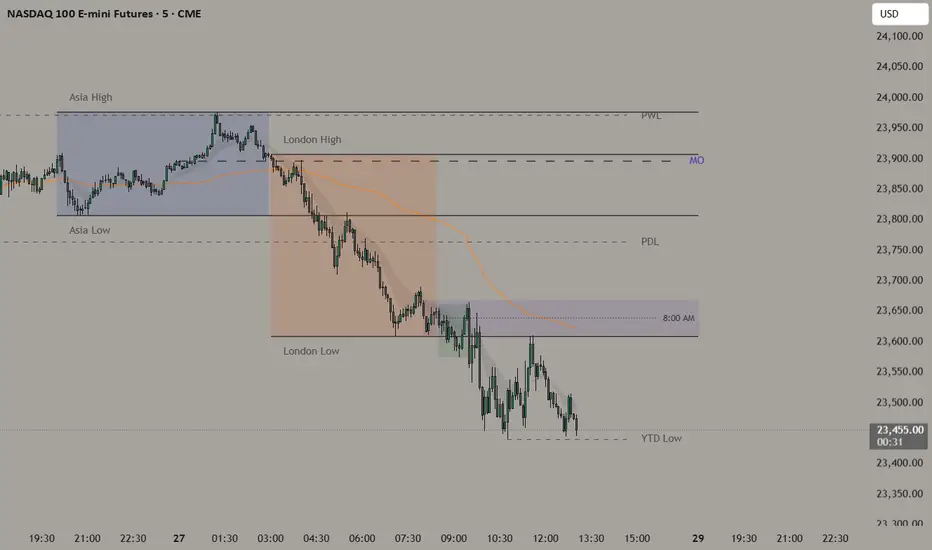
-Smooths Key Levels-
Overview
This indicator unifies seven market structure tools into one clean overlay, all sharing a single timezone setting and a configurable daily reset time. Every element is designed to work together — session ranges establish the intraday structure, key levels provide higher timeframe context, and the EMA cloud filters trend direction.
Components and How They Work
-EMA Cloud (9/21)** — Two exponential moving averages calculated using the standard EMA formula. The space between them is filled to create a cloud that visually represents momentum. When price is above the cloud the bias is bullish, below is bearish, and inside signals consolidation.
-Asia Session (default 8PM–3AM)** — Tracks the highest high and lowest low of the Asia trading session using local time. The range is shaded and the high/low lines extend until the daily reset, giving NY session traders a clear reference for potential breakout levels.
-London Session (default 3AM–8:30AM)** — Same methodology as Asia. London often expands beyond the Asia range — these levels frequently act as support and resistance during the NY open.
-8AM 15-Minute Range** — Highlights the high and low of the 8AM candle, a widely watched pre-market reference range used by futures traders to identify early session bias.
-Midnight Open** — Marks the opening price of the midnight candle. Used as an intraday fair value reference and mean reversion level.
-Key Levels** — Automatically plots Previous Day, Previous Week, Previous Month highs and lows, and the Current Year high and low. These are drawn from the actual wick of the extreme bar and extend to the right as dashed reference lines.
Why Combined
All seven tools reference the same timezone and reset at the same configurable time (default 6PM). Separating them into individual scripts would require duplicating timezone inputs and cause layering and z-order conflicts between their drawing objects. Combined, they form a coherent market structure framework where each layer provides context for the next.
How To Use
1. Set your timezone offset in settings to match your broker feed
2. Adjust session start/end times if needed for your market
3. Use Asia and London highs/lows as key reference levels during NY session
4. Watch the 8AM range for early directional bias
5. Key levels highlight confluence zones — when PDH aligns with PWH for example, that level carries more weight
Overview
This indicator unifies seven market structure tools into one clean overlay, all sharing a single timezone setting and a configurable daily reset time. Every element is designed to work together — session ranges establish the intraday structure, key levels provide higher timeframe context, and the EMA cloud filters trend direction.
Components and How They Work
-EMA Cloud (9/21)** — Two exponential moving averages calculated using the standard EMA formula. The space between them is filled to create a cloud that visually represents momentum. When price is above the cloud the bias is bullish, below is bearish, and inside signals consolidation.
-Asia Session (default 8PM–3AM)** — Tracks the highest high and lowest low of the Asia trading session using local time. The range is shaded and the high/low lines extend until the daily reset, giving NY session traders a clear reference for potential breakout levels.
-London Session (default 3AM–8:30AM)** — Same methodology as Asia. London often expands beyond the Asia range — these levels frequently act as support and resistance during the NY open.
-8AM 15-Minute Range** — Highlights the high and low of the 8AM candle, a widely watched pre-market reference range used by futures traders to identify early session bias.
-Midnight Open** — Marks the opening price of the midnight candle. Used as an intraday fair value reference and mean reversion level.
-Key Levels** — Automatically plots Previous Day, Previous Week, Previous Month highs and lows, and the Current Year high and low. These are drawn from the actual wick of the extreme bar and extend to the right as dashed reference lines.
Why Combined
All seven tools reference the same timezone and reset at the same configurable time (default 6PM). Separating them into individual scripts would require duplicating timezone inputs and cause layering and z-order conflicts between their drawing objects. Combined, they form a coherent market structure framework where each layer provides context for the next.
How To Use
1. Set your timezone offset in settings to match your broker feed
2. Adjust session start/end times if needed for your market
3. Use Asia and London highs/lows as key reference levels during NY session
4. Watch the 8AM range for early directional bias
5. Key levels highlight confluence zones — when PDH aligns with PWH for example, that level carries more weight
오픈 소스 스크립트
트레이딩뷰의 진정한 정신에 따라, 이 스크립트의 작성자는 이를 오픈소스로 공개하여 트레이더들이 기능을 검토하고 검증할 수 있도록 했습니다. 작성자에게 찬사를 보냅니다! 이 코드는 무료로 사용할 수 있지만, 코드를 재게시하는 경우 하우스 룰이 적용된다는 점을 기억하세요.

면책사항
해당 정보와 게시물은 금융, 투자, 트레이딩 또는 기타 유형의 조언이나 권장 사항으로 간주되지 않으며, 트레이딩뷰에서 제공하거나 보증하는 것이 아닙니다. 자세한 내용은 이용 약관을 참조하세요.
오픈 소스 스크립트
트레이딩뷰의 진정한 정신에 따라, 이 스크립트의 작성자는 이를 오픈소스로 공개하여 트레이더들이 기능을 검토하고 검증할 수 있도록 했습니다. 작성자에게 찬사를 보냅니다! 이 코드는 무료로 사용할 수 있지만, 코드를 재게시하는 경우 하우스 룰이 적용된다는 점을 기억하세요.
면책사항
해당 정보와 게시물은 금융, 투자, 트레이딩 또는 기타 유형의 조언이나 권장 사항으로 간주되지 않으며, 트레이딩뷰에서 제공하거나 보증하는 것이 아닙니다. 자세한 내용은 이용 약관을 참조하세요.