OPEN-SOURCE SCRIPT
Hamppu - Flow Engine
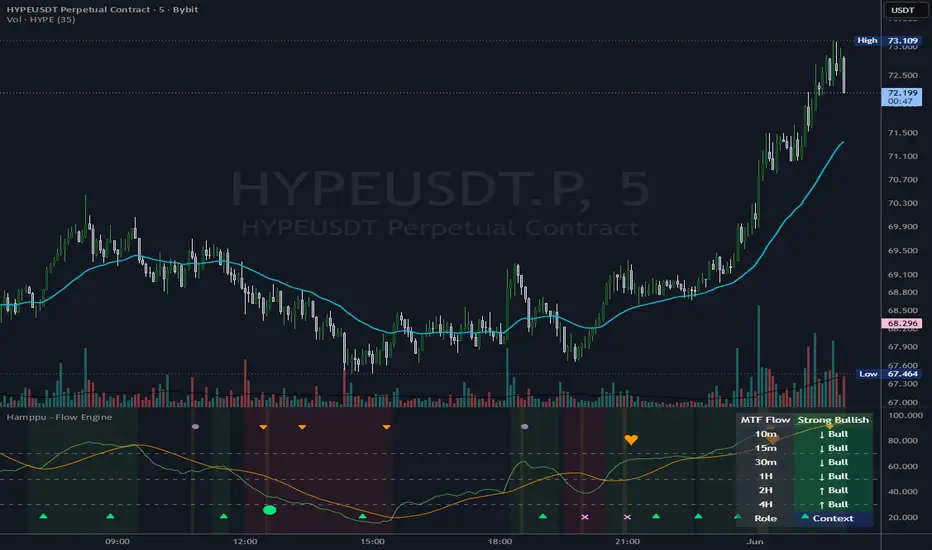
Hamppu - Flow Engine is an open-source crypto intraday context engine built in Pine Script v6.
It is designed to help read market context, not to provide standalone buy/sell signals.
The script combines multi-layer RSI regime logic, RSI compression/release, WaveTrend-style stretch reclaim/reject context, liquidity sweep quality scoring, displacement after sweep, HTF with-flow / counter-flow classification and a dynamic MTF Flow Stack.
The goal is transparency. Markers are not magic signals. They are context events that help show when momentum, liquidity and higher-timeframe flow may be interacting.
Core features:
- Multi-layer RSI momentum regime
- RSI compression and directional release
- WaveTrend-style stretch reclaim/reject context
- Liquidity sweep quality scoring
- Displacement after sweep
- HTF with-flow / counter-flow classification
- MTF Flow Stack with selectable 3–6 timeframe slots
- Curated profiles: Balanced, Degen Fast, Conservative, Research and Custom
- Optional source labels for studying RSI / WaveTrend / Degen Fast marker sources
Visual language:
- Background color shows local RSI regime.
- Marker color shows HTF alignment.
- MTF Flow Stack shows broader multi-timeframe momentum context.
Marker guide:
- Triangle = early momentum reclaim/reject context
- Circle = momentum release after RSI compression
- X = compression release / compression ended
- Heart = Flow Context: sweep + displacement + momentum
- Orange marker = counter-flow / HTF disagreement
Profiles:
Balanced is the default public profile.
Degen Fast is a faster 5m/15m profile with early reclaim behavior.
Conservative is stricter and produces fewer context events.
Research is a looser exploration profile.
Custom is for manual tuning.
Important:
Balanced, Degen Fast, Conservative and Research are curated presets. These presets may override selected sensitivity controls internally, including sweep thresholds, cooldowns, compression tightness and confirmed/live behavior.
Use Profile = Custom if you want manual control over the visible sensitivity inputs.
Suggested workflow:
1. Start with Balanced.
2. Read the background regime first.
3. Check marker color for HTF alignment.
4. Use the MTF Flow Stack to understand broader context.
5. Treat markers as context events, not automatic entries.
6. Use your own price action, risk management and invalidation.
Alerts:
Alerts focus on main context events and with-flow reclaim/reject events. Not every visual marker has a separate alert. For more stable alerts, use bar-close alert settings.
Stability note:
When confirmed HTF is active, HTF Bias uses the previous closed HTF candle. Current chart timeframe values can still update while the active candle is open.
License: MIT.
This script is published for educational/open-source purposes. It does not provide financial advice.
It is designed to help read market context, not to provide standalone buy/sell signals.
The script combines multi-layer RSI regime logic, RSI compression/release, WaveTrend-style stretch reclaim/reject context, liquidity sweep quality scoring, displacement after sweep, HTF with-flow / counter-flow classification and a dynamic MTF Flow Stack.
The goal is transparency. Markers are not magic signals. They are context events that help show when momentum, liquidity and higher-timeframe flow may be interacting.
Core features:
- Multi-layer RSI momentum regime
- RSI compression and directional release
- WaveTrend-style stretch reclaim/reject context
- Liquidity sweep quality scoring
- Displacement after sweep
- HTF with-flow / counter-flow classification
- MTF Flow Stack with selectable 3–6 timeframe slots
- Curated profiles: Balanced, Degen Fast, Conservative, Research and Custom
- Optional source labels for studying RSI / WaveTrend / Degen Fast marker sources
Visual language:
- Background color shows local RSI regime.
- Marker color shows HTF alignment.
- MTF Flow Stack shows broader multi-timeframe momentum context.
Marker guide:
- Triangle = early momentum reclaim/reject context
- Circle = momentum release after RSI compression
- X = compression release / compression ended
- Heart = Flow Context: sweep + displacement + momentum
- Orange marker = counter-flow / HTF disagreement
Profiles:
Balanced is the default public profile.
Degen Fast is a faster 5m/15m profile with early reclaim behavior.
Conservative is stricter and produces fewer context events.
Research is a looser exploration profile.
Custom is for manual tuning.
Important:
Balanced, Degen Fast, Conservative and Research are curated presets. These presets may override selected sensitivity controls internally, including sweep thresholds, cooldowns, compression tightness and confirmed/live behavior.
Use Profile = Custom if you want manual control over the visible sensitivity inputs.
Suggested workflow:
1. Start with Balanced.
2. Read the background regime first.
3. Check marker color for HTF alignment.
4. Use the MTF Flow Stack to understand broader context.
5. Treat markers as context events, not automatic entries.
6. Use your own price action, risk management and invalidation.
Alerts:
Alerts focus on main context events and with-flow reclaim/reject events. Not every visual marker has a separate alert. For more stable alerts, use bar-close alert settings.
Stability note:
When confirmed HTF is active, HTF Bias uses the previous closed HTF candle. Current chart timeframe values can still update while the active candle is open.
License: MIT.
This script is published for educational/open-source purposes. It does not provide financial advice.
오픈 소스 스크립트
트레이딩뷰의 진정한 정신에 따라, 이 스크립트의 작성자는 이를 오픈소스로 공개하여 트레이더들이 기능을 검토하고 검증할 수 있도록 했습니다. 작성자에게 찬사를 보냅니다! 이 코드는 무료로 사용할 수 있지만, 코드를 재게시하는 경우 하우스 룰이 적용된다는 점을 기억하세요.

면책사항
해당 정보와 게시물은 금융, 투자, 트레이딩 또는 기타 유형의 조언이나 권장 사항으로 간주되지 않으며, 트레이딩뷰에서 제공하거나 보증하는 것이 아닙니다. 자세한 내용은 이용 약관을 참조하세요.
오픈 소스 스크립트
트레이딩뷰의 진정한 정신에 따라, 이 스크립트의 작성자는 이를 오픈소스로 공개하여 트레이더들이 기능을 검토하고 검증할 수 있도록 했습니다. 작성자에게 찬사를 보냅니다! 이 코드는 무료로 사용할 수 있지만, 코드를 재게시하는 경우 하우스 룰이 적용된다는 점을 기억하세요.
면책사항
해당 정보와 게시물은 금융, 투자, 트레이딩 또는 기타 유형의 조언이나 권장 사항으로 간주되지 않으며, 트레이딩뷰에서 제공하거나 보증하는 것이 아닙니다. 자세한 내용은 이용 약관을 참조하세요.