ICT Opening Gaps & EHPDA
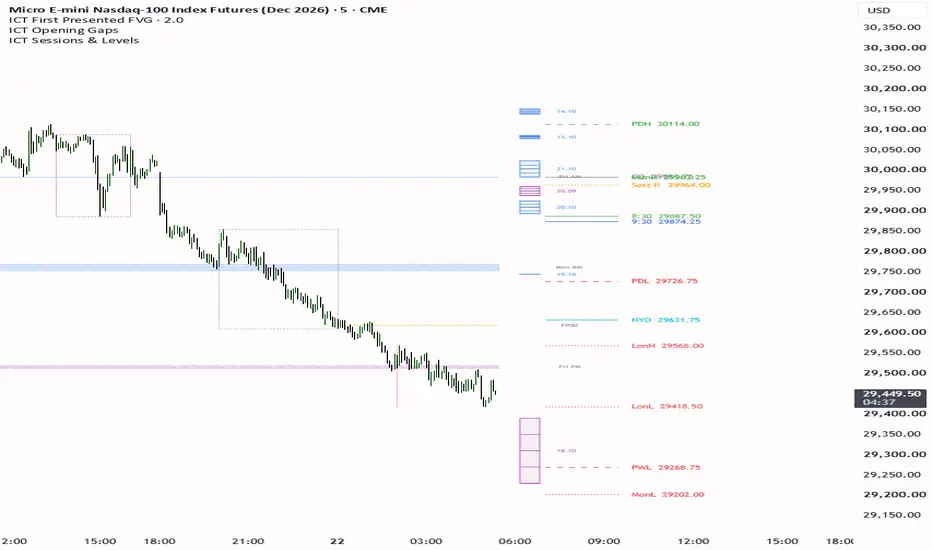
ICT Opening Gaps & EHPDA displays New Week Opening Gaps (NWOG) and New Day Opening Gaps (NDOG), with optional Event Horizon price-delivery arrays.
DISPLAY
Choose full zones, compact right-side rectangles, or both. Rectangles can show the midpoint, 25% and 75% levels, and a date label. Their offset, width, line thickness and label spacing are configurable independently. Each gap type has its own color and history count.
DEFAULT SETUP
Both NWOG and NDOG are enabled with five historical gaps each. Compact rectangles use a 10-bar offset and 8-bar width, with midpoint and quarters enabled. NWOG is purple; NDOG is blue. Dates use dd.MM. Event Horizon, the information table and alert switches are off by default. These defaults match the author's chart configuration.
HOW TO USE
Add the indicator to a chart and adjust the Gaps and Gap Rectangle settings to choose the history and display geometry. Enable the optional modules or alerts only when needed. Gap boundaries are reference areas; this indicator does not produce buy or sell signals.
CREDITS
Based on the NWOG/NDOG + EHPDA code by CDC Trading LABN (CDC_Trading_LABN). This adaptation adds compact rectangle rendering with configurable bar offsets, width, midpoint, quarter levels and date labels, plus the configured display defaults. The original author attribution is retained in the source.
DISPLAY
Choose full zones, compact right-side rectangles, or both. Rectangles can show the midpoint, 25% and 75% levels, and a date label. Their offset, width, line thickness and label spacing are configurable independently. Each gap type has its own color and history count.
DEFAULT SETUP
Both NWOG and NDOG are enabled with five historical gaps each. Compact rectangles use a 10-bar offset and 8-bar width, with midpoint and quarters enabled. NWOG is purple; NDOG is blue. Dates use dd.MM. Event Horizon, the information table and alert switches are off by default. These defaults match the author's chart configuration.
HOW TO USE
Add the indicator to a chart and adjust the Gaps and Gap Rectangle settings to choose the history and display geometry. Enable the optional modules or alerts only when needed. Gap boundaries are reference areas; this indicator does not produce buy or sell signals.
CREDITS
Based on the NWOG/NDOG + EHPDA code by CDC Trading LABN (CDC_Trading_LABN). This adaptation adds compact rectangle rendering with configurable bar offsets, width, midpoint, quarter levels and date labels, plus the configured display defaults. The original author attribution is retained in the source.

면책사항
해당 정보와 게시물은 금융, 투자, 트레이딩 또는 기타 유형의 조언이나 권장 사항으로 간주되지 않으며, 트레이딩뷰에서 제공하거나 보증하는 것이 아닙니다. 자세한 내용은 이용 약관을 참조하세요.
면책사항
해당 정보와 게시물은 금융, 투자, 트레이딩 또는 기타 유형의 조언이나 권장 사항으로 간주되지 않으며, 트레이딩뷰에서 제공하거나 보증하는 것이 아닙니다. 자세한 내용은 이용 약관을 참조하세요.