OPEN-SOURCE SCRIPT
업데이트됨 Custom Candle Highlighter (NY Time)
### Overview
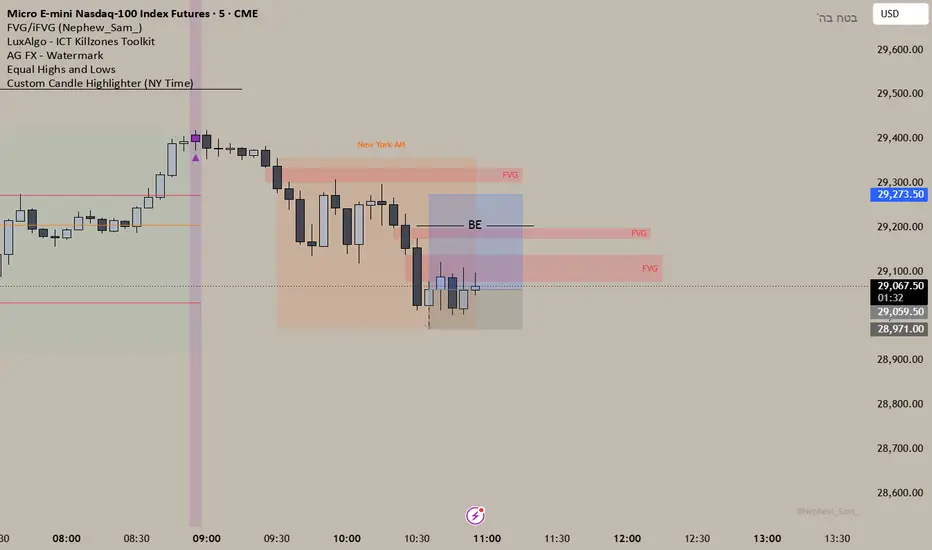
This lightweight utility script highlights exactly two specific candles during the trading day based on your custom time inputs. It is designed for traders who track specific key economic releases, market opens, or daily institutional windows.
### Features
* **Precise NY Time Tracking:** The script converts candle times to the New York timezone (`America/New_York`), meaning it automatically adjusts for U.S. Daylight Saving Time (DST). It will remain accurate regardless of your local chart timezone display.
* **Dual Time Inputs:** Easily set two independent times (Hour and Minute) directly from the indicator settings panel without changing the code.
* **Highly Visible Triggers:** When a candle matches your set time, the script highlights it using three visual anchors:
1. Changes the candle body color to Yellow.
2. Applies a soft Yellow background slot behind the candle.
3. Places a tiny green triangle underneath the candle for absolute clarity.
### Important Usage Notes (Best Settings)
* **Timeframe Requirement:** To capture exact minutes (e.g., 08:55 AM), you **must** use this indicator on lower-interval timeframes like the **1-minute (1m)** chart. If you are on a 1-hour chart, individual minute triggers will not paint.
* **Inputs:** Access the settings gear icon to adjust the hours (0-23 format) and minutes (0-59 format) for both the morning and afternoon session targets.
Feel free to leave a comment or drop a like if you find this script useful for your daily routine!
This lightweight utility script highlights exactly two specific candles during the trading day based on your custom time inputs. It is designed for traders who track specific key economic releases, market opens, or daily institutional windows.
### Features
* **Precise NY Time Tracking:** The script converts candle times to the New York timezone (`America/New_York`), meaning it automatically adjusts for U.S. Daylight Saving Time (DST). It will remain accurate regardless of your local chart timezone display.
* **Dual Time Inputs:** Easily set two independent times (Hour and Minute) directly from the indicator settings panel without changing the code.
* **Highly Visible Triggers:** When a candle matches your set time, the script highlights it using three visual anchors:
1. Changes the candle body color to Yellow.
2. Applies a soft Yellow background slot behind the candle.
3. Places a tiny green triangle underneath the candle for absolute clarity.
### Important Usage Notes (Best Settings)
* **Timeframe Requirement:** To capture exact minutes (e.g., 08:55 AM), you **must** use this indicator on lower-interval timeframes like the **1-minute (1m)** chart. If you are on a 1-hour chart, individual minute triggers will not paint.
* **Inputs:** Access the settings gear icon to adjust the hours (0-23 format) and minutes (0-59 format) for both the morning and afternoon session targets.
Feel free to leave a comment or drop a like if you find this script useful for your daily routine!
릴리즈 노트
Changed the colors to purple, I like it more 오픈 소스 스크립트
트레이딩뷰의 진정한 정신에 따라, 이 스크립트의 작성자는 이를 오픈소스로 공개하여 트레이더들이 기능을 검토하고 검증할 수 있도록 했습니다. 작성자에게 찬사를 보냅니다! 이 코드는 무료로 사용할 수 있지만, 코드를 재게시하는 경우 하우스 룰이 적용된다는 점을 기억하세요.

면책사항
해당 정보와 게시물은 금융, 투자, 트레이딩 또는 기타 유형의 조언이나 권장 사항으로 간주되지 않으며, 트레이딩뷰에서 제공하거나 보증하는 것이 아닙니다. 자세한 내용은 이용 약관을 참조하세요.
오픈 소스 스크립트
트레이딩뷰의 진정한 정신에 따라, 이 스크립트의 작성자는 이를 오픈소스로 공개하여 트레이더들이 기능을 검토하고 검증할 수 있도록 했습니다. 작성자에게 찬사를 보냅니다! 이 코드는 무료로 사용할 수 있지만, 코드를 재게시하는 경우 하우스 룰이 적용된다는 점을 기억하세요.
면책사항
해당 정보와 게시물은 금융, 투자, 트레이딩 또는 기타 유형의 조언이나 권장 사항으로 간주되지 않으며, 트레이딩뷰에서 제공하거나 보증하는 것이 아닙니다. 자세한 내용은 이용 약관을 참조하세요.