OPEN-SOURCE SCRIPT
업데이트됨 Draggable TradeSize RR System | julzALGO
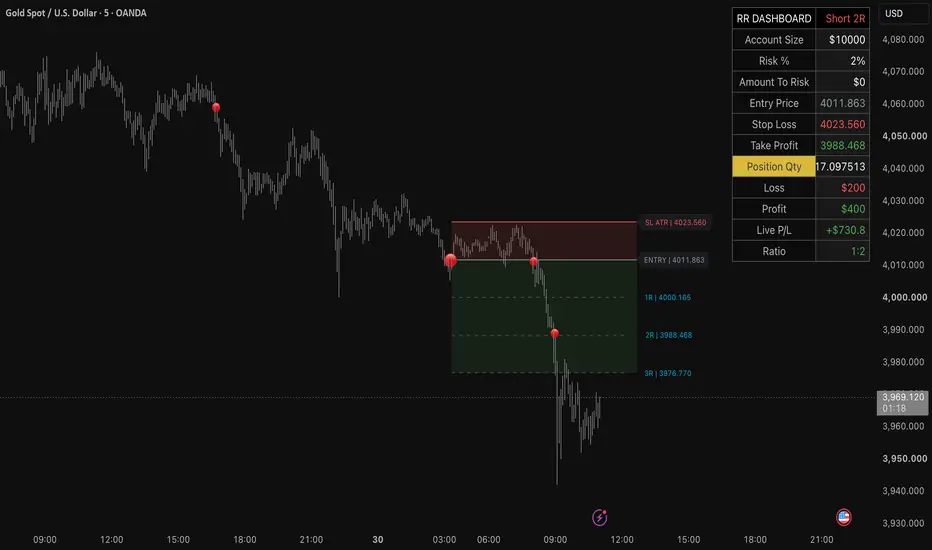
⚪ Summary
The Draggable TradeSize RR System is a professional trade planning, position sizing, and risk management indicator that helps traders calculate every aspect of a trade before entering the market.
Simply place your Entry and Stop Loss directly on the chart using TradingView's interactive drag points. The indicator instantly calculates your optimal position size, monetary risk, expected reward, live profit/loss, and Risk-to-Reward ratio.
Designed for Stocks, Forex, Crypto, Futures, CFDs, Metals, Options, and Custom Instruments, this tool adapts to multiple markets while maintaining consistent risk management.
🟠 Key Features
✔ Interactive Drag & Drop RR Tool

* Draggable Entry and Stop Loss
* Professional Risk/Reward visualization
* Automatic trade recalculation
* Adjustable RR width
✔ Long & Short Trade Planning

Quickly switch between Long and Short positions with automatic RR adjustment.
✔ Multiple Stop Loss Modes

Choose the stop method that matches your trading style:
* Manual
* ATR
* Pivot Swing
✔ Automatic Position Sizing

Automatically calculates position size using:
* Risk %
* Fixed Amount
* Account Size
* Stop Loss Distance
* Point Value
* Quantity Step
✔ Multi-Asset Support

Supports:
* Stocks
* Crypto / Spot
* Forex
* Futures
* Metals / CFD
* Options
* Custom Instruments
Automatically displays the correct position type:
* Shares
* Coin Quantity
* Contracts
* Lots / Units
* Position Quantity
✔ Automatic Price Gap Detection
Automatically detects significant Bullish and Bearish Price Gaps as they develop, helping identify potential market imbalances for improved trade planning.

Features include:
* Bullish Price Gap detection
* Bearish Price Gap detection
* Largest Gap filter
* Automatic removal of filled gaps
* Lightweight chart markers
Price Gap markers help identify potential imbalance zones for improved trade planning.
✔ Professional RR Dashboard
Monitor every important trade statistic in one place.

The dashboard provides a complete overview of your trade, including:
* Account Size
* Risk %
* Amount To Risk
* Entry Price
* Stop Loss
* Take Profit
* Position Size
* Maximum Loss
* Expected Profit
* Live Profit/Loss
* Risk : Reward Ratio
✔ Dashboard Target Selection

Select which take-profit target is displayed:
* 1R
* 2R
* 3R
✔ Visibility Rescue Mode
Automatically repositions the RR planner when switching to symbols with different price scales, ensuring the tool remains visible without manual adjustment.
✔ Multi-Currency Support
Supports multiple dashboard currencies, including:
USD, PHP, EUR, GBP, JPY, AUD, CAD, CHF, NZD, SGD, HKD, CNY, INR, IDR, MYR, THB, KRW, BTC, and Custom Currency.
✔ Professional Customization
Customize:
* Entry Color
* Stop Color
* Target Color
* Dashboard Header
* Dashboard Position
* Long Marker
* Short Marker
⚪ How to Use
Initial Setup

1. Add the indicator to your chart.
2. After adding the indicator, TradingView will prompt you to place the Entry and Stop anchors directly on the chart.
3. Click on the chart to position the Entry.
4. Click again to place the Stop Loss.
5. The complete Risk/Reward plan is created automatically.
Moving the Entry

* Locate the blue (Long) or red (Short) circular marker at the Entry Price.
* Click and drag the marker, then drag it to a new location.
The indicator automatically recalculates:
* Position Size
* Stop Loss Distance
* Expected Profit
* Maximum Loss
* Risk/Reward Ratio
* Live Profit/Loss
Moving the Stop Loss

* When Stop Mode = Manual, drag the second marker to adjust your Stop Loss.
* In ATR and Pivot modes, the Stop Loss is calculated automatically and cannot be dragged.
⚪ Trade Planning
1. Select Long or Short.
2. Choose Stop Mode.
3. Set your Account Size.
4. Select Risk % or Fixed Amount.
5. Choose Asset Type.
6. Review Position Size and Risk before entering the trade.
⚪ Inputs
Draggable RR System
* Show RR Tool
* Direction
* Stop Mode
* Visibility Rescue Mode
* Auto Fit Distance × ATR
* Drag Entry
* Drag Stop
* ATR Length
* ATR Multiplier
* Pivot Lookback
* Target 1R
* Target 2R
* Target 3R
* Dashboard Take Profit
* RR Width Bars
* Show Risk / Reward Zones
* Show RR Dashboard
Position Sizing
* Account Size
* Risk %
* Risk Source
* Amount To Risk
* Asset Type
* Custom Point Value
* Quantity Step
* Dashboard Currency
* Custom Currency Symbol
Price Gap Detection
* Show Gap Markers
* Largest Gaps To Show
Style
* Entry Color
* Stop Color
* Target Color
* Dashboard Header
* Dashboard Position
* Long Marker
* Short Marker
📌 Important Notes
This indicator is designed for one active trade plan per chart.
When switching to another symbol, the existing Entry and Stop anchors remain linked to the original chart.
To create a new trade plan, simply remove the indicator and add it again. TradingView will prompt you to place new Entry and Stop anchors.
If the RR planner is not visible after changing symbols, enable Visibility Rescue Mode or reload the indicator. This behavior is expected because TradingView stores interactive price and time anchors for each indicator instance.
🔴 Disclaimer
This indicator is designed as a trade planning, position sizing, and risk management tool. It does not generate buy or sell signals and should be used together with your own market analysis and trading strategy.
Always practice disciplined risk management and never risk more than you can afford to lose.
The Draggable TradeSize RR System is a professional trade planning, position sizing, and risk management indicator that helps traders calculate every aspect of a trade before entering the market.
Simply place your Entry and Stop Loss directly on the chart using TradingView's interactive drag points. The indicator instantly calculates your optimal position size, monetary risk, expected reward, live profit/loss, and Risk-to-Reward ratio.
Designed for Stocks, Forex, Crypto, Futures, CFDs, Metals, Options, and Custom Instruments, this tool adapts to multiple markets while maintaining consistent risk management.
🟠 Key Features
✔ Interactive Drag & Drop RR Tool
* Draggable Entry and Stop Loss
* Professional Risk/Reward visualization
* Automatic trade recalculation
* Adjustable RR width
✔ Long & Short Trade Planning
Quickly switch between Long and Short positions with automatic RR adjustment.
✔ Multiple Stop Loss Modes
Choose the stop method that matches your trading style:
* Manual
* ATR
* Pivot Swing
✔ Automatic Position Sizing
Automatically calculates position size using:
* Risk %
* Fixed Amount
* Account Size
* Stop Loss Distance
* Point Value
* Quantity Step
✔ Multi-Asset Support
Supports:
* Stocks
* Crypto / Spot
* Forex
* Futures
* Metals / CFD
* Options
* Custom Instruments
Automatically displays the correct position type:
* Shares
* Coin Quantity
* Contracts
* Lots / Units
* Position Quantity
✔ Automatic Price Gap Detection
Automatically detects significant Bullish and Bearish Price Gaps as they develop, helping identify potential market imbalances for improved trade planning.
Features include:
* Bullish Price Gap detection
* Bearish Price Gap detection
* Largest Gap filter
* Automatic removal of filled gaps
* Lightweight chart markers
Price Gap markers help identify potential imbalance zones for improved trade planning.
✔ Professional RR Dashboard
Monitor every important trade statistic in one place.
The dashboard provides a complete overview of your trade, including:
* Account Size
* Risk %
* Amount To Risk
* Entry Price
* Stop Loss
* Take Profit
* Position Size
* Maximum Loss
* Expected Profit
* Live Profit/Loss
* Risk : Reward Ratio
✔ Dashboard Target Selection
Select which take-profit target is displayed:
* 1R
* 2R
* 3R
✔ Visibility Rescue Mode
Automatically repositions the RR planner when switching to symbols with different price scales, ensuring the tool remains visible without manual adjustment.
✔ Multi-Currency Support
Supports multiple dashboard currencies, including:
USD, PHP, EUR, GBP, JPY, AUD, CAD, CHF, NZD, SGD, HKD, CNY, INR, IDR, MYR, THB, KRW, BTC, and Custom Currency.
✔ Professional Customization
Customize:
* Entry Color
* Stop Color
* Target Color
* Dashboard Header
* Dashboard Position
* Long Marker
* Short Marker
⚪ How to Use
Initial Setup
1. Add the indicator to your chart.
2. After adding the indicator, TradingView will prompt you to place the Entry and Stop anchors directly on the chart.
3. Click on the chart to position the Entry.
4. Click again to place the Stop Loss.
5. The complete Risk/Reward plan is created automatically.
Moving the Entry
* Locate the blue (Long) or red (Short) circular marker at the Entry Price.
* Click and drag the marker, then drag it to a new location.
The indicator automatically recalculates:
* Position Size
* Stop Loss Distance
* Expected Profit
* Maximum Loss
* Risk/Reward Ratio
* Live Profit/Loss
Moving the Stop Loss
* When Stop Mode = Manual, drag the second marker to adjust your Stop Loss.
* In ATR and Pivot modes, the Stop Loss is calculated automatically and cannot be dragged.
⚪ Trade Planning
1. Select Long or Short.
2. Choose Stop Mode.
3. Set your Account Size.
4. Select Risk % or Fixed Amount.
5. Choose Asset Type.
6. Review Position Size and Risk before entering the trade.
⚪ Inputs
Draggable RR System
* Show RR Tool
* Direction
* Stop Mode
* Visibility Rescue Mode
* Auto Fit Distance × ATR
* Drag Entry
* Drag Stop
* ATR Length
* ATR Multiplier
* Pivot Lookback
* Target 1R
* Target 2R
* Target 3R
* Dashboard Take Profit
* RR Width Bars
* Show Risk / Reward Zones
* Show RR Dashboard
Position Sizing
* Account Size
* Risk %
* Risk Source
* Amount To Risk
* Asset Type
* Custom Point Value
* Quantity Step
* Dashboard Currency
* Custom Currency Symbol
Price Gap Detection
* Show Gap Markers
* Largest Gaps To Show
Style
* Entry Color
* Stop Color
* Target Color
* Dashboard Header
* Dashboard Position
* Long Marker
* Short Marker
📌 Important Notes
This indicator is designed for one active trade plan per chart.
When switching to another symbol, the existing Entry and Stop anchors remain linked to the original chart.
To create a new trade plan, simply remove the indicator and add it again. TradingView will prompt you to place new Entry and Stop anchors.
If the RR planner is not visible after changing symbols, enable Visibility Rescue Mode or reload the indicator. This behavior is expected because TradingView stores interactive price and time anchors for each indicator instance.
🔴 Disclaimer
This indicator is designed as a trade planning, position sizing, and risk management tool. It does not generate buy or sell signals and should be used together with your own market analysis and trading strategy.
Always practice disciplined risk management and never risk more than you can afford to lose.
릴리즈 노트
🔄 Update NotesThis update improves the position sizing engine for better accuracy and clearer dashboard information across supported asset classes.
What's New
Added separate position sizing display for Forex and Gold/Metals.
*Forex now displays both Units and Lots on the dashboard.
*Gold/Metals now displays both Units / Oz and Gold Lots.
Added adjustable inputs:
*Forex Units Per Lot (default: 100,000)
*Gold / Metals Units Per Lot (default: 100)
Improvements:
*Existing Risk/Reward, Entry, Stop Loss, Take Profit, Risk Calculation, and Live P/L logic remain unchanged.
*Dashboard position sizing values are locked after the trade plan is created, while Live P/L continues to update in real time based on current market price.
*Improved compatibility with different broker contract specifications for Forex and Metals.
릴리즈 노트
Improved the position sizing dashboard for both **Forex** and **CFD-style** instruments.*Forex now displays both Unit Qty and Lot Qty.
*CFD / Other instruments now also display both Unit Qty and Lot Qty.
Added adjustable lot conversion settings:
*Forex Units Per Lot (default: 100,000)
*CFD Units Per Lot (default:100)
* Removed asset-specific wording to provide a cleaner and more consistent sizing display across different brokers and instrument types.
오픈 소스 스크립트
트레이딩뷰의 진정한 정신에 따라, 이 스크립트의 작성자는 이를 오픈소스로 공개하여 트레이더들이 기능을 검토하고 검증할 수 있도록 했습니다. 작성자에게 찬사를 보냅니다! 이 코드는 무료로 사용할 수 있지만, 코드를 재게시하는 경우 하우스 룰이 적용된다는 점을 기억하세요.

Official julzALGO Community:
discord.gg/FJkAYEAH
discord.gg/FJkAYEAH
면책사항
해당 정보와 게시물은 금융, 투자, 트레이딩 또는 기타 유형의 조언이나 권장 사항으로 간주되지 않으며, 트레이딩뷰에서 제공하거나 보증하는 것이 아닙니다. 자세한 내용은 이용 약관을 참조하세요.
오픈 소스 스크립트
트레이딩뷰의 진정한 정신에 따라, 이 스크립트의 작성자는 이를 오픈소스로 공개하여 트레이더들이 기능을 검토하고 검증할 수 있도록 했습니다. 작성자에게 찬사를 보냅니다! 이 코드는 무료로 사용할 수 있지만, 코드를 재게시하는 경우 하우스 룰이 적용된다는 점을 기억하세요.
Official julzALGO Community:
discord.gg/FJkAYEAH
discord.gg/FJkAYEAH
면책사항
해당 정보와 게시물은 금융, 투자, 트레이딩 또는 기타 유형의 조언이나 권장 사항으로 간주되지 않으며, 트레이딩뷰에서 제공하거나 보증하는 것이 아닙니다. 자세한 내용은 이용 약관을 참조하세요.