OPEN-SOURCE SCRIPT
Risk Guard - Position Size & Risk Ceiling
What it does
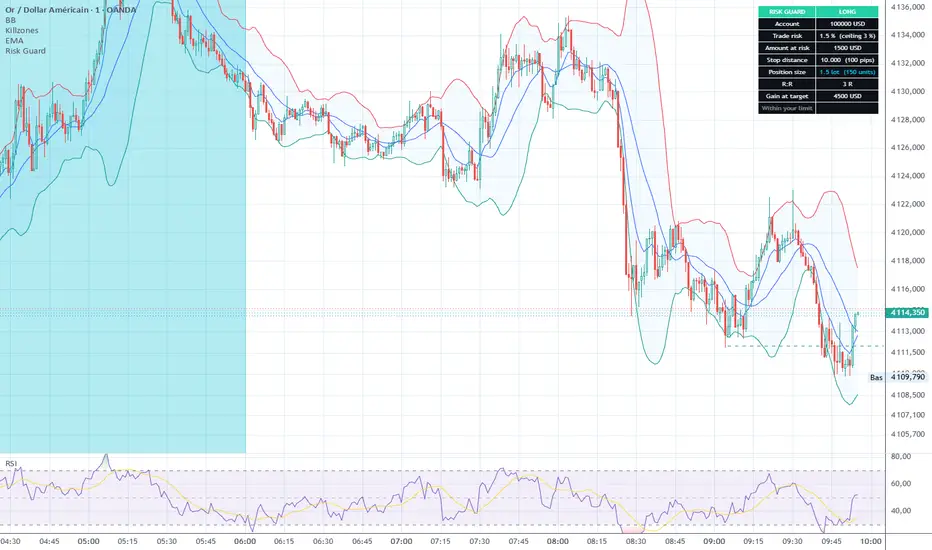
Risk Guard sizes your position from the risk you are willing to take, and tells you immediately when that risk goes above the limit you set for yourself.
Most position size calculators stop at the arithmetic. This one adds the part that actually protects an account: a ceiling.
Why a ceiling
Many traders do not use a fixed risk per trade. They size up on strong setups and down on weak ones. That flexibility is fine, until one trade quietly goes far beyond what the account can absorb.
Risk Guard separates the two:
- Risk for THIS trade is what you are taking right now, and it can change every time.
- Your risk ceiling is your rule, and it does not change.
When the first goes above the second, the table switches to the alert colour and says so plainly.
How to use it
1. Add the indicator. It displays straight away, using the current price and one ATR as demonstration values, so you never face an empty table.
2. Open the settings and enter your own Entry and Stop in the Trade group. Add a Target if you want R:R.
3. Set your account size, the risk for this trade, and your ceiling.
4. Pick the sizing mode and the pip size that match your instrument.
Sizing modes
Lots: gold, forex, CFD. Set the contract size (XAUUSD standard is 100 oz per lot, forex standard is 100000).
Units: crypto and spot.
Whichever you pick, the position size is shown with its unit spelled out and the other unit in brackets, so it cannot be misread.
What it shows
Direction, account size, trade risk against your ceiling, amount at risk, stop distance in price and in pips, position size, R:R and gain at target.
Customisation
Every colour is configurable: header within limit, header when the ceiling is passed, table background, text, position size value, and the entry, stop and target lines. Text size, border width and table position can also be changed.
Notes
Pip size is a setting, not a guess: gold 0.1, forex majors 0.0001, JPY pairs 0.01, and 0 to hide pips on crypto.
The calculation is exact when the quote currency matches your account currency. On crosses where it does not, treat the result as an approximation.
This is a planning tool. It does not place orders and does not read your broker account.
Risk Guard sizes your position from the risk you are willing to take, and tells you immediately when that risk goes above the limit you set for yourself.
Most position size calculators stop at the arithmetic. This one adds the part that actually protects an account: a ceiling.
Why a ceiling
Many traders do not use a fixed risk per trade. They size up on strong setups and down on weak ones. That flexibility is fine, until one trade quietly goes far beyond what the account can absorb.
Risk Guard separates the two:
- Risk for THIS trade is what you are taking right now, and it can change every time.
- Your risk ceiling is your rule, and it does not change.
When the first goes above the second, the table switches to the alert colour and says so plainly.
How to use it
1. Add the indicator. It displays straight away, using the current price and one ATR as demonstration values, so you never face an empty table.
2. Open the settings and enter your own Entry and Stop in the Trade group. Add a Target if you want R:R.
3. Set your account size, the risk for this trade, and your ceiling.
4. Pick the sizing mode and the pip size that match your instrument.
Sizing modes
Lots: gold, forex, CFD. Set the contract size (XAUUSD standard is 100 oz per lot, forex standard is 100000).
Units: crypto and spot.
Whichever you pick, the position size is shown with its unit spelled out and the other unit in brackets, so it cannot be misread.
What it shows
Direction, account size, trade risk against your ceiling, amount at risk, stop distance in price and in pips, position size, R:R and gain at target.
Customisation
Every colour is configurable: header within limit, header when the ceiling is passed, table background, text, position size value, and the entry, stop and target lines. Text size, border width and table position can also be changed.
Notes
Pip size is a setting, not a guess: gold 0.1, forex majors 0.0001, JPY pairs 0.01, and 0 to hide pips on crypto.
The calculation is exact when the quote currency matches your account currency. On crosses where it does not, treat the result as an approximation.
This is a planning tool. It does not place orders and does not read your broker account.
오픈 소스 스크립트
트레이딩뷰의 진정한 정신에 따라, 이 스크립트의 작성자는 이를 오픈소스로 공개하여 트레이더들이 기능을 검토하고 검증할 수 있도록 했습니다. 작성자에게 찬사를 보냅니다! 이 코드는 무료로 사용할 수 있지만, 코드를 재게시하는 경우 하우스 룰이 적용된다는 점을 기억하세요.

Swing crypto depuis 2018, gold en intraday depuis 2ans. Chaque trade passe dans mon journal : tradoshi.com
면책사항
해당 정보와 게시물은 금융, 투자, 트레이딩 또는 기타 유형의 조언이나 권장 사항으로 간주되지 않으며, 트레이딩뷰에서 제공하거나 보증하는 것이 아닙니다. 자세한 내용은 이용 약관을 참조하세요.
오픈 소스 스크립트
트레이딩뷰의 진정한 정신에 따라, 이 스크립트의 작성자는 이를 오픈소스로 공개하여 트레이더들이 기능을 검토하고 검증할 수 있도록 했습니다. 작성자에게 찬사를 보냅니다! 이 코드는 무료로 사용할 수 있지만, 코드를 재게시하는 경우 하우스 룰이 적용된다는 점을 기억하세요.
Swing crypto depuis 2018, gold en intraday depuis 2ans. Chaque trade passe dans mon journal : tradoshi.com
면책사항
해당 정보와 게시물은 금융, 투자, 트레이딩 또는 기타 유형의 조언이나 권장 사항으로 간주되지 않으며, 트레이딩뷰에서 제공하거나 보증하는 것이 아닙니다. 자세한 내용은 이용 약관을 참조하세요.