OPEN-SOURCE SCRIPT
업데이트됨 Iron Condor Pro v6 – Full Engine
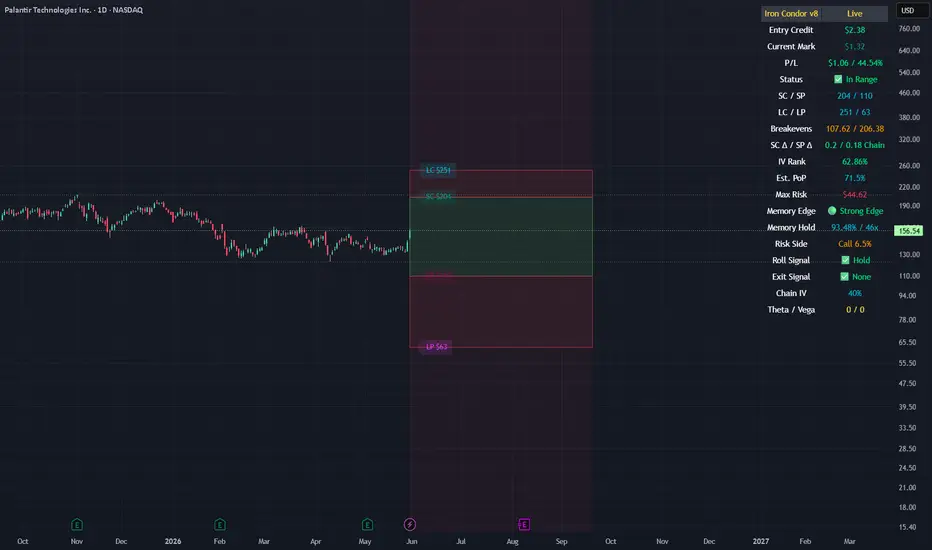
IronCondor Engine v6.6 is a multi-mode options strategy tool for planning and managing iron condors, straddles, strangles, and butterflies. It supports both setup planning and live trade tracking with modeled delta, risk-based strike selection, IV rank estimation, and visual breach alerts.
Use Setup Mode to preview strike structures based on IV proxy, ATR, delta targeting, and risk tier (High/Mid/Low/Delta). Use Live Mode to track real trades, enter strike/premium data, and monitor live P&L, delta drift, and range status.
This script does not connect to live option chains. Volatility and delta are modeled using price history. All strikes and premiums must be confirmed using your broker before placing trades. Best used with strong support/resistance levels and high IV rank (30%+).
For educational purposes only.
Workflow Guide
Use this flow whether you're setting up on Sunday night or any day before placing a trade.
Step 0: Pre-Script Preparation
Before using the script:
Identify major support and resistance zones on your chart. Define the expected range or consolidation area. Use this context to help evaluate strike placement
1. Setup Phase (Pre-Trade Planning)
Step 1 – Load the Script
Add: IronCondor Engine v6.6 – Full Risk/Decay Edition to your chart
Step 2 – Set Mode = Setup
This enables planning mode, where the engine calculates strike combinations based on:
Your selected risk profile (High, Mid, Low, or Delta)
Historical volatility (20-day log return)
ATR (Average True Range)
Target short delta (adjustable)
Step 3 – Review Setup Table
Enable Show Setup Table to view calculated strikes and width by risk tier.
Adjust any of the following as needed:
Target Short Delta
Strike Interval ($)
Width multipliers (High/Mid/Low)
Risk tier under Auto-Feed Choice
Step 4 – Evaluate the Setup
Is the net credit at least 1.5–2.0x your max risk?
Are the short strikes clearly outside support/resistance zones?
Are the short deltas between 0.15 and 0.30?
Is the range wide enough to handle normal price movement?
Step 5 – Prep for Execution
Enable Auto-Feed Setup → Live to carry Setup strikes into Live mode
Or disable it if you prefer to manually enter strikes later
2. Trade Execution (Live Tracking Mode)
Step 1 – Place the Trade with Your Broker
Use your brokerage (TOS, Tasty, IBKR, etc.) to place the iron condor or other structure
Step 2 – Set Mode = Live
In Live mode:
If Auto-Feed is ON, the Setup strikes auto-populate
If Auto-Feed is OFF, manually enter:
Short and long strikes (Call and Put)
Premiums collected/paid per leg
Total net credit (Entry Credit)
Optional: Input current mid prices for each leg in the "Live Chain" section to track live mark-to-market P&L
Once all required fields are valid, the script activates:
Real-time profit/loss tracking
Max risk estimate
Delta monitoring on short legs
IV Rank estimate
Breach detection system
Chart visuals (if enabled)
3. Trade Management (During the Week)
While the trade is active, use the dashboard and visuals to monitor:
Key Metrics:
Unrealized P/L %
Mark-to-market value vs entry credit
Daily decay (theta)
Days until expiration
Breach status:
In Range
Near Breach
Breached
Alerts:
Price near short strike → suggests roll
Price breaches long strike → breach alert
50% or 75% profit → optional exit signal
Delta exceeds threshold → exposure may need adjustment
Management Tips:
At 50–75% profit: consider closing early
If price nears a short leg: roll, hedge, or manage
If nearing expiry: decide whether to hold or close
If IV collapses: may accelerate time decay or reduce exit value
4. End-of-Week or Expiration Management
If Profit Target Hit
Close early to reduce risk and lock gains
If Still Open Near Expiry
Close the position or
Hold through expiration only if you're fully prepared for pinning/gamma/assignment scenarios
Avoid holding open spreads over the weekend unless part of a defined strategy
Reference Notes
Strike Width
Defined as:
Width = Distance between Short and Long strike
Used for calculating max loss and breach visuals
Delta Guidelines
0.15–0.20 = safer, wider range, lower credit
0.25–0.30 = more aggressive, tighter range, higher credit
Use Target Short Delta input to adjust auto-selected strikes accordingly
Credit Example
Sell Call: $1.04
Sell Put: $0.23
Buy Call + Put wings: $0.14
Net Credit = $1.13 = $113 per contract (max profit)
This is the max profit if price stays between short strikes through expiration
IV Rank (Estimated)
This script does not use options chain IV data.
Instead, it calculates a volatility proxy:
ivRaw = ta.stdev(log returns, 20) * sqrt(252)
IV Rank is then calculated as the percentile of this value within the last 252 bars.
High IV Rank (30%–100%) → better premium-selling conditions
Low IV Rank (<30%) → lower edge for condors
Ideal to sell premium when IV Rank is above 30–50%
Disclosures and Limitations
This script is for educational use only
It does not connect to live option chains
All strikes, deltas, and premiums must be validated through your broker
Always confirm real-time IV, delta, and pricing before placing a trade
Use Setup Mode to preview strike structures based on IV proxy, ATR, delta targeting, and risk tier (High/Mid/Low/Delta). Use Live Mode to track real trades, enter strike/premium data, and monitor live P&L, delta drift, and range status.
This script does not connect to live option chains. Volatility and delta are modeled using price history. All strikes and premiums must be confirmed using your broker before placing trades. Best used with strong support/resistance levels and high IV rank (30%+).
For educational purposes only.
Workflow Guide
Use this flow whether you're setting up on Sunday night or any day before placing a trade.
Step 0: Pre-Script Preparation
Before using the script:
Identify major support and resistance zones on your chart. Define the expected range or consolidation area. Use this context to help evaluate strike placement
1. Setup Phase (Pre-Trade Planning)
Step 1 – Load the Script
Add: IronCondor Engine v6.6 – Full Risk/Decay Edition to your chart
Step 2 – Set Mode = Setup
This enables planning mode, where the engine calculates strike combinations based on:
Your selected risk profile (High, Mid, Low, or Delta)
Historical volatility (20-day log return)
ATR (Average True Range)
Target short delta (adjustable)
Step 3 – Review Setup Table
Enable Show Setup Table to view calculated strikes and width by risk tier.
Adjust any of the following as needed:
Target Short Delta
Strike Interval ($)
Width multipliers (High/Mid/Low)
Risk tier under Auto-Feed Choice
Step 4 – Evaluate the Setup
Is the net credit at least 1.5–2.0x your max risk?
Are the short strikes clearly outside support/resistance zones?
Are the short deltas between 0.15 and 0.30?
Is the range wide enough to handle normal price movement?
Step 5 – Prep for Execution
Enable Auto-Feed Setup → Live to carry Setup strikes into Live mode
Or disable it if you prefer to manually enter strikes later
2. Trade Execution (Live Tracking Mode)
Step 1 – Place the Trade with Your Broker
Use your brokerage (TOS, Tasty, IBKR, etc.) to place the iron condor or other structure
Step 2 – Set Mode = Live
In Live mode:
If Auto-Feed is ON, the Setup strikes auto-populate
If Auto-Feed is OFF, manually enter:
Short and long strikes (Call and Put)
Premiums collected/paid per leg
Total net credit (Entry Credit)
Optional: Input current mid prices for each leg in the "Live Chain" section to track live mark-to-market P&L
Once all required fields are valid, the script activates:
Real-time profit/loss tracking
Max risk estimate
Delta monitoring on short legs
IV Rank estimate
Breach detection system
Chart visuals (if enabled)
3. Trade Management (During the Week)
While the trade is active, use the dashboard and visuals to monitor:
Key Metrics:
Unrealized P/L %
Mark-to-market value vs entry credit
Daily decay (theta)
Days until expiration
Breach status:
In Range
Near Breach
Breached
Alerts:
Price near short strike → suggests roll
Price breaches long strike → breach alert
50% or 75% profit → optional exit signal
Delta exceeds threshold → exposure may need adjustment
Management Tips:
At 50–75% profit: consider closing early
If price nears a short leg: roll, hedge, or manage
If nearing expiry: decide whether to hold or close
If IV collapses: may accelerate time decay or reduce exit value
4. End-of-Week or Expiration Management
If Profit Target Hit
Close early to reduce risk and lock gains
If Still Open Near Expiry
Close the position or
Hold through expiration only if you're fully prepared for pinning/gamma/assignment scenarios
Avoid holding open spreads over the weekend unless part of a defined strategy
Reference Notes
Strike Width
Defined as:
Width = Distance between Short and Long strike
Used for calculating max loss and breach visuals
Delta Guidelines
0.15–0.20 = safer, wider range, lower credit
0.25–0.30 = more aggressive, tighter range, higher credit
Use Target Short Delta input to adjust auto-selected strikes accordingly
Credit Example
Sell Call: $1.04
Sell Put: $0.23
Buy Call + Put wings: $0.14
Net Credit = $1.13 = $113 per contract (max profit)
This is the max profit if price stays between short strikes through expiration
IV Rank (Estimated)
This script does not use options chain IV data.
Instead, it calculates a volatility proxy:
ivRaw = ta.stdev(log returns, 20) * sqrt(252)
IV Rank is then calculated as the percentile of this value within the last 252 bars.
High IV Rank (30%–100%) → better premium-selling conditions
Low IV Rank (<30%) → lower edge for condors
Ideal to sell premium when IV Rank is above 30–50%
Disclosures and Limitations
This script is for educational use only
It does not connect to live option chains
All strikes, deltas, and premiums must be validated through your broker
Always confirm real-time IV, delta, and pricing before placing a trade
릴리즈 노트
🦅 Iron Condor Pro v8 – Pattern Memory EditionWhat's New in v8
🧠 Pattern Memory Engine
The Pattern Memory Engine searches historical market conditions that resemble the current setup and evaluates how similar Iron Condor structures performed.
It tracks:
• Historical hold rate
• Match count
• Call-side breach risk
• Put-side breach risk
• Overall Memory Edge rating
This helps answer: "When the market looked like this before, how often did the trade stay inside the short strikes?"*
---
📦 Iron Condor Zone Boxes
Visual trade structure is now displayed directly on the chart.
Green Zone:
• Profit zone between the short strikes
Red Zones:
• Call wing risk zone
• Put wing risk zone
Outer Risk Areas:
• Breach zones beyond the long strikes
This makes it easier to visualize trade location, risk, and potential adjustment areas.
---
📈 Manual Broker Chain Integration
Iron Condor Pro does NOT pull live options-chain data.
Instead:
1. Open your broker's option chain.
2. Copy the trade information.
3. Enter it into the indicator.
Supported manual inputs:
• Entry Credit
• Current Leg Mid Prices
• Short Call Delta
• Short Put Delta
• Call IV
• Put IV
• Net Theta
• Net Vega
getcho ass over to the options chain, grab the data, and paste it into the inputs. It takes about 30 seconds.
---
🎯 Auto vs Manual Strike Source
Use Auto Strikes = ON
Planning Mode
The script automatically generates Iron Condor candidates using:
• High Risk
• Mid Risk
• Low Risk
• Delta Target
Use this mode when searching for new trade ideas.
---
Use Auto Strikes = OFF
Trade Management Mode
Enter the exact strikes filled by your broker.
This ensures:
• Accurate zones
• Accurate breakevens
• Accurate risk visualization
• Accurate trade management
---
📊 Improved Live Dashboard
The dashboard now displays:
• Entry Credit
• Current Mark Value
• P/L %
• Breakevens
• Max Risk
• IV Rank
• Delta Monitoring
• Memory Edge
• Historical Hold Rate
• Risk Side Analysis
• Roll Signal
• Exit Signal
---
✅ Corrected Credit Spread P/L Logic
Profit now increases as the Iron Condor value decreases:
```pine
unrealizedPL = entryCredit - markValue
```
This properly reflects credit-spread mechanics.
---
Workflow
Step 1 — Setup Mode
Use Auto Strikes = ON
Choose:
• High
• Mid
• Low
• Delta
Review:
• Strike placement
• IV Rank
• Pattern Memory Edge
• Historical Hold %
• Risk Side
• Setup Table
---
## Step 2 — Broker Confirmation
Before entering a trade:
Confirm:
• Actual strikes
• Net credit
• Short deltas
• Implied volatility
• Bid/ask spreads
• Liquidity
• Earnings risk
---
## Step 3 — Enter Live Trade
Switch:
Mode = Live
Turn:
Use Auto Strikes = OFF
Enter:
• Short Call Strike
• Long Call Strike
• Short Put Strike
• Long Put Strike
• Entry Credit
Then copy from the option chain:
• Current Leg Mid Prices
• Short Call Delta
• Short Put Delta
• IV
• Theta
• Vega
---
## Step 4 — Manage the Trade
Monitor:
• Current P/L
• Breakevens
• Delta Drift
• Memory Edge
• Historical Hold %
• Risk Side
• Roll Signal
• Exit Signal
---
Step 5 — Manage or Exit
Consider adjustments when:
• 50%–75% profit target is reached
• Price approaches short strikes
• Short deltas become elevated
• Pattern Memory deteriorates
• A wing is breached
• Expiration risk becomes excessive
---
Purpose
This indicator is NOT trying to replace your broker.
Your broker already provides:
• Greeks
• Option Chains
• Risk Graphs
• Pricing Models
Iron Condor Pro adds chart-based context your broker typically does not provide:
• Pattern Memory
• Historical Hold Analysis
• Breach-Side Analysis
• Strike Visualization
• Condor Zone Mapping
• Trade Management Context
The goal is simple:
Find better setups, visualize risk more clearly, and manage Iron Condors directly from the chart.
SETUP MODE
↓
Script generates candidate condors
↓
You review High / Mid / Low / Delta
↓
Check Memory Edge
Check Hold %
Check Risk Side
Check chart structure
↓
Pick the setup you like
↓
WRITE THAT SHIT DOWN
(or screenshot it)
↓
Go to broker
↓
See if the chain actually supports it
↓
Place trade
↓
LIVE MODE
↓
Turn Auto Strikes OFF
↓
Enter actual filled strikes
↓
Enter actual credit
↓
Enter actual chain Greeks
↓
Manage trade
오픈 소스 스크립트
트레이딩뷰의 진정한 정신에 따라, 이 스크립트의 작성자는 이를 오픈소스로 공개하여 트레이더들이 기능을 검토하고 검증할 수 있도록 했습니다. 작성자에게 찬사를 보냅니다! 이 코드는 무료로 사용할 수 있지만, 코드를 재게시하는 경우 하우스 룰이 적용된다는 점을 기억하세요.

면책사항
해당 정보와 게시물은 금융, 투자, 트레이딩 또는 기타 유형의 조언이나 권장 사항으로 간주되지 않으며, 트레이딩뷰에서 제공하거나 보증하는 것이 아닙니다. 자세한 내용은 이용 약관을 참조하세요.
오픈 소스 스크립트
트레이딩뷰의 진정한 정신에 따라, 이 스크립트의 작성자는 이를 오픈소스로 공개하여 트레이더들이 기능을 검토하고 검증할 수 있도록 했습니다. 작성자에게 찬사를 보냅니다! 이 코드는 무료로 사용할 수 있지만, 코드를 재게시하는 경우 하우스 룰이 적용된다는 점을 기억하세요.
면책사항
해당 정보와 게시물은 금융, 투자, 트레이딩 또는 기타 유형의 조언이나 권장 사항으로 간주되지 않으며, 트레이딩뷰에서 제공하거나 보증하는 것이 아닙니다. 자세한 내용은 이용 약관을 참조하세요.