OPEN-SOURCE SCRIPT
업데이트됨 Decision zone V2
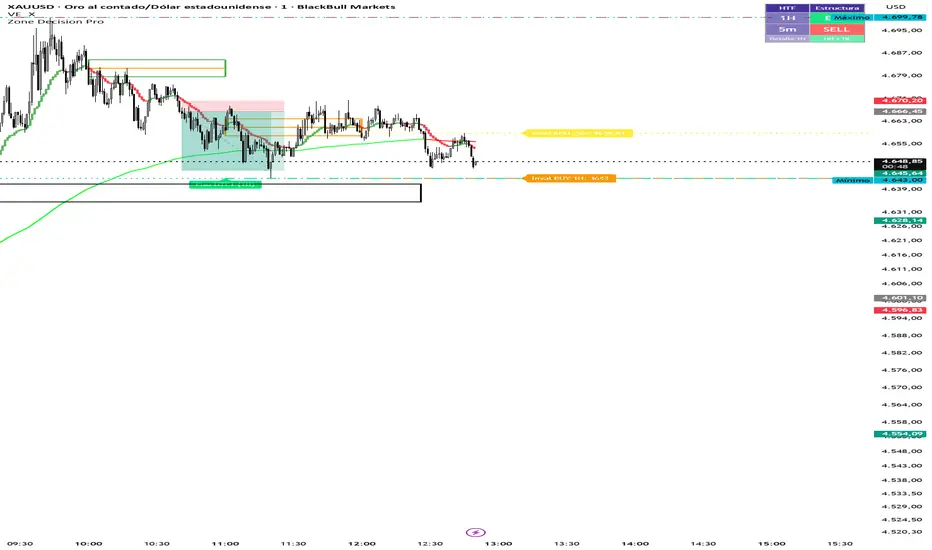
Multi Cuadros PRO + HTF Levels is a trading indicator that plots configurable time-based boxes with midlines, along with the latest higher timeframe (HTF) support and resistance levels using pivot detection. It is fully customizable in size, style, and timing, designed to identify key market zones efficiently
릴리즈 노트
Multi Cuadros PRO + HTF Levels is a trading indicator that plots configurable time-based boxes with midlines, along with the latest higher timeframe (HTF) support and resistance levels using pivot detection. It is fully customizable in size, style, and timing, designed to identify key market zones efficiently릴리즈 노트
Multi Cuadros PRO + HTF Levels is a trading indicator that plots configurable time-based boxes with midlines, along with the latest higher timeframe (HTF) support and resistance levels using pivot detection. It is fully customizable in size, style, and timing, designed to identify key market zones efficiently.릴리즈 노트
Evaluates market structure (HH/HL vs LH/LL) across two configurable timeframes and displays a BUY/SELL/NEUTRAL panel in the corner of the chart. Includes invalidation lines.릴리즈 노트
Zone Decision Pro — Update Summary (April 2026)1. HTF Pisos y Techos — Group Renaming (Modules 2 & 3)
Groups renamed to ━━ HTF 1 — Pisos y Techos and ━━ HTF 2 — Pisos y Techos for clarity.
Settings compacted using inline rows: timeframe + ON toggle on one row, pivot bars + visibility on the next, colors + style on the last.
Bug fix: added h2Level / l2Level tracking to Module 3 so lines correctly disappear when price touches them.
2. HTF Structure Bias — Settings Compacted (Module 4)
Former separate groups gBiasPanel, gInval1, gInval2 eliminated.
━━ Bias — Configuración now holds the direction mode and the three BUY / SELL / NEUTRAL colors in a single inline row.
━━ Bias HTF 1 and ━━ Bias HTF 2 each consolidate their timeframe, pivot bars, invalidation toggle, color, weight, and style into one single row per group.
HTF 2 includes its own ON/OFF toggle at the start of the row.
3. Time-Based Alerts & Icons Per Box (Module 1)
Each of the 8 boxes received a new inline row (c1d … c8d) with three fields:
오픈 소스 스크립트
트레이딩뷰의 진정한 정신에 따라, 이 스크립트의 작성자는 이를 오픈소스로 공개하여 트레이더들이 기능을 검토하고 검증할 수 있도록 했습니다. 작성자에게 찬사를 보냅니다! 이 코드는 무료로 사용할 수 있지만, 코드를 재게시하는 경우 하우스 룰이 적용된다는 점을 기억하세요.

면책사항
해당 정보와 게시물은 금융, 투자, 트레이딩 또는 기타 유형의 조언이나 권장 사항으로 간주되지 않으며, 트레이딩뷰에서 제공하거나 보증하는 것이 아닙니다. 자세한 내용은 이용 약관을 참조하세요.
오픈 소스 스크립트
트레이딩뷰의 진정한 정신에 따라, 이 스크립트의 작성자는 이를 오픈소스로 공개하여 트레이더들이 기능을 검토하고 검증할 수 있도록 했습니다. 작성자에게 찬사를 보냅니다! 이 코드는 무료로 사용할 수 있지만, 코드를 재게시하는 경우 하우스 룰이 적용된다는 점을 기억하세요.
면책사항
해당 정보와 게시물은 금융, 투자, 트레이딩 또는 기타 유형의 조언이나 권장 사항으로 간주되지 않으며, 트레이딩뷰에서 제공하거나 보증하는 것이 아닙니다. 자세한 내용은 이용 약관을 참조하세요.