OPEN-SOURCE SCRIPT
Past Session POC / VAH / VAL (Full Day)
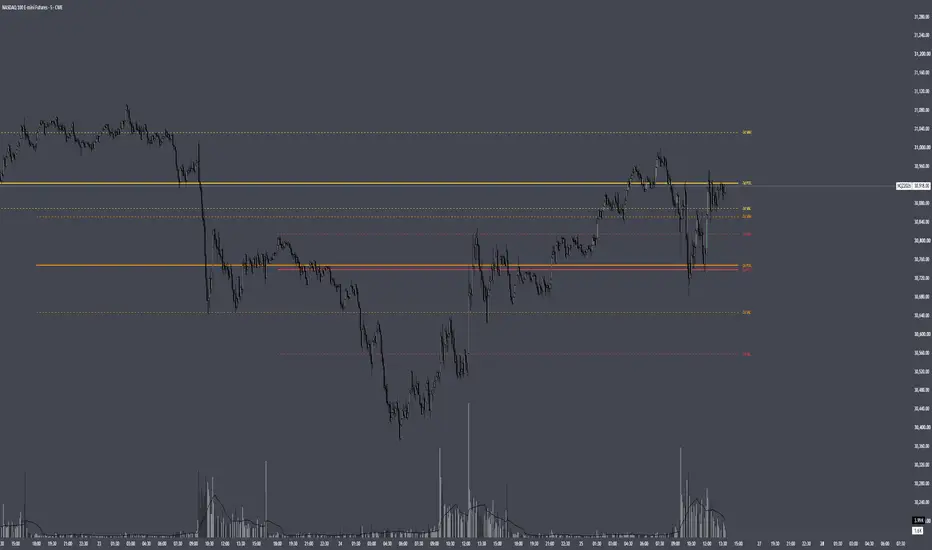
Past Session POC / VAH / VAL (Full Day)
Plots the Point of Control, Value Area High and Value Area Low from up to 5 previous full trading sessions (for CME futures, the 18:00 ET open through the 17:00 ET close).
HOW IT WORKS
Instead of estimating volume from chart candles, the script pulls lower-timeframe data (1 minute by default) and distributes each intrabar's volume across the price levels it actually traded through. This builds a full volume-at-price profile for each session, so the levels closely match TradingView's built-in Session Volume Profile when the row settings are the same.
- POC: the price row with the highest traded volume
- Value Area: expands outward from the POC, comparing the next two rows above and below and adding the larger side, until the chosen % of session volume (default 70%) is covered
- VAH / VAL: the top and bottom of that value area
SETTINGS
Profile: set Rows Layout, Row Size and Value Area % to match your Session Volume Profile. "Ticks Per Row" is recommended for precise levels (e.g. 4 ticks = 1 point on NQ).
Sessions: show or hide the POC, VAH and VAL for each of the last 5 sessions individually, each with its own colour.
Display: line widths and styles, how far lines extend past the current bar, and label position and size.
NOTES
- Intrabar Timeframe must be equal to or lower than the chart timeframe.
- Levels are calculated once each session closes, so they do not repaint.
- Built from intrabar candle data, not tick data, so on sessions where two rows are nearly tied the POC can occasionally differ by one row from the built-in profile.
Plots the Point of Control, Value Area High and Value Area Low from up to 5 previous full trading sessions (for CME futures, the 18:00 ET open through the 17:00 ET close).
HOW IT WORKS
Instead of estimating volume from chart candles, the script pulls lower-timeframe data (1 minute by default) and distributes each intrabar's volume across the price levels it actually traded through. This builds a full volume-at-price profile for each session, so the levels closely match TradingView's built-in Session Volume Profile when the row settings are the same.
- POC: the price row with the highest traded volume
- Value Area: expands outward from the POC, comparing the next two rows above and below and adding the larger side, until the chosen % of session volume (default 70%) is covered
- VAH / VAL: the top and bottom of that value area
SETTINGS
Profile: set Rows Layout, Row Size and Value Area % to match your Session Volume Profile. "Ticks Per Row" is recommended for precise levels (e.g. 4 ticks = 1 point on NQ).
Sessions: show or hide the POC, VAH and VAL for each of the last 5 sessions individually, each with its own colour.
Display: line widths and styles, how far lines extend past the current bar, and label position and size.
NOTES
- Intrabar Timeframe must be equal to or lower than the chart timeframe.
- Levels are calculated once each session closes, so they do not repaint.
- Built from intrabar candle data, not tick data, so on sessions where two rows are nearly tied the POC can occasionally differ by one row from the built-in profile.
오픈 소스 스크립트
트레이딩뷰의 진정한 정신에 따라, 이 스크립트의 작성자는 이를 오픈소스로 공개하여 트레이더들이 기능을 검토하고 검증할 수 있도록 했습니다. 작성자에게 찬사를 보냅니다! 이 코드는 무료로 사용할 수 있지만, 코드를 재게시하는 경우 하우스 룰이 적용된다는 점을 기억하세요.

면책사항
해당 정보와 게시물은 금융, 투자, 트레이딩 또는 기타 유형의 조언이나 권장 사항으로 간주되지 않으며, 트레이딩뷰에서 제공하거나 보증하는 것이 아닙니다. 자세한 내용은 이용 약관을 참조하세요.
오픈 소스 스크립트
트레이딩뷰의 진정한 정신에 따라, 이 스크립트의 작성자는 이를 오픈소스로 공개하여 트레이더들이 기능을 검토하고 검증할 수 있도록 했습니다. 작성자에게 찬사를 보냅니다! 이 코드는 무료로 사용할 수 있지만, 코드를 재게시하는 경우 하우스 룰이 적용된다는 점을 기억하세요.
면책사항
해당 정보와 게시물은 금융, 투자, 트레이딩 또는 기타 유형의 조언이나 권장 사항으로 간주되지 않으며, 트레이딩뷰에서 제공하거나 보증하는 것이 아닙니다. 자세한 내용은 이용 약관을 참조하세요.