OPEN-SOURCE SCRIPT
SkaleHub Zones [Level 2]
Overview
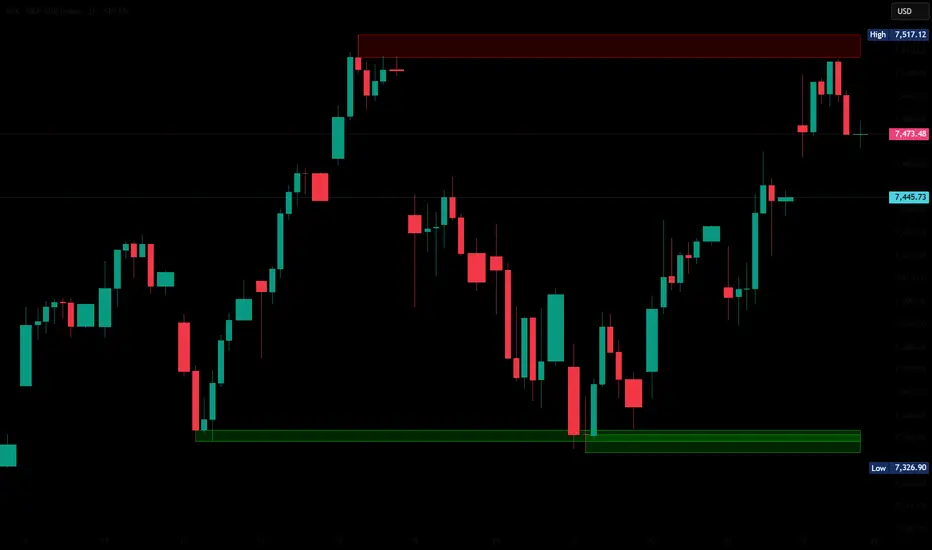
The first premium tool in the SkaleHub Advanced progression suite. This algorithm mathematically identifies historical pivot points and automatically draws institutional Supply and Demand (Support and Resistance) zones across your chart.
The Edge
Amateurs trade in the middle of nowhere; professionals wait for price to come to areas of high liquidity. This script automates that patience, eliminating the tedious daily routine of manually drawing support and resistance lines, and dynamically adapting as new price action unfolds.
Key Features:
Automated Zone Plotting: Accurately maps out historical swing highs and lows, drawing clean, shaded areas that represent real institutional order blocks.
Smart Mitigation (Auto-Delete): The algorithm extends active zones indefinitely but immediately stops plotting them the moment a candle closes beyond the zone, keeping your chart free of broken, obsolete lines.
Patience Enforcer: Systemizes your trading by visually showing you exactly where to do business. No trades should be taken unless price enters one of these auto-drawn SkaleHub Zones.
How to Use
Apply the indicator to your chart.
Wait for the market to enter a drawn zone.
Do not trade immediately upon entry. Once price enters a Level 2 Zone, drop to a lower timeframe and wait for momentum to shift in your favor before executing.
If a candle closes completely outside a zone, the zone will stop extending. This represents a breakout and a shift in market structure.
Author's Note
This is a premium, Invite-Only script. It is Level 2 of the SkaleHub Training System. To gain access to this script and the subsequent algorithmic trigger tools, your TradingView username must be explicitly authorized through the SkaleHub Academy.
The first premium tool in the SkaleHub Advanced progression suite. This algorithm mathematically identifies historical pivot points and automatically draws institutional Supply and Demand (Support and Resistance) zones across your chart.
The Edge
Amateurs trade in the middle of nowhere; professionals wait for price to come to areas of high liquidity. This script automates that patience, eliminating the tedious daily routine of manually drawing support and resistance lines, and dynamically adapting as new price action unfolds.
Key Features:
Automated Zone Plotting: Accurately maps out historical swing highs and lows, drawing clean, shaded areas that represent real institutional order blocks.
Smart Mitigation (Auto-Delete): The algorithm extends active zones indefinitely but immediately stops plotting them the moment a candle closes beyond the zone, keeping your chart free of broken, obsolete lines.
Patience Enforcer: Systemizes your trading by visually showing you exactly where to do business. No trades should be taken unless price enters one of these auto-drawn SkaleHub Zones.
How to Use
Apply the indicator to your chart.
Wait for the market to enter a drawn zone.
Do not trade immediately upon entry. Once price enters a Level 2 Zone, drop to a lower timeframe and wait for momentum to shift in your favor before executing.
If a candle closes completely outside a zone, the zone will stop extending. This represents a breakout and a shift in market structure.
Author's Note
This is a premium, Invite-Only script. It is Level 2 of the SkaleHub Training System. To gain access to this script and the subsequent algorithmic trigger tools, your TradingView username must be explicitly authorized through the SkaleHub Academy.
오픈 소스 스크립트
트레이딩뷰의 진정한 정신에 따라, 이 스크립트의 작성자는 이를 오픈소스로 공개하여 트레이더들이 기능을 검토하고 검증할 수 있도록 했습니다. 작성자에게 찬사를 보냅니다! 이 코드는 무료로 사용할 수 있지만, 코드를 재게시하는 경우 하우스 룰이 적용된다는 점을 기억하세요.

Beau Green
Founder of SkaleHub
Founder of SkaleHub
면책사항
해당 정보와 게시물은 금융, 투자, 트레이딩 또는 기타 유형의 조언이나 권장 사항으로 간주되지 않으며, 트레이딩뷰에서 제공하거나 보증하는 것이 아닙니다. 자세한 내용은 이용 약관을 참조하세요.
오픈 소스 스크립트
트레이딩뷰의 진정한 정신에 따라, 이 스크립트의 작성자는 이를 오픈소스로 공개하여 트레이더들이 기능을 검토하고 검증할 수 있도록 했습니다. 작성자에게 찬사를 보냅니다! 이 코드는 무료로 사용할 수 있지만, 코드를 재게시하는 경우 하우스 룰이 적용된다는 점을 기억하세요.
Beau Green
Founder of SkaleHub
Founder of SkaleHub
면책사항
해당 정보와 게시물은 금융, 투자, 트레이딩 또는 기타 유형의 조언이나 권장 사항으로 간주되지 않으며, 트레이딩뷰에서 제공하거나 보증하는 것이 아닙니다. 자세한 내용은 이용 약관을 참조하세요.