OPEN-SOURCE SCRIPT
Trading Checklist with Score
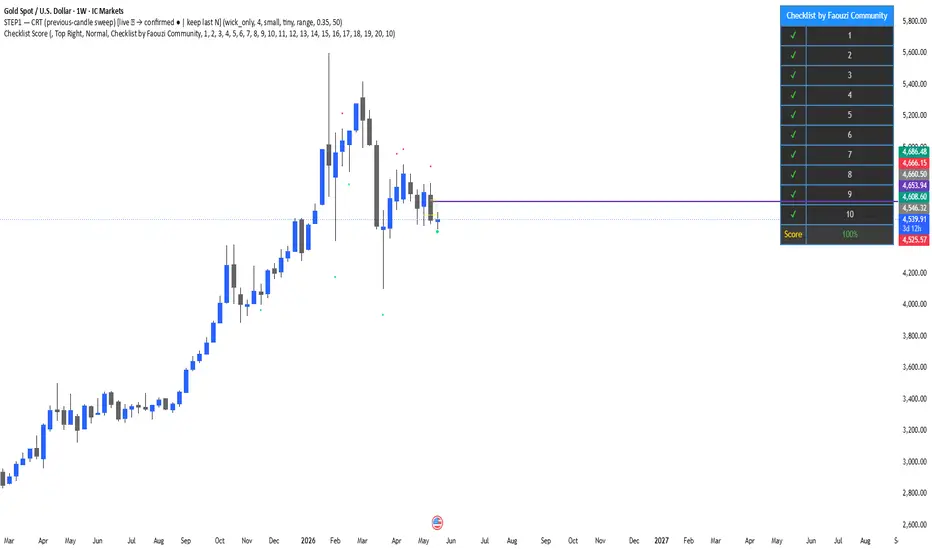
This indicator displays a customizable trading checklist directly on the chart.
It is designed to help discretionary traders organize their trade validation process before entering a position. The script does not generate buy or sell signals, does not automate trading decisions, and does not make any performance claims.
Main features:
• Up to 20 checklist rows
• 10 rows displayed by default
• Adjustable number of visible rows from 1 to 20
• Optional trade score based only on the visible checklist rows
• Custom text for each checklist item
• Custom table position, colors, text size, and header
• Optional symbol pinning, so the checklist can be linked to one chart symbol
How to use:
1. Add the indicator to the chart.
2. Open the indicator settings.
3. Edit each checklist row with your own trading criteria.
4. Select the number of visible rows.
5. Check or uncheck each row depending on your trade plan.
6. Use the score as an organizational aid, not as a trading signal.
This script is intended for education, journaling, and discretionary trade preparation. It does not predict market direction and should not be used as a standalone trading system.
Credits:
This version was customized and published by Faouzi Community. If this script is based on or inspired by another open-source checklist script, credit to the original author must be preserved according to TradingView’s open-source reuse rules.
It is designed to help discretionary traders organize their trade validation process before entering a position. The script does not generate buy or sell signals, does not automate trading decisions, and does not make any performance claims.
Main features:
• Up to 20 checklist rows
• 10 rows displayed by default
• Adjustable number of visible rows from 1 to 20
• Optional trade score based only on the visible checklist rows
• Custom text for each checklist item
• Custom table position, colors, text size, and header
• Optional symbol pinning, so the checklist can be linked to one chart symbol
How to use:
1. Add the indicator to the chart.
2. Open the indicator settings.
3. Edit each checklist row with your own trading criteria.
4. Select the number of visible rows.
5. Check or uncheck each row depending on your trade plan.
6. Use the score as an organizational aid, not as a trading signal.
This script is intended for education, journaling, and discretionary trade preparation. It does not predict market direction and should not be used as a standalone trading system.
Credits:
This version was customized and published by Faouzi Community. If this script is based on or inspired by another open-source checklist script, credit to the original author must be preserved according to TradingView’s open-source reuse rules.
오픈 소스 스크립트
트레이딩뷰의 진정한 정신에 따라, 이 스크립트의 작성자는 이를 오픈소스로 공개하여 트레이더들이 기능을 검토하고 검증할 수 있도록 했습니다. 작성자에게 찬사를 보냅니다! 이 코드는 무료로 사용할 수 있지만, 코드를 재게시하는 경우 하우스 룰이 적용된다는 점을 기억하세요.

면책사항
해당 정보와 게시물은 금융, 투자, 트레이딩 또는 기타 유형의 조언이나 권장 사항으로 간주되지 않으며, 트레이딩뷰에서 제공하거나 보증하는 것이 아닙니다. 자세한 내용은 이용 약관을 참조하세요.
오픈 소스 스크립트
트레이딩뷰의 진정한 정신에 따라, 이 스크립트의 작성자는 이를 오픈소스로 공개하여 트레이더들이 기능을 검토하고 검증할 수 있도록 했습니다. 작성자에게 찬사를 보냅니다! 이 코드는 무료로 사용할 수 있지만, 코드를 재게시하는 경우 하우스 룰이 적용된다는 점을 기억하세요.
면책사항
해당 정보와 게시물은 금융, 투자, 트레이딩 또는 기타 유형의 조언이나 권장 사항으로 간주되지 않으며, 트레이딩뷰에서 제공하거나 보증하는 것이 아닙니다. 자세한 내용은 이용 약관을 참조하세요.